


PC23d |PC43d |PC43t
Instrukcja instalacji modułu Ethernet
Przed rozpoczęciem wyłącz drukarkę i odłącz kabel zasilający.
 Postępuj zgodnie ze standardowymi wytycznymi dotyczącymi wyładowań elektrostatycznych (ESD), aby uniknąć uszkodzenia sprzętu.
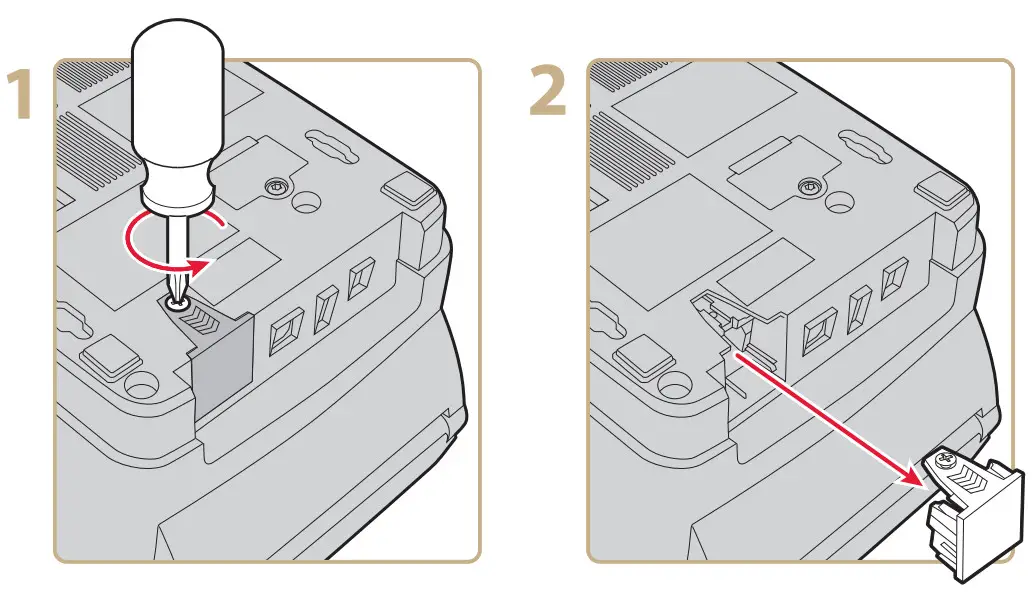

Więcej informacji można znaleźć w Podręczniku użytkownika drukarek biurkowych PC23 i PC43.

Siedziba główna na świecie
6001 36th Avenue Zachód
Everett, Waszyngton 98203
USA
Proszę zadzwonić pod numer 425.348.2600
faks 425.355.9551
www.intermec.pl
© 2011 Intermec Technologies
Korporacja. Wszelkie prawa zastrzeżone.

Instrukcja instalacji modułów Ethernet PC23d, PC43d i PC43t

Dokumenty / Zasoby
 | Moduł Ethernet |
Odniesienia
- Instrukcja obsługimanual.tools
Opublikowano: 29 listopada 2021 r.
Zaktualizowano: 30 listopada 2021 r.