1. Wprowadzenie
This manual provides essential information for setting up, operating, and maintaining your XIAOMI Redmi Note 15 Pro+ Plus 5G Ai smartphone. This device features a 6500mAh battery with 100W HyperCharge, a 200MP ultimate-clarity camera, and is powered by the Snapdragon® 7s Gen 4 processor. It boasts a 6.83" 1.5K CrystalRes AMOLED display with Corning® Gorilla® Glass Victus® 2 for enhanced durability. The phone is designed with IP66/IP68/IP69/IP69K dust and water resistance, ensuring reliability in various environments. Please read this manual thoroughly to ensure proper usage and to maximize your device's potential.
2. Co znajduje się w pudełku
Sprawdź, czy w opakowaniu produktu znajdują się wszystkie elementy:
- XIAOMI Redmi Note 15 Pro+ Plus 5G Ai Smartphone
- Wysuwacz tacy na kartę SIM
- Kabel USB
- Zasilacz ścienny 100W
3. Konfiguracja
3.1 Instalacja karty SIM
The device supports Dual SIM (nano SIM + nano SIM or nano SIM + eSIM). Ensure your SIM card is already activated by your carrier. This device is compatible with T-Mobile, Mint, Tello, and other carriers under the T-Mobile network in the USA. For international use, it works with any GSM carrier SIM.

Image: Compatibility chart for network carriers.
- Znajdź tackę na kartę SIM znajdującą się z boku urządzenia.
- Włóż narzędzie do wyjmowania tacki karty SIM do małego otworu obok tacki.
- Delikatnie naciśnij, aż tacka wysunie się.
- Place your nano SIM card(s) or activate your eSIM as per carrier instructions.
- Ostrożnie włóż tackę karty SIM z powrotem do urządzenia.
3.2 Pierwsze włączenie zasilania
- Naciśnij i przytrzymaj przycisk zasilania, aż pojawi się logo Xiaomi.
- Postępuj zgodnie z instrukcjami wyświetlanymi na ekranie, aby dokończyć konfigurację początkową, obejmującą wybór języka, połączenie Wi-Fi i konfigurację konta Google.
4. Główne cechy
- Wyświetlacz: 6.83" 1.5K CrystalRes AMOLED display with up to 120Hz refresh rate, 3200 nits peak brightness, and Corning Gorilla Glass Victus 2 protection.
- Edytor: Snapdragon® 7s Gen 4 (4nm manufacturing process, Octa-core up to 2.7GHz, Adreno GPU).
- System kamer: New 200MP ultimate-clarity main camera with OIS, 1/1.4" sensor size, 8MP ultra-wide camera, and 32MP front camera.
- Ładowanie baterii: 6500mAh battery with 100W HyperCharge and up to 22.5W reverse charging.
- Trwałość: Ultra-durable smartphone with 2.5-meter certified drop resistance and IP66/IP68/IP69/IP69K dust and water resistance.
- Funkcje AI: Includes Circle to Search with Google, Google Gemini, AI Interpreter, AI Notes, AI Recorder, AI Subtitles, AI Film, and AI image editing.
- Bezpieczeństwo: In-screen fingerprint sensor and AI face unlock.
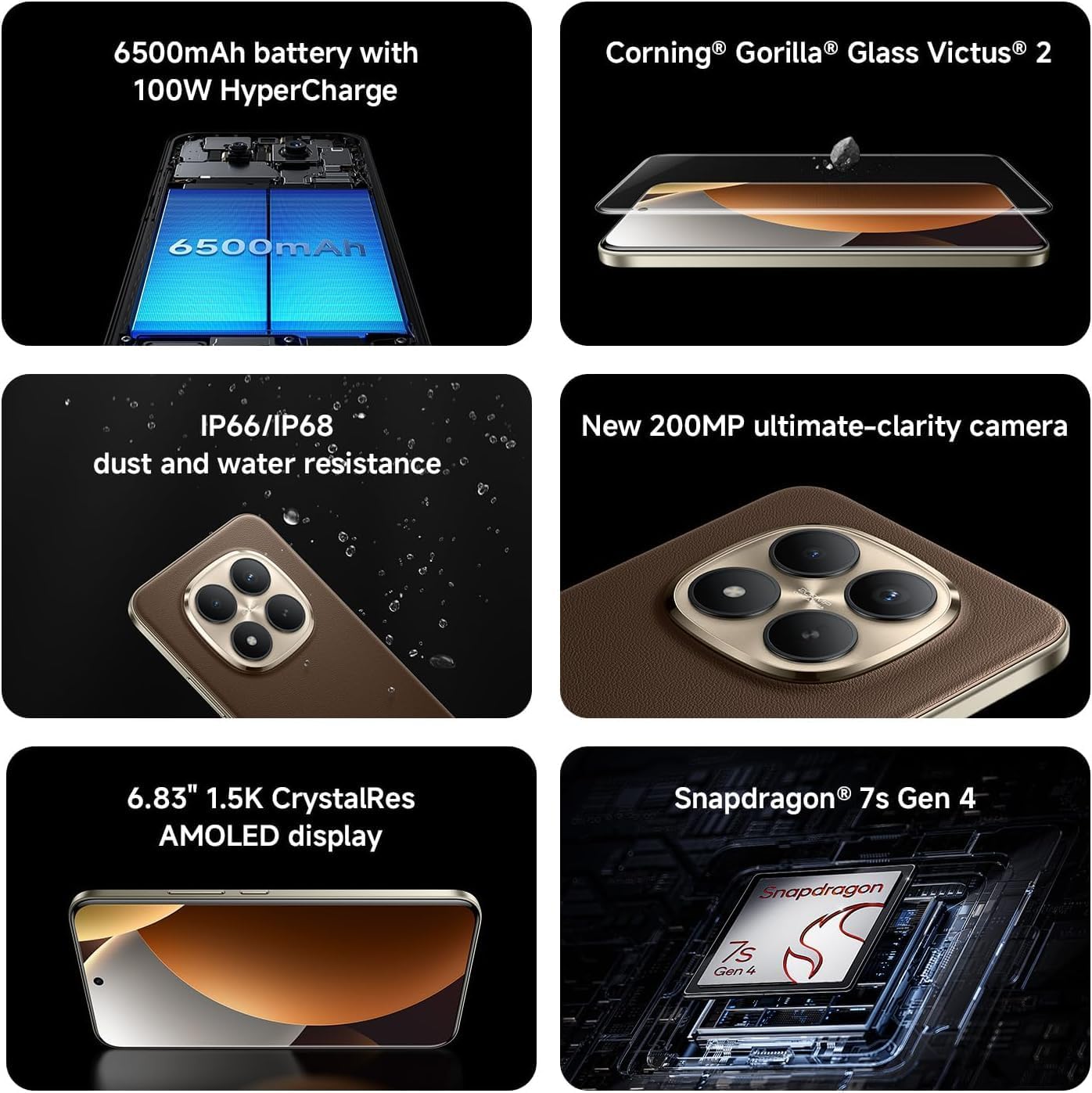
Image: Key features of the Redmi Note 15 Pro+ Plus 5G Ai.
5. Instrukcja obsługi
5.1 HyperOS (Based on Android 14)
Your device runs on HyperOS, based on Android 14, offering a feature-rich and customizable user experience. Explore various settings for personalization, security, and productivity. While some third-party applications may be pre-installed, most can be uninstalled if not desired.
5.2 Korzystanie z kamery
The 200MP main camera system allows for capturing highly detailed photos and videos. The 32MP front camera is ideal for high-resolution selfies and video calls.
- Tryby robienia zdjęć: Utilize Ultra HD for 200MP images, Photo mode for standard shots, Portrait mode for bokeh effects, and Pro mode for manual control over imaging parameters.
- Nagrywanie wideo: Record 4K videos at 30 fps or 1080p videos at 30/60 fps with the rear camera. The front camera supports 1080p at 30/60 fps.
- Dodatkowe funkcje: Explore Documents, Slow Motion, Time-lapse, and Panorama modes for creative content creation.
5.3 Bateria i ładowanie
The 6500mAh battery supports 100W HyperCharge for rapid charging and 22.5W reverse charging to power other devices. Optimize battery life using features like:
- Ochrona baterii: Extend battery lifespan by setting the device to stop charging at 80% or charge fully only when scheduled.
- Inteligentne ładowanie: The system learns your charging habits to optimize battery health.
- Cold Endurance Mode: Limits device performance in cold environments to extend battery life.
6. Specyfikacje
| Funkcja | Szczegół |
|---|---|
| Numer modelu | 2510ERA8BG |
| Rozmiar wyświetlacza | 6.83 cali |
| Rozdzielczość wyświetlacza | 2712 x 1220 (1.5K CrystalRes AMOLED) |
| Częstotliwość odświeżania | Do 120 Hz |
| Edytor | Snapdragon® 7s drugiej generacji |
| BARAN | 12 GB (expandable with Memory Extension) |
| Składowanie | 512 GB |
| Kamera tylna | 200MP Main (OIS) + 8MP Ultra-wide |
| Przednia kamera | 32MP |
| Pojemność baterii | 6500 mAh |
| Ładowanie przewodowe | 100 W HyperCharge |
| System operacyjny | HyperOS Based on Android 14 |
| Odporność na wodę i kurz | IP66/IP68/IP69/IP69K |
| Łączność | 5G, 4G, Wi-Fi 6/6E, Bluetooth 5.4, NFC |
| Wymiary | 7 x 4 x 2 cala (opakowanie) |
| Waga przedmiotu | 14 uncji |
7. Konserwacja i pielęgnacja
- Czyszczenie: Do czyszczenia ekranu i obudowy używaj miękkiej, niepozostawiającej włókien ściereczki. Unikaj materiałów ściernych i silnych środków chemicznych.
- Temperatura: Używaj urządzenia w zalecanym zakresie temperatur. Unikaj ekstremalnego ciepła lub zimna.
- Aktualizacje oprogramowania: Regularnie sprawdzaj dostępność aktualizacji systemu i instaluj je, aby zapewnić optymalną wydajność, bezpieczeństwo i dostęp do nowych funkcji.
- Wodoodporność: While the device is water-resistant, avoid intentional submersion or exposure to high-pressure water. Ensure all ports are dry before charging.
8. Rozwiązywanie Problemów
- Urządzenie się nie włącza: Ensure the battery is charged. Connect to the 100W wall adapter and try again.
- Awarie/zawieszanie się aplikacji: Close the app and reopen it. If the issue persists, restart the device.
- Problemy z łącznością sieciową: Check your SIM card installation. Toggle Airplane Mode on/off. Restart the device.
- Niska wydajność: Clear cache of apps, uninstall unused applications, or perform a factory reset (back up data first).
9. Gwarancja i pomoc techniczna
For warranty information and customer support, please refer to the warranty card included in your product package or visit the official XIAOMI webZachowaj dowód zakupu na wypadek roszczeń gwarancyjnych.