1. Wprowadzenie
Thank you for choosing the SANSUI 24 inch Smart WebOS TV. This manual provides essential information for setting up, operating, and maintaining your new television. Please read this manual thoroughly before using the product to ensure proper and safe operation. Keep this manual for future reference.

Image: The SANSUI 24 inch Smart WebOS TV integrated into a modern living space, displaying a vibrant gaming scene. This illustrates the TV's capability for entertainment and its sleek design.
2. Koniec produktuview
Główne cechy
- Wyświetlacz: 24 inch 720P LED VA Panel (1366x768 resolution) with 200 Nits brightness and 1200:1 contrast ratio. Features Dolby Video and 178° viewkąty.
- Inteligentna platforma: WebOS hub for access to popular streaming services like Netflix, Prime Video, Hulu, Disney+, and HBO Max.
- Łączność: Airplay support for screen mirroring, Bluetooth 5.2, Wi-Fi, 3 HDMI 1.4 ports, 2 USB 2.0 ports, Audio Video port, RJ45 Ethernet port, TV Tuner (ATSC), and RF Antenna Input.
- Audio: Immersive Dolby Atmos Stereo Sound with dual 8W cinematic speakers and 5 sound Equalizers.
- Projekt: Compact 4-Side Bezel-Less Design with a twin footing stand.
- Edytor: Powered by a 1.4GHz ARM Cortex A55*4 CPU and Mali-G31 MP2 GPU, with 1GB DDR RAM and 8GB eMMC Flash storage for smooth performance.
- Integracja inteligentnego domu: Kompatybilny z Apple HomeKit.
- Dodatkowe funkcje: Parental control, Wide Viewkąt.

Image: A visual summary of the SANSUI Smart WebOS TV's core features, highlighting its smart capabilities, display brightness, internal hardware, audio technology, and connectivity options.
Co jest w pudełku
- SANSUI 24 inch Smart WebSystem operacyjny TV
- Zdalne sterowanie
- Baterie do pilota
- Twin Footing Stand
- Instrukcja obsługi (ten dokument)
- Kabel zasilający
- Wall-mount Bracket (optional, may be sold separately or included depending on package)

Image: This diagram illustrates the physical dimensions of the 24-inch SANSUI TV and lists the accessories typically included in the product package, such as the remote control, batteries, user manual, stand, and wall-mount bracket.
3. Konfiguracja
3.1 Rozpakowywanie i umieszczanie
- Carefully remove the TV from its packaging. Retain the packaging materials for potential future transport or service.
- Place the TV on a stable, flat surface or mount it on a wall using a compatible VESA 100x100mm wall mount bracket (sold separately). Ensure adequate ventilation around the TV.
- If using the stand, attach the twin footing stands securely to the bottom of the TV using the provided screws.
3.2 Podłączanie zasilania
- Connect the power cable to the TV's power input port.
- Podłącz drugi koniec kabla zasilającego do odpowiedniego gniazdka elektrycznego.
3.3 Podłączanie urządzeń zewnętrznych
Your SANSUI TV offers various connectivity options:
- HDMI: Use HDMI cables to connect devices such as Blu-ray players, gaming consoles, or set-top boxes to the HDMI 1.4 ports (x3).
- USB: Insert USB drives into the USB 2.0 ports (x2) to play media files.
- Antena RF: Connect a coaxial cable from your antenna or cable TV wall outlet to the RF Antenna Input for over-the-air or cable channels.
- Wejście AV: Do podłączania starszych urządzeń należy używać kabla AV.
- RJ45: Podłącz kabel Ethernet, aby uzyskać przewodowe połączenie z Internetem.
- Optyczne wyjście audio: Connect to an external sound system or soundbar for enhanced audio.
- Słuchawka: Podłącz słuchawki do prywatnego słuchania.

Obraz: szczegółowy view of the TV's side panel, labeling each port for USB, RF Antenna, HDMI, Earphone, AV IN, RJ45, and Optical Audio Output, indicating their functions for connecting various devices.
3.4 Kreator pierwszego uruchomienia i konfiguracji
- Naciśnij przycisk zasilania na pilocie lub na telewizorze.
- Follow the on-screen instructions of the setup wizard to select your language, country, and connect to your Wi-Fi network.
- Agree to the WebOS terms and conditions to access smart features.
- Perform a channel scan if you have connected an antenna.
4. Instrukcja obsługi
4.1 Funkcje zdalnego sterowania
Pilot zdalnego sterowania umożliwia nawigację po funkcjach telewizora. Zapoznaj się z przyciskami:
- Moc: Włącza/wyłącza telewizor.
- Przyciski numeryczne: Bezpośredni wybór kanału.
- Wejście: Wybiera źródła wejściowe (HDMI, USB, AV itp.).
- Panel nawigacyjny (góra/dół/lewo/prawo/OK): Umożliwia nawigację po menu i potwierdzanie wyborów.
- Z powrotem: Powrót do poprzedniego ekranu.
- Dom: Dostęp do WebCentrum OS.
- Zwiększanie/zmniejszanie głośności: Reguluje głośność.
- Kanał w górę/w dół: Zmienia kanały.
- Streaming Shortcuts: Dedicated buttons for popular apps like Netflix, Prime Video, Disney+, etc.
- Szybki dostęp: Displays the quick access edit screen.
- Przewodnik: Displays the channel guide (if available).

Image: A visual guide to the SANSUI TV remote control, detailing the layout and function of each button for easy navigation and control of the television's features.
4.2 Używanie WebCentrum systemu operacyjnego
Naciśnij Dom button on your remote to access the WebOS Hub. From here, you can:
- Launch pre-installed streaming applications (Netflix, YouTube, Prime Video, etc.).
- Access connected input sources.
- Zarządzaj ustawieniami telewizora.
- Browse and install new apps from the content store.

Image: A clear display of the WebOS Hub interface, showcasing a selection of popular streaming applications available for direct access, emphasizing the TV's smart capabilities.
4.3 Airplay and Screen Mirroring
The TV supports Apple Airplay for effortless screen mirroring from your compatible Apple devices (iPhone, iPad, Mac). Ensure your device and the TV are connected to the same Wi-Fi network. Select the Airplay option on your device and choose your SANSUI TV from the list.
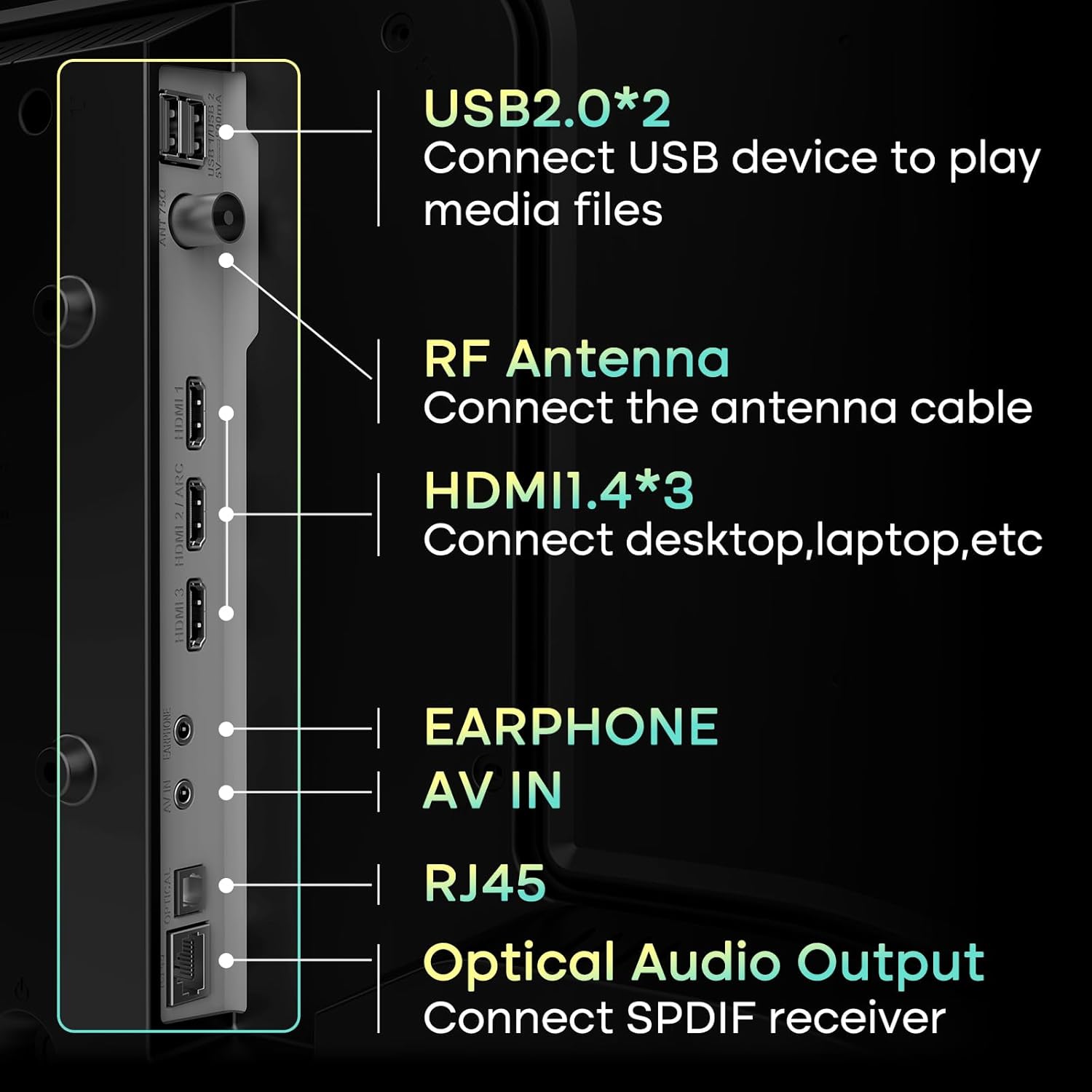
Image: This image illustrates the Airplay feature, showing a smartphone's content being wirelessly mirrored onto the SANSUI TV, highlighting its convenience for sharing media.
4.4 Łączność Bluetooth
Connect Bluetooth 5.2 compatible devices such as headphones, soundbars, or game controllers to your TV for a wireless experience. Navigate to the TV's settings menu, select Bluetooth, and pair your device.

Image: This visual demonstrates the TV's Bluetooth 5.2 capabilities and its 2*8W speakers, showing a user connecting a smartphone to the TV for audio playback, enhancing the sound experience.
4.5 Ustawienia obrazu i dźwięku
Access the TV's settings menu to customize picture and sound to your preference. Options include:
- Tryby obrazu: Standard, Vivid, Sports, Movie, Game, Energy Saving.
- Brightness, Contrast, Color, Sharpness: Fine-tune display quality.
- Tryby dźwięku: Standard, Music, Cinema, Sports, Game.
- Korektor: Adjust audio frequencies.

Image: A screenshot of the TV's picture settings menu, demonstrating the various customizable options available to users for optimizing their viewing experience, such as different picture modes.
4.6 Kontrola rodzicielska
Utilize the parental control features to restrict access to certain channels or content based on ratings. This helps ensure a safe viewing environment for children. Access these settings through the TV's main menu.
5. Konserwacja
5.1 Czyszczenie telewizora
- Ekran: Delikatnie przetrzyj ekran miękką, suchą, niepozostawiającą włókien ściereczką. W przypadku uporczywych zabrudzeń delikatnie przetrzyj.ampPrzetrzyj ściereczkę wodą lub specjalnym środkiem do czyszczenia ekranów. Unikaj silnych środków chemicznych i materiałów ściernych.
- Ciało: Przetrzyj ramę i podstawę telewizora miękką, suchą ściereczką.
- Wentylacja: Aby zapobiec przegrzaniu, sprawdź, czy otwory wentylacyjne z tyłu telewizora nie są zablokowane.
5.2 Aktualizacje oprogramowania
Your SANSUI TV may receive software updates to improve performance and add new features. It is recommended to enable automatic updates or periodically check for updates in the TV's settings menu to ensure optimal functionality.
6. Rozwiązywanie Problemów
Jeśli masz problemy z telewizorem, zapoznaj się z poniższymi typowymi rozwiązaniami:
| Problem | Możliwe rozwiązanie |
|---|---|
| Brak zasilania | Check if the power cable is securely connected to both the TV and the electrical outlet. Ensure the outlet is working. Try pressing the power button on the TV itself. |
| Brak obrazu, ale dźwięk jest | Sprawdź źródło sygnału wejściowego. Upewnij się, że podłączone urządzenie jest włączone i działa prawidłowo. Wypróbuj inny kabel lub port HDMI. |
| Brak dźwięku, ale obraz jest | Check the volume level and ensure the TV is not muted. Verify audio output settings (e.g., internal speakers vs. external sound system). Check audio cables for external devices. |
| Pilot nie działa | Wymień baterie w pilocie. Upewnij się, że między pilotem a czujnikiem podczerwieni telewizora nie ma żadnych przeszkód. |
| Nie można połączyć się z siecią Wi-Fi | Ensure your Wi-Fi router is on and working. Re-enter the Wi-Fi password carefully. Try restarting both the TV and your router. Move the TV closer to the router if possible. |
| Smart apps not loading or slow | Check your internet connection speed. Close and reopen the app. Clear the app's cache (if available in settings). Restart the TV. |
7. Specyfikacje
| Funkcja | Szczegół |
|---|---|
| Marka | SANSUI |
| Numer modelu | ES-24VA1-CA-1 / ES-24VA1-US-1 |
| Rozmiar ekranu | 24 cali |
| Technologia wyświetlania | LED VA Panel |
| Rezolucja | 768p (1366x768) |
| Częstotliwość odświeżania | 60 Hz |
| Jasność | X NUMX Nits |
| Współczynnik kontrastu | 1200:1 |
| Viewing kąt | 178° |
| System operacyjny | WebCentrum systemu operacyjnego |
| Edytor | 1.4GHz ARM Cortex A55*4 CPU |
| Procesor graficzny | Mali-G31 MP2 |
| BARAN | 1GB DDR |
| Składowanie | 8 GB pamięci flash eMMC |
| Wyjście audio | 2 x 8W Speakers, Dolby Atmos Stereo Sound |
| Łączność | Wi-Fi, Bluetooth 5.2, 3x HDMI 1.4, 2x USB 2.0, 1x AV In, 1x RJ45, 1x RF Antenna, 1x Optical Audio Out, 1x Earphone |
| Wymiary produktu (Gł. x Szer. x Wys.) | 4.72 x 16.14 x 24.41 cala (z podstawką) |
| Waga przedmiotu | 7.09 funta |
| Kompatybilny z uchwytem VESA | 100x100mm |
8. Gwarancja i wsparcie
8.1 Informacje o gwarancji
SANSUI products are manufactured to high-quality standards and are warranted against manufacturing defects. Please refer to the warranty card included with your product for specific terms, conditions, and duration of the warranty. Keep your purchase receipt as proof of purchase.
8.2 Obsługa klienta
For technical assistance, troubleshooting beyond this manual, or warranty claims, please contact SANSUI customer support. You can typically find contact information (phone number, email, or website) on the product packaging, the warranty card, or by visiting the official SANSUI webstrona.
When contacting support, please have your TV model number (ES-24VA1) and purchase information readily available.


