Wstęp
This manual provides essential information for setting up, operating, and maintaining your Acer Nitro V 16 AI Gaming Laptop. Please read this manual thoroughly to ensure optimal performance and longevity of your device.

Obraz: Przód view of the Acer Nitro V 16 AI Gaming Laptop, showcasing jego wyświetlacza i klawiatury.
Organizować coś
Co jest w pudełku
Po rozpakowaniu należy sprawdzić, czy wszystkie elementy są obecne:
- Acer Nitro V 16 AI Gaming Laptop
- Zasilacz/ładowarka
- iCarp Type-C 3-in-1 Hub (USB 3.0, HDTV 4K Output, Type-C PD)

Image: The included iCarp Type-C 3-in-1 Hub, providing additional connectivity options.
Pierwsze włączenie zasilania
- Connect the power adapter to the laptop's DC-in jack and a power outlet.
- Otwórz pokrywę laptopa.
- Naciśnij przycisk zasilania, aby włączyć laptopa.
- Postępuj zgodnie z instrukcjami wyświetlanymi na ekranie, aby ukończyć początkową konfigurację systemu Windows 11 Home.
Łączność
The Acer Nitro V 16 AI offers a comprehensive selection of ports for various peripherals and external devices.
- USB-A 3.2: Three ports for connecting standard USB devices.
- USB-C 4: One port for high-speed data transfer and display output.
- HDMI 2.1: Do podłączania zewnętrznych wyświetlaczy lub telewizorów.
- Gigabitowy Ethernet RJ45: Do przewodowego połączenia sieciowego.
- Gniazdo słuchawkowe: Do wejścia/wyjścia audio.
- Gniazdo kart microSD: Do rozszerzania pamięci masowej lub przesyłania danych z kart pamięci.
- Blokada Kensingtona: Ze względów bezpieczeństwa fizycznego.

Obraz: Lewa strona view of the laptop detailing the various input/output ports.
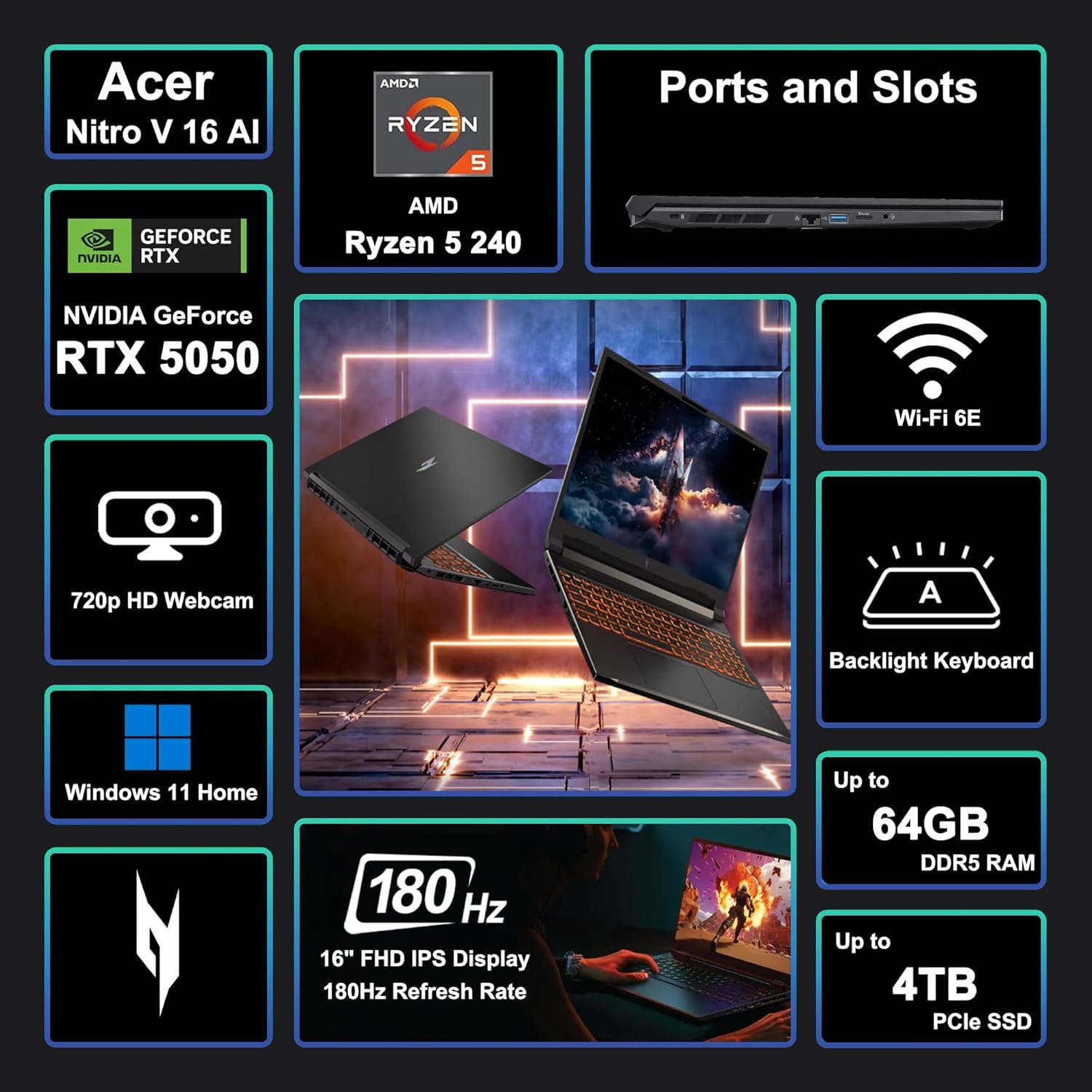
Image: A visual summary of key features and specifications of the Acer Nitro V 16 AI.
Korzystanie z laptopa
Funkcje wyświetlacza
The laptop features a 16-inch WUXGA (1920 x 1200) IPS display with a 180Hz refresh rate, providing smooth visuals for gaming and other demanding applications.

Image: Visual representation of the difference between 60Hz and 180Hz refresh rates, highlighting smoother motion at higher rates.
Klawiatura i touchpad
The integrated keyboard is backlit, enhancing visibility in low-light conditions. The touchpad provides precise navigation and supports multi-touch gestures.

Image: Close-up of the backlit keyboard, showing key layout and illumination.
Koniec wydajnościview
The Acer Nitro V 16 AI is equipped with an AMD Zen 4 Hexa-Core Ryzen 5 240 Processor and a dedicated NVIDIA GeForce RTX 5050 8GB Graphic card, alongside 32GB of RAM and a 1TB SSD, ensuring robust performance for gaming, content creation, and multitasking.

Image: Details of the AMD Ryzen 5 240 processor, highlighting its core count, threads, cache, and clock speed.

Image: Information about the NVIDIA GeForce RTX 5050 GPU, emphasizing its capabilities for gaming and creative tasks.
Układ chłodzenia
The laptop incorporates an advanced cooling system designed to maintain optimal temperatures during intensive use, preventing thermal throttling and ensuring consistent performance.
Żywotność baterii
The 76Wh battery provides several hours of usage depending on the workload. For prolonged high-performance tasks like gaming or video editing, it is recommended to keep the laptop connected to the power adapter.
Konserwacja
- Czyszczenie: Do czyszczenia ekranu i obudowy używaj miękkiej, niepozostawiającej włókien ściereczki. Unikaj silnych środków chemicznych.
- Aktualizacje oprogramowania: Regularnie aktualizuj system operacyjny i sterowniki, aby zapewnić bezpieczeństwo i wydajność.
- Wentylacja: Ensure the laptop's vents are clear and unobstructed to prevent overheating.
- Pielęgnacja baterii: Unikaj częstego całkowitego rozładowywania akumulatora. W przypadku długotrwałego przechowywania naładuj akumulator do około 50–60%.
Rozwiązywanie problemów
- Brak zasilania: Sprawdź, czy zasilacz jest prawidłowo podłączony, a gniazdko działa prawidłowo.
- Problemy z wyświetlaniem: Check external monitor connections if applicable. Update graphics drivers.
- Opóźnienie wydajności: Close unnecessary applications. Check for background processes consuming resources. Ensure proper ventilation.
- Problemy z łącznością: For Wi-Fi, restart your router and the laptop. For wired connections, check the Ethernet cable.
Specyfikacje
| Funkcja | Szczegół |
|---|---|
| Marka | klon |
| Nazwa modelu | Acer Nitro V 16 AI |
| Rozmiar ekranu | 16 cali |
| Rozdzielczość ekranu | 1920 x 1200 pikseli (WUXGA) |
| Częstotliwość odświeżania | 180 Hz |
| Edytor | AMD Zen 4 Hexa-Core Ryzen 5 240 (4.3 GHz base, up to 5GHz boost) |
| BARAN | 32 GB DDR5 |
| Składowanie | Dysk SSD 1TB |
| Koprocesor graficzny | NVIDIA GeForce RTX 5050 8GB |
| System operacyjny | Windows 11 Home |
| Typ bezprzewodowy | Wi-Fi 6E (802.11ax) |
| Porty | 3x USB-A 3.2, 1x USB-C 4, 1x HDMI 2.1, 1x RJ45, Headset Jack, MicroSD Card Reader |
| Bateria | 76 Wh |
| Waga przedmiotu | 5.38 funta |
| Wymiary produktu (dł. x szer. x wys.) | 10.9 x 14.2 x 0.96 cala |

Image: Physical dimensions and weight of the Acer Nitro V 16 AI laptop.
Gwarancja i wsparcie
Aby uzyskać informacje dotyczące gwarancji i pomocy technicznej, zapoznaj się z dokumentacją dołączoną do produktu lub odwiedź oficjalną stronę pomocy technicznej firmy Acer webMiejsce. Plany ochrony mogą być dostępne z rozszerzonym zakresem ochrony.


