1. Wprowadzenie
This manual provides detailed instructions for the installation, operation, and maintenance of your AINAVI 11.5-inch Car Radio Stereo. This advanced system is designed to upgrade your vehicle's infotainment experience with Android 13.0, wireless CarPlay, Android Auto, GPS navigation, and various multimedia features. Please read this manual thoroughly before installation and use to ensure proper functionality and safety.
2. Koniec produktuview
The AINAVI 11.5-inch Car Radio Stereo is a high-performance multimedia system compatible with specific Jeep Wrangler JK, Dodge Grand Caravan, and Dodge Ram models. It features an 11.5-inch QLED touchscreen with 1280x800 resolution, running on Android 13.0 with 4GB RAM and 64GB ROM for smooth operation. Key features include:
- 11.5-calowy ekran dotykowy QLED: G+G full lamination technology with 178° full-viewkąt.
- System operacyjny Android 13.0: Latest operating system for enhanced performance.
- Bezprzewodowy/przewodowy CarPlay i Android Auto: Bezproblemowa integracja ze smartfonem.
- Nawigacja GPS: Supports online and offline maps.
- 5G WiFi & Bluetooth 5.4: Fast internet connectivity and stable device pairing.
- Radio AM/FM/RDS: Access to various radio stations.
- Sterowanie z kierownicy: Retains original vehicle controls.

Image: The 11.5-inch HD IPS Touch Screen, showcasing its vibrant display and full lamination technology for clarity and responsiveness.
3. Zawartość opakowania
Sprawdź, czy wszystkie wymienione poniżej elementy znajdują się w Twojej paczce. Jeśli brakuje któregokolwiek z nich lub jest on uszkodzony, skontaktuj się z obsługą klienta.
- 11.5-inch Car Head Unit for Jeep Wrangler JK
- Plastikowa ramka
- AHD 1080P Tył View Camera + Extension Power Cable
- Mikrofon
- Antena GPS
- Kabel USB 4-pinowy
- Kabel USB 6-pinowy
- Instrukcja obsługi (ten dokument)
- Kabel zasilający
- Power Harness with CAN BUS (for some models)
- Narzędzie do usuwania niebieskiej ramki
- Kabel RCA
- Linka sterująca cofaniem
Note: The specific cables included may vary slightly depending on the vehicle model.
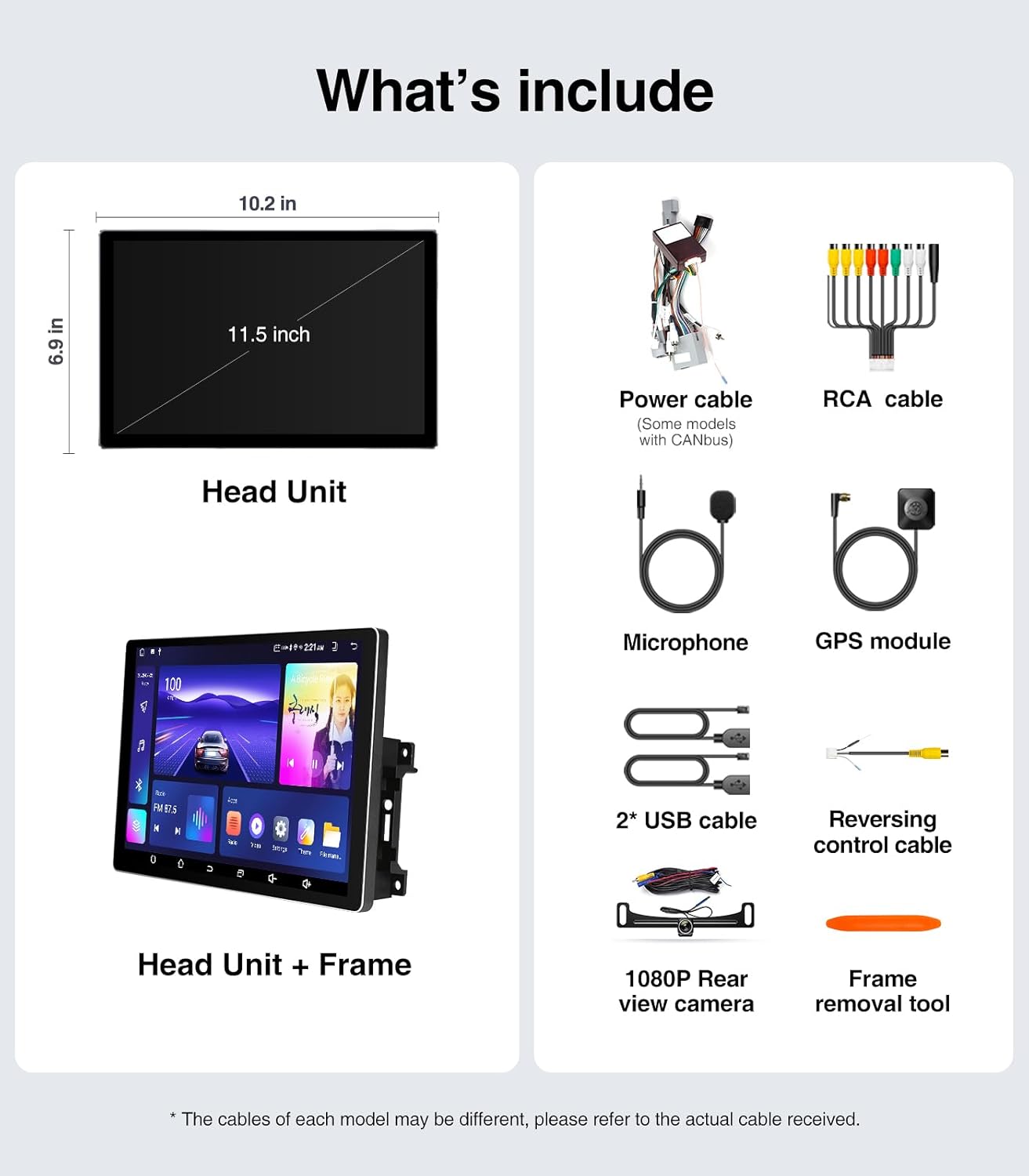
Image: A visual representation of all components included in the package, such as the head unit, frame, various cables, camera, microphone, and tools.
4. Przewodnik instalacji (konfiguracja)
The AINAVI Car Radio Stereo is designed for a plug-and-play installation for compatible vehicles. However, professional installation is recommended if you are unfamiliar with car audio system wiring.
4.1 Kontrola przed instalacją
- Ensure your vehicle is compatible with the head unit (Jeep Wrangler JK 2007-2018, Dodge Grand Caravan 2011-2020, Dodge Ram 2009-2012, etc.).
- Gather all necessary tools, including the provided frame removal tool.
- Disconnect the vehicle's battery before starting the installation to prevent electrical shorts.
4.2 Kroki instalacji
- Carefully remove the original car radio and dashboard trim using the frame removal tool. Refer to your vehicle's service manual for specific trim removal instructions.
- Connect the provided power harness and CAN BUS (if applicable) to the vehicle's wiring. Ensure all connections are secure.
- Connect the GPS antenna, USB cables, microphone, and rear view camera cables to the corresponding ports on the new head unit.
- Mount the new 11.5-inch head unit into the dashboard opening. Ensure it fits securely within the plastic frame.
- Podłącz ponownie akumulator pojazdu.
- Turn on the vehicle's ignition and test the head unit's basic functions (power, audio, touch screen).
- Reinstall the dashboard trim panels.

Image: A comparison showing the vehicle's dashboard before and after the installation of the AINAVI 11.5-inch car radio stereo, highlighting the significant visual upgrade.

Image: Illustrates the plug-and-play nature of the installation, showing a user connecting wiring harnesses, along with icons indicating support for Steering Wheel Control and AMP.
5. Instrukcja obsługi
5.1 Podstawowa obsługa
- Włączanie/wyłączanie: The unit powers on with the vehicle's ignition. Press and hold the power button (if available) for manual power control.
- Ekran dotykowy: Navigate the Android interface by tapping, swiping, and pinching gestures.
- Regulacja głośności: Adjust volume using the on-screen controls or your vehicle's steering wheel buttons.
5.2 Bezprzewodowy/przewodowy CarPlay i Android Auto
Connect your iPhone or Android smartphone for seamless integration of navigation, communication, and entertainment apps.
- Ensure Bluetooth is enabled on your smartphone and the head unit.
- Na jednostce głównej otwórz aplikację CarPlay lub Android Auto.
- For wireless connection, pair your phone via Bluetooth. For wired, connect your phone using a USB cable to the designated USB port.
- Aby nawiązać połączenie, postępuj zgodnie z instrukcjami wyświetlanymi na ekranie.
Once connected, you can use voice commands (e.g., "Hey Siri" or "Hey Google") for hands-free operation.

Image: A visual of the head unit displaying the Wireless CarPlay and Android Auto interface, with a smartphone icon indicating connectivity and various app logos.
5.3 Nawigacja GPS
Urządzenie obsługuje nawigację zarówno online, jak i offline.
- Mapy online: Connect the head unit to a WiFi hotspot (e.g., from your phone) to access real-time traffic information and updated maps.
- Mapy offline: Download maps for your region to the unit's internal storage. This allows navigation without an internet connection.
- Use the pre-installed navigation app or download your preferred app from the Google Play Store.
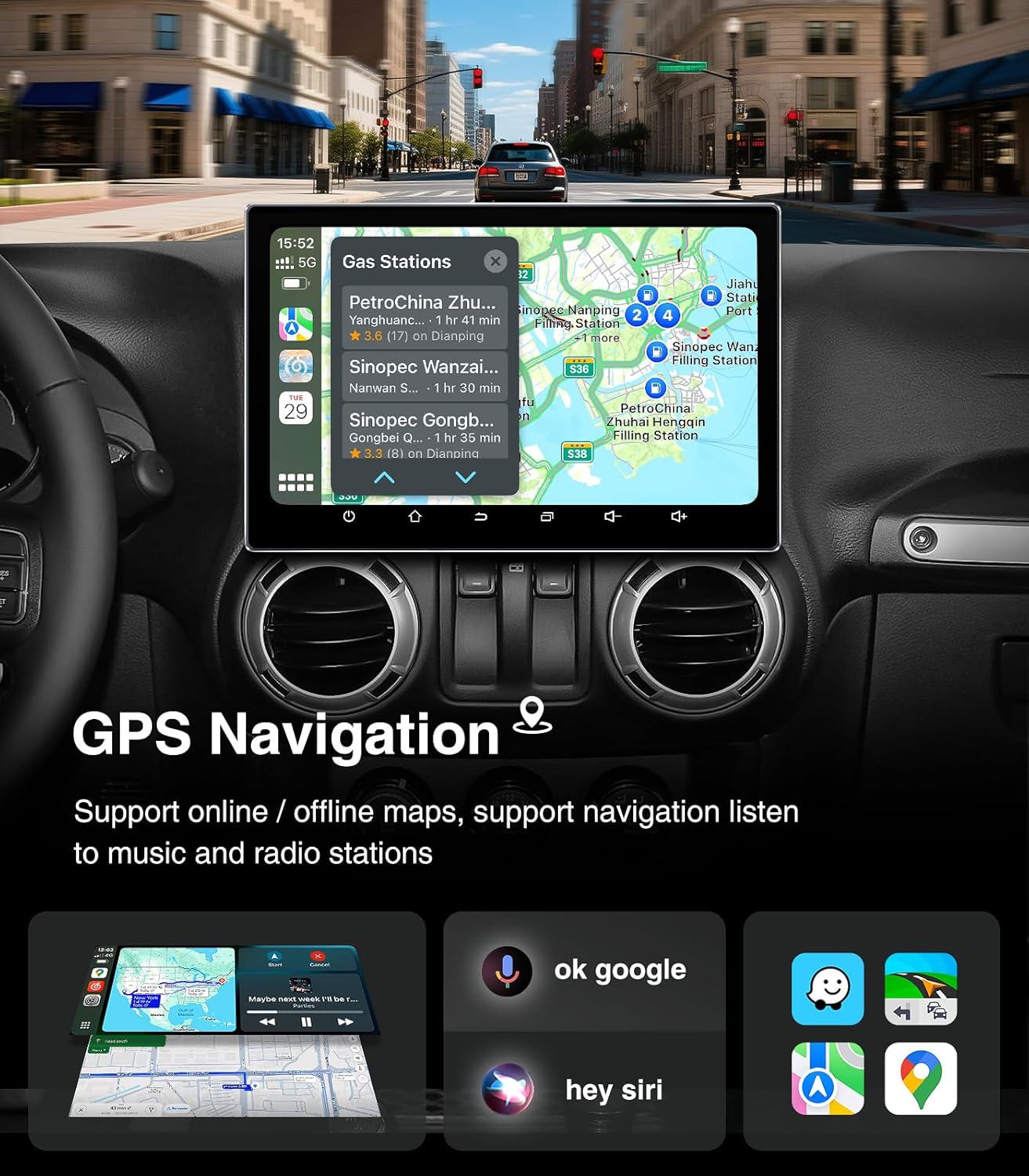
Image: The head unit displaying a GPS navigation map with points of interest and traffic information, alongside icons for voice commands like "ok google" and "hey siri".
Radio 5.4 AM/FM/RDS
Access your favorite radio stations with the built-in tuner.
- Open the "Radio" application on the head unit.
- Scan for available stations or manually tune to a specific frequency.
- Zapisz swoje ulubione stacje jako ustawienia wstępne, aby mieć do nich szybki dostęp.
- The RDS (Radio Data System) feature displays station information where available.

Image: The head unit displaying the AM/FM/RDS radio interface, showing frequency tuning and preset options, with a scenic road background.
5.5 5G WiFi Hotspot & Bluetooth Connection
Enhance your connectivity with fast WiFi and stable Bluetooth.
- Wi-Fi: Connect to a mobile hotspot or home WiFi network to browse the internet, download apps, and stream content. Supports dual-band 2.4GHz & 5GHz.
- Bluetooth 5.4: Pair your smartphone for hands-free calls, Bluetooth music streaming, and phonebook synchronization.

Image: The head unit displaying a phone dialer interface, indicating Bluetooth connectivity with a smartphone, and icons for various supported apps like Google Play, Chrome, YouTube, Instagram, and Netflix.
6. Konserwacja
Aby zapewnić długowieczność i optymalną pracę radia samochodowego AINAVI, należy przestrzegać poniższych wskazówek dotyczących konserwacji:
- Czyszczenie ekranu: Delikatnie przetrzyj ekran dotykowy miękką, niepozostawiającą włókien ściereczką. W przypadku uporczywych plam delikatnie przetrzyj.ampPrzetrzyj ściereczkę wodą lub środkiem do czyszczenia ekranów. Unikaj silnych środków chemicznych i materiałów ściernych.
- Aktualizacje oprogramowania: Periodically check for system updates through the unit's settings menu. Keeping the software updated ensures optimal performance, security, and access to new features.
- Kontrola temperatury: Avoid exposing the unit to extreme temperatures for extended periods. While designed for automotive environments, prolonged exposure to direct sunlight or freezing conditions can affect performance.
- Połączenia kablowe: Upewnij się, że wszystkie kable są dobrze podłączone. Luźne połączenia mogą powodować sporadyczne problemy.
7. Rozwiązywanie Problemów
Jeśli masz problemy z radiem samochodowym, zapoznaj się z poniższymi typowymi problemami i ich rozwiązaniami:
| Problem | Możliwa przyczyna | Rozwiązanie |
|---|---|---|
| Urządzenie nie włącza się | Luźne połączenie zasilania, przepalony bezpiecznik, problem z akumulatorem pojazdu. | Sprawdź kable zasilające i bezpiecznik. Upewnij się, że akumulator pojazdu jest naładowany. |
| Brak dźwięku | Zbyt niska głośność, wyciszenie włączone, problem z okablowaniem głośników, nieprawidłowe źródło dźwięku. | Zwiększ głośność, sprawdź stan wyciszenia, zweryfikuj połączenia głośników, wybierz właściwe źródło dźwięku. |
| Ekran dotykowy nie reaguje | Błąd oprogramowania, problem z kalibracją ekranu. | Restart the unit. If issue persists, perform a factory reset (data will be lost). |
| CarPlay/Android Auto nie łączy się | Bluetooth/USB issue, phone settings, app not updated. | Ensure Bluetooth is on and paired. Try a different USB cable. Update phone OS and apps. |
| Utracony lub niedokładny sygnał GPS | Przeszkoda w antenie GPS, słaby odbiór satelitarny. | Upewnij się, że antena GPS ma czyste pole widzenia view nieba. Sprawdź połączenie antenowe. |
If these solutions do not resolve the issue, please contact AINAVI customer support.
8. Specyfikacje
| Funkcja | Szczegół |
|---|---|
| Marka | AINAVI |
| System operacyjny | Android 13.0 |
| Pojemność pamięci masowej | 64 GB (pamięć ROM) |
| BARAN | 4 GB |
| Rozmiar ekranu | 11.5 cali |
| Typ wyświetlacza | QLED, G+G Full Lamination |
| Rezolucja | 1280x800 |
| Technologia łączności | Bluetooth 5.4, USB, Wi-Fi (2.4Ghz & 5Ghz), Wireless CarPlay, Wired Android Auto |
| Cechy specjalne | AM/FM/RDS radio, 5G WiFi, CarPlay+Android Auto+Mirror Link+AirPlay, Split Screen Function, Touch Screen |
| Kompatybilne urządzenia | Smartfon, iPhone |
| Typ montażu | Montaż na desce rozdzielczej |
| Tryb wyjścia audio | Stereofoniczny |
| Typ serwisu pojazdu | Samochód |
9. Gwarancja i wsparcie
AINAVI provides technical support for this product. If you have any questions regarding installation, operation, or troubleshooting that are not covered in this manual, please do not hesitate to contact us via Amazon email. We are committed to providing prompt assistance.
Please retain your proof of purchase for warranty claims. Specific warranty terms and conditions may apply and are available upon request or through the product's purchase platform.


