1. Koniecview
Welcome to the Headwolf Titan 1 user manual. This document provides essential information for setting up, operating, and maintaining your new Android 15 tablet. The Headwolf Titan 1 is designed for high-performance gaming, immersive entertainment, and efficient everyday use, featuring a powerful Dimensity 8300 processor, a vibrant 2.5K 144Hz display, and robust connectivity options.
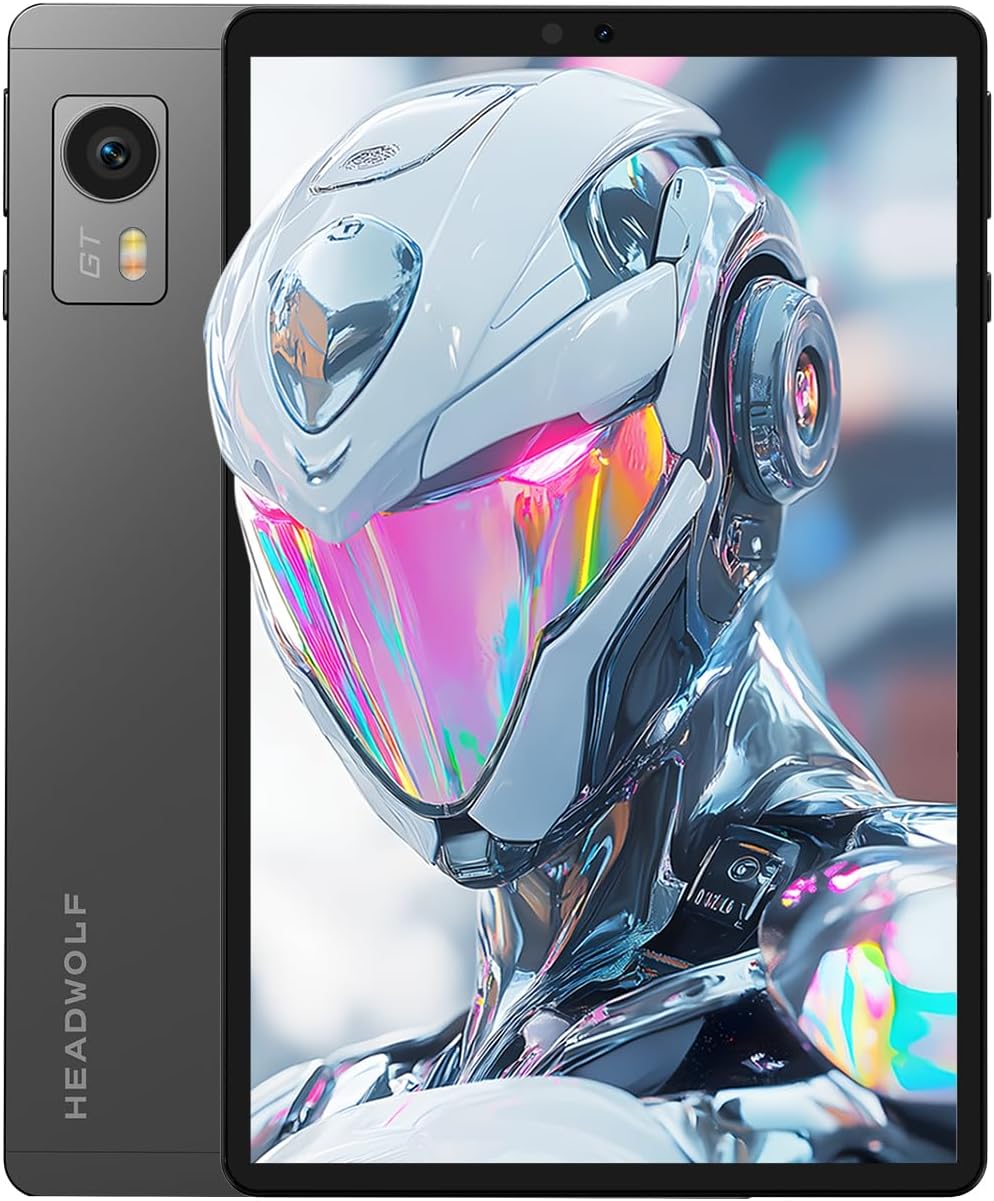
Image 1.1: Headwolf Titan 1 Tablet showcasindzięki eleganckiemu wzornictwu i żywemu wyświetlaczowi.
2. Konfiguracja
2.1 Pierwsze włączenie zasilania
To power on your Headwolf Titan 1 tablet, press and hold the power button located on the side of the device until the Headwolf logo appears on the screen. Follow the on-screen instructions to complete the initial setup, including language selection, Wi-Fi connection, and Google account login.
2.2 Ładowanie urządzenia
Connect the provided USB-C cable to the tablet's USB-C port and the other end to a compatible PD20W power adapter. Plug the power adapter into a wall outlet. The battery indicator on the screen will show the charging status. For optimal charging speed, use the original charger and cable.
2.3 Instalacja karty SIM
The Headwolf Titan 1 supports dual nano-SIM cards for 4G LTE connectivity. To install SIM cards:
- Znajdź tackę na kartę SIM z boku tabletu.
- Włóż narzędzie do wyjmowania karty SIM do małego otworu obok tacki i delikatnie naciskaj, aż tacka wyskoczy.
- Place your nano-SIM cards into the designated slots on the tray, ensuring they are correctly oriented.
- Ostrożnie włóż tackę z powrotem do tabletu, aż zatrzaśnie się na swoim miejscu.
3. Główne cechy
3.1 Procesor i wydajność
The Headwolf Titan 1 is powered by the MediaTek Dimensity 8300 Octa-core CPU, built on a 4nm process for high efficiency and stable performance. It integrates an APU 780 AI processor and an ARM G615 MC6 GPU (1400MHz), providing enhanced AI computing capabilities and optimized graphics rendering for a smooth user experience, especially in demanding applications and 3D games. The device achieves an AnTuTu benchmark score of approximately 1.6 million points.

Image 3.1: Visual representation of the MediaTek Dimensity 8300 processor, highlighting its advanced architecture.

Image 3.2: The APU 780 AI processor, supporting generative AI technologies and large language models.
3.2 Wyświetlacz i wizualizacje
The 8.8-inch display features a 2.5K (2560x1600) resolution with 343 PPI, delivering sharp and vibrant images. A 144Hz refresh rate ensures smooth motion, which is particularly beneficial for fast-paced games and video content. With 500 nits brightness, the screen is clear even in bright environments. Widevine L1 support allows for high-quality streaming from services like Amazon Prime Video, Disney+, and Hulu.

Image 3.3: The 2.5K 144Hz display provides a fluid and detailed visual experience.

Image 3.4: Detailed specifications of the display, including resolution, PPI, and brightness.
3.3 Pamięć i przechowywanie
The tablet is equipped with 12GB of LPDDR5X RAM, expandable by an additional 12GB for a total of 24GB, ensuring seamless multitasking. It features 256GB of UFS 4.0 internal storage, offering sequential read speeds of up to 4200 MB/s and write speeds of up to 2800 MB/s. This high-speed storage allows for quick app loading and efficient data transfer. Storage can be expanded up to 2TB via a microSD card (not included).

Image 3.5: Illustration of the 24GB LPDDR5X RAM and 256GB UFS 4.0 ROM, highlighting speed benefits.
3.4 Łączność
The Headwolf Titan 1 supports 4G LTE for stable network communication on the go, Wi-Fi 6E (802.11ax) for high-speed wireless internet, and Bluetooth 5.4 for connecting peripherals. This ensures reliable and fast connections for all your needs, whether at home or outdoors.

Image 3.6: The tablet supports 4G LTE, enabling high-speed internet access anywhere.

Image 3.7: Highlighting Wi-Fi 6E technology for faster and more stable wireless connections.
3.5 Bateria i ładowanie
A large 7200mAh battery provides extended usage times, making it suitable for travel and outdoor activities. The tablet supports 20W PD (Power Delivery) fast charging via its USB-C port, allowing for quick recharges.

Image 3.8: The 7200mAh battery ensures long-lasting performance on a single charge.
3.6 kamer
The Headwolf Titan 1 features an 8MP front-facing camera for video calls and online classes, and a 16MP rear camera with autofocus for capturing clear photos of landscapes, food, and daily life.

Image 3.9: The tablet's camera system, featuring an 8MP front and 16MP rear camera for various photography needs.
3.7 Sensors and Operating System
Running on Android 15, the tablet offers enhanced privacy protection and digital well-being features. It includes a variety of sensors: a gyro sensor and gravity sensor for precise motion detection in games, a geomagnetic sensor for accurate navigation, and a light sensor for automatic screen brightness adjustment. GPS, GLONASS, BeiDou, Galileo, and QZSS support ensure accurate location tracking. Face Unlock provides convenient and secure access to your device.

Image 3.10: The smart gyro sensor enhances gaming and video experiences with precise motion detection.

Image 3.11: Secure and convenient face authentication for unlocking the tablet.
Dźwięk 3.8
Equipped with SmartPA dual speakers, the tablet delivers an immersive sound experience for movies and music. The device uses a Type-C port for audio output and does not feature a 3.5mm headphone jack.

Image 3.12: The SmartPA dual speakers provide rich and immersive audio.
3.9 Design and Cooling
The Headwolf Titan 1 features a slim 7.9mm metal body and weighs approximately 325g, making it highly portable. It incorporates a multi-layer cooling design with a VC vapor chamber and graphene heat dissipation for effective thermal management during extended use.

Image 3.13: The tablet's ultra-thin and lightweight design for enhanced portability.

Obraz 3.14: Wybuch view of the multi-layer cooling system, including the VC vapor chamber and graphene.
3.10 Gaming and External Display
The Headwolf Titan 1 supports HDMI/DP output and wireless projection, allowing you to connect to a larger screen for an enhanced gaming or viewing experience. It also supports gamepads for more intuitive control in various game genres.

Image 3.15: The tablet connected to an external monitor via USB3.0 with HDMI/DP output for a larger display experience.

Image 3.16: The tablet paired with a gamepad for an enhanced gaming experience.
4. Instrukcja obsługi
4.1 Funkcjonalność podzielonego ekranu
The Headwolf Titan 1 supports split-screen mode, allowing you to run two applications simultaneously. This feature is useful for productivity, such as referencing documents while working on another app, or for multitasking during online learning.
4.2 Eye-Friendly Reading Mode
For extended reading sessions, activate the eye-friendly reading mode. This mode adjusts screen colors and brightness to reduce eye strain, making it more comfortable to read e-books or browse content for long periods.
4.3 Automatyczna regulacja jasności
The integrated light sensor automatically adjusts the screen brightness based on ambient light conditions. This feature optimizes visibility and conserves battery life. You can also manually adjust brightness settings in the display menu.

Image 4.1: Android 15 features including smart search, voice assistant, text creation, and split-screen operation.
5. Konserwacja
5.1 Aktualizacje oprogramowania
The Headwolf Titan 1 supports OTA (Over-The-Air) online updates for its Android 15 operating system. Regularly check for and install updates to ensure your device has the latest features, security patches, and performance improvements. Future updates to Android 16 are also planned.
5.2 Czyszczenie i pielęgnacja
To clean your tablet, use a soft, dry, lint-free cloth. Avoid using abrasive cleaners, solvents, or aerosol sprays, as these can damage the screen or finish. Keep the device away from excessive moisture and extreme temperatures.
5.3 Żywotność baterii
To maximize battery life, avoid fully discharging the battery frequently. It is recommended to keep the battery charge between 20% and 80%. Avoid exposing the device to high temperatures, as this can degrade battery performance over time.
6. Rozwiązywanie Problemów
If you encounter any issues with your Headwolf Titan 1 tablet, please refer to the following general troubleshooting steps:
- Urządzenie się nie włącza: Upewnij się, że bateria jest naładowana. Podłącz tablet do ładowarki i odczekaj kilka minut przed ponownym włączeniem.
- Ekran nie reaguje: Try restarting the device by holding down the power button for about 10-15 seconds until it powers off, then power it on normally.
- Problemy z łącznością (Wi-Fi/4G LTE): Check your network settings. For Wi-Fi, try forgetting the network and reconnecting. For 4G LTE, ensure your SIM card is properly inserted and your mobile data plan is active.
- Aplikacje ulegają awarii lub zawieszają się: Zamknij i ponownie otwórz aplikację. Jeśli problem nadal występuje, wyczyść pamięć podręczną i dane aplikacji w Ustawieniach > Aplikacje.
For more complex issues or persistent problems, please contact Headwolf customer support.
7. Specyfikacje
| Funkcja | Specyfikacja |
|---|---|
| Marka | Wilkołak |
| Nazwa modelu | Tytan 1 |
| System operacyjny | Android 15 |
| Rozmiar ekranu | 8.8 cali |
| Rozdzielczość wyświetlacza | 2560x1600 pikseli |
| Marka procesora | MediaTek (Dimensity 8300) |
| Procesor graficzny | ARM G615 MC6 |
| Pojemność pamięci masowej | 256 GB |
| BARAN | 12GB LPDDR5X (+12GB expansion) |
| Łączność | 4G LTE, Wi-Fi 6E (802.11ax), Bluetooth 5.4 |
| Rozdzielczość przedniej kamery | 8 MP |
| Rozdzielczość tylnej kamery | 16 MP |
| Pojemność baterii | 7200 mAh |
| Waga przedmiotu | 325 gramów |
| Wymiary | Wymiary 23.5 x 21 x 3.7 cm |
| Głośnik | SmartPA Dual Speakers |
8. Gwarancja i wsparcie
Headwolf provides comprehensive support for your Titan 1 tablet:
- 2-letnia gwarancja: Your device is covered by a 2-year long-term warranty.
- Tokyo After-Repair Center: For repair services, please contact the Tokyo after-repair center.
- Dedykowana obsługa klienta: A specialized customer support team is available to assist you with any inquiries.
For support inquiries, please refer to the contact information provided with your product or visit the official Headwolf webstrona.

Obraz 8.1: Koniecview of Headwolf's support services, including warranty and customer service.
9. Filmy produktowe
9.1 Headwolf Titan 1 Product Overview
Wideo 9.1: Sędziaview pokaz wideoasing the design, key features, and performance of the Headwolf Titan 1 tablet. This video demonstrates the tablet's capabilities in various usage scenarios, including gaming and multimedia consumption.
9.2 Headwolf Titan 1 Unboxing and First Look
Video 9.2: This video provides an unboxing experience of the Headwolf Titan 1, detailing the contents of the package and offering a first look at the tablet's physical design and initial boot-up process.


