Wstęp
Thank you for choosing the Soundstream BXT4.2000 4-Channel Amplifier. Niniejsza instrukcja zawiera podstawowe informacje dotyczące prawidłowej instalacji, obsługi i konserwacji urządzenia. amplifier. Przed przystąpieniem do instalacji lub użytkowania należy dokładnie przeczytać tę instrukcję, aby zapewnić optymalną wydajność i bezpieczeństwo.
The BXT4.2000 is a 4-channel, 2000W Class AB amplifier designed to enhance your car audio system. It features advanced sound processing options, including a Bass Reconstruction Processor, to restore and boost lower frequency harmonics for a richer audio experience.
Informacje dotyczące bezpieczeństwa
- Przed przystąpieniem do wykonywania jakichkolwiek podłączeń elektrycznych należy zawsze odłączyć ujemny zacisk akumulatora pojazdu.
- Upewnij się, że wszystkie przewody są prawidłowo poprowadzone i zabezpieczone, aby zapobiec ich uszkodzeniom lub zwarciom.
- Do połączeń zasilania i uziemienia należy stosować przewody o odpowiednim przekroju, zgodnie ze specyfikacją podaną w części dotyczącej instalacji.
- Zamontuj ampPrzechowywać w bezpiecznym miejscu, które zapewnia odpowiednią wentylację i jest chronione przed wilgocią i nadmiernym ciepłem.
- Nie uruchamiaj ampJeśli jest uszkodzony lub działa nieprawidłowo, należy go wymienić. Zapoznaj się z sekcją rozwiązywania problemów lub skontaktuj się z wykwalifikowanym personelem serwisowym.
- Avoid listening to audio at excessively high volumes for prolonged periods, as this can cause hearing damage.
Produkt ponadview
The Soundstream BXT4.2000 amplifier features a robust design with clearly labeled connection and adjustment panels for ease of installation and tuning.
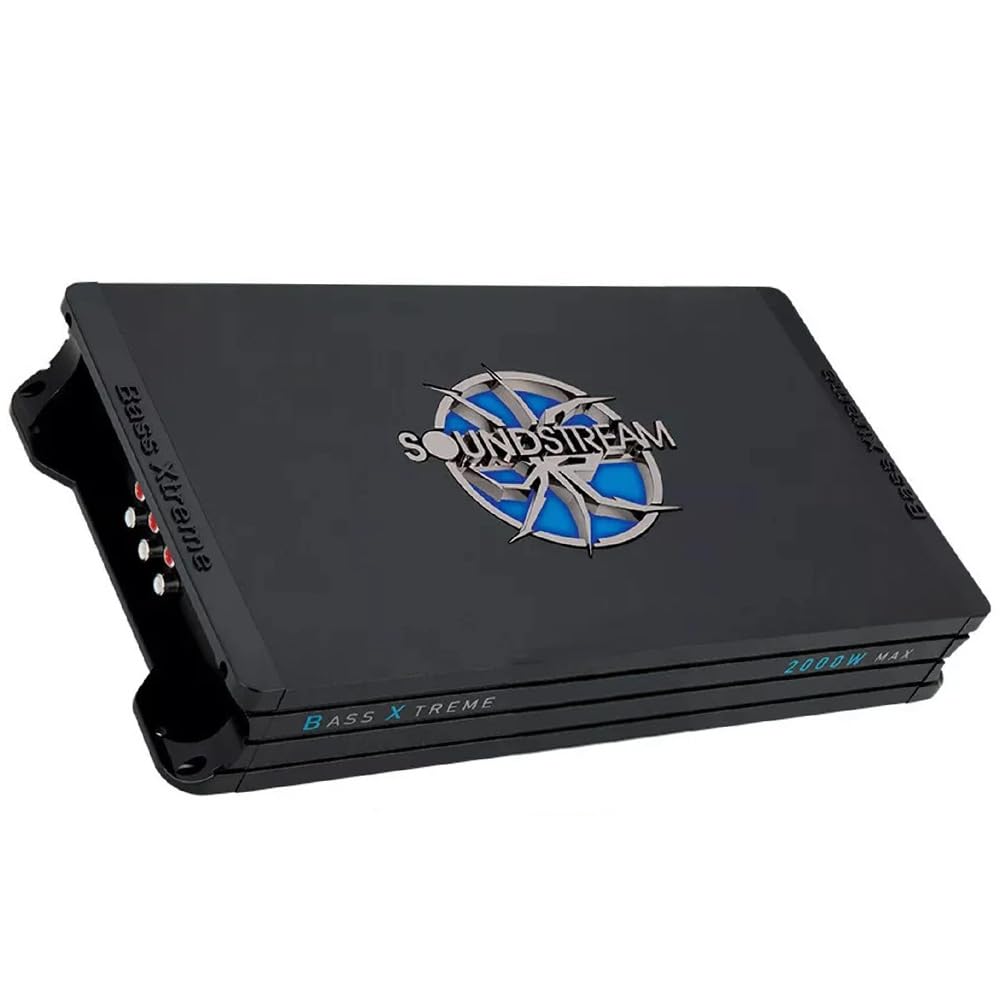
Figure 1: Soundstream BXT4.2000 4-Channel Amplifier, showing its overall compact design.
Ten amplifier is equipped with various inputs, outputs, and controls to allow for precise audio customization. The following image details the connection and adjustment panels.

Rysunek 2: Szczegółowy view z amplifier's connection side panel (top) and input/adjustments side panel (bottom).
Konfiguracja i instalacja
Prawidłowa instalacja ma kluczowe znaczenie dla wydajności i trwałości Twojego urządzenia. amplifier. Jeśli masz wątpliwości co do któregokolwiek kroku, skonsultuj się z profesjonalnym instalatorem.
1. Miejsce montażu
Choose a dry, well-ventilated location away from direct sunlight and heat sources. Ensure sufficient airflow around the ampliyfikator. Zabezpiecz ampPrzymocuj urządzenie mocno do twardej powierzchni, używając odpowiednich elementów mocujących.
2. Power Connections (Connection Side Panel)
Refer to the 'Connection Side Panel' in Figure 2 for these connections.
- GND (uziemienie): Connect this terminal to a clean, unpainted metal surface of the vehicle's chassis. The ground wire should be as short as possible and of the same gauge as the power wire.
- REM (zdalne włączanie): Connect this terminal to the remote output wire from your head unit. This wire turns the ampwłączanie i wyłączanie głośnika za pomocą systemu audio w samochodzie.
- +12V (Wejście zasilania): Connect this terminal directly to the positive (+) terminal of your vehicle's battery. An in-line fuse holder with the specified fuse rating (40A x 2) must be installed within 18 inches (45 cm) of the battery.
- BEZPIECZNIK: Ten amplifier is equipped with two 40A fuses. Ensure these are correctly installed. Replace only with fuses of the same type and rating.
3. Speaker Outputs (Connection Side Panel)
Refer to the 'Connection Side Panel' in Figure 2 for these connections.
- Connect your speakers to the "SPEAKERS OUTPUTS" terminals. The amplifier supports 4-channel stereo operation or 2-channel bridged operation.
- Tryb stereo: Connect each speaker to its corresponding RIGHT or LEFT positive and negative terminals.
- Tryb mostkowy: For higher power output to subwoofers or single speakers, connect the speaker across the BRIDGE terminals (typically the positive of one channel and the negative of the adjacent channel, as indicated on the amplifier). Ensure the speaker impedance is suitable for bridged operation (typically 4Ω minimum).
4. Audio Input (Input/Adjustments Side Panel)
Refer to the 'Input/Adjustments Side Panel' in Figure 2 for these connections.
- Connect the RCA output cables from your head unit or audio source to the "INPUT" RCA jacks on the amplifier. Ensure correct channel matching (Right to Right, Left to Left).
Instrukcja obsługi i regulacji
The 'Input/Adjustments Side Panel' (Figure 2) provides controls for fine-tuning the ampwyjście lifiera.
1. Przejmij kontrolę
- WZMOCNIENIE (MIN/MAX): Ta kontrola pasuje do amplifier's input sensitivity to the output level of your head unit. Start with the gain set to minimum (MIN). Play a familiar track at about 75% of your head unit's maximum volume. Slowly increase the ampZwiększaj wzmocnienie filtra, aż usłyszysz zniekształcenia, a następnie lekko je zmniejsz. To zapewni maksymalną czystość sygnału wyjściowego.
2. Ustawienia zwrotnicy
The BXT4.2000 features adjustable crossovers for precise frequency management.
- HPF (filtr górnoprzepustowy): This filter allows frequencies above the set point to pass through, blocking lower frequencies. Adjustable from 120Hz to 3KHz. Use for full-range speakers to prevent them from playing bass frequencies they cannot reproduce effectively.
- LPF (filtr dolnoprzepustowy): This filter allows frequencies below the set point to pass through, blocking higher frequencies. Adjustable from 50Hz to 250Hz (Rear channels only). Use for subwoofers to ensure they only reproduce bass frequencies.
- PEŁNY: Bypasses the crossover, allowing the full frequency range to pass through.
3. Bass Boost (Rear Channels Only)
- BASS BOOST (+6dB/+12dB/0): This control allows you to increase the bass output at a specific frequency (typically 50Hz). Use sparingly to avoid distortion. The amplifier offers 0dB, +6dB, and +12dB boost options.
4. Power/Protect Indicators
- ZASILANIE (zielona dioda LED): Świeci się, gdy amplifier jest włączony i działa normalnie.
- PROTECT (Red LED): Świeci się, gdy amplifier enters protection mode due to a fault (e.g., short circuit, overheating, low voltage). If this LED lights up, immediately turn off your audio system and investigate the cause.
Specyfikacje
| Funkcja | Specyfikacja |
|---|---|
| Maksymalna moc | 2000 watów |
| Moc skuteczna przy 4Ω | 110W x 4 |
| Moc skuteczna przy 2Ω | 175W x 4 |
| RMS Bridged @ 4Ω | 350W x 2 |
| Low Pass Filter (Rear) | 50Hz-250Hz |
| High Pass Filter (Front/Rear) | 120Hz-3KHz |
| Bass Boost (Rear) | 0-6-12dB |
| Bass Boost Frequency (Rear) | 50 Hz |
| Odpowiedź częstotliwościowa | 20Hz-20KHz |
| Stosunek sygnału do szumu (S/N) | 105dB |
| Czułość wejściowa | 200Mv-6V |
| Całkowite zniekształcenie harmoniczne (THD) | <0.05% |
| Objętość operacjitage | 9V-16V DC |
| Ocena bezpiecznika | 40A x 2 |
| Wymiary (dł. x szer. x wys.) | 14.50″ x 7.5″ x 2.25″ |
| Waga przedmiotu | 6 funta |
| Liczba kanałów | 4 |
Rozwiązywanie problemów
Jeśli masz problemy z urządzeniem amplifier, zapoznaj się z poniższymi typowymi problemami i rozwiązaniami:
- Brak zasilania / Amplifier nie włącza się:
- Check the +12V power, GND, and REM connections for proper contact and voltage.
- Verify the in-line fuse near the battery and the fuses on the amplifier are intact.
- Ensure the remote turn-on wire from the head unit is providing +12V when the head unit is on.
- Protect LED Illuminates:
- Zwarcie: Check speaker wires for shorts to ground or to each other. Verify speaker impedance is within the amplifier's acceptable range.
- Przegrzanie: Zapewnij amplifier has adequate ventilation. Reduce gain settings if operating at high volumes for extended periods.
- Niska/wysoka objętośćtage: Sprawdź pojemność akumulatora pojazdutagi system ładowania.
- Brak dźwięku:
- Check all RCA input connections from the head unit to the ampliyfikator.
- Verify speaker connections are secure and correctly wired.
- Sprawdź, czy jednostka główna jest włączona i odtwarza dźwięk.
- Dostosuj ustawienia wzmocnienia.
- Zniekształcony dźwięk:
- Zmniejszyć ampustawienie wzmocnienia lifiera.
- Sprawdź prawidłowe ustawienia zwrotnicy; nieprawidłowe ustawienia mogą powodować zniekształcenia.
- Upewnij się, że impedancja głośników jest zgodna amplżejsze wymagania.
- Sprawdź, czy źródło dźwięku nie jest zniekształcone.
Konserwacja
The Soundstream BXT4.2000 amplifier wymaga minimalnej konserwacji, aby zapewnić długotrwałą wydajność.
- Czyszczenie: Okresowo wycieraj ampZewnętrzną powierzchnię filtra należy czyścić miękką, suchą ściereczką, aby usunąć kurz. Nie należy używać silnych środków chemicznych ani ściernych środków czyszczących.
- Wentylacja: Upewnij się, że ampŻebra chłodzące urządzenia Lifier są pozbawione przeszkód, co pozwala na właściwe odprowadzanie ciepła.
- Znajomości: Od czasu do czasu należy sprawdzać wszystkie połączenia zasilania, uziemienia, pilota i głośników, aby mieć pewność, że są dobrze dokręcone i nie są skorodowane.
- Wymiana bezpiecznika: If a fuse blows, replace it only with a fuse of the exact same type and rating (40A). Using an incorrect fuse can damage the amprozlać lub spowodować pożar.
Gwarancja i wsparcie
Soundstream products are designed and manufactured to the highest quality standards. For specific warranty terms and conditions, please refer to the warranty card included with your product or visit the official Soundstream website. For technical support or service inquiries, please contact Soundstream customer service or your authorized dealer.
When contacting support, please have your product model number (BXT4.2000) and purchase information readily available.


