1. Wprowadzenie
The Bresser MeteoChamp 9-in-1 WLAN Weather Station is designed for weather enthusiasts, providing comprehensive meteorological data. This advanced system features a sophisticated 9-in-1 multi-sensor and a digital display base station with extensive data memory and export options. It measures temperature, humidity, wind speed and direction, precipitation, UV level, light intensity, atmospheric pressure, and the WBGT index. The station also offers a complete weather forecast, heat stress index, and air quality data, accessible via Wi-Fi connection to a smartphone app.
A unique feature is the photo frame function, allowing personal photos to be transferred to the base station's display via a dedicated app, alternating with important weather data in an automatic slideshow.
2. Informacje dotyczące bezpieczeństwa
Please read this manual carefully before using the device. Keep these instructions for future reference. Failure to follow these instructions may result in electric shock, fire, or other hazards.
- Nie wystawiaj urządzenia na działanie ekstremalnych temperatur, bezpośredniego światła słonecznego i wysokiej wilgotności.
- Trzymaj urządzenie z dala od wody i innych płynów.
- Nie próbuj samodzielnie demontować ani naprawiać urządzenia. Skontaktuj się z wykwalifikowanym personelem serwisowym.
- Używaj wyłącznie dołączonego zasilacza i akcesoriów.
- Trzymaj baterie poza zasięgiem dzieci. Zużyte baterie utylizuj prawidłowo.
- Ensure the outdoor sensor is mounted securely to prevent it from falling.
3. Zawartość opakowania
Sprawdź, czy w przesyłce znajdują się wszystkie elementy wymienione poniżej:
- Stacja bazowa z zasilaczem
- 9 w 1 zewnętrzny czujnik wieloczujnikowy
- Mounting hardware (screws, nuts, washers, mounting bracket)
- Instrukcja obsługi (ten dokument)

Obraz: Ponadview of the Bresser MeteoChamp 9-in-1 WLAN Weather Station base unit and outdoor multi-sensor.
4. Konfiguracja
4.1. Rozpakowanie i wstępna kontrola
Carefully remove all components from the packaging. Inspect them for any signs of damage. Keep the packaging for future storage or transport.
4.2. Outdoor Multi-Sensor Assembly
The 9-in-1 outdoor sensor requires minor assembly before installation. Follow these steps:
- Attach the wind vane to the designated slot on the sensor unit.
- Secure the anemometer cups to the top of the sensor.
- Ensure the rain collector is clear of any debris.
- Insert batteries into the outdoor sensor (batteries not included). Refer to the sensor's specific battery compartment for type and orientation.
Video: Detailed assembly instructions for the outdoor multi-sensor, showing how to attach the wind vane, anemometer, and prepare for installation.

Obraz: Tył view of the base station, showing the USB power input and control buttons.
4.3. Base Station Power-Up
Connect the provided power adapter to the base station's USB input port and then plug it into a wall outlet. The display will power on.
4.4. Instalacja i parowanie aplikacji
To fully utilize the smart features, download the companion app (e.g., WSLink or Weatherseed, as compatible with ProWeatherLive services) from your smartphone's app store. Follow the in-app instructions to connect your base station to your Wi-Fi network and pair it with the outdoor sensor. This will enable remote monitoring and data export.
Video: Demonstrates the features of a smart weather station app, including precise weather forecasts and alert notifications.
5. Instrukcja obsługi
5.1. Wyświetlanieview
The 10-inch TFT HD display provides a clear overview of all measured parameters. Key information includes:
- Dane zewnętrzne: Temperature, humidity, wind speed (gust and average), wind direction, precipitation (hourly, daily, weekly, monthly, yearly), UV index, light intensity.
- Dane wewnętrzne: Temperature, humidity, atmospheric pressure.
- Prognoza: 24-hour and 14-day weather forecasts with probability of precipitation.
- Indeksy specjalne: Heat Stress Index (WBGT), Air Quality Index (AQI), Moon phases.
- Data i godzina: Aktualny czas i data.

Image: The base station's digital display, showing various weather parameters such as temperature, humidity, wind speed, and forecast icons.
5.2. Photo Frame Function
Transform your weather station into a personal photo gallery. Use the dedicated app to transfer photos directly to the base station's screen. The automatic slideshow will alternate between your images and essential weather data.
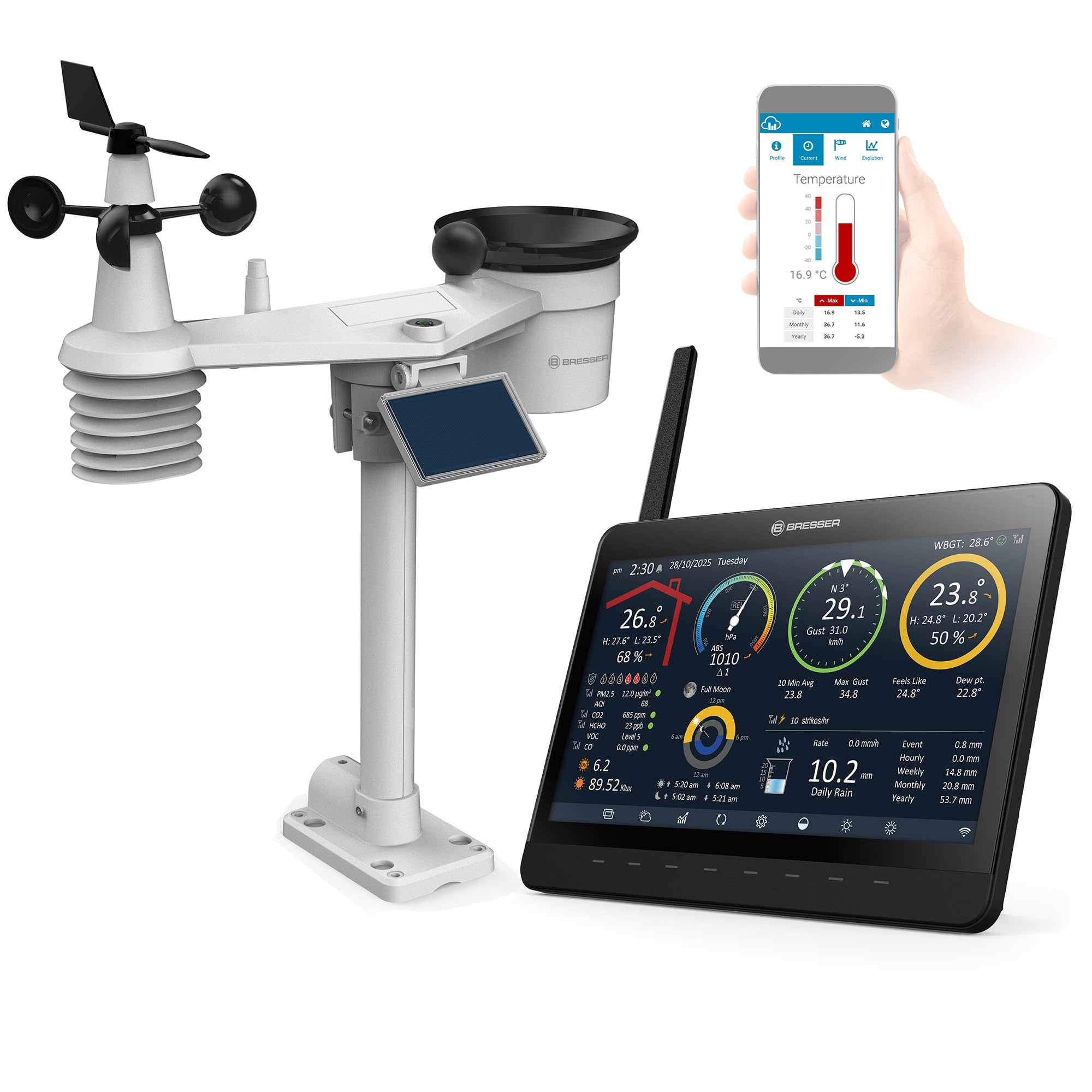
Image: The Bresser MeteoChamp base station functioning as a digital photo frame, displaying personal images alongside weather information.
5.3. Rejestrowanie i eksportowanie danych
The station features extensive data memory, allowing you to review historical data, maximum/minimum values, and graphs. Data can be exported to a computer via CSV for detailed analysis.
5.4. Heat Stress Index and Air Quality Index
The device calculates the Heat Stress Index (WBGT) based on thermal factors, providing four heat alert levels to help manage outdoor activities during hot weather. It also displays the local Air Quality Index (AQI) and can retrieve online data for PM2.5, PM10, NO2, SO2, O3, and CO pollution levels.
6. Konserwacja
6.1. Czyszczenie
- Wipe the base station and display with a soft, dry cloth.
- Periodically clean the outdoor sensor, especially the rain collector and wind sensors, to remove dirt, leaves, or insects that may affect accuracy. Use a damp cloth and mild detergent if necessary, avoiding abrasive cleaners.
6.2. Battery Replacement (Outdoor Sensor)
When the outdoor sensor's battery level is low (indicated on the base station display or app), replace the batteries. Refer to the sensor's manual for specific battery type and replacement procedure. Ensure proper polarity.
6.3. Aktualizacje oprogramowania
Regularly check for firmware updates for the base station and app updates for your smartphone. Updates often include performance improvements and new features. Follow the instructions provided within the app or on the manufacturer's webwitryna do aktualizacji.
7. Rozwiązywanie Problemów
- No data from outdoor sensor: Check sensor batteries, ensure it's within range of the base station, and verify proper pairing.
- Nieprawidłowe odczyty: Ensure the sensor is mounted correctly and free from obstructions. Calibrate if necessary (refer to the full manual for calibration procedures).
- Problemy z łącznością Wi-Fi: Check your router, ensure the base station is within Wi-Fi range, and re-enter Wi-Fi credentials in the app if needed.
- Wyświetlacz nie działa: Check power connection to the base station.
For more detailed troubleshooting, please consult the comprehensive manual or contact customer support.
8. Specyfikacje
| Numer modelu: | 15196 |
| Typ wyświetlacza: | 10" TFT HD Digital Display |
| Pomiary: | Temperature, Humidity, Wind Speed, Wind Direction, Precipitation, UV Level, Light Intensity, Atmospheric Pressure, WBGT Index, AQI |
| Łączność: | WLAN (WiFi) |
| Źródło zasilania: | Base Station: AC Adapter; Outdoor Sensor: Batteries (not included) |
| Cechy szczególne: | Digital Photo Frame Function, Data Logging (up to 2 years), CSV Export, Heat Stress Index, Air Quality Index, Internet Weather Forecasts |
| Wymiary (opakowanie): | Wymiary 47.5 x 36.5 x 20 cm |
| Waga (produktu): | 620 gramów |
9. Gwarancja i pomoc techniczna
This Bresser product comes with a manufacturer's warranty. For specific warranty terms and conditions, please refer to the warranty card included in your package or visit the official Bresser website. For technical support, product inquiries, or service requests, please contact Bresser customer service through their official channels.
Więcej informacji i zasobów pomocy znajdziesz na stronie Bresser Store on Amazon.


