Wstęp
This manual provides essential information for the safe and efficient use of your Philips Smart TV Ambilight THE ONE 55 inch 4K 144 Hz, model 55PUG8929/78. Please read these instructions carefully before operating the device and retain them for future reference.
Your Philips TV features Ambilight technology, a P5 processor for enhanced image quality, Dolby Vision and Dolby Atmos for immersive audiovisual experiences, a 144Hz refresh rate with VRR and AMD FreeSync Premium for gaming, and the Titan OS smart TV platform.
Organizować coś
1. Rozpakowanie i zawartość opakowania
Carefully remove all components from the packaging. Ensure all items are present before discarding packaging materials.
- 1 Smart TV Philips 55"
- 1 Zdalne sterowanie
- 2 baterie AAA
- 1 Kabel zasilający
- 1 Szybki przewodnik
- 1 Legal and safety leaflet
- 1 Stojak na stół
Note: The product does not include installation services. For apartment delivery, lifting, or wall mounting, the customer is responsible. Philips is not responsible for installation or assembly.
2. Montaż stojaka lub montaż na ścianie
If using the included table stand, follow the instructions in the quick start guide to securely attach it to the TV. Ensure all screws are tightened properly. If wall mounting, use a VESA-compatible wall mount (sold separately) and consult a professional for installation to ensure safety and proper alignment. The TV supports VESA 30cm mounting.

Obraz: Przód view of the Philips 55 inch Smart TV with its table stand assembled.
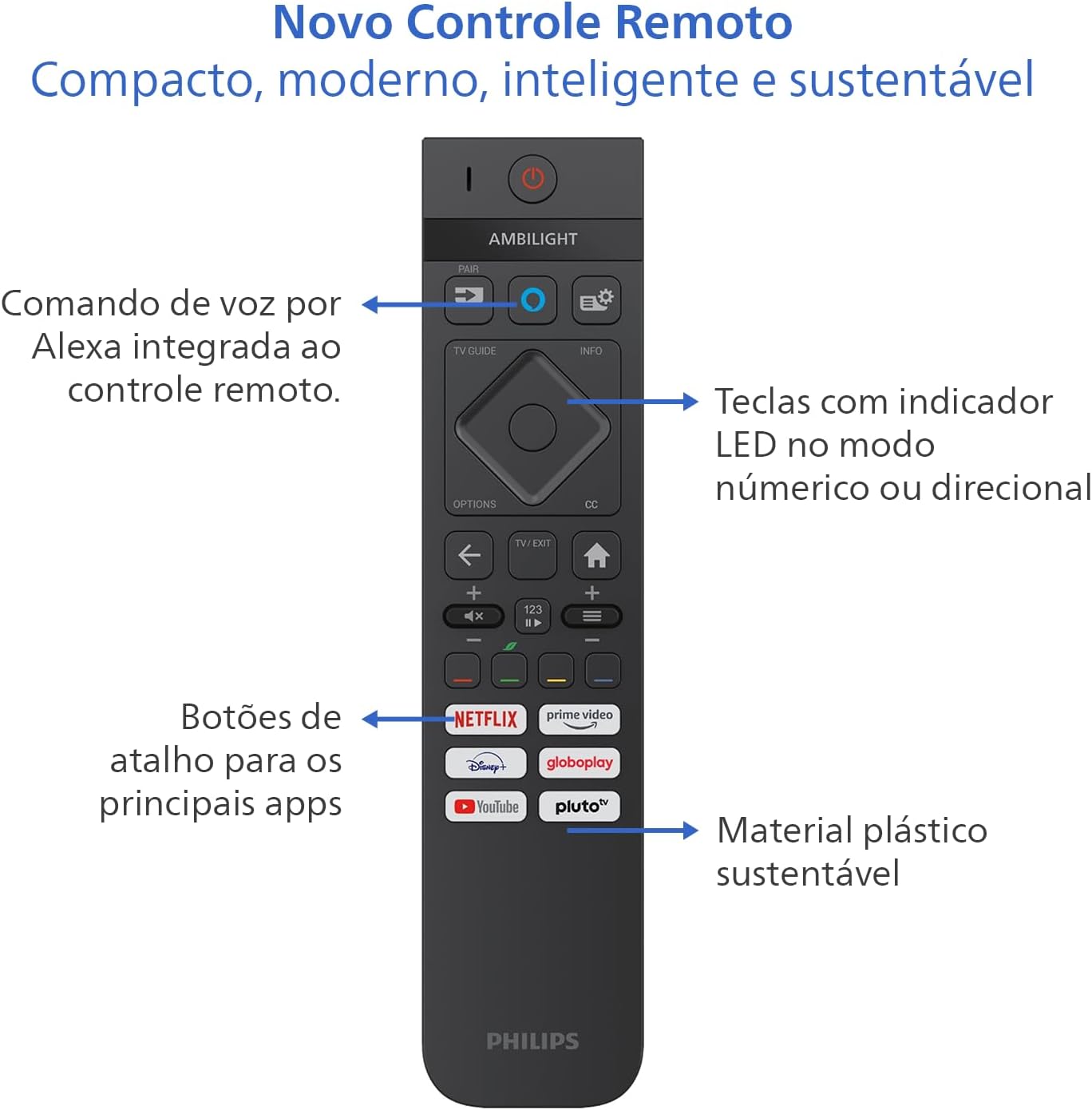
Image: Diagram showing the dimensions of the Philips 55 inch Smart TV with and without the stand, including VESA wall mount specifications (30cm).
3. Podłączanie urządzeń peryferyjnych
Connect your devices to the TV's ports. Refer to the back and side views for port locations.
- Moc: Connect the power cable to the TV and a suitable electrical outlet (110V/220V compatible).
- HDMI: Use HDMI 2.1 ports for high-definition devices like gaming consoles, Blu-ray players, or set-top boxes. There are 4 HDMI ports available.
- USB: Connect USB drives for media playback or external devices. There are 2 USB ports.
- Antenna/RF: Connect your antenna cable for terrestrial TV reception.
- Ethernet (RJ-45): Do przewodowego połączenia internetowego.
- Audio L-R: Analogowe wejście audio.
- SPDIF (dźwięk optyczny): Do cyfrowego wyjścia audio do soundbarów lub systemów kina domowego.
- Wyjście słuchawkowe: Do podłączenia słuchawek.

Obraz: Profesjonalista z bokufile of the Philips 55 inch Smart TV, highlighting the accessible USB ports and other side connections.

Obraz: Tył view of the Philips 55 inch Smart TV, displaying the full array of input and output ports for various connections.
4. Pierwsze włączenie i konfiguracja sieci
After connecting the power cable, press the power button on the remote control. Follow the on-screen instructions to complete the initial setup, including language selection, country, and network connection (Wi-Fi or Ethernet). The TV supports Wi-Fi Dual Band and Bluetooth 5.2 for wireless connectivity.
Instrukcja obsługi
1. Funkcje pilota
The included remote control is designed for intuitive navigation and features voice command with integrated Alexa. Insert the two AAA batteries into the remote control before use.

Obraz: Szczegółowy view of the Philips Smart TV remote control, highlighting the voice command button (Alexa), LED indicator keys, and dedicated shortcut buttons for popular streaming applications.
- Przycisk zasilania: Włącza lub wyłącza telewizor.
- Voice Command (Alexa): Press and hold to use voice commands for searching content, controlling smart home devices, and more.
- Panel nawigacyjny: Użyj przycisków kierunkowych, aby poruszać się po menu i wybierać opcje.
- Przyciski skrótów: Direct access to popular streaming apps like Netflix, Prime Video, YouTube, and Pluto TV.
- Głośność/kanał: Dostosuj głośność i zmień kanał.
- LED Indicator Keys: Keys with LED indicators for numeric or directional mode.
2. Funkcje Smart TV (system operacyjny Titan)
Your TV runs on Titan OS, offering a user-friendly interface and quick access to various applications. The home screen is customizable, allowing you to prioritize your favorite apps and content.

Image: The Philips Smart TV's home screen, showing a selection of streaming applications and a personalized content layout.
- Personalized Home Screen: Access your favorite content and applications with recommendations tailored to your preferences.
- Intuicyjny interfejs: Organize your home screen by prioritizing frequently used applications for easy daily access.
- Odkrywanie treści: Easily find new content with agile navigation and smart search functions.
3. Technologia Ambilight
Ambilight projects colors from the screen onto the surrounding wall, enhancing immersion. Your TV features three-sided Ambilight with 8 illumination modes.

Image: A Philips Ambilight TV displaying dynamic backlighting that extends the on-screen colors onto the wall, creating an immersive viewzdobywania doświadczenia.
- Naturalna: Softer colors and brightness for visual comfort.
- Żywy: Stronger, more vibrant Ambilight colors to create a sense of expanded imagery.
- Lounge: Can be active even when the TV is off, creating a cozy ambient atmosphere.
- Gra: Adapts lights to dark and dynamic scenes, enhancing gaming immersion.
- Muzyka: Ambilight follows the rhythm of music, ideal for creating a festive home environment.
- AmbiWake Up: Simulates sunrise with soft Ambilight, gentle music, and weather forecast.
- Ambi-sleep: With the screen off, Ambilight emits an orange light and nature sounds to promote sleep.
- Zorza polarna: Transforms the TV into a decorative piece, displaying continuous animations for a pleasant ambiance.

Image: Comparison of Ambilight's Natural mode (soft, comfortable lighting) and Vivid mode (strong, vibrant lighting for expanded imagery).

Image: Comparison of Ambilight's Lounge mode (ambient lighting when TV is off) and Game mode (dynamic lighting for gaming immersion).

Image: Comparison of Ambilight's Music mode (lights synchronize with music) and AmbiWake Up mode (simulates sunrise).

Image: Comparison of Ambilight's Ambi-sleep mode (orange light and nature sounds for sleep) and Aurora mode (decorative animations).
4. Jakość obrazu i dźwięku
The TV features a P5 processor, 4K resolution, Dolby Vision, and HDR10+ for exceptional image quality. The audio system includes 40W RMS, Dolby Atmos, and DTS Play-Fi for immersive sound.

Image: Explanation of the Philips P5 Perfect Picture Engine, illustrating how it optimizes colors, contrasts, and movements for realistic images.

Image: Visual comparison demonstrating the enhanced detail and richness of images with Dolby Vision and HDR compared to standard display.
- P5 Processor: Optimizes colors, contrasts, and movements in real-time for vivid and realistic images.
- Dolby Vision i HDR10+: Provides cinematic visual experience with impressive brightness, contrast, and color detail in 4K resolution.
- 40W RMS Audio: Powerful sound output that fills the environment with clarity and intensity.
- Dolby Atmos i DTS:X: Advanced audio technologies creating a three-dimensional sound effect for an immersive experience.
- Intellisound with AI: Automatic audio adjustment based on content, ensuring clear and balanced sound from subtle dialogues to intense soundtracks.
5. Funkcje gier
Designed for gamers, this TV offers a fluid and responsive gaming experience.

Image: The Philips Smart TV's Game Bar interface, showing various settings for optimizing the gaming experience, including VRR, ALLM, and FreeSync Premium.
- 144Hz VRR: Variable Refresh Rate ensures ultra-fast, tear-free, and stutter-free motion.
- AMD Freesync Premium: Provides stable, fluid, and lag-free gaming.
- Pasek gier: Access gaming-specific settings quickly.
- ALLM (tryb automatycznego niskiego opóźnienia): Automatically switches to low-latency mode for responsive gaming.
- Gry w chmurze: Compatible with cloud gaming services like Blacknut.
Konserwacja
1. Czyszczenie telewizora
- Ekran: Delikatnie przetrzyj ekran miękką, niepozostawiającą włókien ściereczką. W przypadku uporczywych zabrudzeń delikatnie przetrzyjampPrzetrzyj ściereczkę wodą lub specjalnym środkiem do czyszczenia ekranów. Nigdy nie spryskuj ekranu bezpośrednio płynem.
- Gabinet: Do czyszczenia obudowy telewizora używaj miękkiej, suchej ściereczki. Unikaj środków czyszczących o działaniu ściernym i rozpuszczalników.
- Zdalne sterowanie: Przecierać miękką, suchą ściereczką.
2. Aktualizacje oprogramowania
Periodically check for software updates to ensure optimal performance and access to the latest features. You can usually find this option in the TV's settings menu under "System" or "About TV". Ensure your TV is connected to the internet for updates.
Rozwiązywanie problemów
Jeśli masz problemy z telewizorem, zapoznaj się z poniższymi typowymi procedurami rozwiązywania problemów, zanim skontaktujesz się z pomocą techniczną.
Brak zasilania
- Sprawdź, czy kabel zasilający jest solidnie podłączony do telewizora i gniazdka elektrycznego.
- Sprawdź, czy gniazdko elektryczne działa, podłączając inne urządzenie.
- Spróbuj nacisnąć przycisk zasilania na samym telewizorze, nie tylko na pilocie.
Brak obrazu lub słaba jakość obrazu
- Sprawdź, czy wybrano prawidłowe źródło sygnału wejściowego (np. HDMI 1, TV).
- Sprawdź wszystkie połączenia kablowe (HDMI, antenowe) pod kątem luzu i uszkodzeń.
- Zmień ustawienia obrazu (jasność, kontrast, kolor) w menu telewizora.
- If using an external device, try connecting it to a different HDMI port or another TV to rule out device issues.
Brak dźwięku lub słaba jakość dźwięku
- Sprawdź, czy dźwięk nie jest wyciszony i jest odpowiednio ustawiony.
- Check audio settings in the TV menu, ensuring the correct audio output is selected (e.g., TV speakers, external audio system).
- If using external speakers or a soundbar, check their power and connections.
Pilot nie działa
- Wymień baterie na nowe baterie AAA.
- Upewnij się, że między pilotem a czujnikiem podczerwieni telewizora nie ma żadnych przeszkód.
- If the remote uses Bluetooth, try re-pairing it with the TV (refer to the TV's settings for pairing instructions).
Network/Internet Connection Issues
- Sprawdź, czy router i modem są włączone i działają prawidłowo.
- Uruchom ponownie router i modem.
- If using Wi-Fi, ensure the TV is within range of your router. Try connecting via Ethernet cable if possible.
- Verify Wi-Fi password if prompted.
Specyfikacje
| Funkcja | Szczegół |
|---|---|
| Marka | Philips |
| Model | 55PUG8929/78 |
| Rozmiar ekranu | 55 cali |
| Technologia wyświetlania | 4K UHD, LED, IPS |
| Rezolucja | 3840 x 2160 pikseli (4K) |
| Częstotliwość odświeżania | 144 Hz |
| Czas reakcji | 8 milisekund |
| Viewing kąt | 178 stopni |
| Proporcje obrazu | 16:9 |
| Współczynnik kontrastu | 1:200,000 |
| System operacyjny | System operacyjny Titan |
| Pojemność pamięci masowej | 8 GB |
| Cechy specjalne | Dolby Atmos / DTS-X, HDR10+/HLG/HDR10, Titan OS, Ambilight |
| Moc wyjściowa audio | 40 W (RMS) |
| Kanały dźwięku przestrzennego | 2.0 |
| Technologia łączności | HDMI, USB, Wi-Fi, Bluetooth |
| Porty HDMI | 4 (zgodne z HDMI 2.1) |
| Porty USB | 2 |
| Inne połączenia | 1 Audio L-R, 1 RF (Antenna), 1 SPDIF (Optical Audio), 1 Headphone Output, 1 Ethernet RJ-45 |
| Łączność bezprzewodowa | Bluetooth 5.2, Wi-Fi Dual Band |
| Tomtage | 110 V, 220 V |
| Etykieta efektywności energetycznej | A (ENCE) |
| Wymiary produktu (bez stojaka) | 123 x 8.1 x 72 cm (szer. x gł. x wys.) |
| Waga produktu (bez stojaka) | 14.2 kilogramów |
| Waga produktu (z podstawą) | 14.6 kilogramów |
| Kolor | Czarny |
| Orzecznictwo | W METRO |
| Rok | 2025 |
Informacje o gwarancji
Your Philips Smart TV model 55PUG8929/78 comes with a 1-letnia gwarancja producenta. This warranty covers defects in materials and workmanship under normal use. Please retain your proof of purchase for warranty claims. For detailed terms and conditions, refer to the legal and safety leaflet included in your package.
Obsługa klienta
For further assistance, technical support, or warranty claims, please contact Philips customer service. You can find contact information on the Philips official webznajdziesz na stronie lub w dokumentacji dołączonej do telewizora.
Oficjalny Philips Webstrona: www.philips.pl