1. Wprowadzenie
This manual provides comprehensive instructions for the installation, setup, operation, and maintenance of your Veise VE027 WiFi Smart Lock. Please read this manual thoroughly before installation and use to ensure proper function and safety. The Veise VE027 offers multiple access methods including WiFi remote control, fingerprint, PIN code, IC card, and traditional key access.

Image 1.1: Veise VE027 Smart Lock components including the exterior keypad, interior unit, IC cards, and physical keys.
2. Koniec produktuview
2.1 Główne cechy
- Built-in WiFi (2.4GHz): Remote control via KK Home App, real-time status, alerts, user management, access logs.
- Wiele metod odblokowania: App (Remote), Fingerprints, PIN Codes, IC Cards, Physical Keys, Alexa, Google Home.
- Wielofunkcyjność: Type-C emergency charging port, low-battery alerts, voice feedback, anti-peeping mode, wrong entry limit, backlit keypad, away mode, vacation mode.
- IC Card Integration: 13.56 MHz IC cards for seamless swipe functionality. One card can open multiple locks.
- Bezpieczeństwo: Military-grade encryption for all access methods.
2.2 Składniki

Image 2.1: Front and back units of the Veise VE027 Smart Lock, along with included IC cards and physical keys.
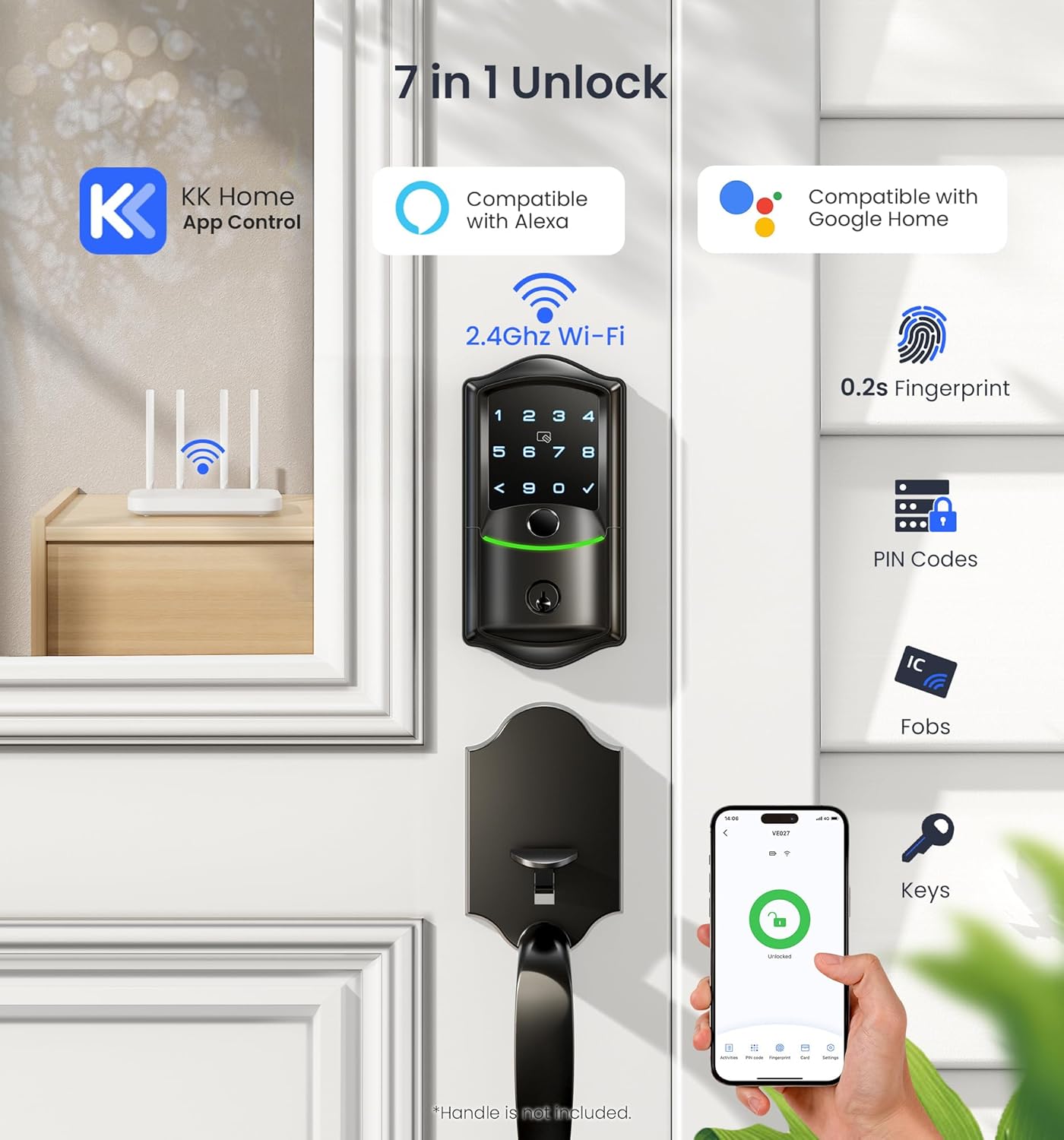
Image 2.2: Visual representation of the seven unlock methods: KK Home App, Alexa, Google Home, Fingerprint, PIN Codes, IC Fobs, and Physical Keys.

Obraz 2.3: Koniecview of the smart lock's multi-tech engine, highlighting Wi-Fi remote control, Bluetooth local control, 5-in-1 locking, 3 voice setups, Type-C emergency port, and real-time alarm.
3. Instrukcja instalacji
The Veise VE027 Smart Lock is designed for standard deadbolt installations. Ensure your door meets the following specifications:
- Door thickness: Typically 1 3/8" to 2" (35mm to 50mm).
- Backset: 2 3/8" or 2 3/4" (60mm or 70mm).
- Cross bore hole: 2 1/8" (54mm).
- Edge bore hole: 1" (25mm).
3.1 Wymagane narzędzia
- Śrubokręt krzyżakowy
- Taśma miernicza
- Ołówek
3.2 Kroki instalacji (ogólne)
- Przygotuj drzwi: Ensure the door is properly drilled according to the dimensions above. If replacing an existing deadbolt, remove it.
- Zainstaluj zatrzask: Insert the latch into the door edge and secure it with screws. Ensure the latch bolt faces the correct direction.
- Montaż zespołu zewnętrznego: Place the exterior keypad assembly onto the door, feeding the cable through the cross bore hole.
- Zamontuj wewnętrzną płytę montażową: Secure the interior mounting plate to the exterior assembly using screws, ensuring the cable passes through the plate.
- Podłącz kabel: Podłącz kabel z zespołu zewnętrznego do zespołu wewnętrznego.
- Zamontuj zespół wewnętrzny: Attach the interior assembly to the mounting plate and secure it with screws.
- Zainstaluj baterie: Insert 4 AA alkaline batteries (not included) into the battery compartment of the interior assembly. Ensure correct polarity.
- Operacja testowa: Manually test the deadbolt mechanism to ensure smooth operation.
For detailed, step-by-step visual instructions, refer to the installation video or diagrams provided with your product packaging.
4. Konfiguracja
4.1 KK Home App Setup
- Pobierz aplikację: Szukaj "KK Home" in your smartphone's app store (iOS or Android) and download it.
- Utwórz konto: Otwórz aplikację i postępuj zgodnie z instrukcjami, aby utworzyć nowe konto użytkownika.
- Dodaj urządzenie: Tap the "+" icon or "Add Device" option in the app. Select your Veise VE027 Smart Lock from the list of available devices.
- Połącz się z Wi-Fi: Follow the in-app instructions to connect your lock to your 2.4GHz WiFi network. This typically involves putting the lock into pairing mode and entering your WiFi credentials.
- Name Your Lock: Assign a name to your lock for easy identification (e.g., "Front Door Lock").

Image 4.1: The KK Home app interface on a smartphone, showing remote lock/unlock functionality, real-time notifications, user management, scheduled codes, and lock history.

Image 4.2: The Veise VE027 Smart Lock is compatible with multiple apps including KK Home, DD Lock, TT Lock, Smart Life, and Tuya Smart, supporting 13.56 MHz IC cards.
4.2 Adding Access Methods (Users, Fingerprints, PINs, IC Cards)
All access methods are managed through the KK Home App or directly on the lock's keypad.
- Dodawanie odcisków palców:
a. In the KK Home App, navigate to the lock's settings and select "Fingerprints."
b. Follow the on-screen prompts to register a new fingerprint. You will be asked to place your finger on the lock's sensor multiple times for accurate registration. - Creating PIN Codes:
a. In the KK Home App, select "PIN Codes."
b. Choose the type of PIN code: Permanent, Scheduled, or One-Time.
c. Enter your desired PIN code (6-10 digits recommended) and confirm. - Registering IC Cards:
a. In the KK Home App, select "IC Cards."
b. Tap "Add Card" and follow the instructions to present the IC card to the lock's sensor.
c. Assign a name to the card for identification.
Image 4.3: Included IC cards for convenient tap-to-unlock access.

Image 4.4: Demonstrates the process of swiping an IC card on the smart lock for entry.

Image 4.5: An IC card can be programmed to unlock multiple Veise smart locks, suitable for various doors like side doors, bedrooms, offices, or garages.
- Voice Control Integration (Alexa/Google Home):
a. Ensure your Veise VE027 lock is successfully connected to the KK Home App.
b. Open your Alexa or Google Home app.
c. Szukaj and enable the "KK Home" skill/service.
d. Link your KK Home account. Your smart lock should now appear as a discoverable device.
5. Instrukcja obsługi
5.1 Odblokowanie drzwi
- Odcisk palca: Umieść zarejestrowany palec na czytniku linii papilarnych. Zamek zostanie odblokowany po rozpoznaniu odcisku palca.
- Kod PIN: Enter your 6-10 digit PIN code on the keypad, then press the '✓' (check) button.
- Karta elektroniczna: Przyłóż zarejestrowaną kartę IC do czytnika kart znajdującego się na zamku.
- Klucz fizyczny: Włóż klucz fizyczny do zamka i przekręć, aby odblokować.
- KK Home App: Open the app, select your lock, and tap the "Unlock" button.
- Sterowanie głosowe: Use voice commands through Alexa or Google Home (e.g., "Alexa, unlock the front door"). You may need to provide a voice PIN for security.
5.2 Zamykanie drzwi
- Blokada jednym dotknięciem: Press and hold the '✓' (check) button on the keypad for 2 seconds.
- Automatyczna blokada: The lock will automatically lock after a set period (configurable in the app).
- KK Home App: Open the app, select your lock, and tap the "Lock" button.
- Klucz fizyczny: Turn the physical key to lock the door.
5.3 Advanced Modes
- Anti-Peeping Mode: When entering a PIN code, you can input random digits before or after your actual PIN to prevent others from guessing your code. Example: XXX + PIN + XXX.
- Tryb poza domem: Activates enhanced security features, often disabling certain access methods or triggering alarms upon unauthorized attempts.
- Tryb wakacyjny: Temporarily disables all user access except for administrator access, ideal for extended periods away.
6. Konserwacja
6.1 Wymiana baterii
The Veise VE027 Smart Lock requires 4 AA alkaline batteries. When the battery level is low, the lock will provide a low-battery alert through voice feedback and the KK Home App. Replace all four batteries simultaneously with new, high-quality alkaline batteries. Do not mix old and new batteries or different battery types.
6.2 Zasilanie awaryjne
In case of complete battery depletion, the lock features a Type-C emergency charging port located on the exterior unit. Connect a portable power bank via a Type-C cable to temporarily power the lock and gain access.
6.3 Czyszczenie
Clean the lock's exterior surfaces with a soft, dry cloth. Avoid using abrasive cleaners, solvents, or harsh chemicals, as these can damage the finish and electronic components. Keep the fingerprint sensor and keypad free from dirt and moisture for optimal performance.
7. Rozwiązywanie Problemów
- Zamek nie odpowiada:
- Sprawdź poziom naładowania baterii i wymień ją w razie potrzeby.
- Ensure the lock is properly installed and all cables are connected.
- Use the emergency Type-C power port if batteries are completely dead. - Odcisk palca nie został rozpoznany:
- Ensure your finger is clean and dry.
- Try different angles or re-register your fingerprint in the app.
- Clean the fingerprint sensor. - Kod PIN nie działa:
- Verify the PIN code is correct and active in the app.
- Ensure you are pressing the '✓' button after entering the code.
- Check if the lock is in 'wrong entry limit' mode (too many incorrect attempts). - Problemy z łącznością aplikacji:
- Ensure your home WiFi network (2.4GHz) is stable.
- Restart your router and the smart lock.
- Check if the lock is within range of your WiFi router.
- Update the KK Home App to the latest version. - Karta IC nie działa:
- Ensure the IC card is properly registered in the app.
- Present the card correctly to the sensor area.
7.1 Przywracanie ustawień fabrycznych
A factory reset will erase all user data and settings, returning the lock to its original state. Refer to the specific instructions provided with your lock or within the KK Home App for the exact factory reset procedure, as it may vary slightly.
8. Specyfikacje
| Atrybut | Specyfikacja |
|---|---|
| Marka | Weise |
| Nazwa modelu | VE027 |
| Typ zamka | Zasuwa |
| Tworzywo | Metal |
| Metoda kontroli | Aplikacja, przycisk, dotyk, głos |
| Łączność | Built-in WiFi (2.4GHz) |
| IC Card Frequency | 13.56MHz |
| Źródło zasilania | 4 baterii AA (brak w zestawie) |
| Zasilanie awaryjne | Port typu C |
9. Gwarancja i wsparcie
For warranty information, technical support, or further assistance, please refer to the warranty card included with your product or visit the official Veise website. You may also contact Veise customer service directly through the contact information provided in your product packaging or on their webstrona.


