1. Wprowadzenie
Thank you for choosing the EWEADN F61 60% Wired RGB Backlit Gaming Keyboard. This compact keyboard is designed for efficiency and performance, offering a comfortable typing experience with vibrant RGB lighting. This manual provides essential information for setting up, operating, and maintaining your new keyboard.
2. Zawartość opakowania
- EWEADN F61 60% Gaming Keyboard
- Odłączany kabel USB typu C
- Instrukcja obsługi
3. Konfiguracja
- Podłącz kabel: Locate the Type-C port on the keyboard. Connect the detachable Type-C USB cable to the keyboard and the other end (USB-A) to an available USB port on your computer (PC, laptop, Mac) or compatible device (phone, tablet).

Image: Connecting the detachable Type-C USB cable to the keyboard for a stable, low-latency connection.
- Podłącz i graj: The keyboard is plug-and-play compatible with Windows and Mac dual systems. No additional drivers are typically required. Your computer should automatically recognize the device.
- Dostosuj ergonomię: Flip out the dual-layer feet on the underside of the keyboard to adjust the typing angle for comfort. There are two angle options: 7 degrees and 15 degrees.

Image: The underside of the keyboard showing the dual-layer feet that can be adjusted for preferred typing angles.
4. Działanie
4.1 Sterowanie oświetleniem RGB
The EWEADN F61 keyboard features vibrant RGB backlighting with multiple effects and brightness levels. Use the following key combinations to customize your lighting:
- FN + Backspace: Switch backlight On/Off.
- FN + IN: Switch between 6 different lighting effects.
- FN + PGUP/PGDN: Adjust light brightness (5 levels).
- FN + O/L: Dostosuj prędkość światła.
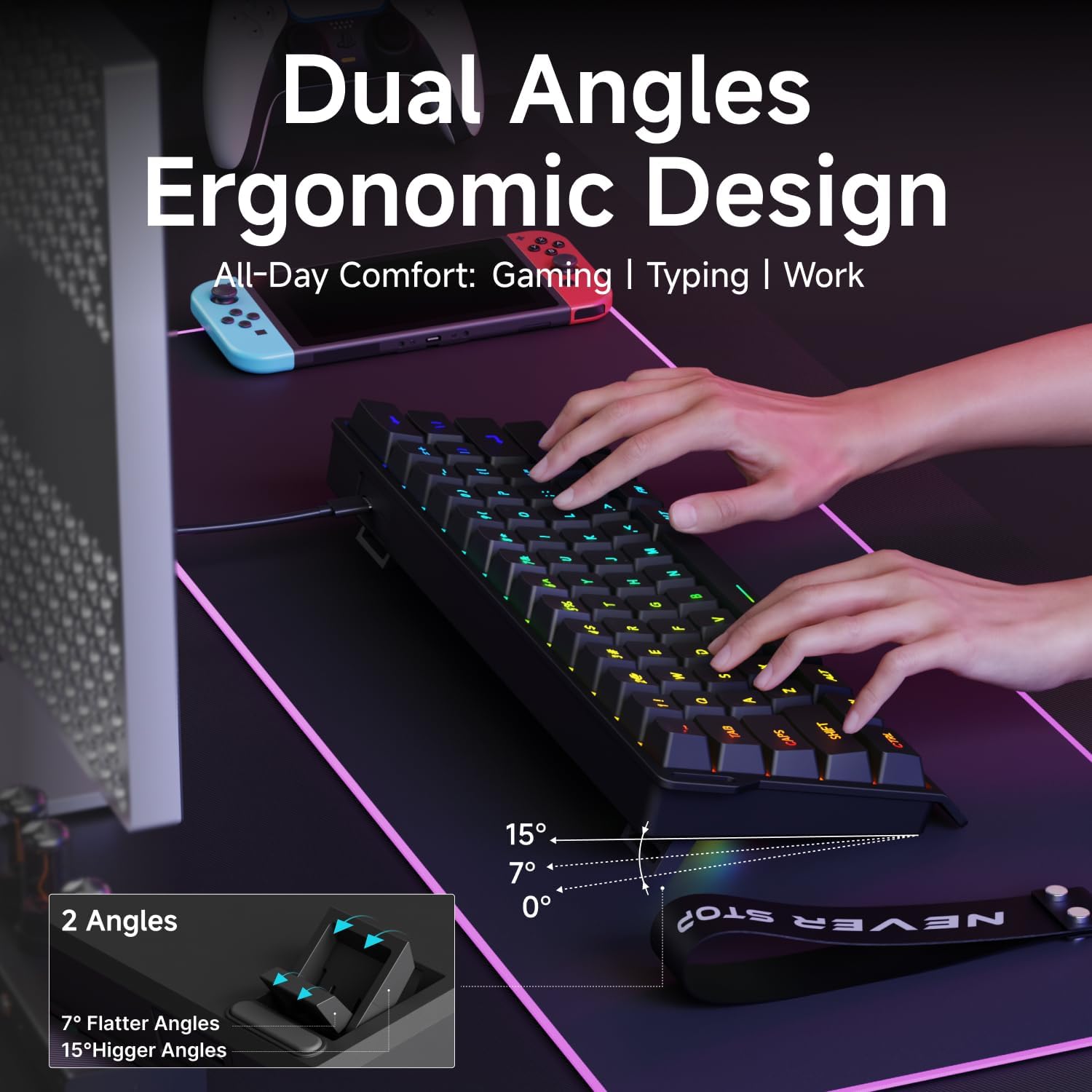
Image: The EWEADN F61 keyboard showcasing its 8 constant backlights and 5 dynamic lighting effects.
4.2 Kombinacje klawiszy funkcyjnych
Due to its 60% compact design, many functions are accessed via the 'FN' key in combination with other keys. Refer to the table below for common shortcuts:
| Kombinacja klawiszy | Funkcjonować |
|---|---|
| FN + WYGRAJ | Zablokuj klawisz Windows |
| FN+R | Wydrukuj ekran |
| FN + T | Pauza |
| FN + Y | Wstawić |
| FN+U | Dom |
| FN + I | Koniec |
| FN + Z | Poprzedni utwór |
| FN + X | Następny utwór |
| FN + C | Zatrzymywać się |
| FN + W | Odtwórz/Pauza |
| FN + B | Zmniejsz głośność |
| FN + N | Zwiększ głośność |
| FN + M | Niemy |
| FN + Backspace | Usuwać |
5. Funkcje
- Compact 60% Design: The F61 features a space-saving layout, retaining essential keys while minimizing footprint. This makes it ideal for gaming, office use, or travel, freeing up desk space.

Image: Visual comparison highlighting the 60% compact design of the EWEADN F61 keyboard, saving significant desk space.
- Połączenie przewodowe: Connects via a detachable Type-C cable, ensuring a stable, continuous, and ultra-low input delay. This wired connection is reliable for competitive gaming and precise typing.
Video: Demonstrates the wired connection of the EWEADN F61 60% RGB Backlit Gaming Keyboard, highlighting its plug-and-play functionality and compatibility.
- Podświetlenie RGB: Offers 6 backlight effects and 5 brightness levels. Dual-layer injection PBT keycaps ensure characters are bright, translucent, and resistant to fading, enhancing visibility in dark environments.
Video: Showcases the vibrant RGB lighting and clear keycaps of the EWEADN F61 keyboard, ideal for dark environments.
- Ergonomic Design & Mechanical Feel: Designed for comfortable extended use, fitting perfectly to your fingertips. Advanced mechanical-like technology provides a satisfying typing feel while maintaining the quietness of a membrane keyboard.

Image: An illustration demonstrating the dual ergonomic angles (7° and 15°) of the EWEADN F61 keyboard for enhanced comfort during use.
- Szeroka kompatybilność: Supports WIN & MAC dual systems, connecting to laptops, PCs, mobile phones, and tablets. Its portable size makes it easy to carry.
Video: Highlights the compact 60% design of the EWEADN F61, emphasizing its space-saving benefits and portability for gaming and travel.
6. Specyfikacje
| Funkcja | Szczegół |
|---|---|
| Numer modelu | F61 |
| Technologia łączności | USB-C (przewodowy) |
| Opis klawiatury | Membrana |
| Materiał nasadek klawiszy | PBT (Dual-Layer Injection) |
| Podświetlenie | RGB (6 efektów, 5 poziomów jasności) |
| Kompatybilne urządzenia | Laptop, PC, Phone, Tablet |
| Systemy operacyjne | Windows, Mac |
| Waga przedmiotu | 1.3 funta |
| Wymiary opakowania | 13.39 x 6.34 x 1.85 cala |
| Tworzywo | Metal, Plastik |
7. Konserwacja
- Czyszczenie: Do przecierania powierzchni klawiatury używaj miękkiej, suchej ściereczki. Aby dokładniej wyczyścić, użyj sprężonego powietrza, aby usunąć kurz i zanieczyszczenia spomiędzy klawiszy. Unikaj stosowania silnych środków chemicznych i materiałów ściernych.
- Pielęgnacja kabli: Handle the detachable Type-C cable with care. Avoid sharp bends or excessive pulling to prevent damage.
- Składowanie: Gdy nie używasz klawiatury, przechowuj ją w czystym, suchym miejscu, z dala od ekstremalnych temperatur i bezpośredniego światła słonecznego.
8. Rozwiązywanie Problemów
- Klawiatura nie odpowiada:
- Sprawdź, czy kabel USB-C jest prawidłowo podłączony do klawiatury i komputera.
- Spróbuj podłączyć klawiaturę do innego portu USB w komputerze.
- Przetestuj klawiaturę na innym komputerze, aby wykluczyć problem związany z danym komputerem.
- Oświetlenie RGB nie działa/działa nieprawidłowo:
- Naciskać FN + Backspace aby upewnić się, że podświetlenie jest włączone.
- Używać FN + IN aby przełączać się między różnymi efektami świetlnymi.
- Dostosuj jasność za pomocą FN + PGUP/PGDN.
- Niektóre klawisze nie działają:
- Sprawdź, czy pod klawiszem nie znajdują się żadne przeszkody fizyczne.
- Upewnij się, że klawiatura jest czysta i wolna od zanieczyszczeń.
9. Gwarancja i wsparcie
The EWEADN F61 keyboard comes with a 360-dniowa gwarancja producenta.
For any questions, troubleshooting assistance, or support, please contact us via email:
Wsparcie e-mailowe: eweadnkeyboard@outlook.com


