Wstęp
This manual provides detailed instructions for the installation, operation, and maintenance of your Alpine ILX-W670-S 7-inch Double-DIN Digital Multimedia Receiver with Backup Bullet Camera. Please read this manual thoroughly before using the product to ensure proper operation and to prevent damage.
Informacje dotyczące bezpieczeństwa
Aby zapobiec obrażeniom ciała lub uszkodzeniu urządzenia i pojazdu, należy zawsze przestrzegać następujących środków ostrożności:
- Nie używaj urządzenia w sposób rozpraszający Cię podczas jazdy. Zawsze priorytetem jest bezpieczeństwo na drodze.
- Ensure all wiring is correctly connected to prevent short circuits or electrical hazards. Incorrect wiring can cause fire or damage.
- Jeśli nie jesteś pewien któregokolwiek kroku, skonsultuj się ze specjalistą w sprawie instalacji.
- Utrzymuj głośność na poziomie umożliwiającym usłyszenie dźwięków dochodzących z zewnątrz, na przykład pojazdów uprzywilejowanych.
- Do not disassemble or modify the unit. This may cause damage and void the warranty.
Zawartość opakowania
Sprawdź, czy w opakowaniu znajdują się wszystkie elementy:
- Alpine ILX-W670-S Digital Multimedia Receiver
- BULCAMC-1 Backup Bullet Camera
- Wiązki przewodów i złącza
- Sprzęt montażowy
- Instrukcja obsługi (ten dokument)

Rysunek 1: Alpine ILX-W670-S Digital Multimedia Receiver with included Backup Bullet Camera. The image displays the 7-inch touchscreen receiver unit, the compact bullet-style backup camera, and a small key fob accessory.
Organizować coś
Instalacja odbiornika
The ILX-W670-S is designed for standard double-DIN vehicle openings. Its shallow-mount chassis is beneficial for vehicles with limited dash space. Professional installation is recommended for optimal performance and safety.
- Przygotowanie: Przed rozpoczęciem jakichkolwiek prac elektrycznych należy odłączyć ujemny zacisk akumulatora pojazdu.
- Montowanie: Secure the receiver into the double-DIN opening using the provided mounting hardware. Ensure it is firmly seated.
- Połączenia elektryczne:
- Connect the main power harness (constant 12V, accessory 12V, ground).
- Connect speaker wires to the vehicle's speaker system.
- Connect the backup camera input cable.
- Connect the USB and AUX input cables as needed.
- For steering wheel control integration, connect the SWC adapter via the 3.5mm mini jack.
- Jeśli używasz zewnętrznego amplifiers, connect the 4V pre-outs (front, rear, subwoofer).
- Testowanie: Reconnect the battery and perform a basic function test before fully reassembling the dashboard.
Instalacja kamery cofania
The BULCAMC-1 bullet camera provides a wide-angle view for enhanced safety when reversing.

Rysunek 2: Z bliska view of the BULCAMC-1 Backup Bullet Camera. This image highlights the compact design and mounting bracket of the camera, which is designed for discreet installation.
- Miejsce montażu: Choose a central location at the rear of the vehicle, typically near the license plate, that offers a clear, unobstructed view.
- Bezpieczne mocowanie: Drill necessary holes (if required) and securely mount the camera using the provided hardware. Ensure the camera is aimed correctly.
- Okablowanie:
- Connect the camera's power wire to the vehicle's reverse light circuit (12V) so it activates when the vehicle is in reverse.
- Run the video signal cable from the camera to the camera input on the ILX-W670-S receiver.
- Wodoodporność: Ensure all connections are properly sealed, as the camera is IP67-68 waterproof rated.
Instrukcja obsługi
Włączanie/wyłączanie zasilania
The unit will power on automatically when the vehicle's ignition is turned to the accessory or on position. To turn off the unit, turn off the vehicle's ignition.
Interfejs z ekranem dotykowym
The ILX-W670-S features a responsive 6.75-inch touchscreen display with 800 x 480 resolution. The home screen is customizable, allowing you to arrange icons and even upload your own background image. The key illumination can be set to one of five colors (red, green, blue, amber, white).
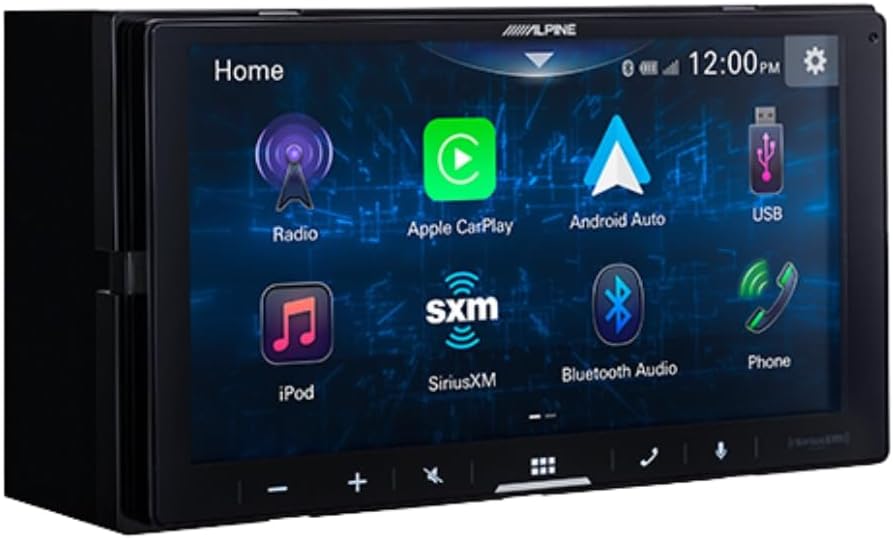
Rysunek 3: Alpine ILX-W670-S home screen displaying various application icons. This image shows the customizable interface with options for Radio, Apple CarPlay, Android Auto, USB, iPod, SiriusXM, Bluetooth Audio, and Phone.
Funkcje audio
- Korektor: Utilize the 13-band graphic EQ to fine-tune audio frequencies to your preference.
- Korekta czasu: The 6-channel time correction feature allows for precise adjustment of sound delivery to each speaker, optimizing the sound stage.
- Crossovery: Adjust front, rear, and subwoofer crossovers to manage frequency distribution to your speakers.
- Sound Boost Menu: Access dedicated controls for bass, mid-bass, and subwoofer output.
- Obsługiwane formaty audio: The unit supports AAC, FLAC, MP3, and WMA audio playback.
Łączność
- Apple CarPlay i Android Auto: Connect your compatible smartphone via USB for wired access to navigation, music, messaging, and other apps directly on the receiver's screen.

Rysunek 4: Alpine ILX-W670-S display showing the Apple CarPlay interface. This image illustrates the integration of smartphone applications like Phone, Music, Maps, Messages, and Podcasts onto the receiver's screen.
- Bluetooth: Pair your smartphone for hands-free calling and wireless audio streaming.
- SiriusXM-Ready: The unit is compatible with SiriusXM satellite radio (requires a separate SiriusXM Connect Vehicle Tuner and subscription).
- Wejście AUX: Connect external audio devices using the 3.5mm auxiliary input.
- Wejście USB: Use the USB port for media playback or smartphone connectivity.
- Sterowanie z kierownicy (SWC): Integrate with your vehicle's factory steering wheel controls using a compatible adapter connected to the 3.5mm mini jack.
Odtwarzanie wideo
The receiver supports various video formats including MP4, MKV, MOV, H.264, FLV, MPEG-4, and AVC. Video playback is typically restricted while the vehicle is in motion for safety reasons.
Obsługa kamery cofania
Po włączeniu biegu wstecznego wyświetlacz automatycznie przełączy się na kamerę view, providing a 155-degree wide-angle perspective. The camera has a low light sensitivity of 0.5 lux, ensuring visibility in various lighting conditions.
Konserwacja
- Czyszczenie ekranu: Delikatnie przetrzyj ekran dotykowy miękką, niepozostawiającą włókien ściereczką. W przypadku uporczywych plam delikatnie przetrzyj.ampPrzetrzyj ściereczkę wodą lub środkiem do czyszczenia ekranów. Unikaj materiałów ściernych i silnych środków chemicznych.
- Opieka ogólna: Utrzymuj urządzenie w czystości, chroniąc je przed kurzem i zanieczyszczeniami. Upewnij się, że wszystkie połączenia są solidne.
- Czyszczenie aparatu: Periodically clean the camera lens with a soft cloth to ensure a clear view.
Rozwiązywanie problemów
| Problem | Możliwa przyczyna | Rozwiązanie |
|---|---|---|
| Brak zasilania urządzenia | Przepalony bezpiecznik, nieprawidłowe okablowanie, luźne połączenie zasilania. | Check vehicle fuses and the unit's fuse. Verify power and ground connections. Ensure the ignition is on. |
| Brak dźwięku | Volume too low; mute activated; speaker wires disconnected; incorrect audio source selected. | Increase volume. Check if mute is active. Verify speaker wiring. Select the correct audio source. |
| Apple CarPlay/Android Auto nie łączy się | Faulty USB cable; phone not compatible; software issue; phone settings. | Use a high-quality, certified USB cable. Ensure your phone's OS is updated. Check phone settings for CarPlay/Android Auto permissions. Restart phone and receiver. |
| Kamera cofania nie jest wyświetlana | Camera power issue; video cable disconnected; vehicle not in reverse. | Ensure vehicle is in reverse. Check camera power connection (to reverse lights). Verify video cable connection to the receiver. |
| Ekran dotykowy nie reaguje | Temporary software glitch; screen damage. | Uruchom ponownie urządzenie (wyłącz i włącz pojazd). Jeśli problem będzie się powtarzał, skontaktuj się z pomocą techniczną. |
Specyfikacje
Alpine ILX-W670-S Digital Multimedia Receiver
- Wyświetlacz: 6.75-inch capacitive touchscreen (800 x 480 resolution)
- Oświetlenie klawiszy: 5-color customizable (red, green, blue, amber, white)
- AmpLiyfikator: Built-in 16W RMS / 45W peak x 4 channels
- Przetwarzanie dźwięku: 13-band graphic EQ, 6-channel time correction, Sound Boost menu, Front/Rear/Subwoofer crossovers
- Przedwyjście: 3 pairs (Front, Rear, Subwoofer) at 4V
- Wejścia: 1x AUX (3.5mm), 1x USB, 1x Camera, SWC adapter via 3.5mm mini jack
- Łączność: Wired Apple CarPlay, Wired Android Auto, Bluetooth (hands-free calling & audio streaming), SiriusXM-ready
- Obsługiwane formaty audio: AAC, FLAC, MP3, WMA
- Obsługiwane formaty wideo: MP4, MKV, MOV, H.264, FLV, MPEG-4, AVC
- Wymiary: 8.75 x 6 x 7 cali (produkt)
- Waga: 3.4 funta
BULCAMC-1 Backup Bullet Camera
- Transduktor: CMOS
- Rezolucja: 420 linii
- Minimalne oświetlenie: 0.5 XNUMX luksów
- View Kąt: 155 stopnia
- Stopień wodoodporności: IP67-68
- Temperatura pracy: -30 to 70 ℃ (-22 to 158 ℉)
Informacje o gwarancji
Alpine products are manufactured to high-quality standards. For specific warranty terms and conditions, please refer to the warranty card included with your product or visit the official Alpine webZachowaj dowód zakupu na wypadek roszczeń gwarancyjnych.
Wsparcie
For further assistance, technical support, or to download the latest firmware updates, please visit the official Alpine webmiejsce na www.alpine-usa.com. You may also contact Alpine customer service directly for personalized support.


