1. Wprowadzenie
This manual provides detailed instructions for the installation, operation, and maintenance of your CAMECHO 9-inch Android 14 Car Stereo. Please read this manual thoroughly before using the product to ensure proper functionality and to prevent damage.
2. Kompatybilne pojazdy
This car stereo is designed for specific Mercedes Benz models. Please verify compatibility with your vehicle's original center console before installation.
- Mercedes Benz B-Class W245
- Mercedes Benz Viano W639
- Mercedes Benz Vito W639
- Mercedes Benz V-Class W639 (2006-2014)
- Mercedes Benz Sprinter (2006-2012)
If you are unsure about compatibility, please send a photo of your car's center console and the back of your original radio to customer support for verification.

Rysunek 2.1: Examples of compatible Mercedes Benz vehicle dashboards.
3. Zawartość opakowania
W skład pakietu wchodzą następujące elementy:
- CAMECHO 9-calowy samochodowy system stereo z systemem Android 14
- Kabel zasilający
- Kabel RCA
- Kable USB (4-pinowe i 6-pinowe)
- Radio Antenna & Antenna Adapter
- Antena GPS
- Mikrofon
- Narzędzie instalacyjne
- AHD Rear Camera (optional purchase)
- Canbus Box (if required for your vehicle)
- Instrukcja obsługi

Figure 3.1: Product dimensions, rear connections, and included accessories.
4. Konfiguracja i instalacja
4.1 Kontrola przed instalacją
Before beginning installation, ensure the car stereo is compatible with your vehicle. If you are replacing an existing unit, carefully remove it. Disconnect the vehicle's battery before proceeding with any wiring.
4.2 połączeń przewodów
Refer to the wiring diagram provided in Figure 3.1 and the specific instructions for your vehicle model. Connect the power cable, RCA cables, USB cables, radio antenna, and GPS antenna to the corresponding ports on the car stereo and your vehicle's wiring harness.
4.3 Montaż urządzenia
Carefully slide the car stereo into the dashboard opening. Secure it using the provided mounting brackets and screws. Ensure all connections are firm and properly routed to avoid pinching or damage.
4.4 Kontrola po instalacji
Reconnect the vehicle's battery. Turn on the ignition and test the car stereo's basic functions, such as power on/off, audio output, and touch screen responsiveness.

Figure 4.1: Before and after installation comparison, showing the car stereo unit and its rear connections.
5. Instrukcja obsługi
5.1 Wireless CarPlay & Android Auto & MirrorLink
The unit supports wireless and wired Apple CarPlay and Android Auto. Use these features to integrate your smartphone applications like Spotify, Google Maps, Waze, and WhatsApp directly onto the car stereo screen. MirrorLink connection is also supported for screen mirroring.
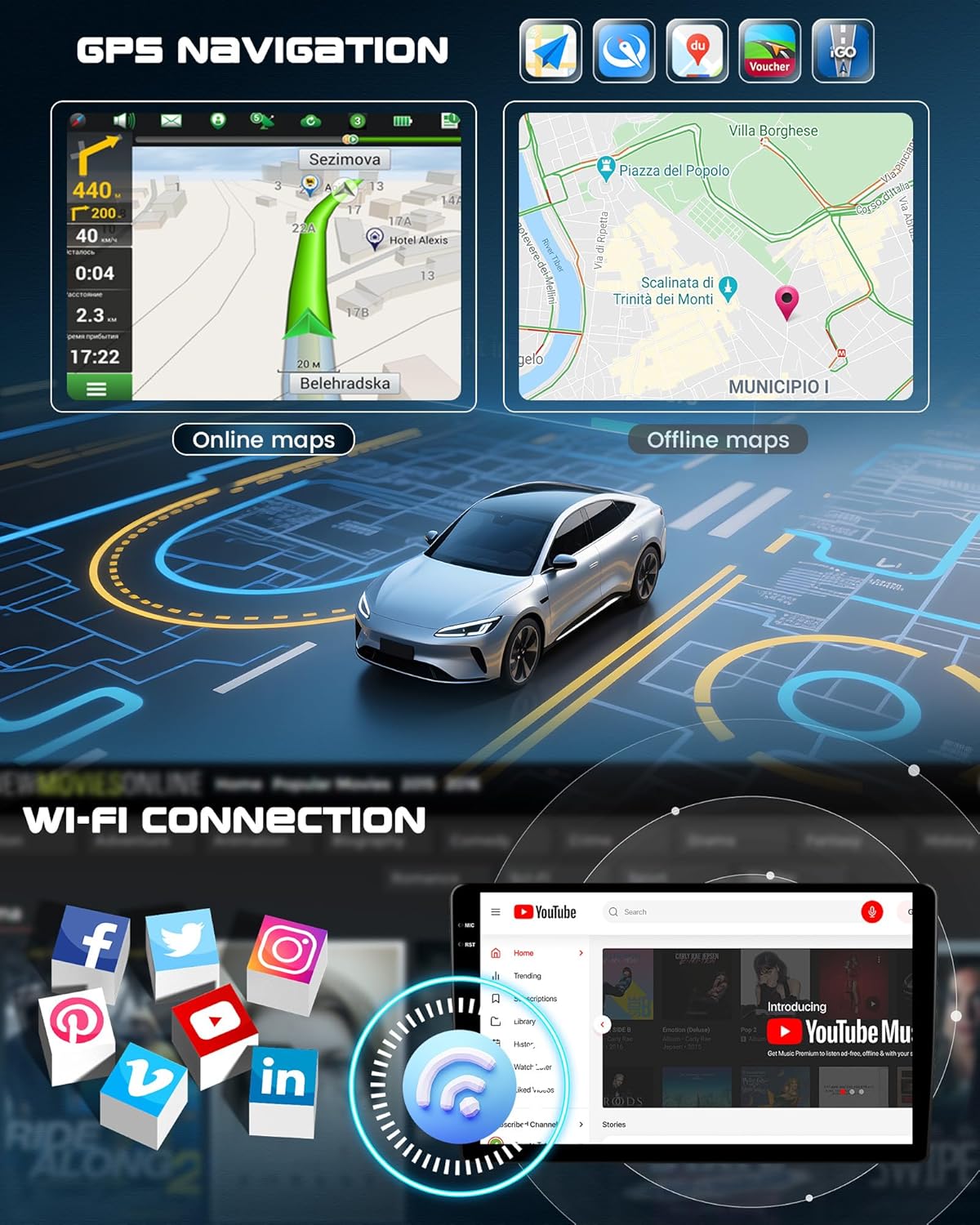
Figure 5.1: CarPlay and Android Auto interface examples.
5.2 Bluetooth 5.0, DSP, 32-Band EQ, FM/RDS Radio
The car stereo features Bluetooth 5.0 for hands-free calling and music streaming. The built-in Digital Sound Processor (DSP) and 32-band Equalizer (EQ) allow for extensive audio customization. The FM/RDS radio tuner provides access to real-time traffic, news, and weather updates.

Figure 5.2: Bluetooth, Radio, and EQ interfaces.
5.3 Nawigacja GPS i łączność Wi-Fi
Integrated GPS navigation supports both online and offline maps. For offline navigation, download free maps via the Here WeGo app after connecting to the internet. Connect to WiFi to browse the internet, stream videos, and download various applications.

Figure 5.3: GPS Navigation and WiFi features.
5.4 Funkcja podzielonego ekranu
The split-screen feature allows you to run multiple applications simultaneously on the display, enhancing multitasking capabilities.

Rysunek 5.4: Funkcjonalność podzielonego ekranu.
5.5 Reversing Assistance (Backup Camera)
The system supports an external backup camera (optional purchase) for reversing assistance, providing HD images, night vision, and a wide-angle view.
5.6 Asystent głosowy
Utilize the smart voice assistant for hands-free control and commands (activation may be required).
5.7 Sterowanie z kierownicy (SWC)
The unit supports steering wheel controls, allowing you to manage audio and other functions without taking your hands off the wheel.
5.8 DAB+ Function (Optional)
A DAB+ module (must be purchased separately) can be connected to enable digital audio broadcasting.
5.9 OBD2 Function (Optional)
An OBD2 device (optional purchase) can be connected to display vehicle diagnostic information on the car stereo screen.

Figure 5.5: Advanced features including reversing assistance, voice control, and optional modules.
6. Rozwiązywanie Problemów
6.1 Unresponsive Buttons
If the buttons on your car stereo are unresponsive, follow these steps:
- Sprawdź połączenia przewodów: Determine which power connector is compatible with your vehicle's original wiring (Power Cable 1 or Power Cable 2).
- If Power Cable 1 is compatible, connect Cable 1 to Cable 5.
- If Power Cable 2 is compatible, identify which end of Power Cable 2 contains the vehicle's CAN wires. Use the corresponding end (Cable 1 or Cable 2) to connect to Cable 5.
- Connect Cable 4 to the CAN bus.
- Enter Factory Settings: Przejdź do: Ustawienia fabryczne (Password: 1234) → Touch Key Settings → Re-calibrate Touch Keys.

Figure 6.1: Wiring diagram for troubleshooting unresponsive buttons.
6.2 Kwestie ogólne
- Brak zasilania: Sprawdź wszystkie połączenia zasilania i bezpieczniki. Upewnij się, że akumulator pojazdu jest naładowany.
- Brak dźwięku: Verify speaker connections. Check volume settings and ensure the mute function is not active.
- Utrata sygnału GPS: Upewnij się, że antena GPS jest prawidłowo zainstalowana i ma zapewnioną przejrzystość. view nieba.
- Problemy z parowaniem Bluetooth: Upewnij się, że Bluetooth jest włączony zarówno w samochodowym radiu, jak i w urządzeniu. Usuń poprzednie sparowania i spróbuj ponownie.
7. Specyfikacje
| Funkcja | Specyfikacja |
|---|---|
| Marka | KAMECHO |
| Numer modelu | 3dcbd16f-08e3-4878-92de-07d644ec55a8 |
| System operacyjny | Android 14 |
| Edytor | 8 rdzenie |
| BARAN | 4 GB |
| ROM | 128 GB |
| Rozmiar ekranu | 9 cali |
| Rozdzielczość ekranu | 1280x720 |
| Wersja Bluetooth | 5.0 |
| Wyrównywacz | 32-Band DSP |
| Tuner radiowy | UKF/RDS |
| Kompatybilne urządzenia | Smartfon, tablet, komputer osobisty |
| Typ wyjścia audio | Bluetooth Speaker, WiFi |
| Konfiguracja kanału dźwięku przestrzennego | 5.1 |
| Kodowanie wideo | MKV, AVI, MP4, RMVB |
| Obsługiwane usługi internetowe | Spotify, YouTube |
| Montaż sprzętu | Radio samochodowe |
| Waga przedmiotu | 1 kilogramów |
| Wymiary opakowania | Wymiary 12 x 4 x 3.5 cm |
8. Konserwacja
Aby zapewnić długowieczność i optymalną pracę radia samochodowego CAMECHO, należy przestrzegać poniższych wskazówek dotyczących konserwacji:
- Czyszczenie: Do czyszczenia ekranu i obudowy używaj miękkiej, suchej ściereczki. Unikaj środków czyszczących o działaniu ściernym i rozpuszczalników.
- Aktualizacje oprogramowania: Okresowo sprawdzaj dostępność aktualizacji oprogramowania i instaluj je, aby mieć pewność, że system działa wydajnie i bezpiecznie.
- Warunki środowiskowe: Unikaj wystawiania urządzenia na działanie ekstremalnych temperatur, długotrwałego bezpośredniego światła słonecznego i nadmiernej wilgoci.
- Zarządzanie kablami: Ensure all cables are securely connected and not exposed to wear and tear.
9. Informacje o gwarancji
This product comes with a standard manufacturer's warranty. Please refer to the warranty card included in your package or contact customer support for specific details regarding warranty coverage and duration. Keep your proof of purchase for warranty claims.
10. Wsparcie
For technical assistance, troubleshooting, or any questions regarding your CAMECHO car stereo, please contact our customer support team.
E-mail: icamecho@hotmail.com

Rysunek 10.1: Dane kontaktowe działu obsługi klienta.


