1. Wprowadzenie
This manual provides essential instructions for the proper setup, operation, and maintenance of your KYOCERA DuraXV Extreme+ E4811 ultra-rugged flip phone. Designed for durability, this device features IP68 dust and waterproof rating, MIL-STD-810G protection, 4G LTE connectivity, and a 5MP camera. Please read this manual thoroughly before using your device to ensure optimal performance and longevity.
2. Zawartość opakowania
Sprawdź, czy w przesyłce znajdują się następujące elementy:
- KYOCERA DuraXV Extreme+ E4811 Handset
- Zasilacz
- Kabel USB
- Akumulator (wstępnie zainstalowany lub osobny)
3. Układ urządzenia
Familiarize yourself with the physical components of your DuraXV Extreme+ E4811.
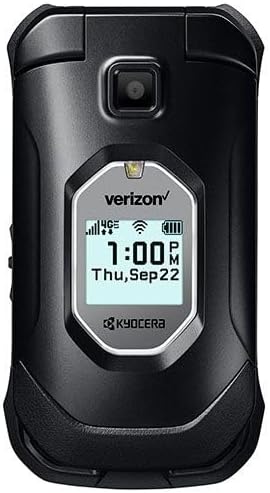
Rysunek 3.1: Przód view of the KYOCERA DuraXV Extreme+ E4811 in its closed position, displaying the external screen with time and network status.
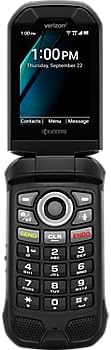
Rysunek 3.2: Przód view of the KYOCERA DuraXV Extreme+ E4811 in its open position, revealing the main display and the physical keypad with navigation buttons.

Rysunek 3.3: Z powrotem view of the KYOCERA DuraXV Extreme+ E4811 in its open position, showing the rear casing and charging contacts.
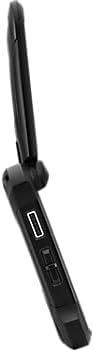
Rysunek 3.4: Strona view of the KYOCERA DuraXV Extreme+ E4811, highlighting the USB charging port and other side buttons.
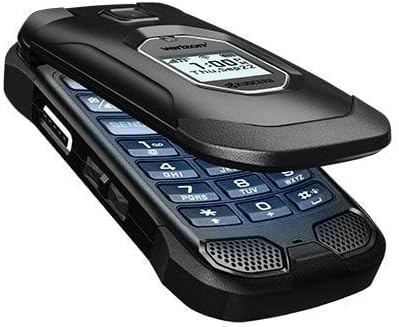
Rysunek 3.5: Kątowy view of the KYOCERA DuraXV Extreme+ E4811 in its open state, providing a perspective of both the display and keypad.
4. Konfiguracja
4.1. Montaż i ładowanie akumulatora
- If the battery is not pre-installed, remove the back cover of the phone.
- Align the battery (1770 mAh) contacts with the phone's terminals and gently press it into place.
- Replace the back cover, ensuring it is securely latched to maintain water and dust resistance.
- Podłącz kabel USB do portu ładowania telefonu i zasilacza. Podłącz zasilacz do gniazdka ściennego.
- Allow the phone to charge fully before initial use. The charging indicator will show progress.
4.2. Instalacja karty SIM
Your DuraXV Extreme+ E4811 requires a Nano-SIM card for cellular service.
- Wyłącz telefon i zdejmij tylną obudowę.
- Znajdź gniazdo karty SIM.
- Insert the Nano-SIM card with the gold contacts facing down and the notched corner aligned with the slot. Push until it clicks into place.
- Załóż tylną obudowę.
4.3. Włączanie/wyłączanie zasilania
- Włączanie: Naciśnij i przytrzymaj przycisk zasilania/zakończenia połączenia, aż ekran się zaświeci.
- Aby wyłączyć: Press and hold the Power/End Call button, then select 'Power off' from the options on the screen.
5. Instrukcja obsługi
5.1. Podstawowa nawigacja
Use the directional pad and center select button to navigate menus and select options. The 'Send' button initiates calls, and the 'End' button terminates calls or returns to the home screen.
5.2. Wykonywanie i odbieranie połączeń
- Zadzwonić: Enter the phone number using the keypad and press the 'Send' button.
- Aby odebrać połączenie: When the phone rings, press the 'Send' button.
- Aby zakończyć połączenie: Press the 'End' button.
5.3. Wysyłanie i odbieranie wiadomości
- Navigate to the 'Messages' application from the main menu.
- Select 'New Message' to compose a text message. Enter the recipient's number and your message.
- Press the 'Send' option to transmit the message.
- Received messages will appear as notifications on the screen and can be accessed through the 'Messages' application.
5.4. Korzystanie z aparatu
Your phone is equipped with a 5MP camera.
- Open the 'Camera' application from the main menu.
- Frame your subject using the display.
- Press the center select button or a dedicated camera button (if available) to capture a photo.
5.5. Connectivity (Bluetooth, Wi-Fi, 4G LTE)
- Bluetooth: Access Bluetooth settings from the main menu to pair with compatible devices like headsets or car kits.
- Wi-Fi: Connect to available Wi-Fi networks via the settings menu to access the internet without using cellular data.
- 4G LTE: The phone automatically connects to the 4G LTE network for high-speed data and calls, provided a valid SIM card and service plan are active.
6. Konserwacja
- Czyszczenie: Użyj miękkiego, damp cloth to clean the phone's exterior. Avoid harsh chemicals or abrasive materials.
- Odporność na wodę i kurz: The phone is IP68 rated. Ensure all port covers are securely closed to maintain water and dust resistance. Do not expose the phone to saltwater or other liquids. If exposed to water, rinse with fresh water and dry thoroughly.
- Pielęgnacja baterii: Avoid extreme temperatures. Do not puncture or disassemble the battery. Use only approved chargers.
- Ochrona środowiska: The phone is MIL-STD-810G compliant, offering protection against drops, shock, vibration, and extreme weather conditions. However, avoid unnecessary harsh treatment.
7. Rozwiązywanie Problemów
If you encounter issues with your phone, refer to the following common solutions:
- Telefon się nie włącza: Ensure the battery is charged. Connect the phone to the charger and attempt to power on after a few minutes.
- Brak sygnału sieciowego: Sprawdź, czy karta SIM jest prawidłowo włożona. Przenieś się w miejsce z lepszym zasięgiem sieci. Skontaktuj się z operatorem, jeśli problem będzie się powtarzał.
- Nie można wykonywać/odbierać połączeń: Verify that you have active cellular service. Check call barring settings. Ensure the phone is not in Airplane Mode.
- Ekran nie reaguje: If the screen is frozen, try performing a soft reset by removing and reinserting the battery (if accessible) or holding the Power button for an extended period.
- Słaba jakość dźwięku: Check the volume settings. Ensure the speaker or earpiece is not obstructed.
8. Specyfikacje
| Funkcja | Specyfikacja |
|---|---|
| Numer modelu | E4811 |
| System operacyjny | Android 11.0 |
| Model procesora | MediaTek Helio |
| Prędkość procesora | 2 GHz |
| BARAN | 2 GB |
| Pamięć wewnętrzna | 16 GB |
| Rozdzielczość wyświetlacza | 480x800 |
| Kamera tylna | 5 MP |
| Pojemność baterii | 1770 mAh |
| Łączność | 4G LTE, Wi-Fi, Bluetooth |
| Oceny trwałości | IP68 Dust & Waterproof, MIL-STD-810G |
| Współczynnik kształtu | Trzepnięcie |
| Gniazdo audio | 3.5 mm |
| Waga przedmiotu | 8 uncji |
9. Gwarancja i wsparcie
Your KYOCERA DuraXV Extreme+ E4811 is covered by a manufacturer's warranty. For specific warranty terms and conditions, please refer to the warranty card included with your product or visit the official KYOCERA website. For technical support, product registration, or further assistance, please visit the KYOCERA support page or contact their customer service directly.
Wsparcie online: www.kyoceramobile.com/support/


