1. Wprowadzenie
This manual provides detailed instructions for the JTEMAN L41 Cell Phone Stand, which integrates a Bluetooth speaker and wireless charging functionality. Please read this manual thoroughly before use to ensure proper operation and to maximize the product's features.
2. Zawartość opakowania
Sprawdź, czy w przesyłce znajdują się wszystkie elementy wymienione poniżej:
- Audio Wireless Charger (Main Unit)
- USB-C Adapter (Power Adapter)
- Kabel USB-C do USB-C
- Instrukcja obsługi
3. Koniec produktuview
The JTEMAN L41 is a versatile 3-in-1 device designed to streamline your desktop. It combines a stable phone stand, a wireless charging station, and a Bluetooth speaker into one compact unit.
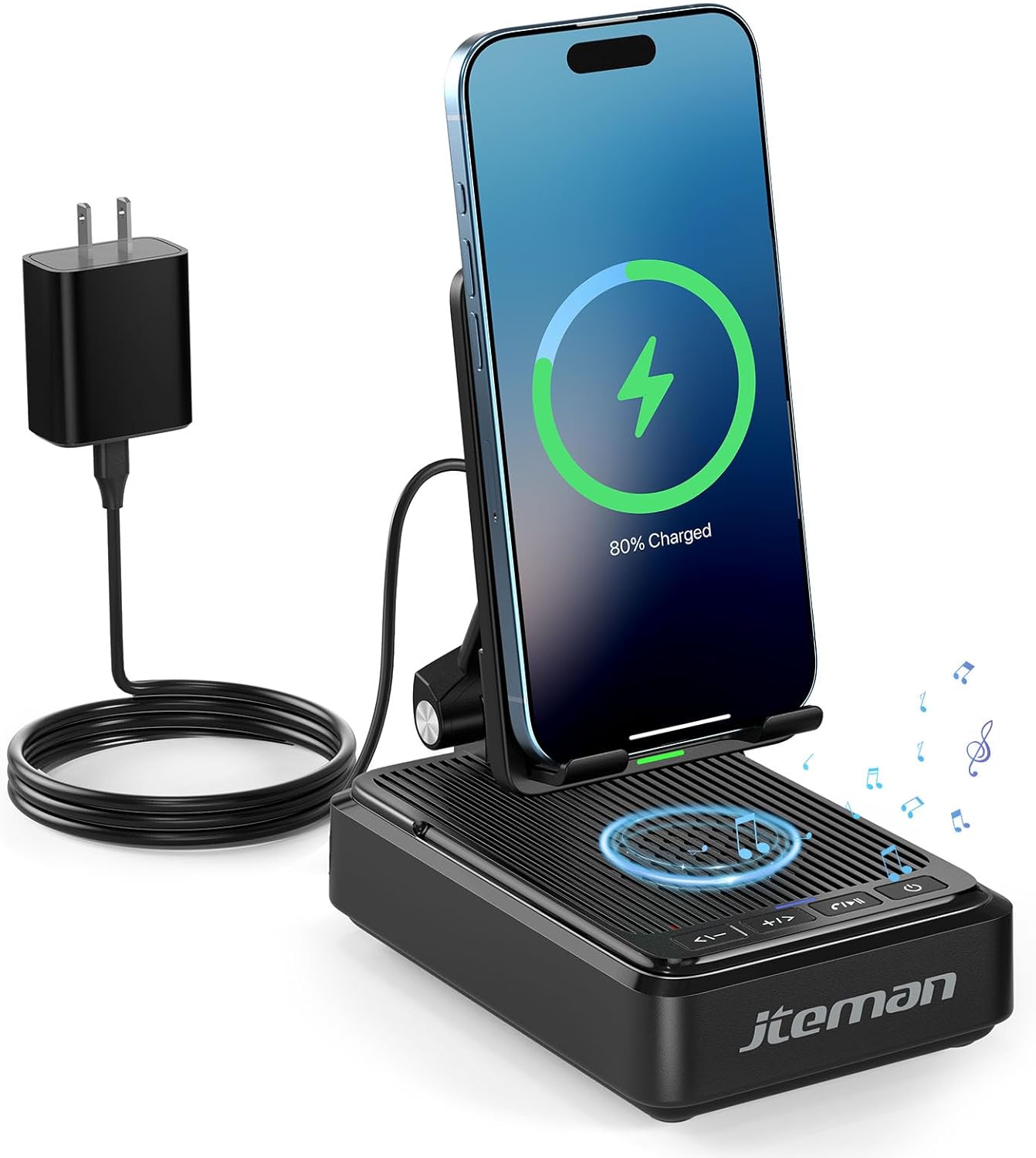
Rysunek 1: JTEMAN L41 Main Unit with Phone Charging
This image displays the JTEMAN L41 device in black, with a smartphone placed vertically on its stand, actively wirelessly charging. The device is connected to a power adapter via a USB-C cable. Musical notes are depicted around the speaker area, indicating its audio function.
Główne cechy:
- Funkcjonalność 3 w 1: Integrates a phone stand, wireless charger, and Bluetooth speaker.
- Regulowany uchwyt na telefon: Umożliwia optymalne viewing angles and supports both horizontal and vertical phone placement.
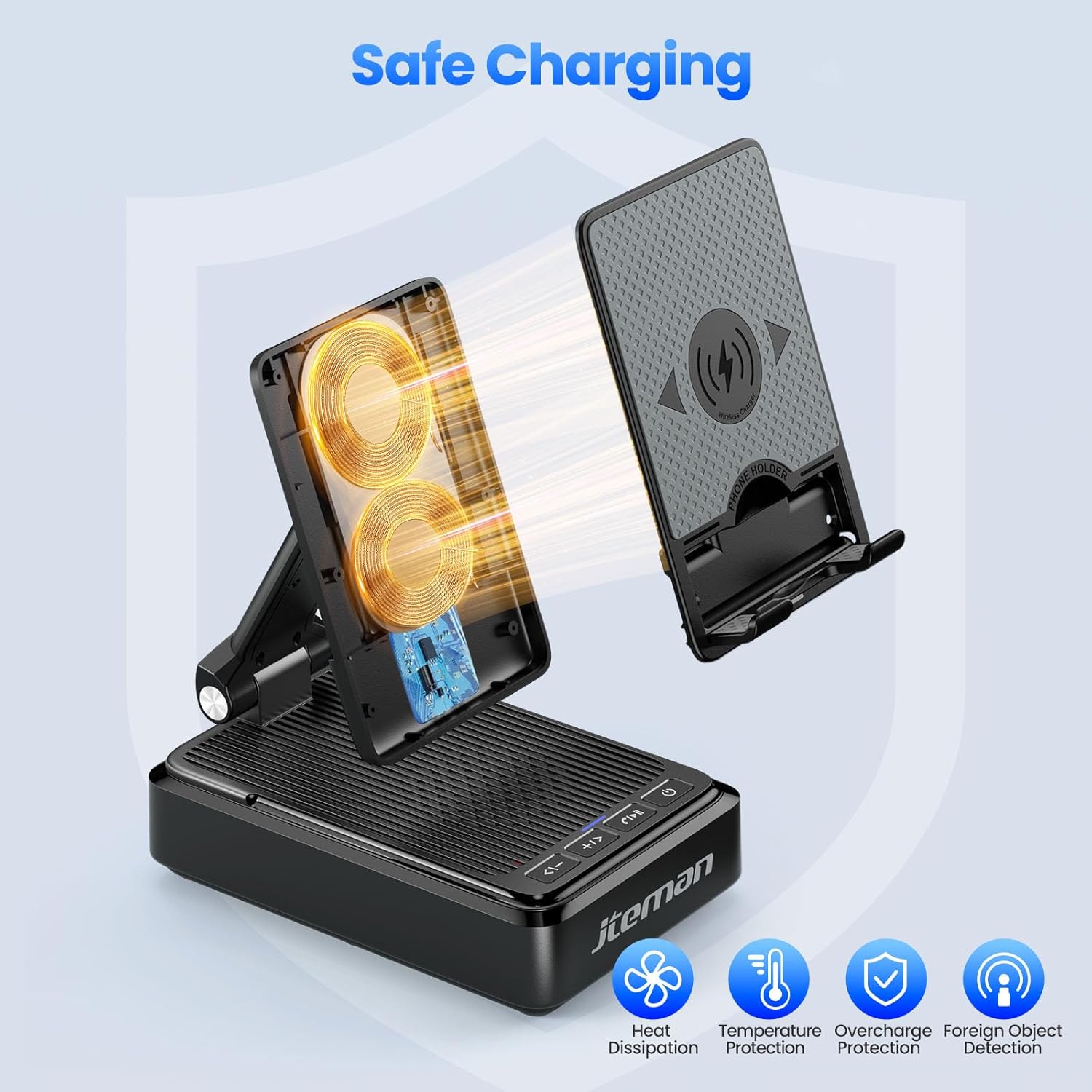
- Stable Wireless Charging: Features dual-coil design for flexible phone positioning and multiple safety protections.
- Głośnik Bluetooth 5.3: Provides clear sound quality and stable connection for audio playback and hands-free calls.
- Składana konstrukcja: Enhances portability and saves space.
4. Instrukcje konfiguracji
- Rozpakuj urządzenie: Ostrożnie wyjąć wszystkie elementy z opakowania.
- Podłącz zasilanie:
- Connect one end of the provided USB-C to USB-C cable to the USB-C port on the back of the JTEMAN L41 unit.
- Connect the other end of the USB-C cable to the provided USB-C power adapter.
- Podłącz zasilacz do standardowego gniazdka ściennego.
Notatka: For optimal wireless charging performance, always use the included 9V2A adapter and USB-C cable.
- Adjust Phone Stand: Unfold the phone stand to your desired viewing angle. The stand is designed to be adjustable for comfortable viewing.
5. Instrukcja obsługi
5.1 Bezprzewodowe ładowanie
- Ensure the JTEMAN L41 is connected to a power source.
- Place your wireless charging-compatible smartphone onto the phone stand. The phone can be placed either horizontally or vertically.
- Align your phone's wireless charging coil with the charging area on the stand. Charging will begin automatically, indicated by a charging icon on your phone's screen.

Rysunek 2: Kompatybilność ładowania bezprzewodowego
This image illustrates the wireless charging function and its compatibility. It shows a smartphone in a case being wirelessly charged on the stand. Important notes indicate that cases should be ≤ 0.15 inches thick, and cases with metal rings, pockets, or magnets should be avoided for proper charging.
Important Notes for Wireless Charging:
- Supports phone cases with a thickness of ≤ 0.15 inches (approximately 3.8mm).
- Avoid using cases with metal rings, pop sockets, credit cards, or magnets, as these can interfere with wireless charging.
- The dual-coil design allows for flexible placement, but ensure proper alignment for efficient charging.
5.2 Obsługa głośnika Bluetooth
- Włączanie: Naciśnij i przytrzymaj przycisk zasilania (⏻) on the front of the unit to turn on the speaker. A voice prompt or indicator light will confirm it's in pairing mode.
- Łączenie w pary:
- Na smartfonie lub innym urządzeniu z włączoną funkcją Bluetooth przejdź do ustawień Bluetooth.
- Szukaj available devices and select "JTEMAN41" (or similar name) from the list.
- Once connected, a confirmation sound will be heard.
- Odtwarzanie dźwięku: Play music or audio from your connected device. Use the volume controls on the JTEMAN L41 or your device to adjust the sound level.
- Rozmowy bez użycia rąk: When a call comes in, press the Play/Pause button (⏸) to answer. Press again to end the call.

Rysunek 3: Enjoying Music with the Bluetooth Speaker
This image shows a woman in a kitchen setting, holding a mug and smiling while a smartphone plays music on the JTEMAN L41 stand. Musical notes emanate from the speaker, highlighting its audio playback capability.
5.3 Phone Stand Functionality
The integrated phone stand is adjustable to provide optimal viewkąty widzenia dla różnych aktywności.
- Regulowany kąt: Gently pivot the phone rest up or down to achieve your preferred viewkąt.
- Orientacja: The stand supports both vertical and horizontal placement of your smartphone, ideal for video calls, watching movies, or browsing.
- Stabilność: The stable, non-slip base and weighted structure prevent tipping, ensuring your device remains secure.
Rysunek 4: Adjustable Desktop Charging Stand
This image depicts a man sitting at a desk, interacting with a smartphone placed on the JTEMAN L41 stand. The stand is shown with an adjustable angle feature, and a diagram illustrates how the USB-C charging cable connects to the phone while on the stand.
5.4 Funkcje przycisków
The control buttons are located on the front of the unit:
| Ikona przycisku | Funkcjonować |
|---|---|
| <- | Zmniejszenie głośności / Poprzedni utwór |
| + / > | Zwiększenie głośności / następny utwór |
| ⏸ | Odtwórz / Pauza / Odbierz połączenie / Zakończ połączenie |
| ⏻ | Włączanie/wyłączanie zasilania |
6. Ważne informacje dotyczące bezpieczeństwa
- Nie wystawiaj urządzenia na działanie wody ani nadmiernej wilgoci.
- Unikaj ekstremalnych temperatur, bezpośredniego światła słonecznego i źródeł ciepła.
- Nie rozmontowuj, nie naprawiaj ani nie modyfikuj urządzenia. Spowoduje to unieważnienie gwarancji.
- Przechowywać w miejscu niedostępnym dla dzieci.
- Use only the provided power adapter and cable to prevent damage and ensure safe operation.
- Podczas użytkowania urządzenia należy zapewnić odpowiednią wentylację wokół niego.
7. Konserwacja
- Czyszczenie: Przetrzyj urządzenie miękką, suchą ściereczką. Nie używaj środków czyszczących o właściwościach ściernych ani rozpuszczalników.
- Składowanie: When not in use for extended periods, store the device in a cool, dry place. The foldable design allows for compact storage.
8. Rozwiązywanie Problemów
| Problem | Możliwa przyczyna | Rozwiązanie |
|---|---|---|
| Urządzenie się nie włącza. | Not connected to power; Power button not pressed. | Ensure the power adapter is securely plugged into the unit and a working outlet. Press and hold the Power button. |
| Ładowanie bezprzewodowe nie działa. | Phone not aligned; Case too thick; Foreign object; Phone not wireless charging compatible. | Re-align phone; Remove thick/metal cases; Remove foreign objects; Verify phone supports wireless charging. Use the included power adapter. |
| Głośnik Bluetooth nie łączy się. | Speaker not in pairing mode; Bluetooth off on device; Device too far. | Ensure speaker is on and in pairing mode; Enable Bluetooth on your device; Move device closer to the speaker (within 10 meters). |
| Niska jakość dźwięku. | Low battery; Device too far; Obstructions. | Ensure the unit is powered; Move device closer; Remove obstructions between device and speaker. |
9. Specyfikacje
| Funkcja | Szczegół |
|---|---|
| Numer modelu | L41 |
| Wymiary produktu | 5.59 x 3.78 x 2.32 cala |
| Waga przedmiotu | 14.9 uncji |
| Wejście Voltage | 9 wolty |
| Prąd wyjściowy | 2 Amps |
| Typ złącza | USB typu C |
| Wersja Bluetooth | 5.3 |
| Tworzywo | Akrylonitryl Butadienowo-styrenowy |
| Kompatybilne urządzenia | Smartphones, Tablets (with wireless charging capability) |
| Wireless Charging Case Thickness | ≤ 0.15 inches (3.8mm) |
10. Gwarancja i wsparcie
JTEMAN provides the following support for this product:
- Wymiana po 12 miesiącach: The product is covered by a 12-month replacement policy from the date of purchase.
- Wsparcie 24-godzinne: For any inquiries or assistance, please contact JTEMAN customer support.
To contact support, please refer to the contact information provided on the product packaging or the official JTEMAN webstrona.


