1. Koniec produktuview
The UYIKOO GLS12 Sport Camera Sunglasses integrate a high-definition camera into a durable, wearable design. These sunglasses are equipped with UV protective polarized lenses and are designed for capturing video and photos during various outdoor activities. The device features a built-in rechargeable battery and supports loop recording.

Figure 1: UYIKOO GLS12 Sport Camera Sunglasses and included accessories.
Główne cechy:
- Rozdzielczość wideo: 1920 x 1080P at 30 frames/second.
- Technologia czujnika fotograficznego: CMOS-y.
- Soczewki: UV Protection Polarized Lenses.
- Składowanie: Supports Micro SD Card (16GB included, up to 32GB).
- Bateria: Built-in rechargeable battery with approximately 1.5 hours of working time.
- Nagranie: Loop recording function (saves video files every 3-6 minutes).
- Łączność: USB-C.
2. Konfiguracja
2.1 Ładowanie urządzenia
Before first use, fully charge the sunglasses. Connect the provided USB cable to the charging port located on the frame and plug the other end into a USB power source (e.g., computer, wall adapter). The charging indicator light will show the charging status.
2.2 Wkładanie karty Micro SD
- Locate the Micro SD card slot on the inner side of the right temple arm.
- Gently insert the provided 16GB Micro SD card into the slot until it clicks into place. Ensure the card is inserted in the correct orientation.
- Aby wyjąć kartę, delikatnie wciśnij ją do środka, aż wysunie się.
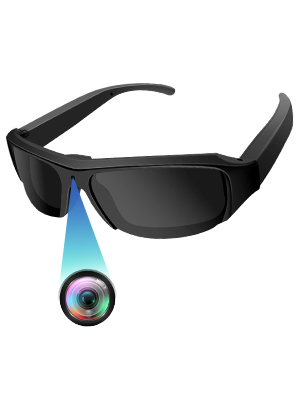
Figure 2: Proper insertion of the Micro SD card into the sunglasses.
3. Instrukcja obsługi
3.1 Włączanie/wyłączanie zasilania
- Włączanie: Long press the power button (located on the inner side of the right temple arm) for a few seconds until the indicator light illuminates.
- Wyłączone: Long press the power button again until the indicator light turns off.
3.2 Nagrywanie wideo
- Ensure the device is powered on and in video mode (check the mode switch if available).
- Short press the power button to start video recording. The indicator light will flash to confirm recording is in progress.
- Short press the power button again to stop recording. The indicator light will stop flashing.
3.3 Robienie zdjęć
- Ensure the device is powered on and in photo mode (check the mode switch if available).
- Short press the power button to take a photo. The indicator light will briefly flash.

Figure 3: Simple one-button operation for capturing video and photos.
3.4 Podłączanie do komputera
Connect the sunglasses to your computer using the provided USB cable. The device will appear as a removable disk, allowing you to access and transfer your recorded video and photo files.
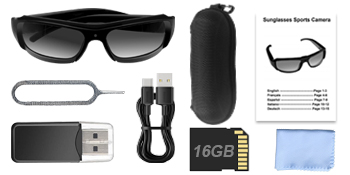
Figure 4: Connecting the sunglasses to a computer via USB for file kierownictwo.
4. Media Examples
4.1 Zdjęcia produktów

Figure 5: Sunglasses in use, demonstrating discreet camera placement.

Figure 6: Visual representation of battery capacity and loop recording functionality.

Rysunek 7: Examples of outdoor activities where the camera sunglasses can be utilized.
4.2 Oficjalne filmy o produktach
Wideo 1: Ponadview of the mini camera glasses, demonstrating features and usage. This video is provided by the seller, OhOsunshine.
5. Konserwacja
- Czyszczenie soczewek: Use the provided microfiber cloth to gently clean the polarized lenses. Avoid abrasive materials that could scratch the lenses.
- Składowanie: Store the sunglasses in the portable glasses case when not in use to protect them from dust and damage.
- Pielęgnacja baterii: To prolong battery life, avoid fully discharging the battery frequently. Charge regularly, especially if not used for extended periods.
- Narażenie na działanie wody: The device is not waterproof. Avoid exposure to heavy rain or submersion in water.
6. Rozwiązywanie Problemów
- Urządzenie się nie włącza: Upewnij się, że bateria jest naładowana. Podłącz ją do źródła zasilania i spróbuj ponownie.
- Nie można nagrać: Check if the Micro SD card is properly inserted and has sufficient free space. The device supports loop recording, but a full card might prevent new recordings if the loop function is not active or configured.
- Słaba jakość wideo/zdjęć: Ensure lenses are clean. Record in well-lit environments for optimal results.
- Computer Not Recognizing Device: Try a different USB port or cable. Ensure the device is powered on when connected.
7. Specyfikacje
| Funkcja | Specyfikacja |
|---|---|
| Nazwa marki | UYIKOO |
| Nazwa modelu | GLS12 |
| Waga przedmiotu | 5 uncji |
| Wymiary opakowania | 7.01 x 2.68 x 2.6 cala |
| Baterie | Wymagane baterie 1 A (w zestawie) |
| Kolor | Żółty |
| Technologia czujnika fotograficznego | CMOS |
| Rozdzielczość przechwytywania wideo | 1080p |
| Format przechwytywania wideo | MP4 |
| Obsługiwany format audio | AAC, MP3 |
| Technologia łączności | USB |
| Cechy specjalne | Wearable Design, Built-in Rechargeable Battery with Loop Recording, UV Protection Polarized Lenses, Easy to Use with Simple On/Off Button |
8. Wsparcie
If you have any questions or encounter issues with your UYIKOO GLS12 Sport Camera Sunglasses, please feel free to contact us. We are committed to resolving any problems within 24 hours.


