Gitara akustyczna Yuer BA-10Pro 10W Amp
Instrukcja obsługi
Wstęp
Thank you for choosing the Yuer BA-10Pro 10W Acoustic Guitar Amp. Ten przenośny amplifier is designed for musicians seeking a versatile and compact solution for practice, recording, and small performances. It features dual inputs for guitar and microphone, digital delay and reverb effects, OTG recording capabilities, and Bluetooth connectivity. This manual provides detailed instructions to help you get the most out of your BA-10Pro ampliyfikator.
Główne cechy:
- Dual 1/4-inch inputs for guitar and microphone.
- High-performance audio chip for balanced sound.
- Built-in digital delay and reverb effects.
- Vocal cut function for improved singing practice.
- OTG recording for direct connection to mobile phones and laptops.
- Bluetooth 5.3 do bezprzewodowego przesyłania strumieniowego dźwięku.
- 4000mAh rechargeable battery for 4-8 hours of playtime.
- 3.5mm headphone jack for silent practice.
- Compact and lightweight design (6x3x3.9 inches, 1.32 lbs).
Produkt ponadview: Sterowanie i połączenia

Obraz: Góra view of the Yuer BA-10Pro amplifier, highlighting the control knobs and input jack.
Elementy sterujące na panelu przednim:
- OPÓŹNIENIE I POGŁOS: Intensity adjustment knobs for digital effects.
- AUX\B.T. VOL: Volume adjustment for auxiliary input and Bluetooth audio.
- TON: Tone instrument adjustment knob.
- NISKI AKUMULATOR: Niska objętośćtage and charging indicator light.
- TOM: Instrument volume control knob.
- MOC: Long press to turn on/off; short press to turn on/off vocal elimination, and status indicators.
- WEJŚCIE: 1/4" Instrument input interface.

Obraz: Tył view of the Yuer BA-10Pro amplifier, showing the various input and output ports.
Połączenia panelu tylnego:
- USB typu C: Charging / OTG Internal Recording port.
- Wyjście słuchawkowe: Gniazdo słuchawkowe 3.5 mm.
- WEJŚCIE AUX: Auxiliary Input jack.
- OBJĘTOŚĆ: MIC Volume Adjustment knob.
- MIKROFON: 1/4" MIC Input jack (compatible with dynamic microphones).
Organizować coś
1. Ładowanie początkowe
Before first use, ensure the BA-10Pro is fully charged. Connect the white USB-C cable to the USB-C port on the rear panel and to a suitable USB power adapter (not included). The LOW BATT indicator will show charging status. A full charge provides 4-8 hours of playtime.
Note: The black USB-C cable is for OTG recording only, not for charging the amp. Use the white USB-C cable to charge the amp.
2. Podłączanie instrumentów i mikrofonów
- Gitara: Plug your acoustic guitar into the WEJŚCIE 1/4" jack on the front panel.
- Mikrofon: Plug your dynamic microphone into the MIKROFON 1/4" jack on the rear panel. Adjust microphone volume using the GŁOŚNOŚĆ MIKROFONU knob on the rear panel.

Image: A person singing into a microphone while another plays an acoustic guitar, demonstrating the dual input capability of the BA-10Pro.
3. Parowanie Bluetooth
To connect a Bluetooth device (e.g., smartphone, tablet, laptop) for backing tracks or audio playback:
- Turn on the BA-10Pro by long-pressing the MOC przycisk.
- Włącz Bluetooth w swoim urządzeniu.
- Szukaj "BA-10Pro" in your device's Bluetooth settings and select it to pair.
- Adjust the Bluetooth volume using the AUX\B.T. VOL pokrętło na panelu przednim.
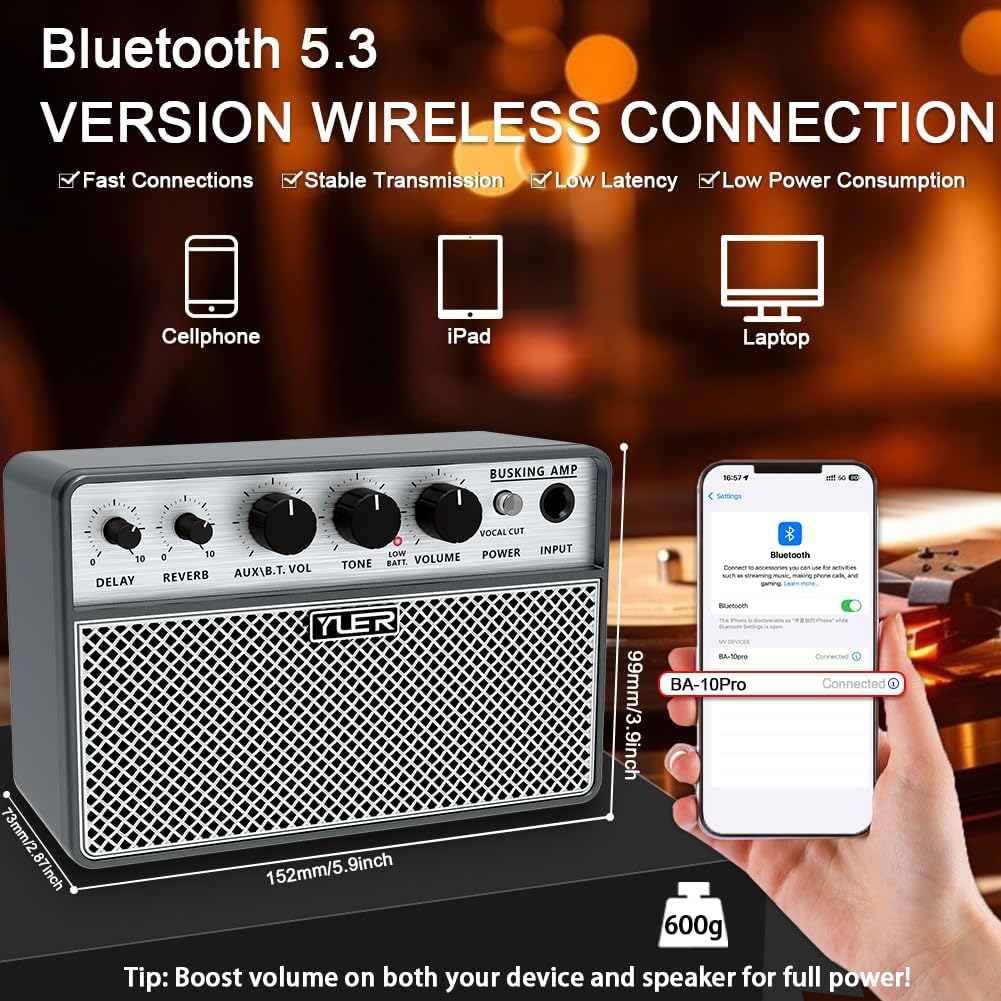
Image: The Yuer BA-10Pro amplifier positioned next to a smartphone displaying its Bluetooth connection screen, indicating successful pairing.
Instrukcja obsługi
1. Włączanie/wyłączanie zasilania
Naciśnij i przytrzymaj MOC przycisk na panelu przednim, aby włączyć amplifier włączony lub wyłączony.
2. Regulacja głośności i tonu
- Użyj TOM knob to control the overall instrument volume.
- Użyj TON knob to adjust the tonal characteristics of your instrument.
- For microphone volume, use the GŁOŚNOŚĆ MIKROFONU knob on the rear panel.
- For AUX/Bluetooth volume, use the AUX\B.T. VOL pokrętło.
3. Using Digital Effects (Delay & Reverb)
The BA-10Pro includes built-in digital delay and reverb effects. Adjust the intensity of these effects using their respective knobs on the front panel. Experiment with different settings to find the desired ambiance for your guitar and vocals.

Image: A musician playing an acoustic guitar, with the Yuer BA-10Pro amplifier in the foreground, illustrating the sound output and internal speaker components.
4. Vocal Cut Function
The vocal cut function can be activated by a short press of the MOC button. This feature helps to reduce or eliminate vocals from a track, allowing you to practice singing along more effectively.
5. OTG Recording
The BA-10Pro supports OTG (On-The-Go) recording, allowing you to directly record your guitar and vocal performance to mobile phones or laptops. Use the black USB-C to USB-C cable for this connection. This function also enables the amp to act as a simple audio interface for live streaming.
6. Headphone and AUX Input
- Gniazdo słuchawkowe: Plug 3.5mm headphones into the Headphone Output on the rear panel for silent practice.
- WEJŚCIE AUX: Connect external audio sources (e.g., MP3 player) to the AUX IN jack on the rear panel. Adjust volume with the AUX\B.T. VOL pokrętło.
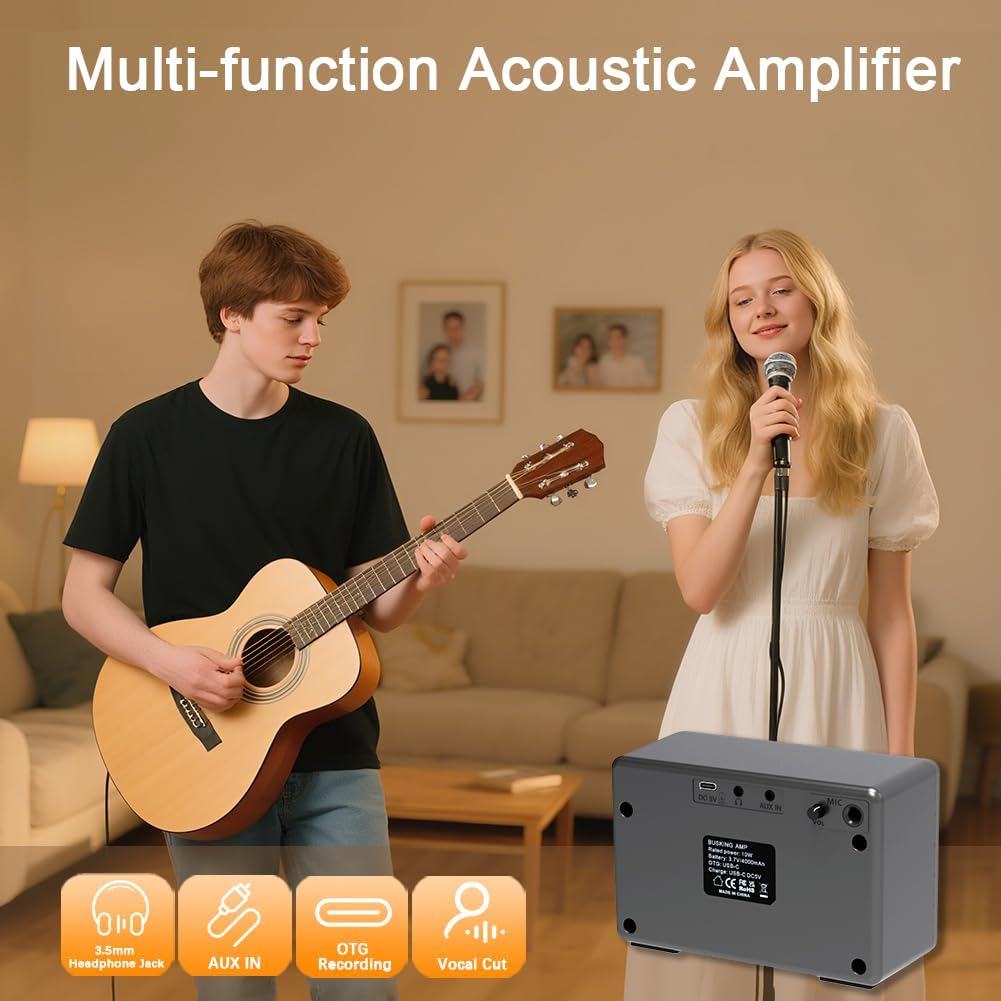
Image: A group of people enjoying music, with the Yuer BA-10Pro amplifier in the scene, accompanied by icons representing its multi-functional capabilities like headphone jack, AUX input, OTG recording, and vocal cut.
Konserwacja
- Czyszczenie: Wytrzyj ampPrzetrzyj miękką, suchą ściereczką. Nie używaj środków czyszczących ani rozpuszczalników o działaniu ściernym.
- Składowanie: Przechowuj ampPrzechowywać w chłodnym, suchym miejscu, z dala od bezpośredniego światła słonecznego i ekstremalnych temperatur.
- Pielęgnacja baterii: Aby przedłużyć żywotność baterii, należy unikać częstego całkowitego rozładowywania. W przypadku dłuższego przechowywania, należy ładować baterię do około 50% pojemności co kilka miesięcy.
- Ochrona: Use the included carry bag for transport to protect the amplifier from dust and minor impacts.
Rozwiązywanie problemów
| Problem | Możliwa przyczyna | Rozwiązanie |
|---|---|---|
| Brak dźwięku z ampliyfikator. | Amplifier not powered on; volume too low; instrument/mic not connected properly; low battery. | Long press POWER button; increase VOLUME/MIC VOL; check cable connections; charge the ampliyfikator. |
| Brak połączenia Bluetooth. | Bluetooth nie jest włączony w urządzeniu; amp not in pairing mode; too far from device. | Ensure Bluetooth is on; restart amp and device; move device closer to amp. |
| OTG recording not working. | Incorrect USB-C cable used; device not compatible with OTG; recording software issue. | Use the black USB-C to USB-C cable; check device's OTG compatibility; ensure recording software is configured correctly. |
| Dźwięk jest zniekształcony lub niewyraźny. | Volume too high; TONE setting incorrect; faulty cable/instrument. | Reduce VOLUME; adjust TONE knob; try different cables/instruments to isolate the issue. |
| Bateria szybko się rozładowuje. | High volume usage; old battery; frequent charging/discharging cycles. | Reduce volume; ensure proper charging habits; contact support if battery life significantly degrades. |
Specyfikacje
| Funkcja | Szczegół |
|---|---|
| Model | BA-10Pro |
| Moc wyjściowatage | 10 watów |
| Waga przedmiotu | 1.61 funta (ok. 0.73 kg) |
| Wymiary produktu | 5.9 x 2.55 x 3.89 cala (ok. 15 x 6.5 x 9.9 cm) |
| Źródło zasilania | Zasilany bateryjnie (akumulator 4000mAh) |
| Typ materiału | Akrylonitryl-butadien-styren (ABS) |
| Typ złącza | 6.35mm Jack, 5.3 Wireless Connectivity (Bluetooth), USB-C |
| Kompatybilne urządzenia | Guitar, Microphones, Phone, iPad, Laptops |
| Kolor | Grey Shell and Silver Grille |
Co jest w pudełku
- BA-10Pro Guitar Amp x1
- White USB-A to Type-C Charging Cable x1
- Black OTG Cable USB-C to USB-C x1
- Instrukcja obsługi x1
- Torba transportowa x1
Image: The Yuer BA-10Pro amplifier displayed alongside its complete set of accessories, including the charging cable, OTG cable, product manual, and carry bag.
Gwarancja i wsparcie
YUER provides a 12-Month Product Guarantee for the BA-10Pro amplifier. Additionally, the product is covered by Amazon's 30-Day Easy Return Policy. For any issues or support inquiries after receiving your BA-10Pro, please reach out to YUER customer service. We are committed to providing 24/7 customer service to ensure your satisfaction.
For further assistance, please visit the official YUER store or contact the seller directly through the platform where you purchased the product.


