Wstęp
This manual provides comprehensive instructions for the CAMECHO Android Carplay Autoradio, model 4G+128G, specifically designed for FIAT Bravo vehicles manufactured between 2008 and 2013. It covers essential information regarding product overview, installation, operation, maintenance, troubleshooting, and technical specifications to ensure optimal performance and user experience.
Produkt ponadview
The CAMECHO Autoradio is an advanced in-car entertainment system featuring a 9-inch touchscreen, Android 15 operating system, 4GB RAM, and 128GB ROM. It integrates seamlessly with your FIAT Bravo (2008-2013 models) to enhance your driving experience with modern connectivity and multimedia capabilities.
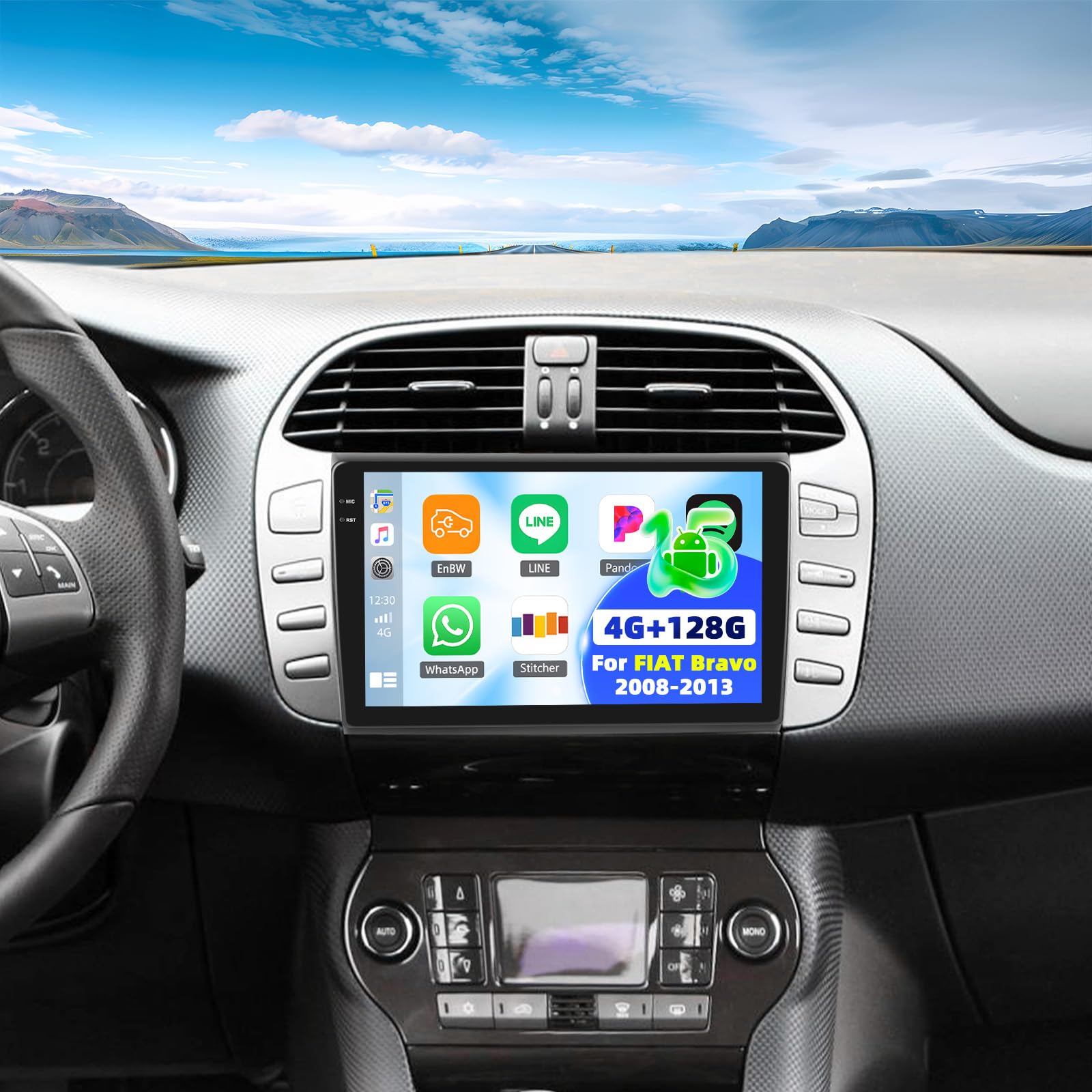
Image: Comparison of the FIAT Bravo dashboard before and after installing the CAMECHO 9-inch touchscreen autoradio.
Wideo: krótka demonstracja produktuasing the CAMECHO Autoradio's display and various angles.
Packing List and Dimensions
Please verify that all components listed below are present in the package before proceeding with installation.

Obraz: Szczegółowy view of the packing list and the physical dimensions of the autoradio unit and its mounting frame.
Zawartość opakowania:
- CAMECHO Autoradio Unit
- Uchwyty montażowe i śruby
- Kabel zasilający
- CANBUS Decoder Box
- Wired Microphone with Clip
- Kabel RCA
- Kable USB (6-pinowe i 4-pinowe)
- Kabel kamery tylnej
- Antena GPS
- Tył AHDview Kamera
- Przedłużacz kamery tylnej
- Removal Tool for old autoradio
- Mały śrubokręt krzyżakowy
- Instrukcja obsługi (angielski)
Wymiary produktu:
The autoradio unit measures approximately 23 cm (length) x 14 cm (width) x 4 cm (thickness). The display is 9 inches. The overall package dimensions are 26 x 17 x 10 cm, with a total weight of 1.4 kg. Refer to the diagram above for detailed measurements of the unit and frame.
Konfiguracja i instalacja
Professional installation is highly recommended to ensure correct wiring and functionality. Always disconnect the vehicle's battery before beginning any electrical work.
Połączenia elektryczne:
- Przewód zasilający: Connect the main power harness to the vehicle's power supply. Ensure all connections are secure.
- Dekoder CANBUS: If your vehicle requires a CANBUS decoder for steering wheel controls or other vehicle data, connect the CANBUS box before powering on the unit. Then, navigate to Apps > Car Settings > Factory Settings (1234) > Protocol settings > Choose Canbus Brand Name > Choose Car's style to configure the SWC properly. Select the matching model and year according to your vehicle's specifications.
- Antena GPS: Connect the GPS antenna and mount it in a location with a clear, unobstructed view nieba w celu optymalnego odbioru sygnału.
- Kable USB: Connect the provided USB cables for data transfer, media playback, or charging external devices.
- Kable RCA: Use RCA cables for connecting external audio/video input or output devices, such as ampwyświetlacze lub dodatkowe wyświetlacze.
- Mikrofon: Connect the external microphone to the designated input for improved hands-free calling clarity.
Tyłview Okablowanie kamery:
Proper wiring of the rearview camera is crucial for its automatic activation and display.
Image: Wiring diagram for connecting the AHD rearview camera to the autoradio system.
- Red Cable 1 and 3: Connect these cables to the positive terminal of your car's reverse light power supply.
- Black Cable 2: Connect this cable to the negative terminal (ground) of your car's reverse light power supply.
- Black Cable 4: Connect this cable to the reverse trigger wire on the autoradio's power harness. This signal tells the unit to switch to the camera view gdy włączony jest bieg wsteczny.
Instrukcja obsługi
Wireless Carplay and Android Auto:
The unit supports wireless Carplay and Android Auto for seamless smartphone integration.

Image: The Carplay interface displayed on the 9-inch autoradio screen.
- Upewnij się, że w smartfonie są włączone Bluetooth i Wi-Fi.
- On the autoradio, navigate to the Carplay or Android Auto application.
- Postępuj zgodnie z instrukcjami wyświetlanymi na ekranie, aby sparować smartfon przez Bluetooth.
- Once connected, you can use voice commands or the touchscreen to access navigation, music, calls, and other compatible apps.
Mirror Link (Wired/Wireless):
Mirror Link allows you to display your smartphone's screen directly onto the autoradio display.

Image: The Mirror Link feature in action, mirroring a smartphone's display to the autoradio.
- For wireless Mirror Link, ensure both the autoradio and your smartphone are connected to the same Wi-Fi network.
- For wired Mirror Link, connect your smartphone to the autoradio using a USB cable.
- Open the Mirror Link application on the autoradio and follow the pairing instructions specific to your smartphone's operating system.
Bluetooth 5.0:
The integrated Bluetooth 5.0 module enables hands-free calling and wireless audio streaming.

Image: The Bluetooth interface, showing options for phone calls and music streaming.
- Enable Bluetooth on both the autoradio and your smartphone.
- Szukaj available devices on your smartphone and select the autoradio (e.g., "CAMECHO Carplay").
- Jeśli zostaniesz o to poproszony, potwierdź kod parowania.
- Po nawiązaniu połączenia możesz wykonywać i odbierać połączenia, uzyskiwać dostęp do książki telefonicznej i odtwarzać muzykę bezprzewodowo.
Radio FM/RDS:
Enjoy high-quality FM radio with RDS (Radio Data System) functionality.

Image: The FM/RDS radio interface, displaying current frequency and options for station management.
- Access the Radio application from the main menu.
- Use the scan function to automatically find and save available stations, or manually tune to a specific frequency.
- The RDS feature will display station information (e.g., station name, song title) where available.
32-Band Equalizer (32EQ):
Customize your audio experience with the built-in 32-band equalizer.

Image: The 32-band equalizer interface, allowing detailed audio customization.
- Navigate to the Sound Settings or EQ application.
- Adjust individual frequency bands to fine-tune the audio output to your preference.
- Pre-set equalizer modes (e.g., Pop, Rock, Jazz) may also be available for quick adjustments.
GPS Navigation and WiFi:
The autoradio features integrated GPS for navigation and Wi-Fi for online connectivity.

Image: The GPS navigation interface and Wi-Fi connection capabilities of the autoradio.
- GPS: The unit supports both online and offline navigation. Ensure the GPS antenna is properly installed. You can download offline maps for navigation without an internet connection.
- Wi-Fi: Connect to a Wi-Fi hotspot (e.g., from your smartphone) to access online applications, stream media, browse the internet, and download software updates.
Sterowanie z kierownicy (SWC):
Program your vehicle's steering wheel buttons for convenient control of the autoradio functions.

Image: Instructions for configuring steering wheel controls on the autoradio.
- Uzyskaj dostęp do ustawień sterowania przy kierownicy w menu systemowym.
- Follow the on-screen instructions to map your vehicle's steering wheel buttons (e.g., volume up/down, track skip, mode) to the corresponding autoradio functions.
- If your vehicle uses a CANBUS decoder, ensure it is correctly connected and configured as described in the Setup section for automatic SWC recognition.
Kamera cofania:
W zestawie tylny AHDview camera provides a wide-angle view for safer parking and reversing maneuvers.

Zdjęcie: Tyłview camera display with parking guidelines, activated when reversing.
- Ensure the camera is properly installed and wired according to the "Rearview Camera Wiring" instructions in the Setup section.
- Wyświetlacz automatycznie przełączy się na kamerę view gdy pojazd zostanie przełączony na bieg wsteczny.
- The camera features HD resolution, a wide viewing angle, and night vision capabilities for enhanced visibility.
Konserwacja
Regular maintenance helps ensure the longevity and optimal performance of your CAMECHO Autoradio.
- Czyszczenie ekranu: Użyj miękkiej, niepozostawiającej włókien ściereczki, lekkoampened with water or a screen-safe cleaner, to clean the touchscreen. Avoid using abrasive materials, alcohol, or chemical solvents, as these can damage the screen surface.
- Aktualizacje oprogramowania: Periodically check for available software updates through the system settings (requires a Wi-Fi connection). Keeping the software updated ensures you have the latest features, performance improvements, and security patches.
- Opieka ogólna: Unikaj wystawiania urządzenia na działanie ekstremalnych temperatur, długotrwałego bezpośredniego światła słonecznego i nadmiernej wilgoci. Zapewnij odpowiednią wentylację wokół urządzenia, aby zapobiec przegrzaniu.
Rozwiązywanie problemów
W tej sekcji omówiono typowe problemy, z którymi możesz się spotkać. W przypadku bardziej złożonych problemów skontaktuj się z obsługą klienta.
| Wydanie | Możliwa przyczyna | Rozwiązanie |
|---|---|---|
| Urządzenie nie włącza się | Incorrect wiring; Blown fuse in vehicle or unit; Loose connection | Check all power connections. Inspect vehicle fuses and the unit's fuse (if accessible). Ensure the ignition wire is correctly connected. |
| Brak dźwięku | Volume too low; Incorrect audio source selected; Speaker wiring issue; Mute activated | Increase volume. Verify the correct audio source (e.g., FM, Bluetooth, USB). Check speaker connections. Ensure the unit is not muted. |
| Utracony lub niedokładny sygnał GPS | GPS antenna obstruction; Poor satellite reception; Antenna not connected | Ensure the GPS antenna has a clear, unobstructed view of the sky. Relocate the antenna if necessary. Verify the antenna is securely connected. |
| Bluetooth connection unstable or fails to pair | Interference; Device compatibility; Out of range; Bluetooth on phone/unit off | Ensure both devices have Bluetooth enabled and are within range. Restart both the autoradio and your smartphone. Clear previous pairings and try again. |
| Sterowanie na kierownicy nie działa | Incorrect CANBUS setup; Wiring issue; Buttons unprogrammed | Verify CANBUS connection and configuration in settings. Ensure buttons are programmed correctly in the SWC settings. Check wiring to the steering wheel control interface. |
| Tyłview kamera nie wyświetla | Incorrect wiring; Faulty camera; Reverse trigger wire not connected | Check camera power and video signal connections. Ensure the reverse trigger wire is correctly connected to the vehicle's reverse light circuit. Test the camera if possible. |
Dane techniczne
Below are the key technical specifications for the CAMECHO 4G+128G Carplay Autoradio.
| Funkcja | Szczegół |
|---|---|
| Marka | KAMECHO |
| Model | 4G+128G CarPlay |
| System operacyjny | Android 15 |
| BARAN | 4 GB |
| ROM | 128 GB |
| Rozmiar ekranu | 9 cali |
| Rozdzielczość ekranu | 1280 * 720 IPS |
| Łączność | Bluetooth 5.0, Wi-Fi, GPS |
| Kompatybilne urządzenia peryferyjne | Smartfon |
| Tryb wyjścia audio | Stereo, dźwięk przestrzenny (5.1) |
| Cechy specjalne | Wireless Carplay, Android Auto, Mirror Link, FM/RDS Radio, 32-Band EQ, AHD Rearview Kamera, sterowanie z kierownicy |
| Wymiary | 26 x 17 x 10 cm (opakowanie) |
| Waga | 1.4 kilograma |
Gwarancja i wsparcie
CAMECHO is committed to providing excellent customer service and support for your product.

Obraz: Ponadview of CAMECHO's customer support and warranty terms.
- Gwarancja: Produkt objęty jest 24 miesięczną gwarancją liczoną od daty zakupu.
- Zasady wymiany: A 30-day replacement policy is available for eligible products.
- Odpowiedź online: We offer an 18-hour online response service for all your inquiries.
- Wsparcie techniczne: Enjoy lifetime technical support for your CAMECHO Autoradio.
Skontaktuj się z pomocą techniczną:
W razie pytań, chęci uzyskania pomocy technicznej lub złożenia reklamacji prosimy o kontakt z naszym zespołem obsługi klienta:

Image: Customer service contact information.
E-mail: CAMECHOVIP@126.com


