Wstęp
This manual provides essential information for the safe and efficient use of your ASUS ROG Strix G18 G814 Gaming Laptop. Please read this guide thoroughly before operating your device to ensure proper setup, operation, and maintenance.
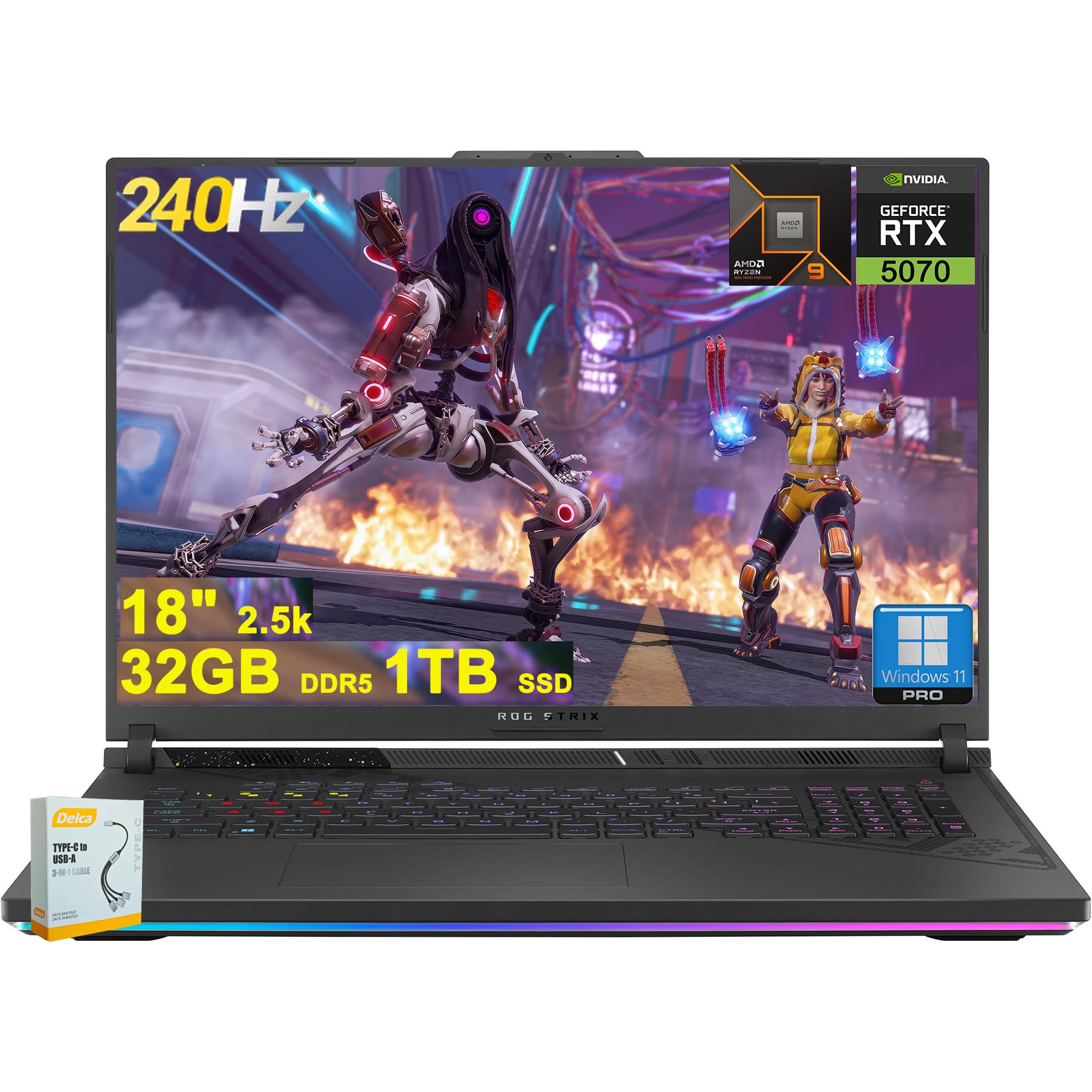
Figure 1: ASUS ROG Strix G18 G814 Gaming Laptop, front view with screen open.
Co jest w pudełku
Sprawdź, czy wszystkie elementy znajdują się w opakowaniu i są w dobrym stanie po rozpakowaniu.
- Laptop gamingowy ASUS ROG Strix G18 G814
- Zasilacz/ładowarka

Figure 2: Contents of the ASUS ROG Strix G18 G814 package, including the laptop and power adapter.
Organizować coś
1. Pierwsze włączenie zasilania
- Podłącz zasilacz: Podłącz zasilacz do portu zasilania laptopa, a następnie do gniazdka ściennego.
- Otwórz laptopa: Ostrożnie otwórz pokrywę laptopa.
- Włączanie: Press the power button, typically located on the keyboard deck. The laptop will begin its initial boot sequence.
- Postępuj zgodnie z instrukcjami wyświetlanymi na ekranie: Complete the Windows 11 setup process, including language selection, network connection, and user account creation.
2. Podłączanie urządzeń peryferyjnych
Connect external devices such as a mouse, keyboard, or external display to the available ports.

Rysunek 3: Strona view of the ASUS ROG Strix G18 G814, illustrating the various input/output ports including USB-A, USB-C, HDMI, and RJ45 Ethernet.
- USB-A 3.2: For standard USB devices like mice, keyboards, and external drives. (2 ports)
- Type USB 4: For high-speed data transfer, display output, and power delivery. (1 port)
- Złącze FRL HDMI 2.1: Do podłączania do zewnętrznych monitorów lub telewizorów.
- Ethernet RJ45: Do przewodowego połączenia sieciowego.
- Gniazdo słuchawkowe/mikrofonowe: Do wejścia/wyjścia audio.
Instrukcja obsługi
Zarządzanie energią
- Włączanie: Naciśnij przycisk zasilania.
- Zamknięcie: Kliknij przycisk Start, następnie Zasilanie, a następnie Wyłącz.
- Tryb uśpienia: Close the lid or select Sleep from the Power menu.
Klawiatura i touchpad
The laptop features a 4-zone RGB backlit keyboard and a precision touchpad for navigation.

Rysunek 4: Zbliżenie view of the ASUS ROG Strix G18 G814's 4-zone RGB backlit keyboard and touchpad.
- Kontrola podświetlenia: Use the dedicated function keys (Fn + Fx) to adjust keyboard backlight brightness or effects.
- Gesty touchpada: Informacje na temat konfigurowalnych gestów wielodotykowych można znaleźć w ustawieniach systemu Windows.
Wyświetlacz i grafika
Your laptop is equipped with an 18-inch 2560x1600 IPS display with a 240Hz refresh rate and 100% DCI-P3 color gamut, powered by an NVIDIA GeForce RTX 5070 8GB graphics card.

Figure 5: Visual representation of the 18-inch IPS display with 2560x1600 resolution and 240Hz refresh rate.

Figure 6: Image highlighting the NVIDIA GeForce RTX 5070 graphics card, emphasizing its role in visual performance.
System audio
Experience enhanced audio with Smart Amp technology, Dolby Atmos support, and AI Noise-canceling for clear communication.

Figure 7: Visual depicting the audio features, including Dolby Atmos and AI Noise-Canceling Microphone.
Wydajność i oprogramowanie
The laptop is powered by an AMD 16-core Ryzen 9 9955HX processor and runs on Windows 11 Pro. It includes 32GB DDR5 RAM and a 1TB SSD for fast performance and storage.

Figure 8: Image illustrating the AMD Ryzen 9 9955HX processor, highlighting its 16-core architecture.
- System operacyjny: Windows 11 Pro provides a secure and efficient computing environment.
- Skrzynia Zbrojowni: Update Armoury Crate software for optimal system management and performance tuning.
Konserwacja
Czyszczenie laptopa
- Ekran: Delikatnie użyj miękkiej, niestrzępiącej się szmatki dampPrzemyj wodą lub płynem do czyszczenia ekranów. Unikaj silnych środków chemicznych.
- Klawiatura i obudowa: Użyj miękkiej ściereczki. W przypadku uporczywych zabrudzeń, delikatnie przetrzyj.amp cloth is acceptable. Ensure no liquid enters openings.
- Wentylatory: Periodically clean dust from the ventilation grilles using compressed air to maintain optimal cooling performance.
Pielęgnacja baterii
- Unikaj ekstremalnych temperatur.
- Nie należy zbyt często całkowicie rozładowywać akumulatora.
- W przypadku długotrwałego przechowywania naładuj akumulator do poziomu około 50–60%.
Rozwiązywanie problemów
| Problem | Możliwe rozwiązanie |
|---|---|
| Laptop się nie włącza. | Upewnij się, że zasilacz jest prawidłowo podłączony zarówno do laptopa, jak i do sprawnego gniazdka elektrycznego. Sprawdź, czy gniazdko elektryczne działa. |
| Ekran pozostaje czarny po włączeniu zasilania. | Connect an external monitor to verify if the issue is with the laptop's display. Try pressing Fn + F6 (or the appropriate function key) to toggle display output. |
| Niska wydajność. | Close unnecessary applications. Check for background processes consuming high resources. Ensure drivers are updated, especially graphics drivers. Verify sufficient free storage space on the SSD. |
| Problemy z połączeniem Wi-Fi. | Restart the laptop and the wireless router. Check Wi-Fi settings in Windows. Ensure Wi-Fi drivers are up to date. |
| Long reboot time after BIOS updates. | This is normal behavior for some BIOS updates. Allow the system to complete the process, which may take several minutes. Do not interrupt the power. |
| Operating System discrepancy (e.g., Windows 11 Home instead of Pro). | Verify the installed OS version via System Information. If there is a discrepancy with the purchased specification, contact your retailer or ASUS support for clarification. |
Specyfikacje
| Nazwa modelu | ASUS ROG Strix G18 G814 |
| Edytor | AMD 16-core Ryzen 9 9955HX (3 GHz) |
| Grafika | NVIDIA GeForce RTX 5070 8 GB Dedykowana |
| Wyświetlacz | 18-inch IPS, 2560x1600 resolution, 240Hz refresh rate, 100% DCI-P3 |
| BARAN | 32 GB pamięci DDR5 SDRAM |
| Składowanie | 1TB SSD (dysk półprzewodnikowy) |
| System operacyjny | Windows 11 Pro |
| Łączność bezprzewodowa | Wi-Fi 6E (802.11ax) |
| Porty | 2x USB-A 3.2, 1x Type USB 4, 1x HDMI 2.1 FRL, 1x RJ45 Ethernet, Headphone/Mic Combo Jack |
| Klawiatura | Klawiatura podświetlana RGB z 4 strefami |
| Audio | Mądry Amp, Dolby Atmos, AI Noise-canceling |
| Webkrzywka | Kamera FHD |
| Bateria | 90 Wh |
| Wymiary (dł. x szer. x wys.) | 11.57 x 15.71 x 1.21 cala |
| Waga | 6.63 funta |
Gwarancja i wsparcie
Aby uzyskać informacje dotyczące gwarancji, pomocy technicznej lub zapytań serwisowych, zapoznaj się z oficjalną stroną pomocy technicznej firmy ASUS webstronie internetowej lub skontaktuj się ze sprzedawcą.
Wsparcie ASUS Webstrona: https://www.asus.com/support/
Please have your product model number (ROG Strix G18 G814) and serial number ready when contacting support.