1. Wprowadzenie
Dziękujemy za zakupasing the Paladone Fortnite RGB Gaming Lamp. This officially licensed light is designed to enhance your gaming environment with customizable, vibrant illumination. It features multiple lighting modes, including color phase, color selection, and a music-responsive mode, all controllable via an included remote. This manual provides essential information for safe and optimal use of your new gaming lamp.
2. Informacje dotyczące bezpieczeństwa
- Przed użyciem należy przeczytać wszystkie instrukcje i zachować je do wykorzystania w przyszłości.
- Produkt przeznaczony jest wyłącznie do użytku wewnątrz pomieszczeń. Nie wystawiać na działanie wody ani wilgoci.
- Upewnij się, że źródło zasilania pojtage matches the product requirements (5V DC).
- Nie próbuj demontować ani modyfikować lampSpowoduje to unieważnienie gwarancji i może spowodować uszkodzenia lub obrażenia.
- Przechowywać w miejscu niedostępnym dla małych dzieci.
- Unikaj bezpośredniego, długotrwałego wystawiania oczu na działanie źródła światła.
- Odłącz lamp from the power source when not in use or before cleaning.
3. Zawartość opakowania
Sprawdź, czy wszystkie elementy są obecne:
- Fortnite RGB Gaming Lamp
- Pilot zdalnego sterowania
- Kabel zasilający USB

Image: The retail packaging box for the Fortnite RGB Gaming Lamp, showing the product name and key features.
4. Konfiguracja
- Rozpakuj Lamp: Carefully remove the Fortnite RGB Gaming Lamp i jego akcesoria z opakowania.
- Podłącz zasilanie: Insert the small end of the included USB power cable into the USB port on the back of the lamp. Connect the larger end of the USB cable to a compatible USB power source (e.g., a USB wall adapter, computer USB port, or gaming console USB port). The power source should provide 5V DC.
- Umieszczenie:
- Wolnostojące: Umieść lamp on a flat, stable surface such as a desk or shelf.
- Mocowanie ścienne: Lamp can also be wall-mounted. Use appropriate hardware (not included) for your wall type and ensure it can safely support the lampwaga.
- Włączanie: Once connected to power, use the remote control to turn on the lamp.

Image: The Fortnite RGB Gaming Lamp in its off state, accompanied by its remote controller.
5. Instrukcja obsługi
The Fortnite RGB Gaming Lamp is operated using the included remote controller. Ensure the remote has a working battery and is pointed towards the lamp for optimal response.
Funkcje pilota zdalnego sterowania:
- Przycisk zasilania (⏻): Włącza lamp Włączone lub wyłączone.
- Kontrola jasności (☀️+ / ☀️-): Adjusts the brightness level. There are three distinct brightness settings.
- Color Selection Buttons: Directly select a specific color from the available options (e.g., Red, Green, Blue, Yellow, Cyan, Purple, White).
- Color Phase Mode: Activates a dynamic mode where the lamp cycles through various colors smoothly.
- Music Responsive Mode: Lamp's lighting will react and change in sync with ambient sounds or music.
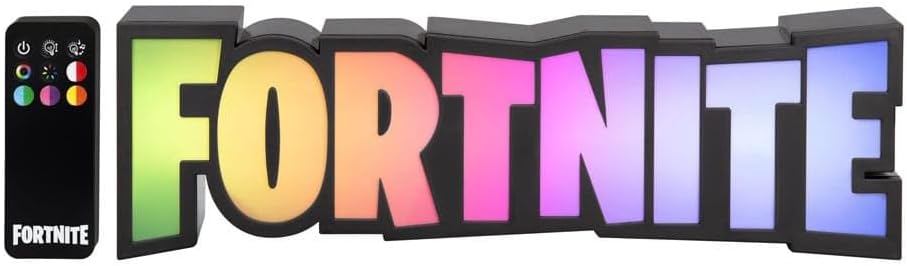
Image: The Fortnite RGB Gaming Lamp illuminated with a vibrant multi-color display, shown alongside its remote control.

Image: The Fortnite RGB Gaming Lamp illuminated with a bright white light, suitable for general room lighting.
6. Konserwacja
- Czyszczenie: Upewnij się, że lamp is unplugged before cleaning. Use a soft, dry cloth to wipe the surface. Do not use abrasive cleaners, solvents, or excessive moisture.
- Składowanie: W przypadku nieużywania przez dłuższy czas, należy przechowywaćamp w chłodnym i suchym miejscu, z dala od bezpośredniego światła słonecznego i ekstremalnych temperatur.
- Wymiana baterii (zdalna): If the remote control's range or responsiveness decreases, replace its battery with a new, compatible type (typically a CR2025 or similar coin cell battery). Refer to the remote's battery compartment for specific details.
7. Rozwiązywanie Problemów
| Problem | Możliwa przyczyna | Rozwiązanie |
|---|---|---|
| Lamp nie włącza się. |
|
|
| Pilot zdalnego sterowania nie reaguje. |
|
|
| Light flickers or changes unexpectedly. |
|
|
8. Specyfikacje
| Numer modelu | 14512 |
| Marka | Paladon |
| Wymiary produktu | 2.36 x 12.6 x 3.86 cala (6 x 32 x 9.8 cm) |
| Waga przedmiotu | 13.2 uncji (374 grama) |
| Źródło zasilania | Elektryczny przewodowy (USB) |
| Tomtage | 5 V (prąd stały) |
| Typ źródła światła | PROWADZONY |
| Kolor światła | Multicolored (RGB) |
| Typ przełącznika | Zdalne sterowanie |
| Tworzywo | Plastikowy |
| Typ montażu | Uchwyt ścienny, wolnostojący |
| Zastosowanie wewnątrz/na zewnątrz | Wnętrz |
| Funkcje żarówki | Multiple lighting modes, color phase, color selection, music responsive mode |
9. Gwarancja i wsparcie
For warranty information or technical support, please refer to the contact details provided on the product packaging or visit the official Paladone webZachowaj dowód zakupu na wypadek roszczeń gwarancyjnych.
For additional information or to explore other Paladone products, visit the Paladone Store on Amazon.


