1. Wprowadzenie
Thank you for choosing the HARDELL Mini Cordless Rotary Tool. This versatile and compact tool is designed for various light-duty tasks such as sanding, polishing, drilling, carving, and engraving. Its cordless design and multiple speed settings provide flexibility and precision for your DIY projects and crafts. Please read this manual thoroughly before use to ensure safe and optimal operation.
2. Informacje dotyczące bezpieczeństwa
- Podczas pracy należy zawsze nosić odpowiedni sprzęt ochrony osobistej, w tym okulary ochronne.
- Utrzymuj miejsce pracy w czystości i dobrym oświetleniu. Zagracone lub ciemne obszary sprzyjają wypadkom.
- Nie należy używać elektronarzędzi w atmosferach zagrożonych wybuchem, np. w obecności łatwopalnych cieczy, gazów lub pyłów.
- Trzymaj dzieci i osoby postronne z dala od siebie podczas obsługi elektronarzędzia. Rozproszenie uwagi może spowodować utratę kontroli.
- Avoid accidental starting. Ensure the switch is in the off-position before connecting to a battery pack, picking up or carrying the tool.
- Nie używaj narzędzia na siłę. Używaj właściwego narzędzia do swojego zastosowania.
- Odłącz akumulator od elektronarzędzia przed dokonaniem jakichkolwiek regulacji, wymianą akcesoriów lub przechowywaniem elektronarzędzia.
- Przechowuj nieużywane elektronarzędzia w miejscu niedostępnym dla dzieci i nie pozwalaj osobom niezaznajomionym z elektronarzędziem lub niniejszą instrukcją na korzystanie z elektronarzędzia.
- Konserwuj elektronarzędzia i akcesoria. Sprawdź, czy ruchome części nie są źle ustawione lub nie są zablokowane, czy nie ma pęknięć części i czy nie występują inne warunki, które mogą mieć wpływ na działanie elektronarzędzia.
- Używaj elektronarzędzia, akcesoriów i końcówek narzędzi zgodnie z niniejszą instrukcją, biorąc pod uwagę warunki pracy i pracę do wykonania.
- This rotary tool is not designed for heavy-duty tasks.
3. Zawartość opakowania
The HARDELL Mini Cordless Rotary Tool kit includes the following items:
- HARDELL Mini Cordless Rotary Tool (Orange)
- Kabel ładujący USB-C
- Assorted Accessories (35 pieces), including:
- Taśmy szlifierskie
- Podkładki polerskie
- Grinding heads
- Wiertła
- Engraving tips
- Koła tnące
- Collets (various sizes)
- Wrench for accessory changes

Image: The HARDELL Mini Cordless Rotary Tool shown with its included USB-C charging cable and various accessories, such as sanding bands, cutting discs, drill bits, and grinding heads.
4. Koniec produktuview
Familiarize yourself with the components of your HARDELL Mini Cordless Rotary Tool:

Image: Diagram showing the key parts of the rotary tool, including the Locking Collar, Spindle Lock Button, On/Off Button, Speed Control Button, Unique Cooling Device, and Type-C Charging Port.
- Locking Collar: Firmly fixes accessories in place.
- Przycisk blokady wrzeciona: Quick collet lock for fast accessory changes. Caution: Do not press this button when the device is running.
- Przycisk włączania/wyłączania: Włącza lub wyłącza narzędzie.
- Speed Control Buttons (+/-): Adjusts the rotational speed. The "+" button increases speed, and the "-" button decreases speed.
- Światło LED: Illuminates the work area for enhanced precision and visibility.
- Port ładowania typu C: For convenient charging using a USB-C cable.
- Unique Cooling Device: Designed to dissipate heat during operation.
Ustawienia prędkości
The tool features 5-speed settings for various applications:
- Prędkość 1: 5000 RPM (Recommended for polishing)
- Prędkość 2: 8000 RPM (Recommended for sanding)
- Prędkość 3: 11000 RPM (Recommended for carving)
- Prędkość 4: 14000 RPM (Recommended for grinding)
- Prędkość 5: 18000 RPM (Recommended for drilling)
5. Instalacja i konfiguracja akcesoriów
Prawidłowy montaż akcesoriów ma kluczowe znaczenie dla bezpieczeństwa i efektywności działania urządzenia.
General Accessory Installation
- Naciśnij przycisk blokujący wrzeciono i odkręć nakrętkę.
- Choose the suitable collet and insert it into the tool. Then, place the black nut over the collet. Install the accessory you need to use.
- Press the spindle lock button again, then tighten the nut to secure the accessory.

Image: Visual guide demonstrating the four steps to install various accessories into the rotary tool's collet.
Installing a Sanding Band
- Insert the sanding drum into the collet and tighten the nut.
- Loosen the screw of the sanding drum.
- Install the sanding band onto the drum.
- Press down the spindle lock button and tighten the screw of the sanding drum with the provided wrench.

Image: Visual instructions for attaching a sanding band to the rotary tool, showing the drum, band, and tightening process.
Installing an HSS Cutting Disc or Sanding Paper
- Insert the wheel mandrel into the collet and tighten the nut.
- Dismantle the screw of the wheel mandrel.
- Install the wheel mandrel and assemble the HSS cutting disc or sanding paper.
- Press down the spindle lock button and tighten the screw of the wheel mandrel with the provided wrench.
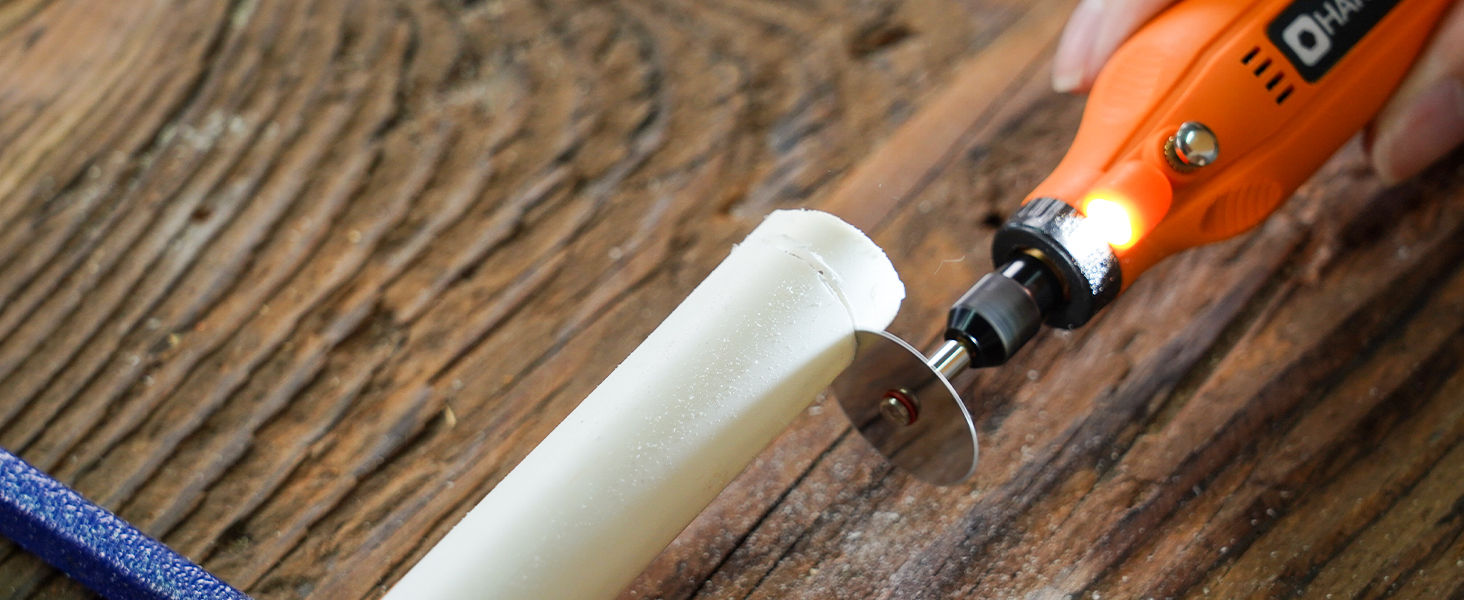
Image: Visual instructions for attaching an HSS cutting disc or sanding paper to the rotary tool, detailing the mandrel and securing steps.
6. Instrukcja obsługi
- Włączanie/wyłączanie: Press the On/Off button to turn the tool on or off.
- Dostosuj prędkość: Use the '+' and '-' buttons to cycle through the 5 available speed settings (5000 RPM to 18000 RPM). The LED indicators will show the current speed level.
- Światło LED: The integrated LED light automatically illuminates when the tool is powered on, providing visibility for detailed work.
- Działanie: Hold the tool firmly and apply gentle pressure to the workpiece. Allow the tool to do the work; excessive force can lead to poor results or damage to the tool/workpiece.

Image: A person using the HARDELL Mini Cordless Rotary Tool for carving a wooden piece, demonstrating its ergonomic design and precision.

Obraz: Zbliżenie view of the rotary tool in action, with its LED light brightly illuminating the precise point of contact on a workpiece, highlighting its utility in detailed tasks.
7. Aplikacje
The HARDELL Mini Cordless Rotary Tool is ideal for a variety of light-duty projects, including but not limited to:
- Engraving on various materials
- Sanding small surfaces or edges
- Carving intricate designs
- Drilling small holes
- Grinding for shaping or smoothing
- Polishing for a smooth finish
- Trimming excess material

Obraz: Pokaz kolażuasing the multi-purpose capabilities of the rotary tool, including sanding wood, carving glass, polishing beads, grinding metal, drilling shells, and cutting plastic.
8. Konserwacja
Ładowanie narzędzia
- Connect the provided USB-C charging cable to the charging port at the base of the tool.
- Plug the other end of the USB-C cable into a compatible power source (e.g., computer, car charger, power bank).
- The LED indicators will show the charging status. A full charge provides up to 100 minutes of continuous use under no-load conditions.
Czyszczenie i przechowywanie
- After each use, disconnect any accessories and gently wipe the tool body with a clean, dry cloth.
- Remove any dust or debris from the collet and spindle area.
- Store the tool and its accessories in a dry, clean place, preferably in its original carrying case, away from direct sunlight and extreme temperatures.
9. Rozwiązywanie Problemów
- Narzędzie się nie włącza: Ensure the tool is fully charged. If the battery is low, connect it to a power source using the USB-C cable.
- Obniżona wydajność: Check if the accessory is securely installed. Ensure the battery is adequately charged. The tool is designed for light-duty tasks; avoid using it for heavy-duty applications that may exceed its capacity.
- Nadmierne wibracje lub hałas: Ensure the accessory is correctly inserted and tightened. A loose or damaged accessory can cause vibration. Replace any worn or damaged accessories.
- Przegrzanie: If the tool feels excessively hot, discontinue use and allow it to cool down. Ensure the cooling vents are not obstructed.
10. Specyfikacje
| Funkcja | Specyfikacja |
|---|---|
| Marka | HARDELL |
| Numer modelu | DM12405ORANGEH-2 |
| Źródło zasilania | Zasilany bateryjnie (litowo-jonowy 3.7 V) |
| Ustawienia prędkości | 5-biegowa (5000-18000 obr./min) |
| Typ ładowania | USB-C |
| Waga przedmiotu | 0.3 lbs (7.4 ounces / 0.21 Kilograms) |
| Cechy specjalne | Compact, LED Light |
| Zawarte komponenty | 35 Accessories, USB-C Cable |
11. Gwarancja i wsparcie
For warranty information, technical support, or any questions regarding your HARDELL Mini Cordless Rotary Tool, please refer to the documentation included in your product packaging or contact HARDELL customer service directly. Contact details can typically be found on the manufacturer's webmiejscu lub na opakowaniu produktu.


