Wstęp
This manual provides comprehensive instructions for the setup, operation, and maintenance of your Comfort Direct Bradbury Ceiling Fan Remote Control (Model CDTR214D). Please read this manual thoroughly before use to ensure proper functionality and safety. This remote is designed for use with specific Harbor Breeze Bradbury Ceiling Fan models, including BRD48MBK6LR, BRD48BNK6LR, BRD48OSB6LR, BRD48MWW6LR, BRD60MBK6LR, BRD60BNK6LRS, and BRD60OSB6LR.
Informacje dotyczące bezpieczeństwa
Always ensure the power to the ceiling fan is turned off at the circuit breaker before performing any installation or maintenance. Do not expose the remote control to water or excessive moisture. Keep batteries out of reach of children. Dispose of used batteries responsibly.
Zawartość opakowania
- 1 x Comfort Direct Bradbury Ceiling Fan Remote Control
- 1 x uchwyt ścienny
- 2 x śruby montażowe

Image: The remote control, its wall mount holder, and two mounting screws, illustrating the complete package contents.
Specyfikacje
| Numer modelu | CDTR214D |
| Wymiary produktu | 2 x 1 x 4 cala |
| Waga przedmiotu | 6 uncji |
| Wymagania dotyczące baterii | 1 x 23A 12V battery (not included) |
| Funkcja specjalna | Radiofrequency (RF) control |
| Kompatybilne urządzenia | Harbor Breeze Bradbury Ceiling Fans (BRD48MBK6LR, BRD48BNK6LR, BRD48OSB6LR, BRD48MWW6LR, BRD60MBK6LR, BRD60BNK6LRS, BRD60OSB6LR) |
Organizować coś
1. Instalacja baterii
- Znajdź komorę baterii z tyłu pilota.
- Aby otworzyć pokrywę baterii, przesuń ją w dół.
- Insert one 23A 12V battery, ensuring the polarity (+/-) matches the diagram inside the compartment.
- Wsuń pokrywę baterii z powrotem na miejsce, aż zaskoczy.

Zdjęcie: Tył view of the remote control with the battery cover removed, revealing the battery compartment for a 23A 12V battery.
2. Pairing the Remote Control with Your Ceiling Fan
Ważny: Only one remote can be programmed per fan. You cannot use two separate remotes to control the same fan.
- Turn Power Off To Fan: Ensure the power supply to your ceiling fan is completely off at the wall switch or circuit breaker.
- Turn Power Back On To Fan: Przywróć zasilanie wentylatora sufitowego.
- Press and Hold "0" Key: Within 30 seconds of restoring power, press and hold the "0" button on your remote control for 5 seconds. The fan light should blink or the fan should briefly turn on to indicate successful pairing.

Image: Visual guide for the remote pairing process, showing the three key steps.
3. Instalacja na ścianie
The included wall mount holder allows for convenient storage of your remote control.
- Choose a suitable location on a wall, away from direct sunlight or heat sources.
- Use the two provided screws to securely attach the wall mount holder to the wall.
- Place the remote control into the holder for easy access.

Image: The remote control securely placed in its wall mount holder, demonstrating its convenient placement on a wall.
Instrukcja obsługi
Once paired, your remote control provides full control over your compatible ceiling fan and its light.
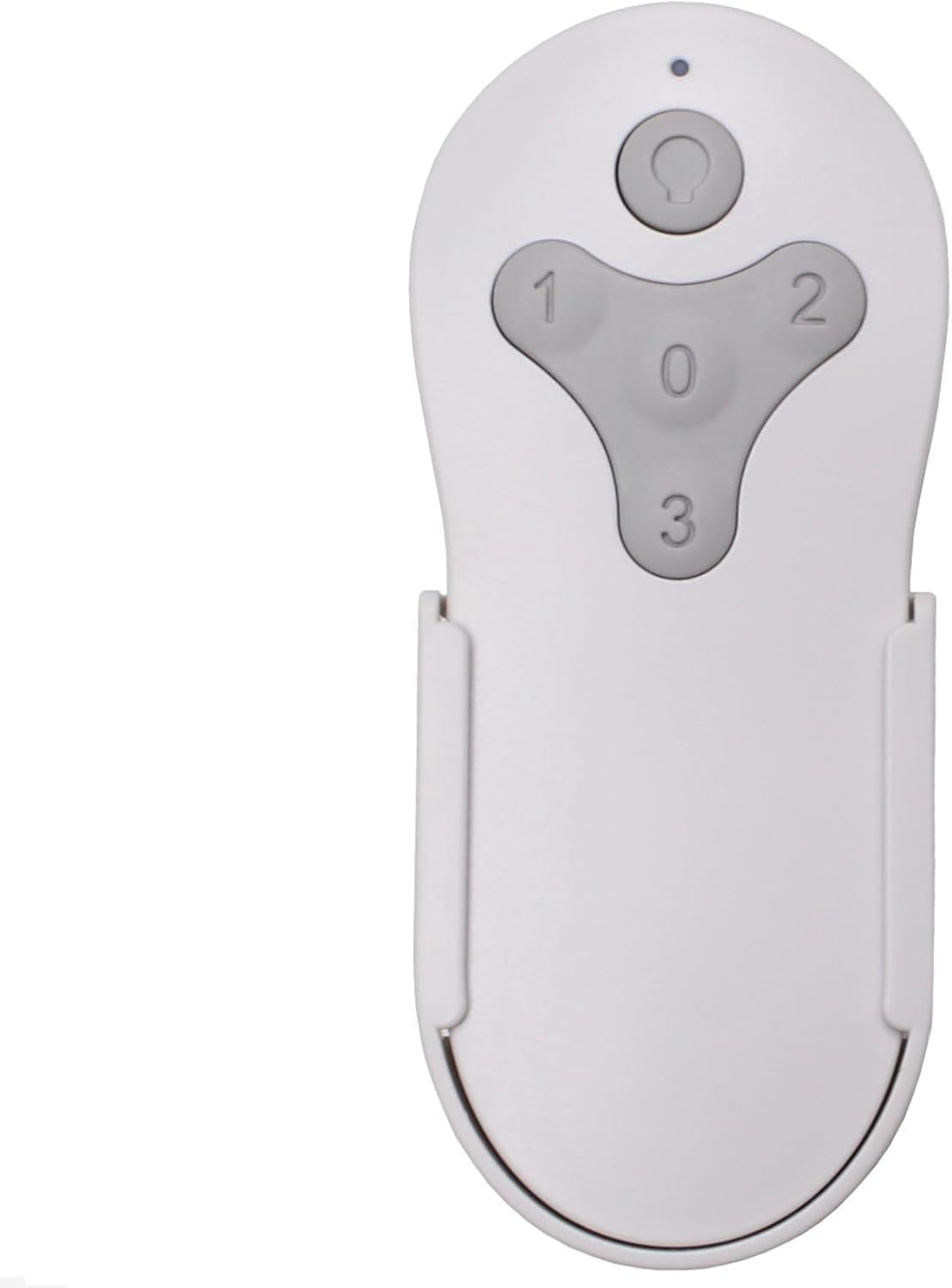
Obraz: Przód view of the remote control, showing the fan speed buttons (1, 2, 3, 0) and the light control button.
Kontrola prędkości wentylatora
- Naciskać "1" for Low fan speed.
- Naciskać "2" for Medium fan speed.
- Naciskać "3" for High fan speed.
- Naciskać "0" aby wyłączyć wentylator.
Light Control with Dimming
- Naciśnij Przycisk światła (usually depicted as a light bulb icon) to turn the fan light On or Off.
- Aby przyciemnić światło, naciśnij i przytrzymaj Przycisk światła. Release the button when the desired brightness level is reached.
Konserwacja
Wymiana baterii
When the remote control's range decreases or it becomes unresponsive, it is likely time to replace the battery. Follow the battery installation steps outlined in the "Setup" section to replace the 23A 12V battery. Ensure proper disposal of the old battery according to local regulations.
Czyszczenie
Wipe the remote control with a soft, dry cloth. Do not use abrasive cleaners or solvents, as these may damage the surface or internal components.
Rozwiązywanie problemów
- Pilot nie odpowiada:
- Sprawdź, czy akumulator jest prawidłowo zainstalowany i wystarczająco naładowany. W razie potrzeby wymień akumulator.
- Ensure the remote is within range of the fan's receiver.
- Re-attempt the pairing process as described in the "Setup" section.
- Fan or light not responding after pairing:
- Verify that the power to the fan is on at the wall switch or circuit breaker.
- Confirm that the remote was successfully paired (fan light blink or brief fan operation). If not, repeat the pairing steps carefully.
- Ensure no other remote is attempting to control the same fan, as only one remote can be paired per fan.
Gwarancja
This Comfort Direct Bradbury Ceiling Fan Remote Control comes with a 1-letnia gwarancja producenta from the date of purchase. This warranty covers defects in materials and workmanship under normal use. Please retain your proof of purchase for warranty claims. For warranty service, please contact Comfort Direct customer support.
Wsparcie
For further assistance, technical support, or inquiries regarding your Comfort Direct Bradbury Ceiling Fan Remote Control, please visit the Comfort Direct website or contact their customer service department. Contact information can typically be found on the product packaging or the official Comfort Direct webstrona.


