1. Wprowadzenie
This manual provides detailed instructions for the setup, operation, maintenance, and troubleshooting of your DIERYA DK68 Wireless Mechanical Keyboard. Please read this manual thoroughly before using the product to ensure proper functionality and to maximize your user experience.
2. Zawartość opakowania
Sprawdź, czy w opakowaniu znajdują się wszystkie elementy:
- 1 x DIERYA DK68 68-Key Wireless Mechanical Keyboard
- 1 x odbiornik bezprzewodowy 2.4G
- 1 x kabel USB-C do USB-A
- 1 x Instrukcja obsługi (ten dokument)
3. Koniec produktuview
The DIERYA DK68 is a compact 68-key mechanical keyboard featuring triple-mode connectivity (wired USB-C, 2.4GHz wireless, and Bluetooth 5.0). It is equipped with linear red mechanical switches and customizable RGB backlighting.

Image: The DIERYA DK68 Wireless Mechanical Keyboard in white, showcasindzięki kompaktowemu układowi 68 klawiszy i podświetleniu RGB.
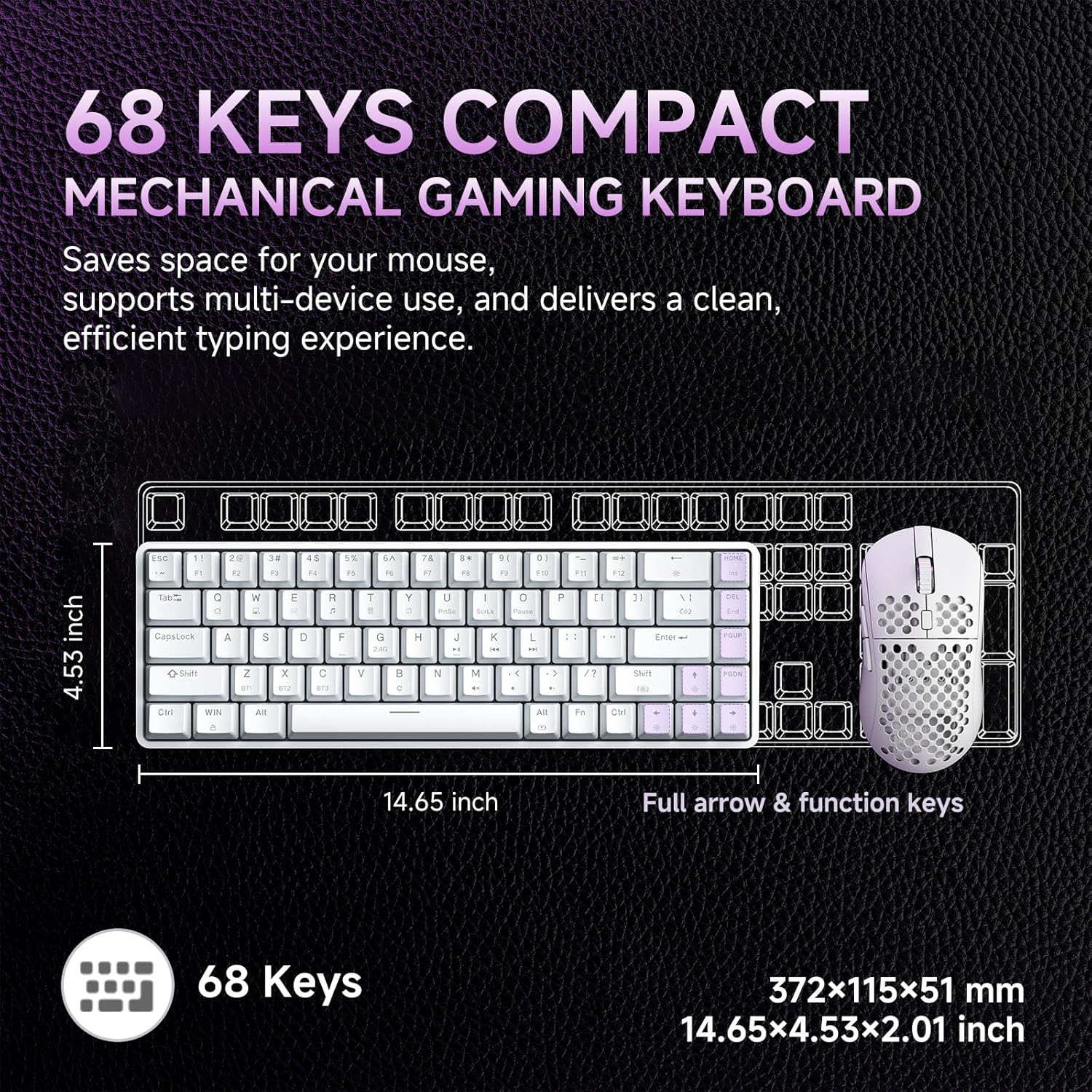
Image: A diagram illustrating the compact dimensions of the DIERYA DK68 keyboard, measuring 14.65 inches in length and 4.53 inches in width.
4. Konfiguracja
4.1 Połączenie przewodowe (USB-C)
- Podłącz dołączony kabel USB-C do portu USB-C klawiatury.
- Connect the other end of the USB-C cable to an available USB-A port on your computer.
- Klawiatura zostanie automatycznie rozpoznana i będzie gotowa do użycia.
4.2 Połączenie bezprzewodowe 2.4 GHz
- Locate the 2.4G wireless receiver included in the package.
- Plug the 2.4G receiver into an available USB-A port on your computer.
- Turn on the keyboard using the switch located on the back or side of the keyboard.
- Klawiatura powinna automatycznie połączyć się z odbiornikiem. Jeśli nie, naciśnij Fn + R aby rozpocząć parowanie.
4.3 Połączenie Bluetooth 5.0
Klawiatura obsługuje podłączenie maksymalnie trzech urządzeń Bluetooth.
- Sprawdź, czy klawiatura jest włączona.
- Naciśnij i przytrzymaj Fn+Z, Fn + X, Lub Fn + C przez 3–5 sekund, aby przejść w tryb parowania odpowiednio dla urządzenia Bluetooth 1, 2 lub 3. Kontrolka zacznie szybko migać.
- Na swoim urządzeniu (komputerze, laptopie, tablecie, smartfonie) włącz Bluetooth i wyszukaj nowe urządzenia.
- Select "DIERYA DK68" from the list of available devices to pair.
- Po sparowaniu kontrolka przestanie migać i będzie świecić światłem ciągłym przez kilka sekund.
- Aby przełączać się między sparowanymi urządzeniami Bluetooth, naciśnij Fn+Z, Fn + X, Lub Fn + C krótko.

Image: Visual representation of the DIERYA DK68's triple-mode connectivity options: USB-C, Bluetooth 5.0, and 2.4GHz wireless, compatible with various operating systems.
5. Instrukcja obsługi
5.1 Podstawowe funkcje klawiatury
The DK68 features a 68-key layout. Many standard functions are accessed via the Fn kombinacje klawiszy.
- Fn + 1-12: F1-F12 function keys.
- Fn + Q/W/E/R/T/Y: Multimedia controls (specific functions may vary).
- Fn + klawisze strzałek: Page Up, Page Down, Home, End.
- Fn + Backspace: Delete.
5.2 Sterowanie oświetleniem RGB
The keyboard offers 20 built-in RGB lighting effects and 16.8 million customizable colors.
- Fn + Backspace: Turn backlight On/Off.
- Fn+Shift: Switch light colors (for certain modes).
- Fn + |\: Switch light modes (cycle through 20 effects).
- Fn + Strzałka w górę: Zwiększ jasność.
- Fn + strzałka w dół: Zmniejsz jasność.
- Fn + strzałka w lewo: Decrease light speed.
- Fn + strzałka w prawo: Increase light speed.

Image: A visual guide to controlling the RGB backlighting on the DIERYA DK68 keyboard using Fn key combinations for mode, color, brightness, and speed adjustments.
5.3 Zarządzanie baterią
The keyboard is equipped with a 3000mAh lithium battery.
- Ładowanie: Connect the keyboard via the USB-C cable to a power source (computer USB port or USB wall adapter). The charging indicator light will show charging status.
- Czas pracy baterii: Up to 12 hours with backlighting on, and up to 333 hours with backlighting off.
- Automatyczne uśpienie: The keyboard enters auto-sleep mode after 3 minutes of inactivity to conserve power. Press any key to wake it up.

Image: An infographic detailing the 3000mAh battery capacity, showing 12 hours of use with lights on, 333 hours with lights off, 3-minute auto-stop, and Type-C charging.
5.4 Dostosowywanie oprogramowania
For advanced customization of keys, macros, and lighting effects, download the dedicated software from the official DIERYA webwitryna. To oprogramowanie umożliwia:
- 16.8 million customizable lighting colors.
- Music-sync lighting effects.
- Full-key macro programming.
- Macro recording and editing.
- Custom shortcut keys.
6. Konserwacja
- Czyszczenie: Use a soft, dry cloth to wipe the keyboard surface. For deeper cleaning, use compressed air to remove dust and debris from between keycaps. Avoid using liquid cleaners directly on the keyboard.
- Składowanie: Przechowuj klawiaturę w chłodnym, suchym miejscu, z dala od bezpośredniego światła słonecznego i ekstremalnych temperatur.
- Demontaż nasadki klawisza: If removing keycaps for cleaning or switch replacement, use a keycap puller to avoid damage.
7. Rozwiązywanie Problemów
| Wydanie | Rozwiązanie |
|---|---|
| Klawiatura nie reaguje (przewodowa) | Upewnij się, że kabel USB-C jest prawidłowo podłączony do klawiatury i komputera. Spróbuj użyć innego portu USB lub kabla. |
| 2.4GHz wireless connection unstable or not connecting | Ensure the 2.4G receiver is plugged in and the keyboard is powered on. Re-pair by pressing Fn + R. Move the receiver closer to the keyboard. Avoid interference from other wireless devices. |
| Problemy z połączeniem Bluetooth | Upewnij się, że Bluetooth jest włączony w Twoim urządzeniu. Wejdź ponownie w tryb parowania (Fn + Z/X/C) and re-pair. Forget the device on your computer/phone and try pairing again. Ensure the keyboard is charged. |
| RGB backlighting not working | Naciskać Fn + Backspace to toggle the backlight. Check brightness settings (Fn + Strzałka w górę/w dół). Ensure the keyboard battery is not critically low. |
| Keys not registering (Anti-Ghosting) | The keyboard features full N-Key Rollover (NKRO). If specific keys are not registering, try cleaning under the keycap or contact support. |
| Klawiatura się nie ładuje | Verify the USB-C cable and power source are functional. Try a different cable or charging port. |
8. Specyfikacje
| Funkcja | Szczegół |
|---|---|
| Model | DIERYA DK68 |
| Łączność | USB-C przewodowy, 2.4 GHz bezprzewodowy, Bluetooth 5.0 |
| Typ przełącznika | Linear Red Mechanical Switches |
| Liczba kluczy | 68 klawisze (układ 60%) |
| Podświetlenie | RGB (16.8 Million Colors, 20 Modes) |
| Pojemność baterii | 3000mAh |
| Żywotność baterii | Up to 12 hours (backlight on), 333 hours (backlight off) |
| Anty-ghosting | Pełny N-Key Rollover (NKRO) |
| Materiał nasadek klawiszy | Acrylonitrile Butadiene Styrene (ABS) Double-shot |
| Kompatybilne urządzenia | Laptop, PC, Smartfon |
| Wymiary | 14.65 x 4.53 x 2.01 cala (372 x 115 x 51 mm) |
| Waga przedmiotu | 1.83 funta (820 g) |
| Zawarte komponenty | Keyboard, 2.4G Receiver, USB Cable, Instruction Manual |
9. Gwarancja i wsparcie
DIERYA products are designed for reliability and performance. For warranty information, technical support, or service inquiries, please refer to the official DIERYA webOdwiedź stronę internetową lub skontaktuj się bezpośrednio z działem obsługi klienta. Zachowaj paragon jako dowód zakupu na wypadek reklamacji.
For the latest drivers and software, please visit: www.dierya.com


