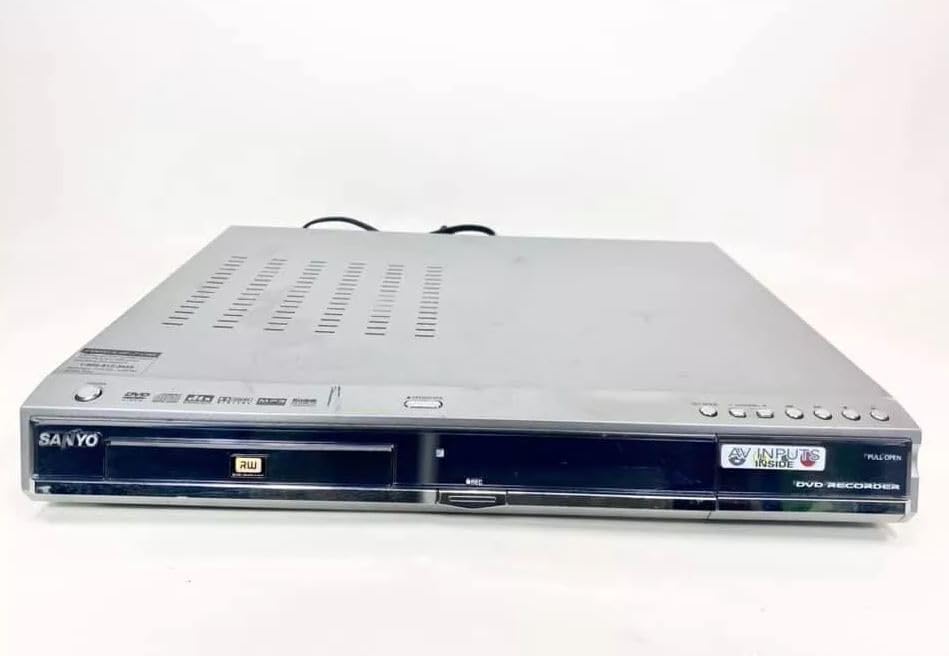
Sanyo DRW-500 DVD Recorder/Player Instruction Manual
Model: DRW-500
Wstęp
This manual provides comprehensive instructions for the safe and efficient operation of your Sanyo DRW-500 DVD Recorder/Player. Please read this manual thoroughly before using the device and retain it for future reference. The Sanyo DRW-500 allows you to record television programs and home videos onto DVD-R/RW discs, as well as play back DVD-Video and Audio CD discs.
Ważne informacje dotyczące bezpieczeństwa
OSTRZEŻENIE: ABY ZMNIEJSZYĆ RYZYKO POŻARU LUB PORAŻENIA PRĄDEM, NIE NALEŻY WYSTAWIAĆ URZĄDZENIA NA DZIAŁANIE DESZCZU LUB WILGOCI.
Podczas korzystania z tego produktu należy zawsze przestrzegać podstawowych zasad bezpieczeństwa, aby zmniejszyć ryzyko pożaru, porażenia prądem elektrycznym i obrażeń ciała.
Nie zasłaniaj żadnych otworów wentylacyjnych. Montaż należy wykonać zgodnie z instrukcją producenta.
Nie należy instalować w pobliżu źródeł ciepła, takich jak grzejniki, kratki wentylacyjne, piece lub inne urządzenia (w tym amp(lifiers) wytwarzające ciepło.
Chroń przewód zasilający przed deptaniem i przytrzaśnięciem, zwłaszcza przy wtyczkach, gniazdkach i miejscach, w których wychodzi z urządzenia.
Stosować wyłącznie dodatki/akcesoria wskazane przez producenta.
Wszelkie czynności serwisowe należy powierzyć wykwalifikowanemu personelowi serwisowemu. Serwis jest wymagany, gdy urządzenie zostało w jakikolwiek sposób uszkodzone.
Zawartość opakowania
Sprawdź, czy w pudełku znajdują się wszystkie elementy:
Sanyo DRW-500 DVD Recorder/Player Unit
Zdalne sterowanie
Kabel audio/wideo RCA
Przewód zasilający
Instrukcja obsługi (ten dokument)
Produkt ponadview
Familiarize yourself with the front and rear panels of your Sanyo DRW-500.
Rysunek 1: Front Panel of Sanyo DRW-500. Shows the disc tray, power button, play/pause, stop, record buttons, and the display screen.
Elementy sterujące na panelu przednim:
Przycisk zasilania: Włącza lub wyłącza urządzenie.
Przycisk OTWÓRZ/ZAMKNIJ: Otwiera i zamyka tackę na płyty.
Przycisk ODTWÓRZ: Starts disc playback.
Przycisk stopu: Stops disc playback or recording.
Przycisk NAGRYWAJ: Rozpoczyna nagrywanie.
POKAZ: Pokazuje aktualny status, czas i informacje o utworze.
Połączenia panelu tylnego:
AUDIO/VIDEO OUT (RCA): Connects to your TV's audio/video input.
S-VIDEO OUT: Provides higher quality video output to compatible TVs.
AUDIO/VIDEO IN (RCA): Connects to external devices like VCRs or camcorders for recording.
MOC W: Podłącza przewód zasilający.
Organizować coś
1. Podłączanie do telewizora
There are two primary ways to connect your Sanyo DRW-500 to a television:
Option A: RCA (Composite Video) Connection
Connect one end of the RCA audio/video cable (red, white, yellow) to the AUDIO/VIDEO OUT jacks on the rear of the DRW-500.
Connect the other end of the RCA cable to the corresponding AUDIO/VIDEO IN jacks on your television. Ensure colors match (yellow to yellow for video, red to red for right audio, white to white for left audio).
Select the correct input channel on your TV (e.g., Video 1, AV1, Input 1).
Connect an S-Video cable (not included) from the WYJŚCIE S-VIDEO jack on the DRW-500 to the S-Video input on your television.
Connect a separate RCA audio cable (red, white) from the WYJŚCIE DZWIĘKU jacks on the DRW-500 to the corresponding audio input jacks on your television. S-Video only carries video, not audio.
Select the correct input channel on your TV (e.g., S-Video, Input 2).
2. Podłączenie zasilania
Podłącz dostarczony przewód zasilający do MOC W port on the rear of the DRW-500.
Podłącz drugi koniec przewodu zasilającego do standardowego gniazdka ściennego prądu zmiennego.
3. Initial Setup and Clock Setting
Upon first power-on, the unit may prompt you to set the clock and other basic settings. Follow the on-screen instructions using the remote control.
Instrukcja obsługi
Odtwarzanie DVD lub CD
Naciśnij MOC przycisk, aby włączyć urządzenie.
Naciśnij OTWÓRZ/ZAMKNIJ przycisk, aby otworzyć tacę na płytę.
Połóż płytę DVD lub CD na tacy etykietą do góry.
Naciśnij OTWÓRZ/ZAMKNIJ ponownie, aby zamknąć tacę.
Odtwarzanie powinno rozpocząć się automatycznie. Jeśli nie, naciśnij GRAĆ przycisk.
Use the remote control for functions like Pause, Stop, Fast Forward, Rewind, and Chapter Skip.
Recording to DVD-R/RW
The Sanyo DRW-500 can record from various external sources connected to its AUDIO/VIDEO IN gniazda.
Recording from a TV/Cable Box:
Connect the audio/video output of your TV or cable box to the AUDIO/VIDEO IN jacks on the rear of the DRW-500.
Insert a blank recordable DVD (DVD-R or DVD-RW) into the disc tray.
Select the correct input source on the DRW-500 using the WYBIERZ WEJŚCIE button on the remote control (e.g., L1, L2).
Tune your TV/cable box to the desired program.
Naciśnij NAGRYWAĆ button on the DRW-500 or its remote control to start recording.
Naciśnij ZATRZYMYWAĆ SIĘ przycisk, aby zakończyć nagrywanie.
Recording from a VCR or Camcorder:
Connect the audio/video output of your VCR or camcorder to the AUDIO/VIDEO IN jacks on the rear of the DRW-500.
Włóż pustą, nagrywalną płytę DVD do napędu.
Select the correct input source on the DRW-500 using the WYBIERZ WEJŚCIE przycisk na pilocie.
Start playback on your VCR or camcorder.
Naciśnij NAGRYWAĆ button on the DRW-500 or its remote control to start recording.
Naciśnij ZATRZYMYWAĆ SIĘ przycisk, aby zakończyć nagrywanie.
Finalizowanie płyty
For recorded DVD-R/RW discs to be playable on other DVD players, they must be "finalized."
Insert the recorded DVD-R/RW disc into the DRW-500.
Uzyskaj dostęp do MENU na pilocie.
Navigate to the "Disc Settings" or "Setup" menu.
Select the "Finalize Disc" option.
Confirm the action. The finalization process may take several minutes. Do not interrupt power during this process.
Note: DVD-RW discs can be unfinalized and re-recorded multiple times. DVD-R discs, once finalized, cannot be recorded on again.
Konserwacja
Czyszczenie urządzenia
Zawsze odłączaj urządzenie od gniazdka elektrycznego przed czyszczeniem.
Do przecierania zewnętrznej części urządzenia należy używać miękkiej, suchej ściereczki.
Do not use liquid cleaners, aerosol cleaners, or strong chemical solvents, as these may damage the finish.
Pielęgnacja dysku
Trzymaj płyty za krawędzie, aby uniknąć pozostawienia odcisków palców na powierzchni przeznaczonej do nagrywania.
Gdy nie używasz płyt, przechowuj je w oryginalnych pudełkach, aby zapobiec zarysowaniom i gromadzeniu się kurzu.
Zabrudzone płyty należy czyścić miękką, niepozostawiającą włókien ściereczką, delikatnie przecierając je od środka na zewnątrz.
Rozwiązywanie problemów
Problem
Możliwa przyczyna
Rozwiązanie
Brak zasilania
Przewód zasilający nie jest prawidłowo podłączony.
Sprawdź podłączenie przewodu zasilającego do urządzenia i gniazdka ściennego.
Brak obrazu i dźwięku
Incorrect TV input selected. A/V cables not connected properly.
Select the correct input on your TV. Ensure A/V cables are securely connected to the correct input/output jacks.
Dysk nie odtwarza się
Disc is dirty or scratched. Disc is inserted incorrectly. Incompatible disc format.
Clean the disc. Insert the disc with the label side up. Ensure the disc is a compatible format (DVD-Video, Audio CD, recorded DVD-R/RW).
Nie można nagrywać
No blank recordable disc inserted. Disc is full or protected. Incorrect input source selected.
Insert a blank DVD-R or DVD-RW. Use a new disc or erase a DVD-RW. Select the correct input source (e.g., L1, L2).
Recorded disc won't play on other players
Disc not finalized.
Finalize the disc using the "Finalize Disc" option in the unit's menu.
Specyfikacje
Funkcja
Szczegół
Model
DRW-500
Producent
Sanyo
Compatible Disc Formats (Playback)
DVD-Video, CD-Audio, DVD-R, DVD-RW (finalized)
Recordable Disc Formats
DVD-R, DVD-RW
Wyjście wideo
Composite Video (RCA), S-Video
Wyjście audio
Stereofoniczne RCA
Zgodność wejścia wideo
NTSC
Technologia łączności
AUX (RCA)
Funkcja specjalna
Kompaktowa konstrukcja
Zasilacz
AC 120V, 60Hz (typical for US models)
Gwarancja i wsparcie
This product is covered by a limited manufacturer's warranty. Please refer to the warranty card included with your purchase for specific terms and conditions. For technical support or service inquiries, please contact Sanyo customer service through their official webwitryny lub danych kontaktowych podanych w dokumentacji gwarancyjnej.
Please note that warranty terms may vary by region and retailer. Keep your proof of purchase for warranty claims.
Instrukcja obsługi mini systemu komponentów SANYO DC-F210 Instrukcja obsługi mini systemu komponentowego SANYO DC-F210, obejmująca konfigurację, obsługę odtwarzacza CD, tunera, amplifier i magnetofon kasetowy, nagrywanie, dubbing, funkcje timera, konserwacja i specyfikacje techniczne. Zawiera ważne środki ostrożności i informacje o gwarancji.
SANYO 18H-815 Portable Radio Service Manual Detailed service manual for the SANYO 18H-815 portable radio, covering specifications, block diagrams, schematic drawings, and parts lists for repair and maintenance.
Instrukcja obsługi radia Portátil Digital Sanyo KS132N FM/AM Podręcznik zwykłego szczegółowego opisu cyfrowego przenośnego radia Sanyo KS132N. Zawiera opis produktu, eSpecificaciones técnicas, instrucciones de uso, mantenimiento, solución de problemas y advertencias de seguridad.