1. Wprowadzenie
The Browning Pro Scout MAX Cellular Camera is designed for remote wildlife scouting and property monitoring. This manual provides essential instructions for the proper setup, operation, and maintenance of your cellular trail camera. It features RADIANT 6 Illumination Technology, dual-carrier cellular connectivity (AT&T or Verizon), GPS-tagged images, and rapid trigger speeds.

Image: The Browning Pro Scout MAX Cellular Camera, shown in its natural outdoor environment, highlighting its camouflage design and robust build for discreet monitoring.
2. Informacje dotyczące bezpieczeństwa
Please read and understand all safety precautions before using this product. Failure to follow these instructions may result in product damage or personal injury.
- Bezpieczeństwo baterii: Use only new, high-quality AA alkaline or lithium batteries. Do not mix old and new batteries, or different types of batteries. Ensure correct polarity during installation. Remove batteries if the camera will be unused for extended periods.
- Warunki środowiskowe: This camera is designed for outdoor use with an IP54 rating, offering protection against dust and splashing water. Avoid submerging the camera in water or exposing it to extreme temperatures beyond its operating range.
- Ostrzeżenie dotyczące kalifornijskiej propozycji 65: Produkt ten zawiera substancje chemiczne, o których władze stanu Kalifornia wiedzą, że mogą powodować raka, wady wrodzone lub inne szkody reprodukcyjne.
3. Zawartość opakowania
Sprawdź, czy w przesyłce znajdują się wszystkie elementy:
- Browning Pro Scout MAX Cellular Camera
- Pre-installed AT&T and Verizon SIM cards
- Mounting strap (typically included, though not explicitly listed in product description)
- Instrukcja obsługi (ten dokument)
Note: 8 AA batteries and an SDXC memory card (up to 512GB) are not included and must be purchased separately.
4. Konfiguracja
4.1. Instalacja baterii i karty SD
- Otwórz obudowę kamery.
- Insert 8 AA batteries into the battery compartment, observing correct polarity.
- Insert a compatible SDXC memory card (up to 512GB) into the SD card slot. Ensure it is fully seated.

Image: A user's hands opening the Browning Pro Scout MAX camera, showing the internal components for battery and SD card insertion.
4.2. Cellular Activation and Mobile App
Your camera comes with pre-installed AT&T and Verizon SIM cards, offering dual-carrier technology. To activate cellular functions:
- Pobierz Strike Force Wireless App na smartfonie lub tablecie. Szukaj "Strike Force Wireless" in your device's app store.
- Follow the in-app instructions to create an account and activate your camera. You will select your preferred carrier (AT&T or Verizon) and a month-to-month data plan. No long-term contracts are required.
- Once activated, you can remotely manage camera settings and view images from anywhere through the app.

Image: Multiple mobile phones showcasing the Strike Force Wireless App, demonstrating its various features for camera management and photo viewing.
4.3. Montaż kamery
The camera can be mounted using the included strap or a 1/4"-20 tripod socket.
- Mocowanie paska: Securely attach the camera to a tree or post using the provided mounting strap. Ensure the camera is stable and pointed towards the desired detection area.
- Tripod/Wall Mount: Utilize the 1/4"-20 tripod socket on the bottom of the camera for mounting on a tripod or compatible wall mount.

Image: The Browning Pro Scout MAX camera securely mounted to a tree, displaying its integrated screen and controls.
5. Działanie
5.1. Włączanie/wyłączanie zasilania
Use the power switch located on the camera to turn it ON or OFF. The camera will perform a self-check upon powering on.
5.2. Podstawowe ustawienia aparatu
Access camera settings via the integrated display and push buttons, or remotely through the Strike Force Wireless App. Key customizable settings include:
- Programmable Picture Delay: Set the delay between captured images (1 second to 60 minutes).
- Wiele zdjęć: Możliwość wykonania do 8 zdjęć na każde zdarzenie wyzwalające.
- Rapid-Fire: Zrób do 8 szybkich zdjęć.
- Adjustable IR Flash: Select between Power Save, Fast Motion, or Long Range modes.
- Technologia Illuma-Smart: Automatically adjusts IR flash for optimal night photos.
5.3. Przechwytywanie obrazu i wideo
- Rozdzielczość obrazu: Robi zdjęcia o rozdzielczości 20 MP.
- Rozdzielczość wideo: Records 1600x900 HD+ videos with sound (5 seconds to 2 minutes in length).
- Prędkość wyzwalania: Ultra-fast 0.25-second trigger speed.
- Czas regeneracji: 0.35-second recovery time between images.
- Widzenie nocne: Features 120 ft infrared illumination with RADIANT 6 Night Illumination Technology.
- Zasięg wykrywania: 100 ft image detection range.
- Smart IR Video: Ensures efficient video capture in low light.
5.4. Cellular Functions and App Usage
The Strike Force Wireless App provides comprehensive control and monitoring capabilities:
- Nationwide 4G LTE Network: Operates on a reliable 4G LTE network for image and video transmission.
- Zarządzanie zdalne: Dostosuj ustawienia kamery, view images, and manage footage ze smartfona lub tabletu.
- GPS Tagged Images: Images are automatically tagged with GPS coordinates for easy location tracking.
- Upload Options: Choose between scheduled or immediate image uploads.
- Alerty: Receive alerts when activity is detected by the camera.

Image: A smartphone displaying the Strike Force Wireless App, illustrating the photo gallery and key cellular features like 4G LTE and GPS tagposzedł.
6. Konserwacja
6.1. Zarządzanie baterią
The camera can operate for up to one year on a single set of 8 AA batteries. Monitor battery levels via the mobile app or the camera's display. Replace all batteries simultaneously when needed.
6.2. Zarządzanie kartą SD
Regularly check the SD card capacity. The camera supports SD Card Management Options, which can be configured to overwrite older files or stop recording when full. Format the SD card periodically for optimal performance.
6.3. Czyszczenie
Delikatnie przetrzyj obiektyw i obudowę aparatu miękką ściereczką.amp cloth. Avoid abrasive cleaners or solvents. Ensure the camera is dry before closing the housing.
6.4. Zasilanie zewnętrzne
The camera includes a 12-Volt External Power Jack for optional external power sources (not included).
7. Rozwiązywanie Problemów
If you encounter issues with your Browning Pro Scout MAX Cellular Camera, refer to the following common solutions:
- Kamera nie włącza się: Ensure batteries are correctly installed with proper polarity and are not depleted. Try new batteries.
- Brak zdjęć/filmów: Check if the SD card is properly inserted and has sufficient free space. Verify camera settings for picture delay and operating mode.
- Słaba jakość obrazu: Clean the camera lens. Ensure the camera is not pointed directly into strong light sources. Check night vision settings (Illuma-Smart Technology, IR flash mode).
- Problemy z łącznością komórkową: Verify that your data plan is active and current. Check the signal strength indicator on the camera or in the app. Ensure you have selected the correct carrier (AT&T or Verizon) during activation. If issues persist, contact Browning customer support or your cellular provider.
- Aplikacja nie łączy się: Ensure your smartphone has an active internet connection. Confirm the camera is powered on and has cellular service. Try restarting both the app and the camera.
For further assistance, consult the Browning Trail Cameras webodwiedź witrynę lub skontaktuj się z działem obsługi klienta.
8. Specyfikacje
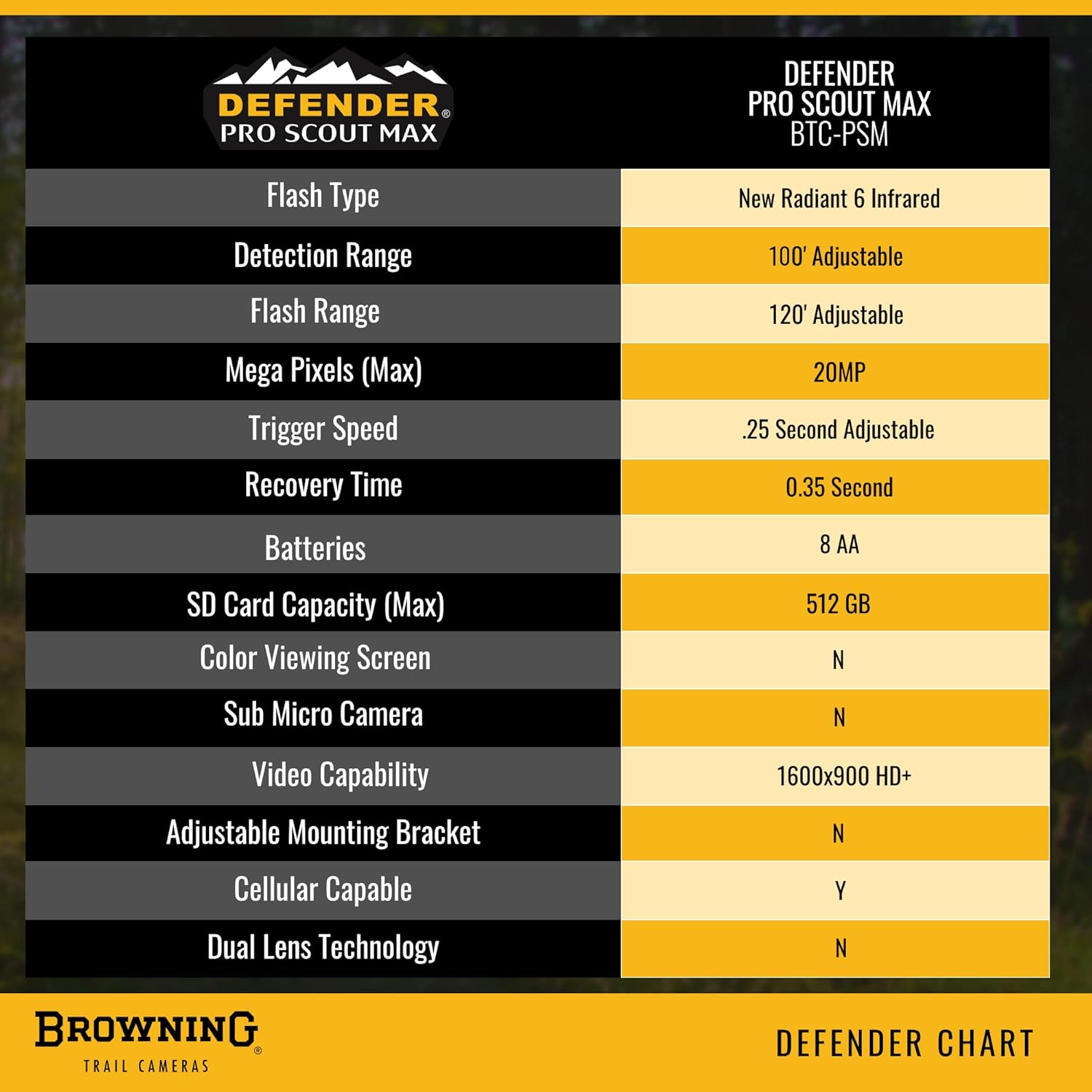
Image: A detailed comparison chart outlining the key specifications of the Defender Pro Scout MAX BTC-PSM camera.
| Funkcja | Szczegół |
|---|---|
| Nazwa modelu | Pro Scout MAX (BTC-PSM) |
| Efektywna rozdzielczość obrazu nieruchomego | 20 MP |
| Rozdzielczość przechwytywania wideo | 1600x900 HD+ (with sound) |
| Szybkość wyzwalania | 0.25 sekund |
| Czas regeneracji | 0.35 sekund |
| Zasięg wykrywania | 100 stóp |
| Zakres noktowizora | 120 Feet (Infrared Illumination) |
| Night Illumination Technology | RADIANT 6 |
| IR Flash Adjustment | Power Save, Fast Motion, Long Range |
| Illuma-Smart Technology | Yes (Automatic IR adjustment) |
| Łączność komórkowa | Nationwide 4G LTE Network (AT&T or Verizon) |
| Karty SIM | Pre-installed AT&T and Verizon |
| GPS Tagobrazy ged | Tak |
| Źródło zasilania | 8 AA Batteries (not included), 12-Volt External Power Jack |
| Żywotność baterii | Do 1 roku |
| Pojemność karty SD | Up to 512GB SDXC (not included) |
| Typ montażu | Strap, 1/4"-20 Tripod Socket |
| Wymiary (dł. x szer. x wys.) | 8.3 x 6.3 x 4.9 cala |
| Waga | 1.1 funtów |
| Międzynarodowa Ocena Ochrony | IP54 |
| Cechy specjalne | Motion Sensor, Smart IR Video, Multi-Shot, Rapid-Fire |
| Kompatybilne urządzenia | Komputer stacjonarny, smartfon, tablet |
9. Gwarancja i pomoc techniczna
9.1. Informacje o gwarancji
Browning Trail Cameras typically offer a limited warranty on their products. Please refer to the warranty card included with your purchase or visit the official Browning Trail Cameras webSzczegółowe warunki gwarancji znajdziesz na stronie. Zachowaj dowód zakupu na wypadek roszczeń gwarancyjnych.
9.2. Obsługa klienta
For technical assistance, troubleshooting, or inquiries regarding your Browning Pro Scout MAX Cellular Camera, please contact Browning Trail Cameras customer support:
- Webstrona: Odwiedź oficjalną stronę Kamery śledzące Browninga webstrona Aby uzyskać odpowiedzi na często zadawane pytania, zasoby pomocy technicznej i informacje kontaktowe.
- Aplikacja mobilna: The Strike Force Wireless App may also offer direct support options or links to help resources.


