1. Wprowadzenie
This manual provides detailed instructions for the installation, operation, and maintenance of your BOTSLAB W510 4K Wireless Outdoor Security Camera System. Please read this manual thoroughly before using the product to ensure proper functionality and safety.
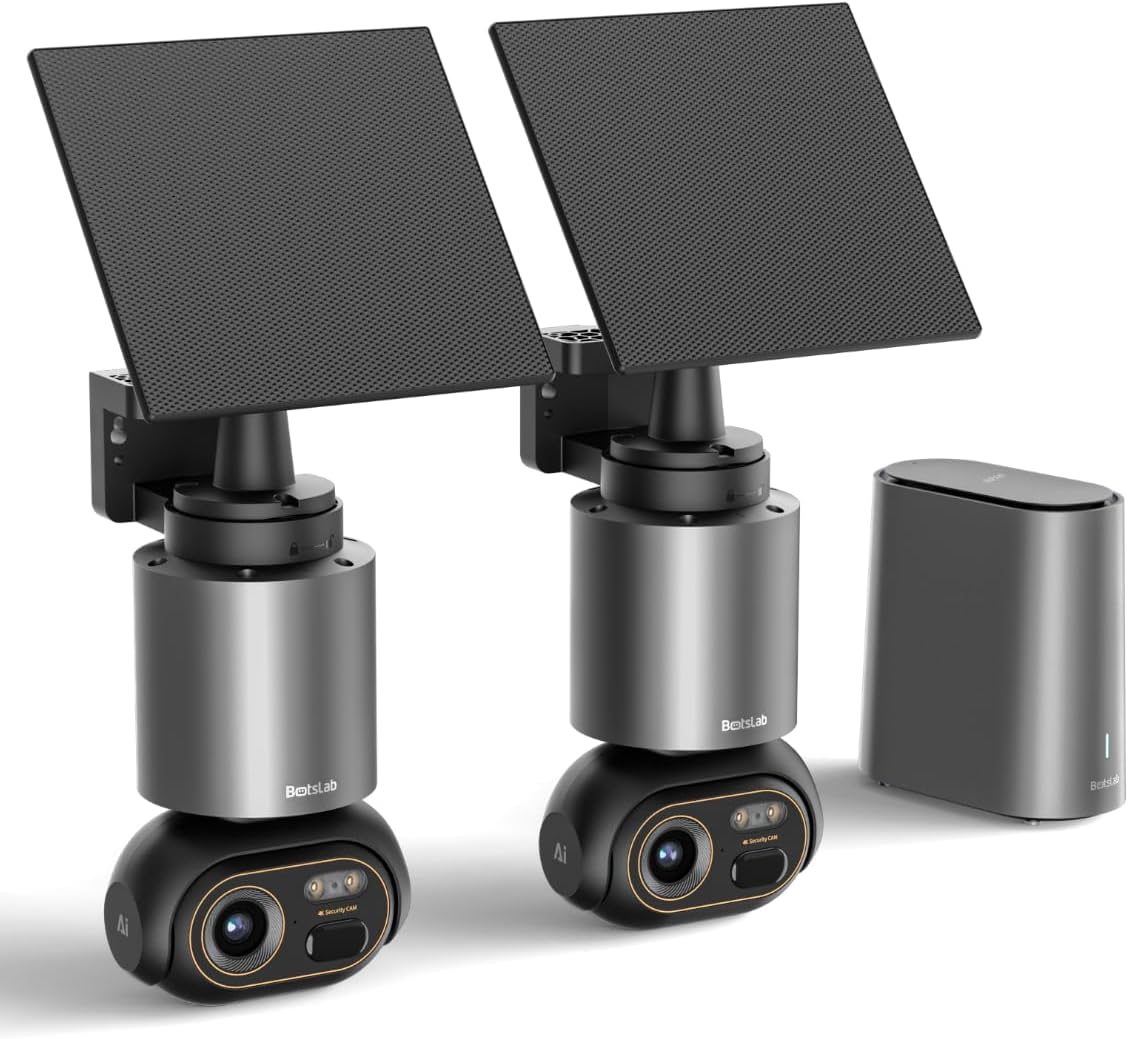
Image 1.1: The BOTSLAB W510 4K Wireless Outdoor Security Camera System, including two cameras with solar panels and the HomeBase unit.
2. Co znajduje się w pudełku
Sprawdź, czy w pakiecie znajdują się wszystkie komponenty:
- W510 Camera body *2
- Wspornik montażowy *2
- Panel słoneczny * 2
- H200 HomeBase *1
- Camera Mounting Brackets / Wall Stickers *2
- Wall Mounting Screws Package *2
- Solar Panel Mounting Bracket / Wall Stickers *2
- Solar Panel Installation Screws (for mounting) *2
- Kabel ładujący typu C * 2
- User Manual (Quick Guide + Certification) *1
- Naklejki ostrzegawcze *2
- Base Station Adapter *1
- Hard Drive Mounting Screws *1
- Kabel Ethernet *1
- User Guide Card *1

Image 2.1: All included components of the BOTSLAB W510 2-Cam Kit.
3. Koniec produktuview
The BOTSLAB W510 system offers advanced security features for outdoor surveillance.
3.1 Główne cechy
- Rozdzielczość 4K Ultra HD: Przechwytuje wyraźne i szczegółowe wideo footage.
- Kolorowe widzenie nocne: Provides vivid, full-color images even in low-light conditions.
- Zasilane energią słoneczną: Equipped with a 5W external solar panel and a 10,000mAh built-in battery for continuous operation.
- 360° Pan & Tilt: Offers a comprehensive panoramic view bez martwych punktów.
- BOTSLAB IQ (AI-Powered): Features intelligent notifications, customized warnings, quick search, and auto-tracking for people, vehicles, and pets.
- Brak opłaty miesięcznej: Utilizes local storage via the H200 HomeBase (32GB internal, expandable up to 16TB with HDD).
- Odporność na warunki atmosferyczne IP66: Zaprojektowane tak, aby wytrzymać różne warunki atmosferyczne.
- Łączność Wi-Fi 2.4G: Ensures stable and long-distance wireless communication.

Image 3.1: Demonstrates the clarity of 4K Ultra HD resolution.

Image 3.2: Illustrates the effectiveness of Color Night Vision.
4. Przewodnik konfiguracji
4.1 Montaż kamery i panelu słonecznego
The camera and solar panel can be mounted together or separately, offering flexibility for optimal solar exposure and camera placement.
- Wybierz odpowiednie miejsce dla swojego aparatu, upewniając się, że ma ono zapewniony czysty obraz. view of the area you wish to monitor and is within Wi-Fi range of the HomeBase.
- Use the provided mounting bracket and screws to securely attach the camera to a wall or ceiling.
- If mounting the solar panel separately, select a location that receives ample direct sunlight throughout the day. The solar panel can be adjusted 360° horizontally and 180° vertically.
- Connect the solar panel's USB-C cable to the camera's charging port. Ensure the port cover is securely closed after connection to maintain weather resistance.

Image 4.1: Various mounting options for the camera and solar panel.
4.2 Connecting to HomeBase
The H200 HomeBase acts as the central hub for your security system, providing local storage and managing camera connections.
- Place the HomeBase in a central location within your home, ensuring it is connected to your router via the provided Ethernet cable and powered on.
- The HomeBase will automatically connect to your cameras once they are powered on and within range.
4.3 Instalacja i parowanie aplikacji
Manage your cameras and access features through the Botslab app.
- Download the 'Botslab' app from your smartphone's app store (available on Google Play and Apple App Store).
- Utwórz konto lub zaloguj się, jeśli już je posiadasz.
- Follow the in-app instructions to add your HomeBase and cameras. This typically involves scanning a QR code on the device or manually selecting the model.
- Ensure your smartphone is connected to a 2.4GHz Wi-Fi network during the initial setup process.

Image 4.2: The Botslab mobile application for device management.
5. Instrukcja obsługi
5.1 Na żywo View i sterowanie
Access real-time video feed and control camera movement via the Botslab app.
- Open the Botslab app and select the desired camera to view transmisja na żywo.
- Use the on-screen controls to pan (horizontal movement) and tilt (vertical movement) the camera for a 360° view.
- Digital zoom allows you to magnify specific areas of the live feed or recorded video.

Image 5.1: Illustrates the 360° pan and tilt capabilities and PIR detection range.
5.2 Detekcja ruchu i powiadomienia
The system uses advanced AI to provide intelligent alerts.
- Intelligent Notification: Receive detailed, descriptive notifications on your smartphone, identifying visitors or events without needing to open the app.
- Customized Warnings: The camera analyzes the scene and can send tailored warnings to suspicious individuals based on the perceived threat level.
- Adjust detection sensitivity and set activity zones within the app to minimize false alarms.

Obraz 5.2: Example of intelligent notifications from the Botslab app.
5.3 Rejestrowanie i przechowywanie
Wszystko footage is stored locally without monthly fees.
- The H200 HomeBase includes 32GB of internal local storage, automatically looping and saving footage for up to two months.
- Storage can be expanded up to 16TB by adding a hard disk drive (not included).
- Uzyskaj dostęp do nagranego pliku footage through the app's timeline or use the Intelligent Search feature.

Image 5.3: HomeBase H200 with local and expandable storage options.
5.4 Dźwięk dwukierunkowy
Communicate with individuals near your camera using the two-way audio feature.
- Z koncertu view w aplikacji dotknij ikony mikrofonu, aby mówić przez głośnik kamery.
- The camera's built-in microphone allows you to hear audio from the camera's location.
5.5 Funkcje sztucznej inteligencji
Leverage BOTSLAB IQ for enhanced surveillance capabilities:
- Rozpoznawanie człowieka: Identifies human figures and filters videos.
- Wykrywanie pojazdów: Recognizes vehicles in the camera's view.
- Wykrywanie zwierząt domowych: Identifies pets (cats and dogs supported).
- Automatyczne śledzenie: The camera automatically tracks the movement of detected subjects (people, vehicles, pets) within its 360° field of view.
- Inteligentne wyszukiwanie: Quickly find specific events, people, vehicles, or objects in historical footage.

Image 5.4: Intelligent Search feature in the Botslab app.
6. Konserwacja
6.1 Ładowanie akumulatora
The camera is designed for minimal power intervention.
- The 5W solar panel continuously charges the built-in 10,000mAh battery. Approximately 30 minutes of direct sunlight can power the camera for a full day.
- In periods of low sunlight, the large battery capacity ensures stable operation for extended durations.
- If manual charging is required, detach the camera from its mount and use the provided Type-C charging cable.
6.2 Czyszczenie
To maintain optimal performance, periodically clean the camera lens and solar panel.
- Użyj miękkiego, damp cloth to gently wipe the lens and solar panel.
- Unikaj stosowania silnych środków chemicznych i materiałów ściernych, które mogą porysować powierzchnie.
6.3 Aktualizacje oprogramowania sprzętowego (OTA)
The system supports Over-The-Air (OTA) firmware updates to improve performance and add new features.
- Ensure your camera and HomeBase are connected to the internet.
- The Botslab app will notify you when a new firmware update is available. Follow the in-app instructions to initiate the update.
7. Rozwiązywanie Problemów
If you encounter issues with your BOTSLAB W510 system, refer to the following common solutions:
- Nie na żywo View/Urządzenie offline: Check the HomeBase's internet connection (Ethernet cable, router status). Ensure the camera is powered on and within range of the HomeBase. Restart the HomeBase and camera if necessary.
- Słaba jakość wideo: Verify your Wi-Fi signal strength. Ensure the camera lens is clean and free from obstructions. Adjust the camera's position if there are strong light sources directly facing the lens.
- Szybkie rozładowywanie baterii: Ensure the solar panel is positioned to receive maximum direct sunlight. Reduce motion detection sensitivity or frequency of recordings if not critical.
- Fałszywe alarmy: Adjust the motion detection sensitivity in the app. Define specific activity zones to monitor only relevant areas.
- Problemy z łącznością aplikacji: Ensure your smartphone has a stable internet connection. Restart the Botslab app.
8. Specyfikacje
| Funkcja | Szczegół |
|---|---|
| Zastosowanie wewnątrz/na zewnątrz | Plenerowy |
| Kompatybilne urządzenia | Smartfon (Android) |
| Źródło zasilania | Zasilany energią słoneczną |
| Protokół łączności | Wi-Fi (2.4 G) |
| Typ montażu | Montaż ścienny |
| Rozdzielczość przechwytywania wideo | 4K |
| Liczba elementów | 2 (2-Cam Kit) |
| Viewing kąt | 360 stopni (obrót i pochylenie) |
| Wymiary przedmiotu Dł. x Szer. x Wys. | 4.72 x 3.8 x 7.54 cala |
| Rozmiar zainstalowanej pamięci Flash | 32 GB (HomeBase) |
| Maksymalny obsługiwany rozmiar pamięci Flash | 16 TB (with external HDD) |
| Czy potrzebne są baterie? | Tak (w zestawie 1 bateria 12 V) |
| Typ fokusu | Autofokus |
| Technologia słabego oświetlenia | Kolor nocy |
| Typ powiększenia | Zoom cyfrowy (8x) |
| Format przechwytywania wideo | Plik AVI |
| Konkretne zastosowania produktu | Zasięg 360 stopni, nadzór |
| Metoda kontroli | Aplikacja |
| Waga przedmiotu | 9.13 funta |
| Nazwa modelu | W510 |
| Funkcja specjalna | 10000mAh Battery, 4K/8MP, No Monthly Fee, 32G Local Storage, Intelligent Notification, Intelligent Alarm, Intelligent Search, Cross-camera Tracking, Facial Detection, Human Detection, Vehicle Detection, Night Vision |
9. Gwarancja i wsparcie
BOTSLAB is committed to providing reliable products and customer satisfaction.
- 12-miesięczna gwarancja: Your BOTSLAB W510 system is covered by a 12-month warranty from the date of purchase.
- Wsparcie techniczne 24/7: For any questions or technical assistance, please contact BOTSLAB customer support.
- Informacje kontaktowe: You can reach support via Amazon Messages or through the contact details provided in the Botslab app.


