1. Wprowadzenie
The KGUSS TOPPING DX5II is a high-performance fully balanced DAC and headphone amplifier combo designed for superior audio reproduction. This manual provides essential information for setting up, operating, and maintaining your device.
Co jest w pudełku
- TOPPING DX5 II x 1
- Pilot zdalnego sterowania x 1
- Kabel USB x 1
- Kabel AC x 1
- Adapter 6.35 mm do 3.5 mm x 1
- Antena Bluetooth x 1
- Karta informacyjna produktu x 1

2. Koniec produktuview i kluczowe cechy
The DX5II is a new generation fully balanced DAC and headphone amplifier combo, offering significant upgrades and advanced functionalities for an enhanced audio experience.
Główne cechy:
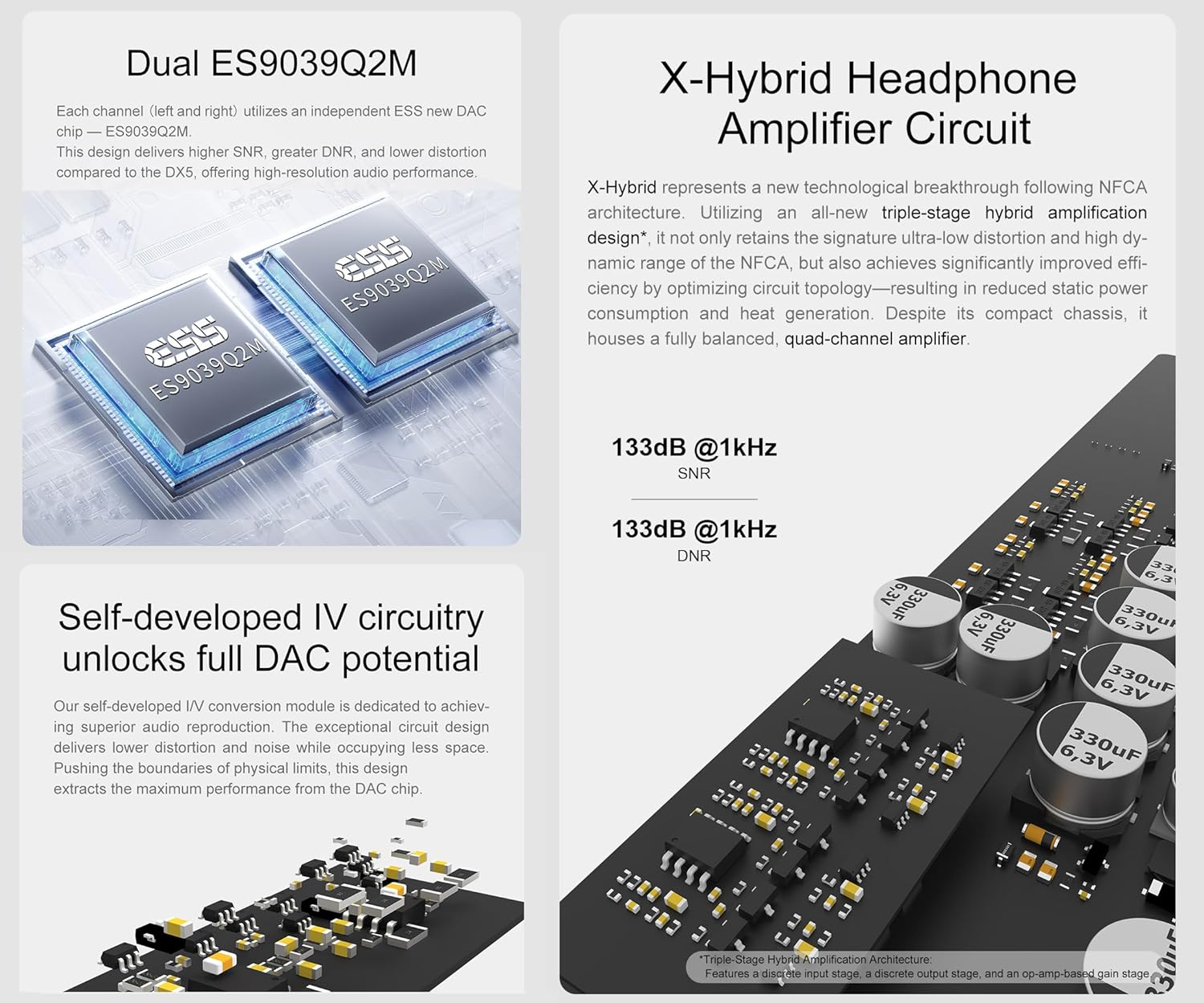
- Dual ES9039Q2M DAC Chips: Each channel utilizes an independent ESS ES9039Q2M DAC chip for lower crosstalk, improved imaging, 133dB SNR, 133dB dynamic range, and distortion as low as 0.00006%.
- X-Hybrid Headphone Ampobwód lifiera: Features an original triple-stage hybryda amp circuit (discrete input, op-amp gain, discrete output) for high efficiency, improved thermals, and precise delivery. Power output peaks at 7600mW x2 into 16Ω.
- Szeroka kompatybilność ze słuchawkami: Equipped with 6.35mm single-ended, 4.4mm balanced, and 4-pin XLR headphone jacks, suitable for low-sensitivity headphones to high-sensitive IEMs with a low noise floor of 1.8uVrms.
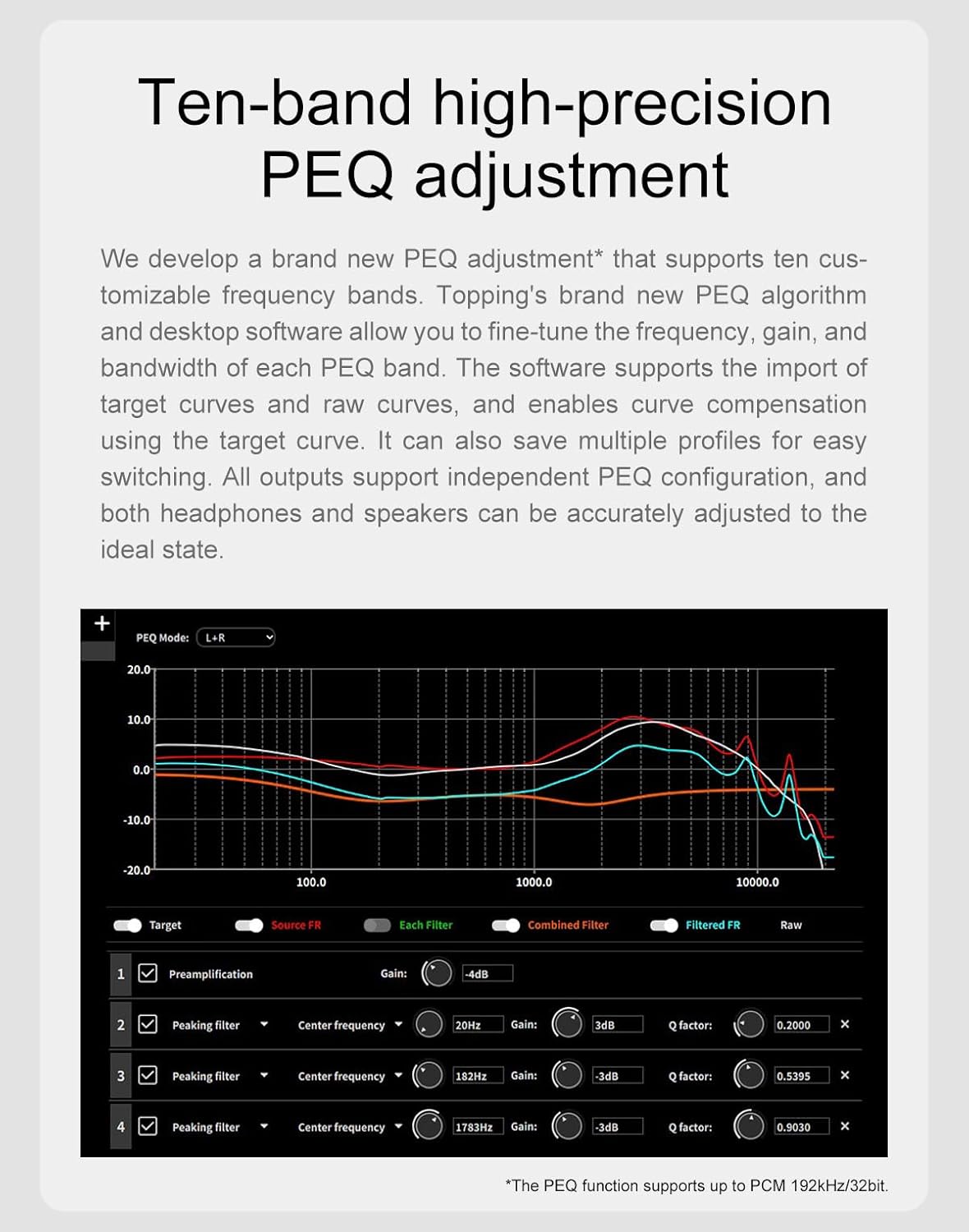
- 10-Band High-Precision PEQ: Desktop software allows tweaking 10 independent frequency bands (frequency, gain, Q-factor adjustment). Multiple profiles can be saved, and EQ can be applied independently to speakers and headphones.
- Łączność bezprzewodowa LDAC: Equipped with QCC5125 chip, supporting Bluetooth 5.1 and up to 96kHz/24bit. Fully supports LDAC, aptX-Adaptive, aptX HD, AAC, and SBC audio encodings for high-quality wireless audio.



Oficjalny film o produkcie: Ponadview
3. Połączenia i konfiguracja
Proper connection of your DX5II is crucial for optimal performance. Follow these steps to set up your device.
Panel przedni nadview
- 4-pin XLR Headphone Output Jack: Do zbalansowanych połączeń słuchawkowych.
- 6.35mm Headphone Output Jack: For single-ended headphone connections.
- 4.4mm Balanced Headphone Output Jack: Do zbalansowanych połączeń słuchawkowych.
- Ekran: Displays current status, settings, and UI.
- Odbiornik zdalnego sterowania: For infrared remote commands.
- Przycisk menu: Dostęp do menu ustawień.
- Przycisk wprowadzania: Switches input channels.
- Przycisk Home: Switches home page display modes.
- Volume Knob & User-defined Button: Rotates to adjust volume; press for user-defined functions.
Tylny panel nadview
- Zbalansowane wyjście XLR: For balanced line output to ampgłośniki aktywne lub głośniki aktywne.
- Single-ended RCA Output: For single-ended line output to ampgłośniki aktywne lub głośniki aktywne.
- Wejście USB: Łączy się z komputerem lub innym źródłem dźwięku USB.
- Optical SPDIF Input: Connects to optical audio sources.
- Coaxial SPDIF Input: Connects to coaxial audio sources.
- Wejście Bluetooth: Do bezprzewodowego strumieniowania dźwięku.
- Wejście/wyjście wyzwalacza 12 V (gniazdo 3.5 mm): Do zsynchronizowanego sterowania mocą z innymi urządzeniami.
- Power Input (AC 100-277V 50/60Hz): Umożliwia podłączenie do źródła zasilania prądem zmiennym.
- Przycisk zasilania: Włącza/wyłącza urządzenie.

Connecting to Input Sources
The DX5II supports USB, Coaxial, Optical, and Bluetooth inputs. Connect your audio source to the corresponding input port on the rear panel.
Podłączanie słuchawek
Three types of headphone jacks are available on the front panel: 6.35mm single-ended, 4.4mm balanced, and 4-pin XLR balanced. Connect your headphones to the appropriate jack.
Łączenie z Amplifiery lub aktywne głośniki
Use XLR or RCA cables to connect the DX5II to your amplifiers or active speakers. Ensure to turn off all devices before making connections to avoid damage.
Połączenie wyzwalacza 12 V
The 12V Trigger IN/OUT allows the DX5II to be activated by other devices or to activate other devices via a 3.5mm AUX cable. This enables synchronized power on/off with compatible equipment.
Official Product Video: User Manual Walkthrough
4. Instrukcja obsługi
Familiarize yourself with the operational controls and settings of your DX5II.
Power On & Off / Standby Operation
- Włączanie: Press the power switch on the rear panel.
- Czuwanie: Short press the volume knob on the front panel or use the remote control to enter standby. Press again to exit.
Ustawienie głośności
- Wycisz/Włącz wyciszenie: Naciśnij przycisk wyciszenia na pilocie.
- Regulacja głośności: Rotate the volume knob on the front panel or use the volume buttons on the remote control.
Ustawienia wejściowe
The DX5II supports multiple input channels. You can choose between auto-detect or manual selection in the setup menu. Use the Input button on the front panel or remote to switch between active inputs.
Ustawienia wyjściowe
The device allows preselection of commonly used output channels. Options include All (Headphone Outputs), All (Line Outputs), HPA SE (6.35mm), HPA BAL (4.4mm/4-pin XLR), LO SE (RCA), and LO BAL (XLR).
PCM Filter Setting
The DX5II offers various PCM filter options (F-1 to F-8) to fine-tune the sound characteristics.
PEQ Configuration
The 10-band high-precision PEQ can be configured via desktop software. You can save up to 5 custom configurations and apply them offline.
Aurora UI Display
The 2.0-inch full-color screen offers various display modes (Normal, VU, FFT) and customizable background colors. The pressable knob supports customizable functions.
5. Rozwiązywanie Problemów
If you encounter any issues with your DX5II, refer to the following common problems and solutions:
- Brak dźwięku: Check power supply, input selection, cable connections, and upstream devices.
- H/M/L blinks, others are off (Firmware exception): Unplug and re-plug the power cable, then flash the firmware again.
- HML and H/L blinks alternately (Input voltage is high/low): Użyj dołączonego zasilacza.
- HML and M blinks alternately (Positive and negative voltage anomalies): Check power supply, disconnect other devices, and reboot.
- Blinks only the current gain LED (Headphone ampobwód liifiera generuje nieprawidłową objętość prądu stałegotagmi): Change the song or turn down the volume.
Aby uzyskać dalszą pomoc, skontaktuj się z obsługą klienta.
Official Product Video: Troubleshooting Guide
6. Specyfikacje
Atrybuty ogólne
| Atrybut | Wartość |
|---|---|
| Zmierzone wymiary | 19.0cm x 15.5cm x 4.4cm (including protruding parts) |
| Waga | 945g |
| Moc wejściowa | 100-277 V AC 50Hz/60Hz |
| sygnał wejściowy | USB/BT/OPCJA/KONCENTRYCZNY |
| Wyjście liniowe | XLR/RCA |
| Gniazdo wyjścia słuchawkowego | 6.35mm headphone output jack, 4.4mm headphone output jack, 4-PIN-XLR headphone output jack |
| Inne złącza | 12V Trigger In (3.5mm jack), 12V Trigger Out (3.5mm jack) |
| Zasięg Bluetooth | >10 mln |
| Wyświetlacz | 2inch LCD |
| Kontrola | 3 buttons + multifunction knob + Remote control |
| Pobór mocy w trybie czuwania | <1.3 W |
| Pobór mocy | <6 W |
DX5 II DAC Parameters (LineOut/USB In@96kHz)
| Parametr | RCA | XLR |
|---|---|---|
| THD+N @1kHz (A-masa) | <0.00008% | <0.00006% |
| THD @20-20kHz 90kBw | <0.0005% | <0.00015% |
| SNR przy 1 kHz (A-masa) | 128dB | 132dB |
| Zakres dynamiki przy 1 kHz (A-wt) | 128dB | 132dB |
| Odpowiedź częstotliwościowa | 20 Hz-20 kHz (±0.3 dB), 20 Hz-40 kHz (±1.0 dB) | 20 Hz-20 kHz (±0.3 dB), 20 Hz-40 kHz (±1.0 dB) |
| Poziom wyjściowy | 2.5 Vrms przy 0 dBFS | 5.0 Vrms przy 0 dBFS |
| Hałas @A-wt | <1.1uVrms | <1.3uVrms |
| Przesłuch w kanale | -135 dB przy 1 kHz | -147 dB przy 1 kHz |
| Równowaga kanału | 0.3dB | 0.3dB |
| Impedancja wyjściowa | 50Ω | 100Ω |
Uwaga: Powyższe dane są wynikiem testu przeprowadzonego w laboratorium TOPPING w warunkach AC220V 50Hz.
Słuchawki DX5 II Amplifier Specifications (USB In@96kHz)
| Parametr | Gniazdo słuchawkowe 6.35 mm | Gniazdo słuchawkowe XLR 4.4 mm/4-pinowe |
|---|---|---|
| THD+N @1kHz (A-masa) | <0.00008% @Output=20mW (32Ω), <0.00007% @Output=22mW (300Ω) | <0.00007% @Output=85mW (32Ω), <0.00007% @Output=85mW (300Ω) |
| THD @20-20kHz (90kBw) | <0.0005% @Output=20mW (32Ω), <0.0005% @Output=22mW (300Ω) | <0.0005% @Output=85mW (32Ω), <0.0005% @Output=90mW (300Ω) |
| SNR @MAX OUT 1kHz (A-ważony) | 131dB | 133dB |
| Zakres dynamiki przy 1 kHz (A-wt) | 131dB | 133dB |
| Odpowiedź częstotliwościowa | 20 Hz-20 kHz (±0.3 dB), 20 Hz-40 kHz (±1.0 dB) | 20 Hz-20 kHz (±0.3 dB), 20 Hz-40 kHz (±1.0 dB) |
| Poziom wyjściowy | 7.2Vpp @G=L, 24.2Vpp @G=H | 15.0Vpp @G=L, 48.6Vpp @G=H |
| Hałas (wagowo) | <2.5uVrms @G=H, <1.1uVrms @G=L | <4.3uVrms @G=H, <1.8uVrms @G=L |
| Przesłuch w kanale | -127 dB przy 1 kHz | -143 dB przy 1 kHz |
| Osiągać | G=L 8.6dB (Vrms/FS), G=H 18.7dB (Vrms/FS) | G=L 14.6dB (Vrms/FS), G=H 24.7dB (Vrms/FS) |
| Równowaga kanału | 0.3dB | 0.3dB |
| Impedancja wyjściowa | <0.1Ω | <0.1Ω |
| Moc wyjściowa | 3300mW x 2 @16Ω THD+N<1%, 2200mW x 2 @32Ω THD+N<1%, 1160mW x 2 @64Ω THD+N<1%, 250mW x 2 @300Ω THD+N<1%, 120mW x 2 @600Ω THD+N<1% | 7600mW x 2 @16Ω THD+N<1%, 6400mW x 2 @32Ω THD+N<1%, 4300mW x 2 @64Ω THD+N<1%, 990mW x 2 @300Ω THD+N<1%, 490mW x 2 @600Ω THD+N<1% |
| Impedancja obciążenia | > 8 Ω | > 8 Ω |
Uwaga: Powyższe dane są wynikiem testu przeprowadzonego w laboratorium TOPPING w warunkach AC220V 50Hz.
7. Środki ostrożności
- Nie trzymaj urządzenia w gorącym, wilgotnym środowisku ani nie uderzaj mocno w urządzenie.
- Otwarcie obudowy powoduje natychmiastową utratę gwarancji!
- Tylko do użytku wewnątrz pomieszczeń.
- Topping nie ponosi żadnej odpowiedzialności za straty lub szkody powstałe bezpośrednio lub pośrednio w wyniku awarii DX5 II.
- Ze względu na konieczność udoskonalenia specyfikacje mogą ulec zmianie bez wcześniejszego powiadomienia.
8. Gwarancja i wsparcie
Hificollege aims for 100% customer satisfaction. We offer authoritative certification, ensuring 100% authenticity of all products sold. Our support team is ready to answer any questions 24/7. We provide more than 1 year of quality restoration, covering repair and shipping costs. We also offer a lowest price match within 30 days.