1. Wprowadzenie
The AOCHUAN Smart M3 is a versatile 3-in-1 device combining a selfie stick, desktop stand, and floor tripod, featuring advanced AI face tracking and remote control capabilities. Designed for content creators and everyday users, it offers hands-free video recording and photography without the need for a dedicated application. This manual provides comprehensive instructions for setting up, operating, and maintaining your Smart M3 tripod.
2. Informacje dotyczące bezpieczeństwa
- Nie wystawiaj urządzenia na działanie ekstremalnych temperatur ani bezpośredniego światła słonecznego przez dłuższy czas.
- Trzymaj urządzenie z dala od wody i innych płynów.
- Unikaj upuszczania i narażania urządzenia na silne uderzenia.
- Nie próbuj samodzielnie demontować ani naprawiać urządzenia. Skontaktuj się z obsługą klienta, aby uzyskać pomoc.
- Ensure your smartphone is securely mounted in the holder before use.
3. Zawartość opakowania
Sprawdź, czy w pakiecie znajdują się wszystkie elementy:
- Smart M3 AI Face Tracking Tripod
- Pilot zdalnego sterowania (x1)
- Kabel ładujący USB-C (x1)
- Instrukcja obsługi produktu (x1)

4. Koniec produktuview
The AOCHUAN Smart M3 features an integrated design with several key components:
- Uchwyt na telefon: Securely holds smartphones from 1.8 to 3.8 inches in width.
- AI Tracking Camera: Located on the main unit, it detects and follows faces.
- Przycisk zasilania: Do włączania/wyłączania urządzenia.
- Port ładowania USB-C: Do ładowania wewnętrznego akumulatora.
- Remote Control Slot: Stores the detachable Bluetooth remote.
- Rozsuwany drążek: Made from aluminum alloy, extends up to 57 inches.
- Nogi statywu: Four-legged design with anti-slip rubber pads for enhanced stability.


5. Konfiguracja
5.1 Rozkładanie statywu
- Gently pull the bottom of the device to extend the tripod legs. Ensure they are fully spread for maximum stability.
- Extend the telescopic pole to your desired height. The pole can reach up to 57 inches.
5.2 Podłączanie smartfona
- Open the phone holder by pulling the top clip upwards.
- Carefully place your smartphone into the holder, ensuring it is centered and securely gripped. The holder accommodates devices from 1.8 to 3.8 inches wide.
5.3 Włączanie
Naciśnij i przytrzymaj przycisk zasilania na jednostce głównej, aż zaświeci się kontrolka.
5.4 Parowanie pilota
The remote control uses Bluetooth. To pair, ensure the remote is charged and the tripod is powered on. Activate Bluetooth on your smartphone and select the Smart M3 remote from the list of available devices. The remote is typically pre-paired or automatically connects upon activation.
6. Instrukcja obsługi
6.1 Śledzenie twarzy przez sztuczną inteligencję
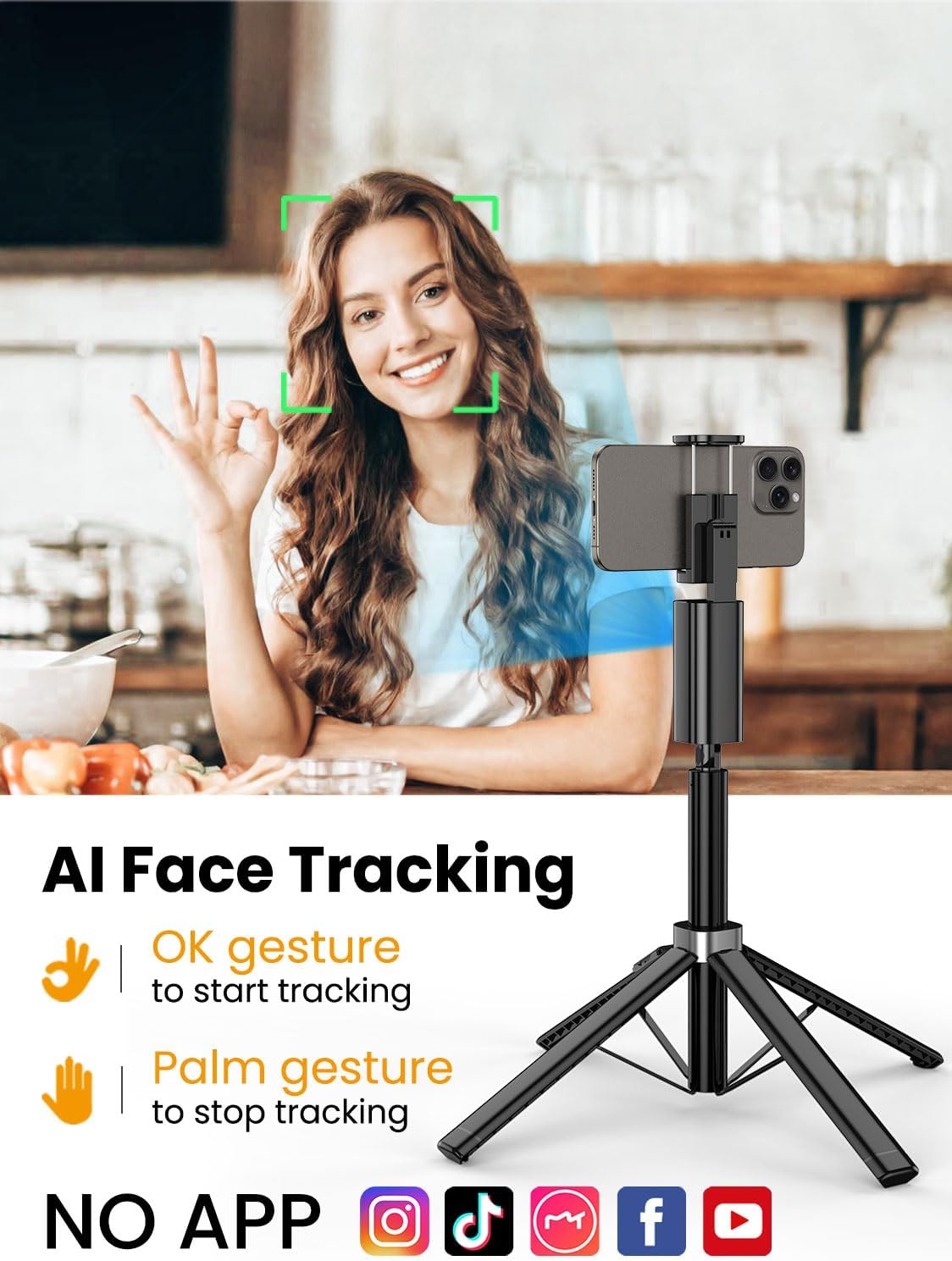
The Smart M3 features an integrated AI tracking camera that does not require an app. It automatically detects and follows faces.
- To Start Tracking: Make an "OK" gesture with your hand towards the AI tracking camera. The device will begin to rotate and follow your face.
- To Stop Tracking: Show your open palm to the AI tracking camera. The device will pause tracking.

6.2 Funkcja zdalnego sterowania
The detachable remote control allows you to operate your smartphone's camera from a distance of up to 10 meters (32 feet). Use it to trigger photos or start/stop video recording, ideal for group shots or solo content creation.

6.3 Extendable Pole
The built-in aluminum alloy extension pole can be adjusted to a maximum height of 57 inches, providing flexibility for various shooting scenarios and wider fields of view.

6.4 Fotografowanie pod wieloma kątami
The Smart M3 offers extensive adjustability for capturing unique perspectives:
- Głowica obrotowa 360°: Allows for panoramic shots and seamless tracking.
- Regulacja nachylenia 270°: Adjust the vertical angle of your smartphone.
- 360° Balanced Handle: Provides additional rotational flexibility.

6.5 Tryby użytkowania
The Smart M3 can be used in three primary modes:
- Podstawka biurkowa: Compact mode for stable placement on flat surfaces.
- Extended Selfie Mode: Use the extended pole for wider selfie shots.
- Floor Tripod Mode: Fully extend the pole and legs for stable, elevated recording.

7. Konserwacja
- Czyść urządzenie miękką, suchą ściereczką. Nie używaj środków czyszczących o właściwościach ściernych ani rozpuszczalników.
- Przechowuj statyw w chłodnym i suchym miejscu, gdy nie jest używany.
- Ensure the remote control is securely stored in its slot to prevent loss.
8. Rozwiązywanie Problemów
- Urządzenie się nie włącza: Sprawdź, czy urządzenie jest w pełni naładowane, używając dołączonego kabla USB-C.
- AI Face Tracking not working: Check for sufficient lighting. Ensure your face is clearly visible to the AI tracking camera. Avoid rapid movements that might cause the tracker to lose focus.
- Remote Control not connecting: Verify that the remote's battery is functional and that Bluetooth is enabled on your smartphone. Re-pair the remote if necessary.
- Niestabilność statywu: Ensure the four legs are fully extended and placed on a flat, stable surface. Avoid using in strong winds.
9. Specyfikacje
| Funkcja | Specyfikacja |
|---|---|
| Wymiary produktu | 1.77 x 1.57 x 57 cala |
| Waga przedmiotu | 1.08 funta (0.49 kilograma) |
| Baterie | Wymagana 1 bateria litowo-jonowa (w zestawie) |
| Producent | AOCHUAN |
| Marka | AOCHUAN |
| Kolor | Czarny |
| Kompatybilne urządzenia | Smartfon |
| Tworzywo | Aluminium |
| Maksymalna wysokość | 57 cali |
| Typ głowicy statywu | Głowy Pana |
| Liczba sekcji nóg | 4 |
| Rozmiar po złożeniu | 12.41 cali |
10. Gwarancja i wsparcie
For warranty information and customer support, please refer to the contact details provided on the product packaging or visit the official AOCHUAN webstrona. Zachowaj dowód zakupu na potrzeby roszczeń gwarancyjnych.


