1. Wprowadzenie
This manual provides essential information for the proper installation, operation, and maintenance of your X-Sense XS0E-iR Smart Wi-Fi Smoke Detector. Please read this manual thoroughly before use and retain it for future reference. This device is designed to detect smoke and provide early warning of potential fires.
2. Koniec produktuview
The X-Sense XS0E-iR is a smart Wi-Fi smoke detector featuring a photoelectric sensor for reliable fire protection. It connects directly to your 2.4 GHz Wi-Fi network, allowing for remote monitoring and control via the X-Sense Home Security application. Key features include a 10-year sensor lifespan, a replaceable battery, an 85 dB alarm, and a multi-color LED status indicator.
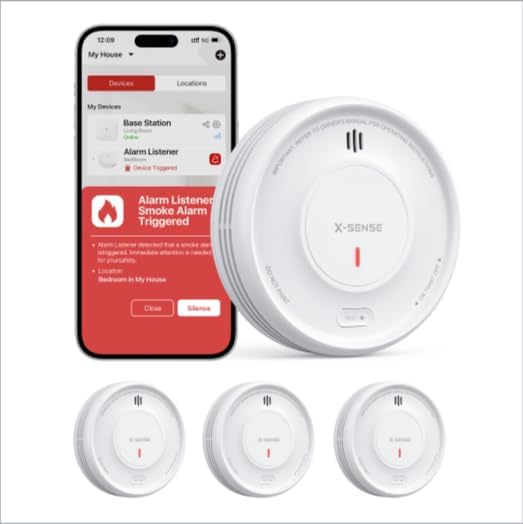
Image 1: X-Sense XS0E-iR Smart Wi-Fi Smoke Detectors and the accompanying mobile application interface. The image displays three smoke detectors and a smartphone screen showing an alarm notification within the app.
3. Zawartość opakowania
Sprawdź, czy po otwarciu opakowania znajdują się wszystkie elementy:
- 3 x X-Sense XS0E-iR Smart Wi-Fi Smoke Detectors
- 6 x Śruby
- 6 x kotwy ścienne
- 1 x Instrukcja obsługi
4. Konfiguracja i instalacja
4.1 Instalacja baterii
- Twist the mounting bracket counter-clockwise to detach it from the detector.
- Insert the provided CR123A battery into the battery compartment, ensuring correct polarity.
- Reattach the mounting bracket by aligning it and twisting clockwise until it clicks into place.
4.2 Montaż detektora
Choose a suitable location for installation, typically on the ceiling in the center of a room or hallway. Avoid corners or areas near vents.
- Mark two drill holes on the ceiling using the mounting bracket as a template.
- Wywierć otwory i włóż kotwy ścienne.
- Secure the mounting bracket to the ceiling with the screws.
- Attach the smoke detector to the mounting bracket by aligning and twisting clockwise until it is firmly in place.
4.3 Połączenie i parowanie aplikacji
The XS0E-iR connects directly to your 2.4 GHz Wi-Fi network.
- Pobierz Bezpieczeństwo w domu X-Sense aplikację ze sklepu z aplikacjami na Twoim urządzeniu.
- Utwórz konto lub zaloguj się.
- Follow the in-app instructions to add a new device. Ensure your smartphone is connected to a 2.4 GHz Wi-Fi network.
- The app will guide you through the pairing process, which typically involves pressing a button on the detector to initiate Wi-Fi pairing mode (indicated by a blue LED).
5. Instrukcja obsługi
5.1 Device Power On/Off
The device powers on automatically upon battery installation. To power off, remove the battery.
5.2 Testowanie detektora
Press and hold the test button on the detector for a few seconds. The alarm will sound (85 dB) and the LED will flash red. This confirms the detector is functioning correctly. Perform this test weekly.
5.3 Zachowanie alarmowe
When smoke is detected, the alarm will sound loudly (85 dB) and the red LED will flash rapidly. Notifications will also be sent to your connected smartphone via the X-Sense Home Security app.
5.4 Funkcje kontroli aplikacji
- Dezaktywacja alarmu: Silence the alarm directly from the app.
- Sprawdź status: View the current status of your detectors.
- Powiadomienia: Receive real-time alerts for alarms, malfunctions, or low battery.
- Tryb nocny: Deactivates the green LED light for undisturbed sleep. This setting can be managed through the app.
- Historia: Access a log of past events and alarms.
- Udostępnianie urządzenia: Share access to the device with family members through the app.
6. Przewodnik po wskaźnikach LED
The 4-color LED indicator provides visual status updates:
- Zielony: Indicates standby mode or normal operation.
- Czerwony: Indicates an alarm condition (smoke detected).
- Żółty: Indicates a malfunction or alert (e.g., low battery, end of product life).
- Niebieski: Indicates Wi-Fi pairing mode.
7. Wymiana baterii
The XS0E-iR uses a replaceable CR123A battery with an estimated lifespan of up to 1 year. When the battery is low, the detector will emit a yellow LED flash and send a notification to your app.
- Obróć detektor w kierunku przeciwnym do ruchu wskazówek zegara, aby wyjąć go z uchwytu montażowego.
- Otwórz komorę baterii.
- Remove the old CR123A battery and dispose of it properly.
- Włóż nową baterię CR123A, zwracając uwagę na prawidłową biegunowość.
- Zamknij komorę baterii i ponownie zamontuj detektor w uchwycie montażowym.
8. Konserwacja
Regular maintenance ensures optimal performance of your smoke detector.
- Test tygodniowy: Press the test button weekly to ensure the alarm functions.
- Miesięczne sprzątanie: Gently vacuum the detector's cover and vents using a soft brush attachment to remove dust and debris. Do not use water or cleaning solutions.
- Sprawdzenie baterii: Replace the battery promptly when a low battery alert is received.
9. Rozwiązywanie Problemów
| Wydanie | Możliwa przyczyna | Rozwiązanie |
|---|---|---|
| Detector not connecting to Wi-Fi | Nieprawidłowe pasmo Wi-Fi (obsługiwane jest tylko pasmo 2.4 GHz); słaby sygnał; nieprawidłowe hasło. | Ensure your router is set to 2.4 GHz. Move the detector closer to the router. Re-enter Wi-Fi password carefully. |
| Fałszywe alarmy | Dust accumulation; steam from bathroom/kitchen; cooking fumes. | Clean the detector monthly. Relocate the detector away from sources of steam or cooking fumes. |
| Yellow LED flashing/App alert | Low battery; end of product life; malfunction. | Replace the battery. If the issue persists after battery replacement, the detector may have reached its end of life and requires replacement. |
| No alarm during test | Dead battery; device malfunction. | Replace the battery. If still no alarm, the device may be faulty and needs replacement. |
10. Specyfikacje
| Funkcja | Szczegół |
|---|---|
| Numer modelu | XS0E-iR |
| Typ czujnika | Fotoelektryczny |
| Źródło zasilania | 1 x CR123A Battery (included) |
| Żywotność baterii | Up to 1 year (replaceable) |
| Głośność alarmu | 85dB |
| Łączność | Wi-Fi 2.4 GHz |
| Wymiary (dł. x szer. x wys.) | 110 × 110 × 30 mm (4.33 × 4.33 × 1.18 cala) |
| Tworzywo | Tworzywo ABS |
| Wilgotność robocza | ≤ 85% |
| Kolor | Biały |
11. Informacje dotyczące bezpieczeństwa
- Nie maluj czujnika dymu. Farba może zatkać komory pomiarowe i uniemożliwić prawidłowe działanie urządzenia.
- Do not install in areas with high humidity, such as bathrooms, or near cooking appliances where steam or smoke could cause false alarms.
- Ensure the detector is installed according to local building codes and regulations.
- Regularly test the detector to ensure it is functioning properly.
- This device is designed for residential use.
12. Gwarancja i wsparcie
Informacje dotyczące szczegółowych warunków gwarancji i danych kontaktowych działu obsługi klienta nie są dostępne w dostarczonych danych produktu. Prosimy o zapoznanie się z opakowaniem produktu lub oficjalną informacją producenta. webmiejsce składania reklamacji gwarancyjnych i udzielania pomocy technicznej.