1. Wprowadzenie
The Moorgen T9 Smart Door Lock is an advanced security solution designed to provide comprehensive protection and convenient access to your property. Featuring a six-layer security system, the T9 integrates cutting-edge technologies such as face recognition, fingerprint scanning, virtual password, and anti-pry alarm capabilities to ensure a secure and intelligent living environment.
This manual provides detailed instructions for the setup, operation, maintenance, and troubleshooting of your Moorgen T9 Smart Door Lock. Please read it carefully before installation and use to ensure optimal performance and safety.
2. Zawartość opakowania
Przed przystąpieniem do instalacji należy sprawdzić, czy w opakowaniu znajdują się wszystkie elementy:
- Smart Door Lock (1 Front panel, 1 Back Panel)
- Instrukcja instalacji
- Cutting Scall Board
- Sprzęt montażowy
- Tarcza gumowa
- Podstawka
- Rękawice
- Bateria
- Kabel ładujący
- 2 RFID Smart Cards
- 2 klucze

Obraz: Ponadview of the Moorgen T9 Smart Door Lock, showing the front and back panels, which are the main components of the lock system.
3. Konfiguracja i instalacja
This section outlines the general steps for installing and setting up your Moorgen T9 Smart Door Lock. For detailed, step-by-step instructions, please refer to the dedicated Installation Manual included in your package.
3.1 Kontrole przed instalacją
- Ensure your door thickness is compatible with the lock.
- Verify that the door frame and strike plate are aligned correctly.
- Sprawdź, czy cała zawartość opakowania jest obecna.
3.2 Fizyczna instalacja
Follow the diagrams and instructions in the separate Installation Manual for precise drilling and mounting of the lock components. This typically involves:
- Przygotowanie drzwi (w razie potrzeby wiercenie otworów).
- Montaż zamka wpuszczanego.
- Mounting the front and back panels.
- Podłączanie kabli wewnętrznych.
- Securing the lock with mounting hardware.

Image: Close-up of the Moorgen T9 Smart Door Lock's front panel, featuring the keypad and camera, essential for installation and initial setup.
3.3 Pierwsze uruchomienie i konfiguracja
Once physically installed, insert the battery and power on the lock. Follow the on-screen prompts or voice guidance for initial setup, which includes:
- Setting the administrator password.
- Connecting to your home Wi-Fi network (via the Moorgen app).
- Registering initial users (face, fingerprint, password, RFID card).
4. Instrukcja obsługi
The Moorgen T9 Smart Door Lock offers multiple convenient and secure ways to access your property.
4.1 Metody odblokowywania
- Rozpoznawanie twarzy: Stand in front of the lock. The integrated camera will scan your face for rapid unlocking (approx. 0.4 seconds).
- Odcisk palca: Połóż zarejestrowany palec na czytniku linii papilarnych.
- Kod dostępu: Enter your 6-digit password on the keypad. Utilize the anti-peeping virtual password feature by entering random numbers before or after your actual password.
- Karta RFID: Present your registered RFID card to the designated sensor area.
- Klucz mechaniczny: In case of emergency or power failure, use the provided mechanical keys.

Image: A user demonstrating the face recognition feature of the Moorgen T9 Smart Door Lock, highlighting its quick and secure access method.
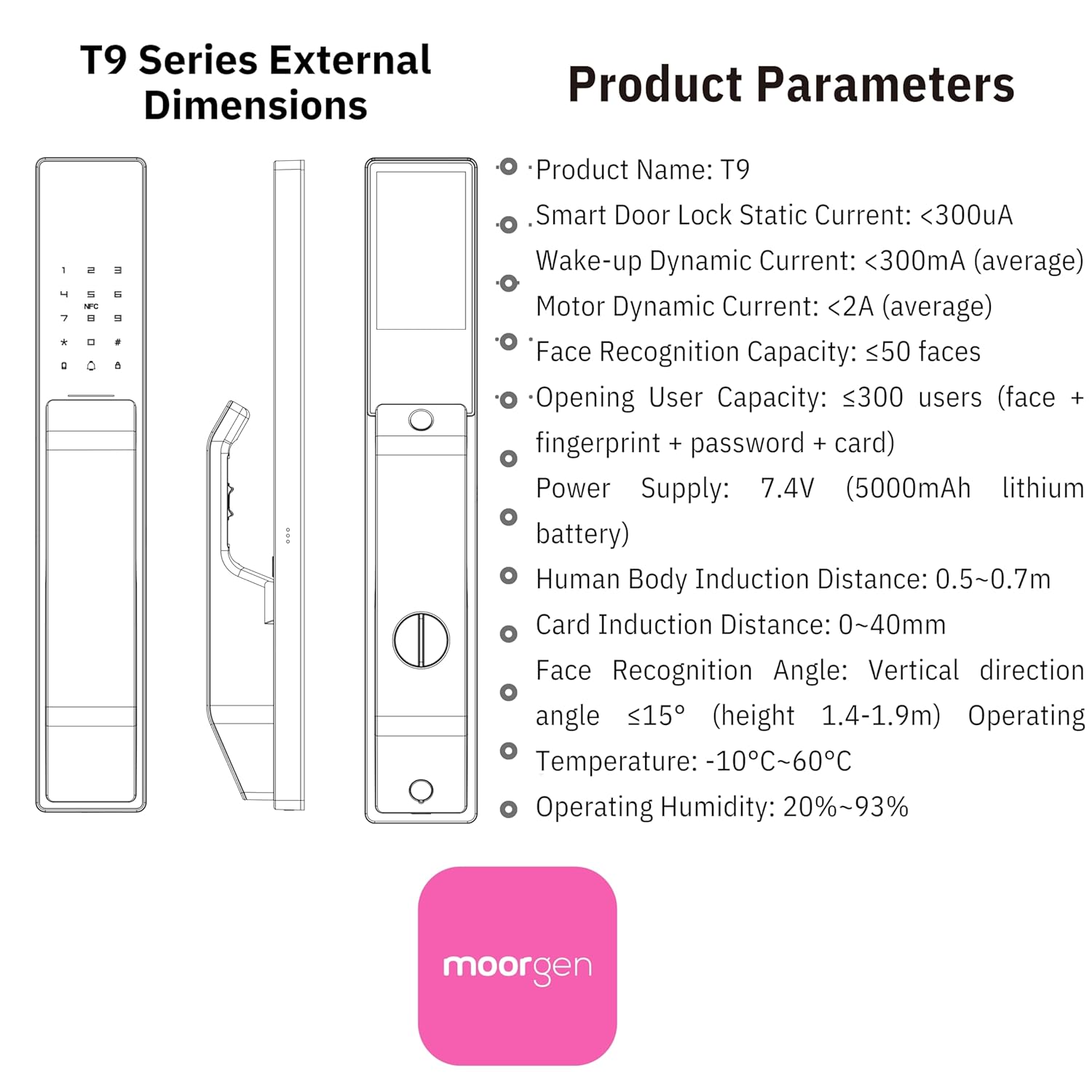
Image: Visual comparison demonstrating the Moorgen T9's facial recognition accuracy and ability to overcome various disguises, ensuring reliable unlocking.

Obraz: Szczegółowy view of the Moorgen T9's fingerprint recognition area, illustrating the advanced sensor technology for quick and accurate biometric access.
4.2 Mechanizm blokujący
The Moorgen T9 Smart Door Lock features an automatic locking system for enhanced security. After closing the door, the lock will automatically engage.
4.3 tryby pracy
- Homeowner Mode: The door lock activates after being locked from the inside. Only administrators and enrolled users can enter and exit, ensuring private space for confidential discussions.
- Tryb biurowy: The door lock enters the constant open mode, allowing anyone to enter and exit at any time. This mode facilitates smooth communication for work environments.
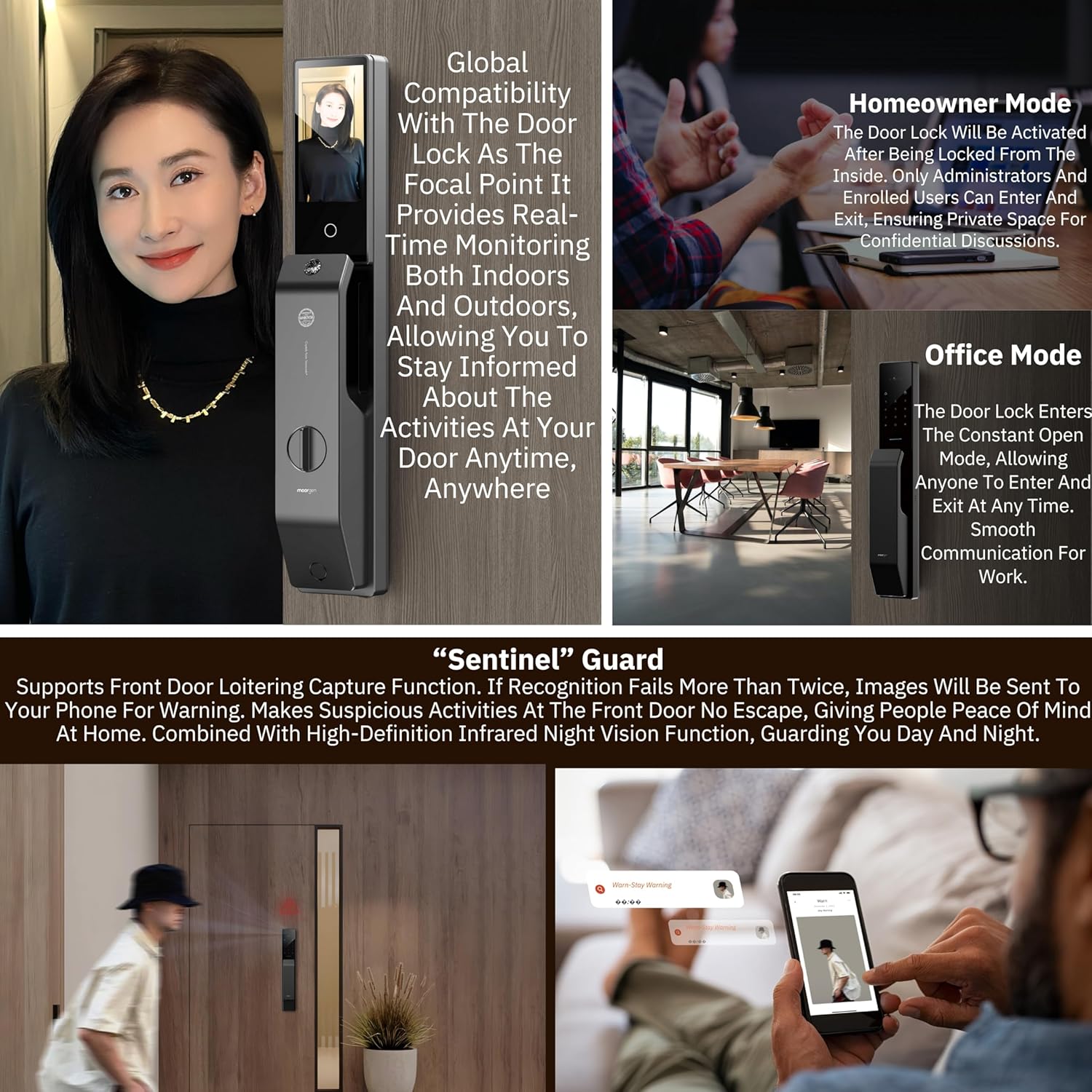
Image: Illustration of the Moorgen T9's Homeowner Mode and Office Mode, showing how the lock adapts to different security and access needs.
4.4 Smart Monitoring and Intercom
- 24-Hour Sentinel Surveillance: The lock features loitering detection that sends instant mobile alerts when someone lingers at your doorstep. If recognition fails more than twice, images will be sent to your phone for warning.
- Proactive Visual Intercom: A 5-inch large HD display with a 1-megapixel HD camera provides a clear view of the situation outside the door.
- Multi-screen Visual Intercom: Connect to Moorgen's smart home system for visual intercom functionality with Moorgen's smart screen.

Image: Depiction of the Moorgen T9's "Sentinel" Guard feature, showing loitering detection and mobile alerts for enhanced security monitoring.

Image: Diagram illustrating the Moorgen T9's smart linkage multi-screen visual intercom system, showing integration with smart home displays for communication.
5. Konserwacja
Proper maintenance ensures the longevity and optimal performance of your Moorgen T9 Smart Door Lock.
5.1 Czyszczenie
- Przetrzyj powierzchnię zamka miękką szmatką.amp płótno.
- Unikaj stosowania środków czyszczących o działaniu ściernym, rozpuszczalników i silnych środków chemicznych, ponieważ mogą one uszkodzić wykończenie i podzespoły elektroniczne.
- Ensure the fingerprint sensor and camera lens are clean and free of smudges for accurate recognition.
5.2 Zarządzanie baterią
- The lock is powered by a 7.4V (5000mAh) lithium battery.
- Recharge the battery using the provided charging cable when the low battery indicator appears.
- Regularly check battery levels via the Moorgen app for uninterrupted operation.
6. Rozwiązywanie Problemów
If you encounter issues with your Moorgen T9 Smart Door Lock, refer to the following common problems and solutions:
| Problem | Możliwa przyczyna | Rozwiązanie |
|---|---|---|
| Zamek nie odpowiada | Niski poziom naładowania baterii; Błąd systemu | Charge the battery; Restart the lock (refer to manual for reset procedure); Use mechanical key. |
| Face/Fingerprint recognition failure | Sensor/camera dirty; Improper positioning; Unregistered user | Clean sensor/camera; Ensure proper positioning; Re-register biometric data; Use alternative unlocking method. |
| Kod dostępu nie działa | Incorrect password; Keypad malfunction | Verify password; Try again; Use alternative unlocking method. |
| Anti-pry alarm triggers frequently | Sensitivity too high; Physical disturbance | Adjust alarm sensitivity settings in the app; Ensure lock is securely installed and not subject to external vibrations. |
If the problem persists after attempting these solutions, please contact Moorgen customer support.
7. Specyfikacje
Detailed technical specifications for the Moorgen T9 Smart Door Lock:
| Funkcja | Szczegół |
|---|---|
| Marka | Moorgen |
| Nazwa modelu | Moorgen T9 Smart Lock |
| Typ zamka | Biometryczny |
| Tworzywo | Cynk |
| Kolor | Czarny |
| Rodzaj wykończenia | Matte Polish |
| Pozycja Wymiary (dł. x szer. x wys.) | 43 x 7 x 8 centymetrów |
| Waga przedmiotu | 3.5 gram |
| Zasilacz | 7.4V (5000mAh lithium battery) |
| Face Recognition Capacity | ≤50 faces |
| Opening User Capacity | ≤300 users (face + fingerprint + password + card) |
| Protokół łączności | Bluetooth, WiFi |
| Metoda kontroli | Aplikacja, dotyk |
| Temperatura pracy | -10°C ~ 60°C |
| Wilgotność robocza | 20% ~ 93% |

Image: Technical drawing showing the external dimensions of the Moorgen T9 Smart Door Lock and a summary of its key product parameters.
8. Gwarancja i wsparcie
Moorgen is committed to providing high-quality products and customer satisfaction.
8.1 Informacje o gwarancji
Please refer to the warranty card included with your product for specific warranty terms and conditions. The warranty typically covers manufacturing defects and malfunctions under normal use.
8.2 Obsługa klienta
For technical assistance, troubleshooting, or warranty claims, please contact the manufacturer or authorized distributor:
- Producent: Moorgen Deutschland GmbH
- Distributor (India): GK Trading house
- E-mail: salesecommerce2025@gmail.com
- Telefon: 9537400727
When contacting support, please have your product model (T9) and ASIN (B0F9YK251Q) ready.


