1. Wprowadzenie
This manual provides essential information for the proper setup, operation, and maintenance of your Ulefone Armor 29 Ultra 5G rugged smartphone. Please read this guide thoroughly before using your device to ensure optimal performance and longevity.
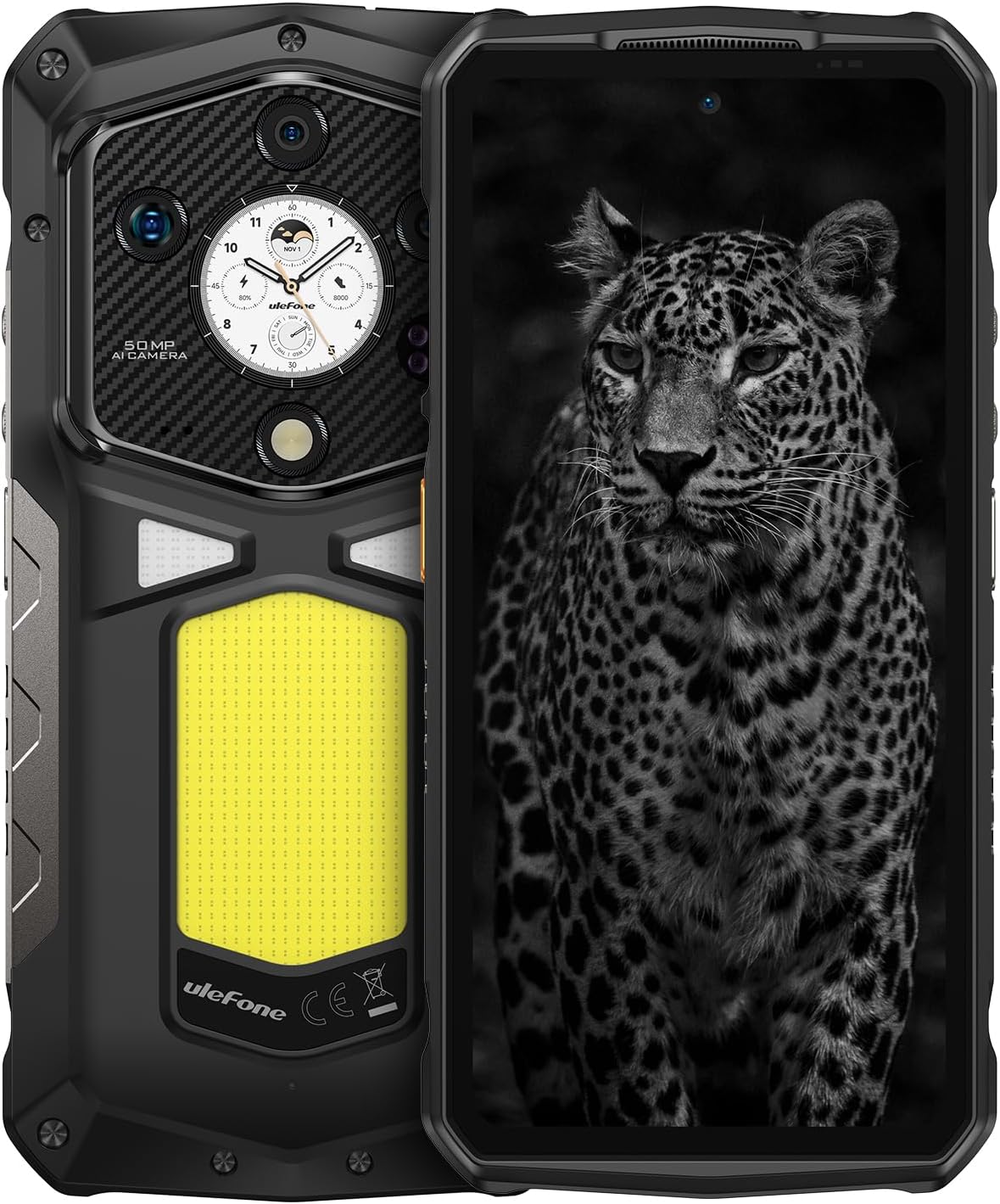
Obraz 1.1: Przód i tył view of the Ulefone Armor 29 Ultra 5G smartphone.
2. Konfiguracja
2.1 Zawartość pudełka
Sprawdź, czy w opakowaniu znajdują się wszystkie elementy:
- Ulefone Armor 29 Ultra 5G Smartphone
- AC Power Charger (100~240V)
- Kabel danych typu C do typu C (100 cm)
- Folia ochronna na ekran (wstępnie nałożona lub osobno)
- Wysuwacz tacy na kartę SIM
- Falrep

Image 2.1: Contents included in the Ulefone Armor 29 Ultra retail box.
2.2 Instalacja karty SIM
- Znajdź tackę na kartę SIM znajdującą się z boku urządzenia.
- Włóż narzędzie do wyjmowania tacki karty SIM w mały otwór obok tacki i mocno naciśnij, aż tacka wyskoczy.
- Place your Nano-SIM card(s) and/or microSD card into the designated slots on the tray. Ensure correct orientation.
- Ostrożnie wsuń tackę z powrotem do telefonu, aż będzie przylegać do obudowy urządzenia.
2.3 Pierwsze włączenie zasilania
Press and hold the Power button (located on the right side of the phone) until the Ulefone logo appears. Follow the on-screen instructions to complete the initial setup, including language selection, Wi-Fi connection, and Google account setup.
3. Instrukcja obsługi
3.1 Wydajność i przechowywanie
The Armor 29 Ultra is powered by the MediaTek Dimensity 9300+ processor, offering robust performance. It features up to 32GB RAM (16GB physical + 16GB virtual) and 1TB internal storage, expandable up to 2TB via microSD card.
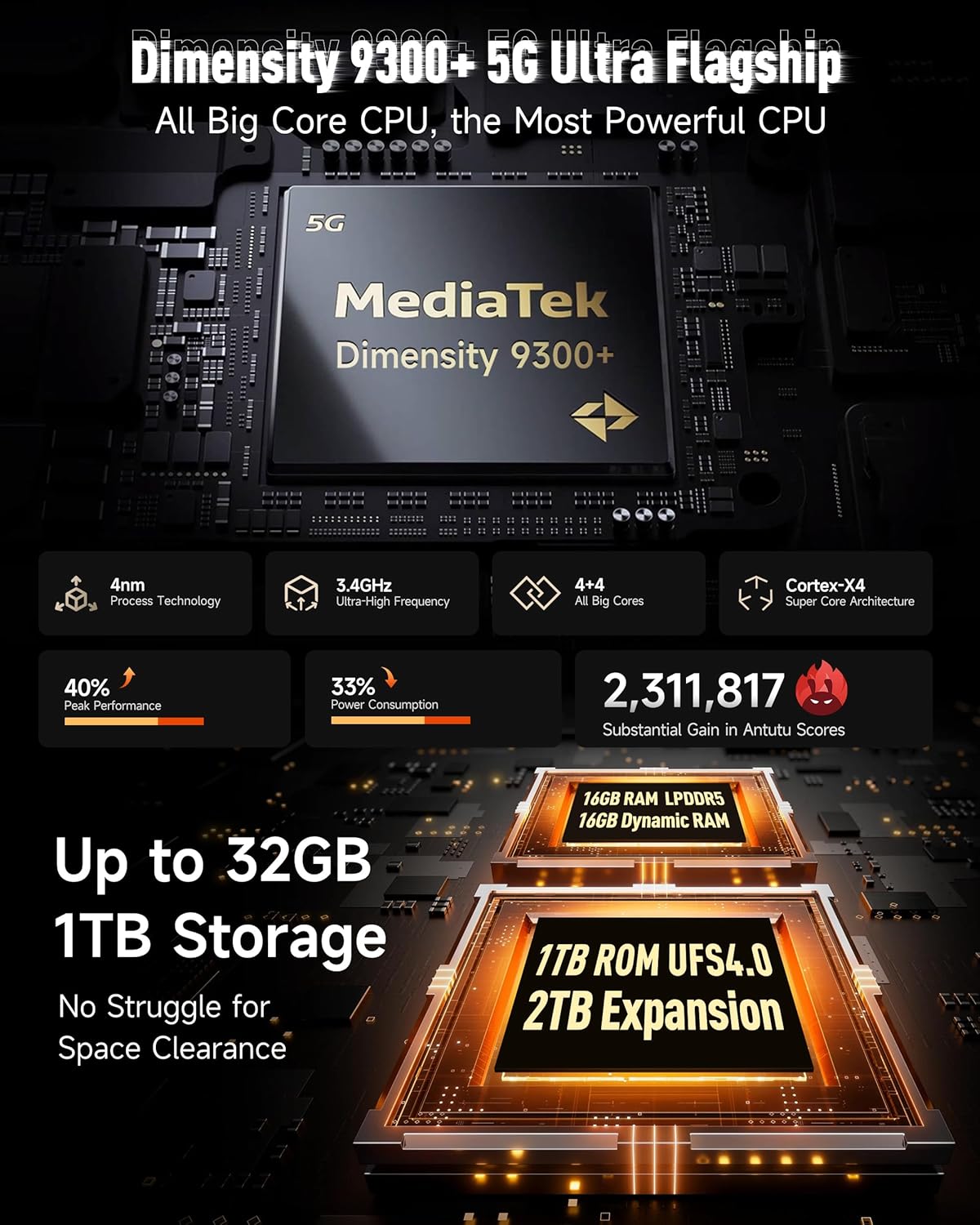
Obraz 3.1: Koniecview of the Dimensity 9300+ processor and memory configuration.
3.2 Dual AMOLED Display
The device features a 6.67-inch flexible AMOLED main display with a 120Hz refresh rate and up to 2200 nits peak brightness. A 1.04-inch flexible AMOLED sub-display on the rear provides quick access to notifications, music controls, and selfie previews.

Image 3.2: Details of the 6.67-inch main AMOLED display and the 1.04-inch sub-display.
3.3 System kamer
The Armor 29 Ultra is equipped with a versatile camera system:
- Główny aparat 50 MP: 1-inch Sony IMX989 sensor, capable of 8K video recording.
- Kamera noktowizyjna 64 MP: OMNIVISION OV64B sensor with 4 infrared LEDs for enhanced low-light visibility.
- 50MP Ultra-wide Macro Lens: Samsung JN1 sensor with a 117.3° field of view.
- Przedni aparat 50 MP: For high-resolution selfies and video calls.

Obraz 3.3: Koniecview of the triple rear camera setup and front camera.
3.4 Bateria i ładowanie
The device features a 21200mAh battery. It supports 120W flash charging, allowing for a 20% charge in approximately 10 minutes. Additionally, it offers 10W reverse charging to power other devices.

Image 3.4: Details on the 21200mAh battery capacity and 120W fast charging capabilities.
3.5 LED Light and Warning Lights
The Armor 29 Ultra includes a powerful 1000-lumen LED camping light with 570 LEDs and a 5-watt output. It also features red and blue warning lights for emergency situations, which can operate in constant or flashing modes with selectable alarm sounds.

Image 3.5: Illustration of the 1000-lumen LED light and emergency warning lights.
3.6 Wytrzymałość i trwałość
The phone is designed to meet MIL-STD 810G standards and boasts IP68 and IP69K ratings, providing protection against water, dust, dirt, sand, humidity, and salt mist. The display is protected by Corning Gorilla Glass 5.

Image 3.6: Visual representation of the phone's IP68/IP69K and MIL-STD-810H durability ratings.
3.7 Łączność
The Armor 29 Ultra supports global 5G networks with dual SIM dual standby. It features Wi-Fi 7, Bluetooth 5.4, NFC, Infrared, USB 3.2 Gen 2, and comprehensive GPS (GPS + GLONASS + Beidou + Galileo).

Image 3.7: Information on 5G network support and Wi-Fi 7 capabilities.
Złącze rozszerzeń 3.8 uSmart
The device includes a uSmart Expansion Connector for compatibility with various external accessories, enhancing its functionality for specialized tasks.

Image 3.8: The uSmart Expansion Connector and examplista kompatybilnych akcesoriów.
3.9 Funkcje Androida 15 i AI
The Armor 29 Ultra runs on Android 15, offering the latest features and security updates. It integrates an AI engine for enhanced computations and supports third-party AI applications.

Image 3.9: Visual representation of the Android 15 operating system interface.
4. Konserwacja
4.1 Ogólna opieka
- Unikaj wystawiania telefonu na działanie ekstremalnych temperatur lub bezpośredniego światła słonecznego przez dłuższy czas.
- Nie należy podejmować prób rozmontowania urządzenia, gdyż spowoduje to utratę gwarancji i może spowodować uszkodzenia.
- Utrzymuj port ładowania i inne otwory w czystości, bez kurzu i zanieczyszczeń.
4.2 Czyszczenie
To clean the device, use a soft, lint-free cloth. For stubborn dirt, a slightly damp cloth with mild soap can be used, ensuring all ports are securely closed. Avoid using harsh chemicals or abrasive materials.
4.3 Aktualizacje oprogramowania
Regularnie sprawdzaj dostępność aktualizacji oprogramowania i instaluj je, aby zapewnić optymalną wydajność, bezpieczeństwo i dostęp do nowych funkcji. Przejdź do Ustawienia > System > Aktualizacja systemu aby sprawdzić dostępność aktualizacji.
5. Rozwiązywanie Problemów
5.1 Urządzenie się nie włącza
- Upewnij się, że bateria jest naładowana. Podłącz telefon do ładowarki i odczekaj kilka minut przed ponownym włączeniem.
- Aby wymusić ponowne uruchomienie, naciśnij i przytrzymaj przycisk zasilania przez co najmniej 10–15 sekund.
5.2 Problemy z ładowaniem
- Verify that the charging cable and adapter are securely connected and undamaged.
- Try using a different compatible charger and cable.
- Delikatnie wyczyść port ładowania suchą, miękką szczoteczką, aby usunąć wszelkie zanieczyszczenia.
5.3 Problemy z łącznością sieciową
- Sprawdź, czy karta SIM jest prawidłowo włożona i aktywowana.
- Uruchom ponownie telefon.
- Idź do Ustawienia > Sieć i internet > Sieć komórkowa i upewnij się, że włączona jest transmisja danych mobilnych i wybrany został właściwy typ sieci.
- Zresetuj ustawienia sieciowe: Ustawienia > System > Resetuj opcje > Resetuj Wi-Fi, sieć komórkową i Bluetooth.
5.4 Wadliwe działanie kamery
- Clear the cache and data of the Camera app: Settings > Apps > See all apps > Camera > Storage & cache > Clear cache / Clear storage.
- Uruchom ponownie telefon.
- Upewnij się, że na obiektywach kamer nie ma żadnych przeszkód fizycznych.
6. Specyfikacje
| Funkcja | Specyfikacja |
|---|---|
| Wymiary produktu | 6.98 x 3.37 x 1.32 cala |
| Waga przedmiotu | 2.66 funta (688 g) |
| Numer modelu przedmiotu | arm29u |
| System operacyjny | Android 15 |
| Prędkość procesora | 3.4 GHz (Dimensity 9300+) |
| Rozmiar zainstalowanej pamięci RAM | 32 GB (16 GB pamięci fizycznej + 16 GB pamięci wirtualnej) |
| Pojemność pamięci masowej | 1024 GB (1TB), expandable up to 2TB |
| Rozmiar ekranu stojącego | 6.67 Inches (Main AMOLED) |
| Rozmiar podwyświetlacza | 1.04 Inches (AMOLED) |
| Częstotliwość odświeżania | 120 Hz (Main Display) |
| Rezolucja | 8K (Scanner Resolution, likely referring to video recording capability) |
| Główna kamera | 50MP (Sony IMX989, f/1.9) |
| Kamera Night Vision | 64MP (OV64B, f/1.79) with 4 IR LEDs |
| Aparat ultraszerokokątny/makro | 50MP (Samsung JN1, f/2.2, 117.3° FOV) |
| Przednia kamera | 50MP |
| Pojemność baterii | 21200 mlnamp Godziny |
| Ładowanie | Ładowanie błyskawiczne 120 W, ładowanie wsteczne 10 W |
| Technologie łączności | Bluetooth 5.4, Infrared, NFC, USB 3.2 Gen 2, Wi-Fi 7, 5G |
| GPS | GPS, GLONASS, Beidou, Galileo |
| Cechy specjalne | Always On Display, Dual Screen, Fast Charging, Rugged Body, Water Resistant, 1000LM LED Light, Custom Key, uSmart Expansion Connector |
| Gniazdo audio | 3.5 mm |
| Operator sieci bezprzewodowej | Odblokowany |
7. Gwarancja i wsparcie
7.1 Informacje o gwarancji
Ulefone provides a 12-month manufacturer warranty service in the US for the Armor 29 Ultra. This warranty covers manufacturing defects under normal use. Please retain your proof of purchase for warranty claims.
7.2 Obsługa klienta
For any questions, technical assistance, or warranty inquiries regarding your Ulefone Armor 29 Ultra, please contact Ulefone customer support. Refer to the contact information provided in your product packaging or visit the official Ulefone webstronie, aby uzyskać szczegółowe informacje na temat pomocy technicznej.


