Wstęp
This manual provides comprehensive instructions for the setup, operation, and maintenance of your Bluesound Pulse Flex 2i Portable Wireless Multi-Room Bluetooth Speaker. This bundle includes the BP100 battery pack and a charcoal gray protective skin, enhancing portability and durability. The Pulse Flex 2i is designed to deliver high-resolution audio with versatile connectivity options, including Wi-Fi, Bluetooth aptX HD, and AirPlay 2, integrated seamlessly into the BluOS multi-room ecosystem.
Co jest w pudełku
Ostrożnie rozpakuj zawartość i upewnij się, że wszystkie elementy są obecne:
- Bluesound Pulse Flex 2i Speaker
- BP100 Battery Pack
- Charcoal Gray Protective Skin
- 120V & 230V AC Power Cord
- Toslink Optical to 3.5mm Mini & Adaptor

Image: Contents of the Bluesound Pulse Flex 2i bundle, showing the speaker, battery pack, and protective skin packaging.
Przewodnik po konfiguracji
1. Installing the BP100 Battery Pack
The BP100 battery pack allows for portable operation. To install:
- Locate the battery compartment on the rear of the Pulse Flex 2i speaker.
- Align the BP100 battery pack with the compartment and gently slide it into place until it clicks securely.
- Ensure the battery pack is fully seated to establish proper electrical contact.
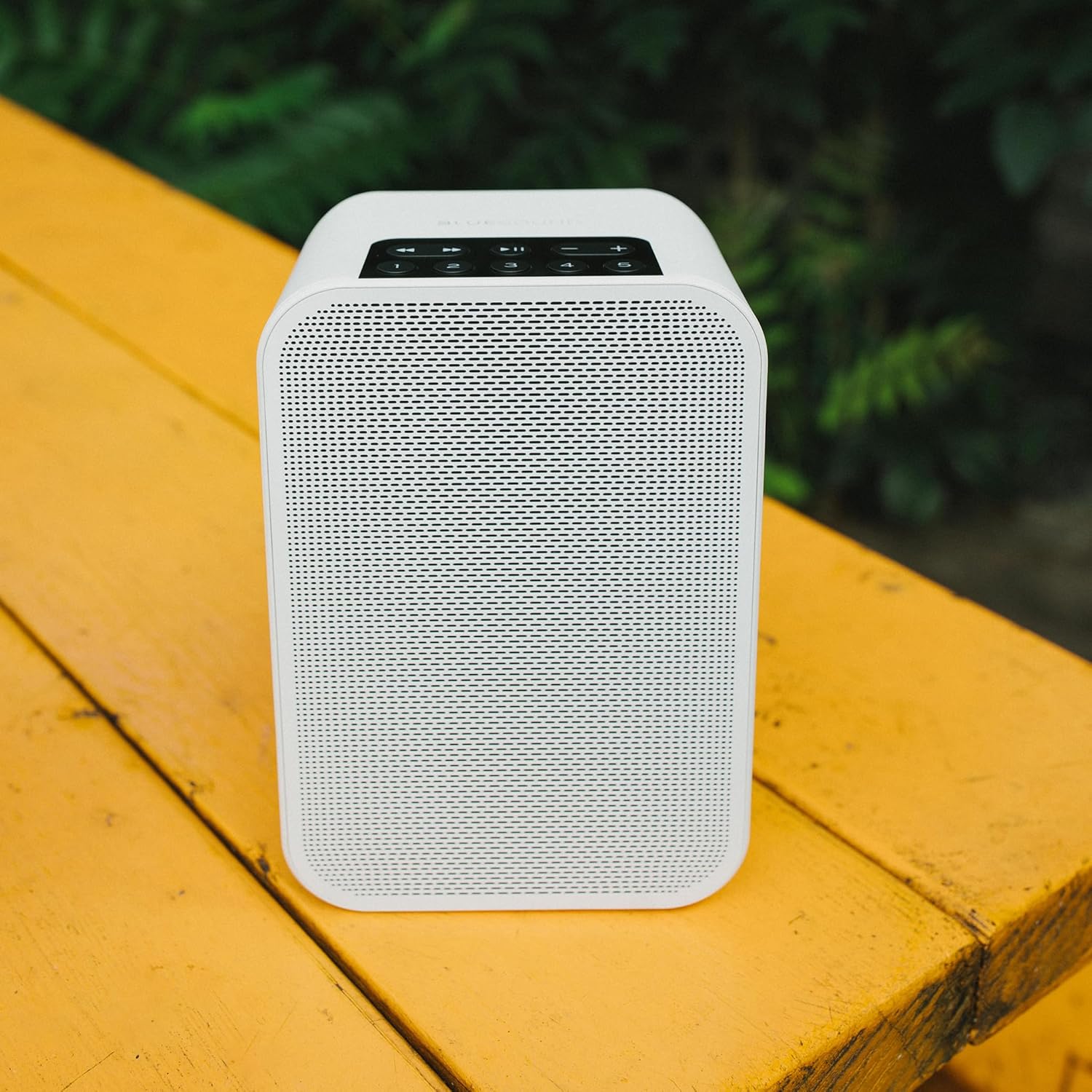
Image: The Bluesound BP100 battery pack, designed for the Pulse Flex 2i speaker.
2. Initial Power-Up and Charging
Before first use, it is recommended to fully charge the battery pack or connect the speaker to AC power.
- Podłącz dołączony przewód zasilający do wejścia zasilania głośnika, a następnie do gniazdka ściennego.
- The speaker will automatically power on. The LED indicator will show charging status.
3. Installing the Protective Skin
The charcoal gray protective skin provides an extra layer of defense for your speaker.
- Gently slide the Pulse Flex 2i speaker into the protective silicone skin, ensuring all ports and buttons align with the skin's openings.
- Smooth out any wrinkles to ensure a snug fit.
4. Connecting to Your Network (BluOS App)
For full functionality, including multi-room audio and high-resolution streaming, connect your Pulse Flex 2i to your home Wi-Fi network using the BluOS Controller app.
- Download the BluOS Controller app from your device's app store (iOS, Android, Windows, macOS).
- Open the app and follow the on-screen instructions to add your new Pulse Flex 2i to your network. This typically involves selecting the speaker from a list of available devices and entering your Wi-Fi password.
5. Parowanie Bluetooth
For direct wireless connection from a mobile device without a Wi-Fi network:
- Press and hold the Bluetooth button on the top panel of the Pulse Flex 2i until the LED indicator begins to flash blue.
- On your mobile device, go to Bluetooth settings and select "Pulse Flex 2i" from the list of available devices.
- Po sparowaniu wskaźnik LED zacznie świecić na niebiesko.

Image: Top panel of the Bluesound Pulse Flex 2i, showing the control buttons including Bluetooth, Play/Pause, Volume, and preset buttons.
Instrukcja obsługi
Podstawowe sterowanie
The top panel of the Pulse Flex 2i features intuitive controls:
- Odtwórz/Pauza: Press the center button to play or pause current audio.
- Zwiększanie/zmniejszanie głośności: Użyj przycisków „+” i „-”, aby dostosować głośność.
- Pomijanie utworów: Use the left and right arrow buttons to skip to the previous or next track.
- Przyciski ustawień wstępnych (1-5): Assign your favorite radio stations, playlists, or music services to these buttons via the BluOS app for quick access.
Multi-Room Streaming with BluOS
The Bluesound Pulse Flex 2i is part of the BluOS ecosystem, allowing you to stream music to multiple Bluesound devices throughout your home.
- Grouping Players: Use the BluOS app to group your Pulse Flex 2i with other BluOS players for synchronized playback.
- Niezależne odtwarzanie: Each player can also play different music independently.
- Obsługiwane usługi: Access a wide range of streaming services (e.g., Spotify, Tidal, Qobuz) and internet radio directly through the BluOS app.
Sterowanie głosowe
The Pulse Flex 2i is compatible with popular voice assistants for hands-free control:
- Amazon Alexa: Enable the BluOS skill in the Alexa app and link your Bluesound account.
- Asystent Google: Link your Bluesound account through the Google Home app.
- Apple Siri: Control via AirPlay 2 from Apple devices.
Note: A compatible voice assistant device (e.g., Amazon Echo, Google Home) is required for voice commands.
Opcje łączności
- Wi-Fi: Primary connection for high-resolution audio and multi-room functionality.
- Bluetooth aptX HD: High-quality Bluetooth streaming from compatible devices.
- Zabawa powietrzna 2: Przesyłaj strumieniowo dźwięk bezpośrednio z urządzeń Apple.
- Wejście optyczne/analogowe: Use the included Toslink optical to 3.5mm mini adaptor for connecting external audio sources.
Konserwacja
Czyszczenie
To maintain the appearance and performance of your Pulse Flex 2i:
- Wipe the speaker and protective skin with a soft, dry, lint-free cloth.
- Nie należy używać środków czyszczących o właściwościach ściernych, wosków ani rozpuszczalników.
- Unikaj rozpylania płynów bezpośrednio na głośnik.
Pielęgnacja baterii
To maximize the lifespan of your BP100 battery pack:
- Unikaj częstego całkowitego rozładowywania akumulatora.
- Przechowuj głośnik w chłodnym i suchym miejscu, jeśli nie będziesz go używać przez dłuższy czas.
- If storing for a long time, ensure the battery has a partial charge (around 50%).
Aktualizacje oprogramowania układowego
Bluesound regularly releases firmware updates to improve performance and add new features. These updates are managed through the BluOS Controller app. Ensure your speaker is connected to Wi-Fi and follow the app's prompts for updates.
Rozwiązywanie problemów
If you encounter issues with your Pulse Flex 2i, refer to the following common solutions:
| Problem | Możliwa przyczyna | Rozwiązanie |
|---|---|---|
| Brak dźwięku | Volume too low; Muted; Incorrect source selected; Speaker not powered on. | Increase volume; Check mute status in app/on speaker; Select correct input source; Ensure power cable is connected or battery is charged. |
| Nie można połączyć się z siecią Wi-Fi | Incorrect Wi-Fi password; Speaker too far from router; Router issues. | Verify Wi-Fi password; Move speaker closer to router; Restart router; Perform a factory reset (see below). |
| Nieudane parowanie Bluetooth | Speaker not in pairing mode; Device already paired; Interference. | Ensure speaker LED is flashing blue; Forget device on your phone and re-pair; Move closer to speaker; Turn off other Bluetooth devices. |
| Krótki czas pracy baterii | Battery not fully charged; High volume usage; Battery degradation over time. | Ensure full charge before use; Reduce volume; Battery lifespan is finite and may decrease with age. |
Przywracanie ustawień fabrycznych
A factory reset can resolve persistent issues by restoring the speaker to its original settings. Warning: This will erase all network settings and presets.
- Disconnect the speaker from power.
- Press and hold the Play/Pause button on the top panel.
- While holding the Play/Pause button, reconnect the power.
- Continue holding the Play/Pause button until the LED indicator turns red, then green, then back to red. Release the button.
- The speaker will restart and enter setup mode.
Specyfikacje
| Funkcja | Szczegół |
|---|---|
| Typ głośnika | przenośny głośnik |
| Kolor | Biały |
| Wymiary produktu | 4.92" gł. x 3.9" szer. x 7.2" wys. |
| Rozmiar głośnika | 7.2 cali |
| Konkretne zastosowania | Portable, Home Entertainment, Multi-Room Streaming |
| Technologia łączności | Bluetooth, Wi-Fi, Ethernet (via optional USB-to-Ethernet adapter) |
| Maksymalna moc wyjściowa głośnika | 25 watów |
| Typ montażu | Uchwyt na blat |
| Battery Life (BP100) | Do 6 godzin |
| Obsługiwane formaty audio | MQA, FLAC, WAV, AIFF, MP3, AAC, WMA, OGG, ALAC |
| Protokół bezprzewodowy | Wi-Fi (802.11ac, dual-band), Bluetooth aptX HD, AirPlay 2 |
Gwarancja i wsparcie
Informacje o gwarancji
Bluesound products are covered by a limited warranty. Please refer to the warranty card included with your product or visit the official Bluesound webAby zapoznać się ze szczegółowymi warunkami gwarancji obowiązującymi w Twoim regionie, odwiedź naszą witrynę.
Note: The included BP100 battery pack and protective skin are subject to their own warranty terms, if applicable.
Obsługa klienta
For technical assistance, troubleshooting beyond this manual, or warranty claims, please contact Bluesound customer support:
- Wsparcie online: Visit the official Bluesound support page for FAQs, knowledge base articles, and support tickets. www.bluesound.com/support
- Informacje kontaktowe: Refer to the Bluesound website for regional contact numbers or email addresses.


