Wstęp
The Marshall Kilburn III is a premium portable Bluetooth speaker designed to deliver exceptional audio quality with a classic aesthetic. It features 360° True Stereophonic sound, robust dust and water resistance, and an extended battery life, making it suitable for various environments. This manual provides detailed instructions for setting up, operating, maintaining, and troubleshooting your Kilburn III speaker.
Co jest w pudełku
- Marshall Kilburn III Speaker
- Kabel ładujący USB-C do USB-C
- Szybki przewodnik
- Informacje prawne i dotyczące bezpieczeństwa
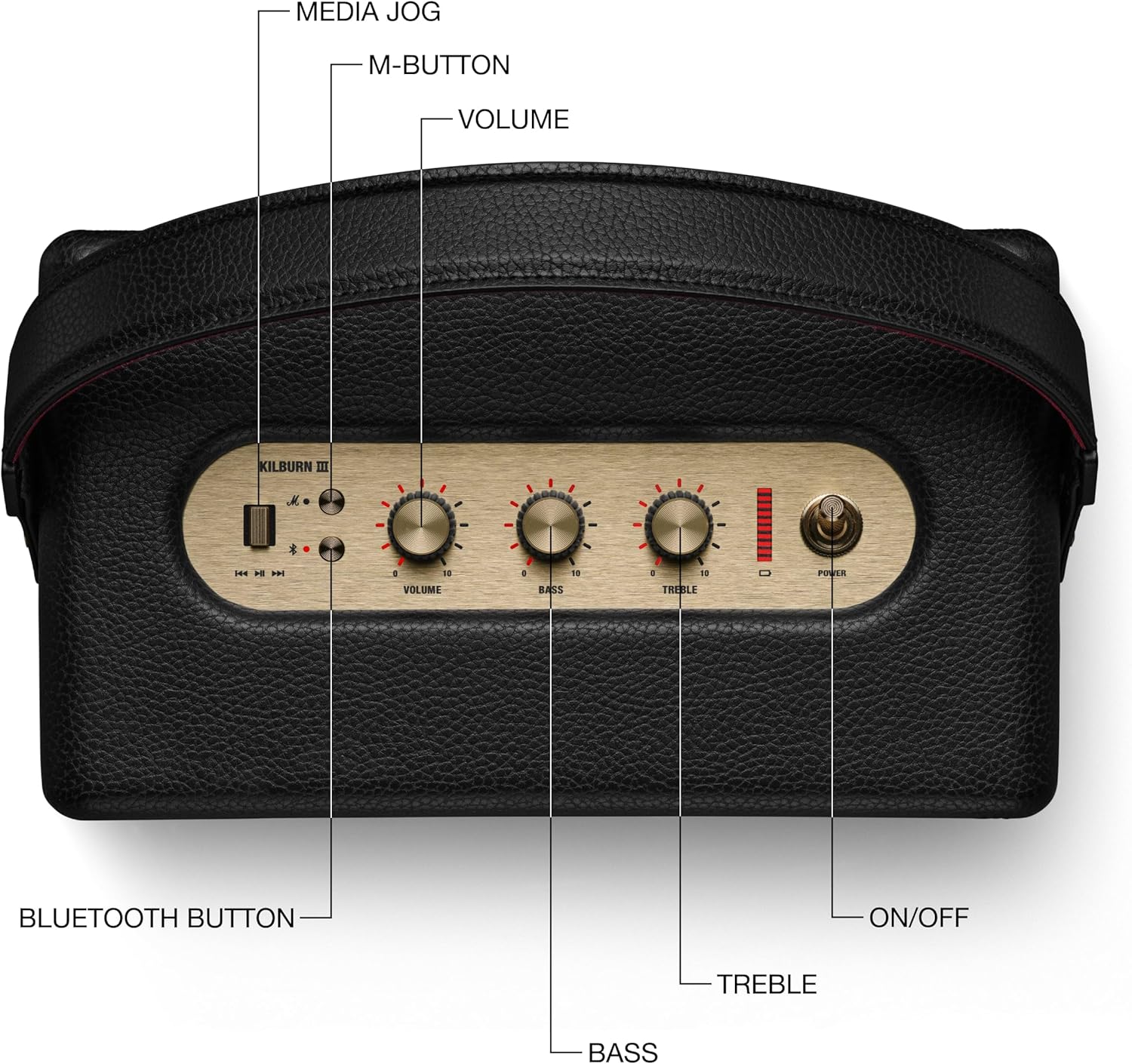
Figure 1: Included components with the Marshall Kilburn III speaker.
Produkt ponadview
The Kilburn III features intuitive controls and a durable design. Familiarize yourself with the main components and controls:

Figure 2: Top panel controls of the Kilburn III speaker.
- Pokrętło głośności: Reguluje ogólny poziom wyjściowy dźwięku.
- Gałka basowa: Controls the low-frequency audio output.
- Pokrętło wysokich tonów: Controls the high-frequency audio output.
- Przycisk zasilania: Toggles the speaker on/off.
- Przycisk Bluetooth: Inicjuje tryb parowania Bluetooth.
- M-Button: Allows switching between custom EQ modes (configurable via the Marshall app).
- Wskaźnik baterii: LED bar indicating remaining battery life.

Figure 3: Rear panel connections of the Kilburn III speaker.
- USB-C Power Input/Output: Used for charging the speaker and for using the speaker as a power bank to charge other devices.
- Wejście AUX 3.5 mm: Do podłączania urządzeń audio za pomocą kabla audio 3.5 mm.
Organizować coś
Ładowanie głośnika
Before first use, fully charge the Kilburn III speaker. Use the included USB-C to USB-C charging cable.
- Connect one end of the USB-C cable to the USB-C port on the rear of the speaker.
- Connect the other end of the USB-C cable to a compatible USB power adapter (not included) or a USB-C power source.
- The battery indicator LEDs on the top panel will illuminate to show charging progress. All LEDs will be solid when fully charged.

Figure 4: Charging the Kilburn III speaker via USB-C.
Parowanie Bluetooth
To connect your audio device to the Kilburn III via Bluetooth:
- Przesuń wyłącznik zasilania do przodu, aż głośnik się włączy.
- Push and hold the Bluetooth button on the top panel until the LED turns to a slow pulse, indicating pairing mode.
- On your audio device (smartphone, tablet, laptop), open the Bluetooth settings.
- Select "Kilburn III" from the list of available devices.
- Once connected, the Bluetooth LED on the speaker will turn solid.

Figure 5: Marshall Kilburn III ready for Bluetooth pairing.
Instrukcja obsługi
Podstawowe odtwarzanie
- Ensure the speaker is powered on and connected via Bluetooth or AUX.
- Rozpocznij odtwarzanie dźwięku z podłączonego urządzenia.
- Adjust the Volume knob on the speaker to your desired listening level.

Figure 6: Adjusting the volume on the Kilburn III.
Regulacja dźwięku
Customize your audio experience using the dedicated Bass and Treble knobs:
- Włącz Pokrętło basowe clockwise to increase bass, or counter-clockwise to decrease it.
- Włącz Pokrętło tonów wysokich clockwise to increase treble, or counter-clockwise to decrease it.
Using the M-Button (Custom Modes)
The M-button allows you to cycle through pre-set or custom equalizer modes. To configure these modes, you may need to use the official Marshall app (if available for this model).
- Naciśnij Przycisk M to switch between available sound modes.
Ładowanie urządzeń zewnętrznych (funkcja powerbanku)
The Kilburn III can act as a power bank to charge your mobile devices:
- Connect your device's USB-C charging cable to the USB-C port on the rear of the Kilburn III.
- The speaker will begin charging your device. Note that using this feature will reduce the speaker's playtime.
Konserwacja
To ensure the longevity and optimal performance of your Marshall Kilburn III speaker, follow these maintenance guidelines:
- Czyszczenie: Use a soft, dry cloth to wipe the speaker's surfaces. Do not use abrasive cleaners, alcohol, or chemical solvents.
- Odporność na wodę i kurz: The speaker is IP54 rated, meaning it is resistant to dust and water splashes from any direction. However, it is not waterproof and should not be submerged in water. Ensure all ports are dry before charging.
- Składowanie: Przechowuj głośnik w chłodnym, suchym miejscu, z dala od bezpośredniego światła słonecznego i ekstremalnych temperatur.
- Pielęgnacja baterii: Aby zapewnić optymalną żywotność baterii, unikaj częstego całkowitego rozładowywania. Ładuj głośnik regularnie, nawet jeśli nie jest używany przez dłuższy czas.
Rozwiązywanie problemów
If you encounter issues with your Kilburn III, try the following solutions:
| Problem | Możliwe rozwiązanie |
|---|---|
| Głośnik nie włącza się. | Upewnij się, że bateria jest naładowana. Podłącz głośnik do źródła zasilania za pomocą kabla USB-C. |
| Nie można sparować przez Bluetooth. |
|
| Brak dźwięku lub niski poziom głośności. |
|
| Zniekształcenie dźwięku. |
|
| Bateria szybko się rozładowuje. |
|
Specyfikacje
| Funkcja | Szczegół |
|---|---|
| Nazwa modelu | Kilburn III |
| Typ głośnika | przenośny głośnik |
| Kolor | Black & Brass |
| Wymiary produktu | 10.75" gł. x 5.91" szer. x 6.65" wys. |
| Waga przedmiotu | 6.17 funtów |
| Żywotność baterii | 50 godzin |
| Czas ładowania | 3 godzin |
| Technologia komunikacji bezprzewodowej | Bluetooth |
| Zasięg Bluetooth | 33 stóp |
| Poziom wodoodporności | Water Resistant (IP54 rated) |
| Maksymalna moc wyjściowa głośnika | 36 watów |
| Tryb wyjścia audio | Stereofoniczny |
| Metoda kontroli | Touch (Knobs) |
| Źródło zasilania | Zasilany bateryjnie |
Gwarancja i wsparcie
The Marshall Kilburn III comes with a Limited Warranty. For detailed warranty information, please refer to the "Legal and Safety Information" document included in your product packaging.
For further assistance, technical support, or to purchase replacement parts, please visit the official Marshall webodwiedź witrynę lub skontaktuj się z obsługą klienta. Możesz również zapoznać się z Instrukcja obsługi (PDF) Aby uzyskać dodatkowe informacje.


