1. Wprowadzenie
Thank you for choosing the BOTSLAB G980H Pro 4K Dash Cam. This manual provides detailed instructions on how to install, operate, and maintain your dash camera system, including the hardwire kit and CPL filter. Please read this manual thoroughly before use to ensure proper functionality and safety.
2. Zawartość opakowania
Sprawdź, czy w przesyłce znajdują się wszystkie elementy wymienione poniżej:
- BOTSLAB 4K+2K Dual Dash Cam (Front and Rear Units)
- Botslab Circular Polarizing Lens (CPL) Filter
- Hardwire Kit (Type C)
- Instrukcja obsługi
- Other standard accessories (e.g., mounting adhesive, cable clips)
3. Koniec produktuview
The BOTSLAB G980H Pro is a high-performance dash camera system designed to capture crystal-clear footage of your journeys. It features a true 4K front camera and a 2K rear camera with 360° rotation capability, providing comprehensive coverage both outside and inside your vehicle.
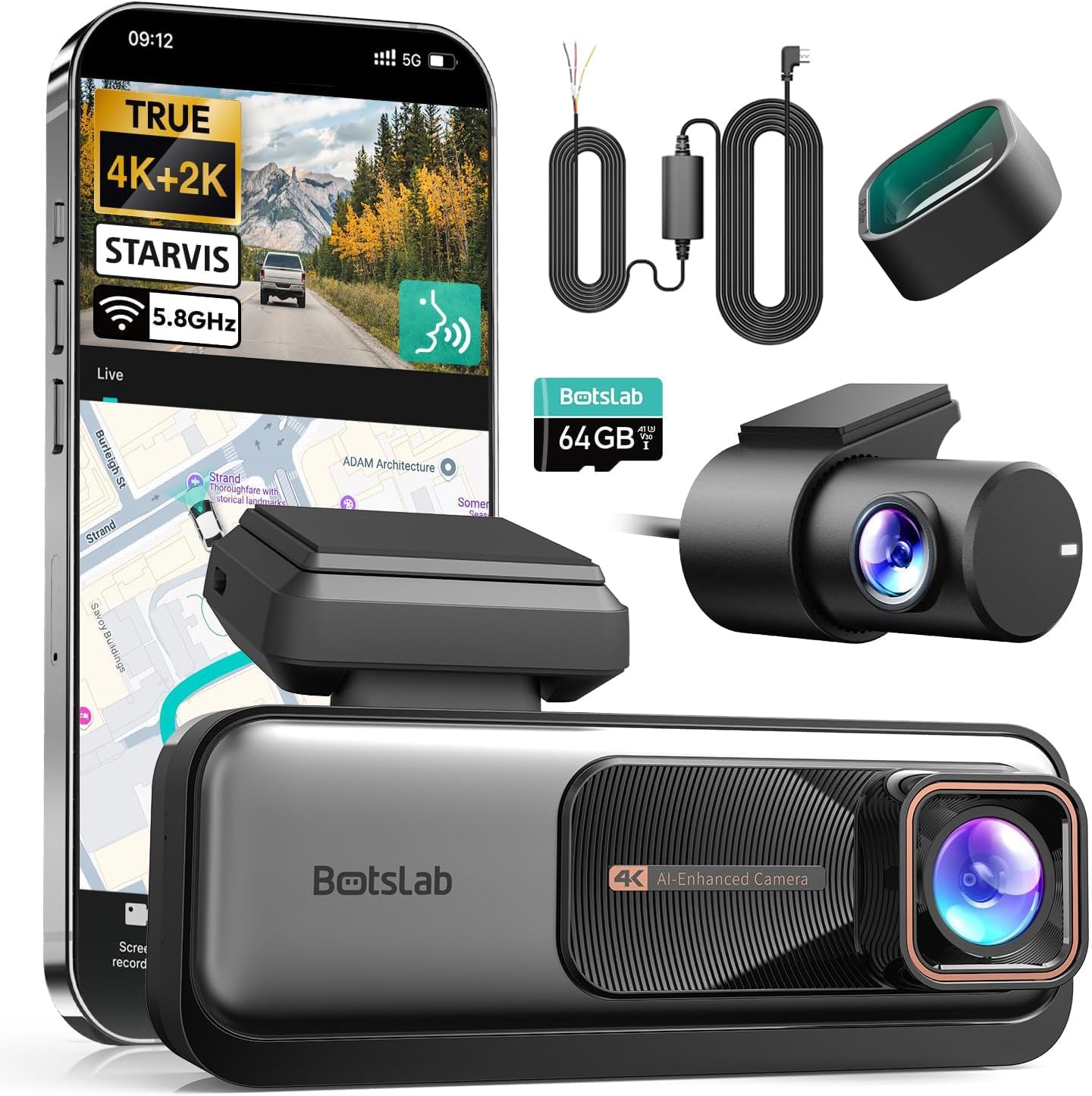
Obraz: Ponadview of the BOTSLAB G980H Pro Dash Cam and its included components.

Image: The G980H Pro Dash Cam shown with a smartphone displaying the live view i interfejs mapy.
4. Konfiguracja i instalacja
Proper installation is crucial for optimal performance. This section guides you through the process of installing the dash cam and the hardwire kit.
4.1 Instalacja zestawu okablowania
The hardwire kit enables 24/7 parking mode functionality by providing continuous power to the dash cam even when the vehicle is off. It connects directly to your car's fuse box.
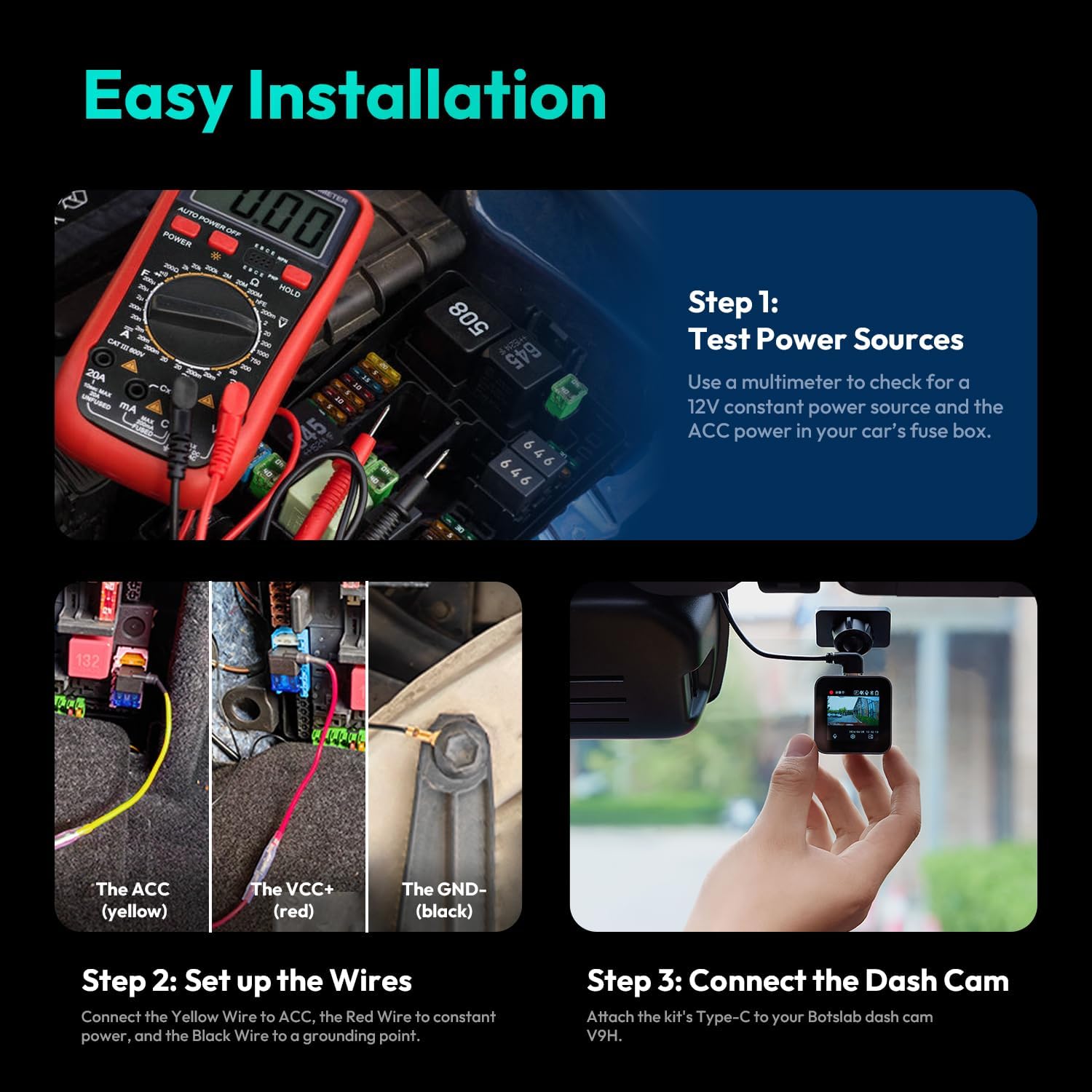
Obraz: Szczegółowy view of the Hardwire Kit, highlighting the Type-C connector, power conversion box, and the ACC (yellow), VCC+ (red), and GND- (black) wires.
- Step 1: Test Power Sources. Use a multimeter to identify a 12V constant power source (for VCC+) and an ACC (Accessory) power source in your car's fuse box. The ACC power should only be active when the ignition is on.
- Step 2: Set Up the Wires. Connect the yellow wire (ACC) from the hardwire kit to the identified ACC fuse slot. Connect the red wire (VCC+) to the constant power fuse slot. Securely connect the black wire (GND-) to a grounding point on the vehicle's chassis, typically a metal bolt or screw.
- Step 3: Connect the Dash Cam. Attach the Type-C connector of the hardwire kit to the corresponding port on your BOTSLAB G980H Pro Dash Cam.

Image: Visual guide for the easy installation process of the hardwire kit, showing multimeter use, wire connections, and dash cam attachment.
4.2 Montaż kamery samochodowej
Zamontuj przednią kamerę samochodową na przedniej szybie, najlepiej za tylnąview lustro, aby mieć pewność, że nie będzie Ci przeszkadzać view. Mount the rear camera on the rear window. Ensure both cameras have a clear view drogi.
4.3 Instalacja filtra CPL
The CPL filter helps reduce glare and reflections from the windshield and road, improving video clarity. Gently attach the CPL filter to the front lens of the dash cam. Rotate the filter while observing the live view on the dash cam or app to find the optimal position for glare reduction.
5. Instrukcja obsługi
This section details the key features and how to operate your G980H Pro Dash Cam.
5.1 Recording Quality and Camera Rotation
The front camera records in true 4K resolution, while the rear camera records in 2K resolution, providing exceptional detail. The rear camera can rotate 360° to monitor either the rear view or the vehicle's interior, making it versatile for various recording needs, including rideshare monitoring.

Image: Comparison of 4K front and 2K rear camera footage, demonstrating clarity for license plate recognition.
5.2 Zaawansowany system wspomagania kierowcy (ADAS)
The G980H Pro features an ADAS powered by AI NPU and BOTSLAB's AI algorithm, providing real-time safety alerts:
- Ostrzeżenie o kolizji z pieszymi: Alerts you to pedestrians in your path.
- Vehicle Movement Alert: Powiadamia Cię, gdy pojazd z przodu zacznie się poruszać.
- Ostrzeżenie o opuszczeniu pasa ruchu: Alerts if you drift out of your lane.
- Driver Fatigue Warning: Prompts you to take a break if signs of fatigue are detected.

Image: Illustrations of various ADAS alerts, including front vehicle start, pedestrian proximity, too close warning, and lane departure.
5.3 Sterowanie głosowe
Operate your dash cam hands-free using voice commands. Supported commands include:
- „Włącz ekran” / „Wyłącz ekran”
- „Zrób zdjęcie”
- „Pokaż przednią kamerę” / „Pokaż tylną kamerę”
- „Początek wideo”
5.4 24/7 Parking Mode
When connected via the hardwire kit, the dash cam automatically enters parking mode after your car is turned off. It continues to monitor your vehicle for impacts or motion, providing protection against theft, vandalism, and hit-and-runs.
5.5 Integracja WiFi 5.8 GHz i GPS
The built-in 5.8GHz WiFi allows for fast and reliable connection to the companion mobile app for real-time viewing, video playback, and settings adjustment. The integrated GPS module tracks your driving route and speed, which can be reviewed using the dedicated DV playback software on your computer.
6. Konserwacja
Aby zapewnić długowieczność i optymalną wydajność kamery samochodowej, należy przestrzegać poniższych wskazówek dotyczących konserwacji:
- Wyczyść soczewki: Regularly wipe the camera lenses with a soft, lint-free cloth to ensure clear recordings.
- Zarządzanie kartami SD: Format the microSD card periodically (e.g., once a month) to prevent data corruption and ensure smooth recording. Use a high-quality, high-endurance microSD card.
- Aktualizacje oprogramowania układowego: Check the BOTSLAB official webodwiedź tę witrynę lub aplikację, aby uzyskać dostęp do aktualizacji oprogramowania sprzętowego, które poprawią wydajność i dodadzą nowe funkcje.
- Temperatura: Unikaj wystawiania kamery samochodowej na działanie ekstremalnych temperatur przez dłuższy czas.
7. Rozwiązywanie Problemów
If you encounter any issues with your dash cam, refer to the following common problems and solutions:
| Problem | Możliwe rozwiązanie |
|---|---|
| Kamera samochodowa nie włącza się. | Check power connections. Ensure the hardwire kit is correctly installed and receiving power from the fuse box. |
| Nagrywanie zostaje zatrzymane lub zawieszone. | Format the microSD card. Ensure you are using a high-speed (Class 10 or U3) and high-endurance microSD card. Replace the card if it's old or damaged. |
| Poor video quality / Glare. | Clean the lenses. Adjust the CPL filter by rotating it to minimize glare. Ensure the windshield is clean. |
| ADAS alerts are inaccurate. | Ensure the dash cam is mounted correctly and has a clear, unobstructed view of the road. Calibrate ADAS settings via the mobile app if available. |
| Problemy z połączeniem Wi-Fi. | Ensure the dash cam's Wi-Fi is enabled. Restart both the dash cam and your mobile device. Try reconnecting through the app. |
8. Specyfikacje
Key technical specifications of the BOTSLAB G980H Pro Dash Cam:
- Rozdzielczość przedniej kamery: Prawdziwe 4K
- Rozdzielczość kamery tylnej: 2K
- Obrót kamery tylnej: 360°
- Łączność: 5.8GHz WiFi, Built-in GPS
- Zaawansowane funkcje: ADAS (Pedestrian Collision, Vehicle Movement, Lane Departure, Driver Fatigue Alerts), Voice Control, 24/7 Parking Mode
- Dołączone akcesoria: Hardwire Kit, CPL Filter
- ASIN: B0F7RNZPB4
- Pierwsza dostępna: 7 maja 2025 r.
9. Gwarancja i wsparcie
Your BOTSLAB G980H Pro Dash Cam is covered by a standard return policy. For specific warranty details and technical support, please refer to the documentation provided with your purchase or contact the seller directly.
Zasady zwrotu: This product is eligible for a refund or replacement within 30 days of purchase, subject to the seller's return policy.
Informacje o sprzedawcy: For support and inquiries, please contact Botslab Security, the seller of this product.


