1. Wprowadzenie
Thank you for choosing the DD Audio PLE-112.1 powered subwoofer system. This unit is designed to provide powerful and controlled bass response for your audio system. It features a 12-inch subwoofer integrated into a precision-tuned, ported MDF enclosure, powered by a compact 400-watt RMS amplifier. This manual provides essential information for proper installation, operation, and maintenance of your PLE-112.1 subwoofer system.
2. Informacje dotyczące bezpieczeństwa
Please read all instructions carefully before operating this product. Failure to do so may result in personal injury or damage to the unit or other equipment.
- Przed przystąpieniem do wykonywania jakichkolwiek podłączeń elektrycznych należy zawsze odłączyć ujemny zacisk akumulatora pojazdu.
- Upewnij się, że wszystkie przewody są prawidłowo poprowadzone i zabezpieczone, aby zapobiec ich uszkodzeniom lub zwarciom.
- Nie wystawiaj urządzenia na działanie wilgoci i ekstremalnych temperatur.
- Unikaj umieszczania urządzenia w miejscach, w których mogłoby ono utrudniać obsługę pojazdu lub działanie urządzeń bezpieczeństwa.
- Consult a professional installer if you are unsure about any installation procedures.
- Use appropriate gauge wiring for power and ground connections to prevent overheating.
3. Zawartość opakowania
Sprawdź, czy w opakowaniu znajdują się wszystkie elementy:
- DD Audio PLE-112.1 Powered Subwoofer Enclosure
- Remote Gain Control Unit
- Wiring Harness (for power, ground, remote, and RCA inputs)
- Instrukcja obsługi (ten dokument)
4. Koniec produktuview
The PLE-112.1 combines a high-performance subwoofer, a dedicated amplifier, and a tuned enclosure into a single, easy-to-install unit.

Rysunek 4.1: Przednie prawe view of the DD Audio PLE-112.1 powered subwoofer system. This image shows the 12-inch subwoofer cone and the flared port on the left side of the enclosure, which is covered in black carpet with red DD Audio branding.

Rysunek 4.2: Tył view of the DD Audio PLE-112.1, highlighting the integrated amplifier panel. The panel includes terminals for power, ground, and remote turn-on, as well as controls for phase, low-pass filter (LPF), and gain. RCA input jacks are also visible.
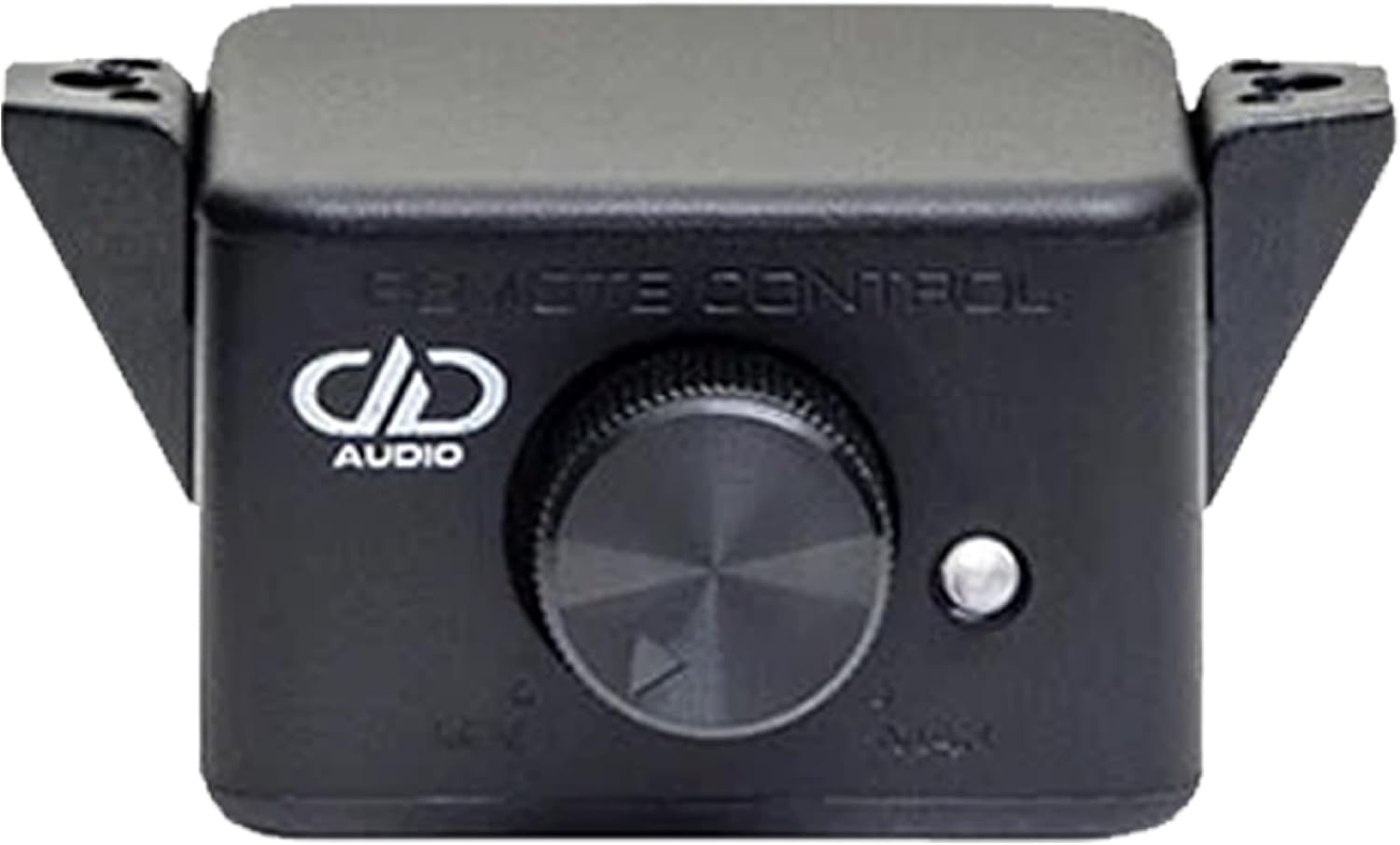
Rysunek 4.3: The remote gain control unit for the PLE-112.1. This compact device features a rotary knob for adjusting the subwoofer's output level and a small LED indicator.
Kluczowe komponenty:
- 12-calowy subwoofer: Features a high-strength, high-excursion motor and a rigid, non-pressed pulp cone for accurate bass reproduction.
- Zintegrowany AmpLiyfikator: A 400-watt RMS monoblock amplifier with discrete outputs and a heat sink for reliable performance.
- Przeniesiona obudowa: Constructed from 18mm MDF with a flared port, optimized for deep bass.
- Zdalna kontrola wzmocnienia: Allows convenient adjustment of the subwoofer's output level from the driver's seat.
5. Konfiguracja i instalacja
Proper installation is crucial for optimal performance and safety. If you are not comfortable with electrical wiring, please seek professional installation.
5.1 Umieszczenie
The PLE-112.1 is designed for vehicle applications. Consider the following for placement:
- Bezpieczne mocowanie: Ensure the enclosure is securely mounted to prevent movement during driving, which could cause damage or injury.
- Bagażnik/Przestrzeń ładunkowa: Typically, the trunk or cargo area of a vehicle provides the best acoustic environment for a subwoofer.
- Przepływ powietrza: Zapewnij odpowiedni przepływ powietrza wokół amplifier's heat sink to prevent overheating.
5.2 połączeń przewodów
Refer to Figure 4.2 for the amplifier panel layout. Make the following connections:
- Masa (GND): Connect the ground terminal to a clean, unpainted metal surface of the vehicle chassis. Ensure a solid, low-resistance connection. Use a wire of the same gauge as the power wire.
- Zasilanie (+12V): Connect the +12V terminal directly to the positive terminal of the vehicle's battery. Install an appropriate fuse (not included, typically 40-60A) within 18 inches (45 cm) of the battery.
- Zdalny (REM): Podłącz złącze REM do wyjścia zdalnego włączania jednostki głównej. Ten przewód sygnalizuje ampPrzełącznik umożliwiający włączanie i wyłączanie sprzętu stereo.
- Wejście RCA: Connect the RCA input jacks (L and R) from your head unit's subwoofer or full-range pre-out. If your head unit only has one subwoofer output, use a Y-adapter.
- Zdalna kontrola wzmocnienia: Connect the remote gain control unit (Figure 4.3) to the dedicated port on the amplifier panel using the provided cable. Mount the remote in an accessible location for easy adjustment.
Ważny: Double-check all connections before reconnecting the vehicle's battery. Incorrect wiring can cause severe damage to the ampukład elektryczny lub układ elektryczny pojazdu.
6. Instrukcja obsługi
Po zainstalowaniu dostosuj ampustawienia filtra zapewniające optymalną jakość dźwięku.
6.1 Amplifier Controls (Refer to Figure 4.2)
- ZDOBYĆ: This control matches the input sensitivity of the amplifier to the output level of your head unit. Start with the gain set to minimum (fully counter-clockwise). Play a familiar track with strong bass at about 75% of your head unit's maximum volume. Slowly increase the gain until you hear distortion, then back it off slightly.
- LPF (filtr dolnoprzepustowy): This control sets the upper frequency limit for the subwoofer. Frequencies above this setting will be filtered out. Adjust the LPF to blend smoothly with your main speakers. A common starting point is between 80Hz and 100Hz. Experiment to find the best integration.
- FAZA: This switch (0°/180°) helps to align the subwoofer's output with your main speakers. Listen to a bass-heavy track and switch between 0° and 180°. Choose the setting that provides the most impactful and cohesive bass.
6.2 Remote Gain Control
The remote gain control allows you to adjust the subwoofer's output level conveniently from your listening position without affecting the amplifier's main gain setting. This is useful for making quick adjustments based on music genre or personal preference.
7. Konserwacja
The DD Audio PLE-112.1 requires minimal maintenance to ensure long-term performance.
- Czyszczenie: Use a soft, dry cloth to wipe down the enclosure and amplifier. Nie używaj silnych środków chemicznych ani ściernych środków czyszczących.
- Unikaj wilgoci: Keep the unit dry. Exposure to water or excessive humidity can damage internal components.
- Sprawdź okablowanie: Okresowo należy sprawdzać, czy wszystkie połączenia przewodów są dobrze dokręcone i czy nie ma śladów zużycia lub korozji.
8. Rozwiązywanie Problemów
If you experience issues with your PLE-112.1, refer to the following common problems and solutions:
| Problem | Możliwa przyczyna | Rozwiązanie |
|---|---|---|
| Brak zasilania / Amplifier LED Off |
|
|
| Brak wyjścia dźwięku |
|
|
| Zniekształcony dźwięk |
|
|
| Słaby bas |
|
|
9. Specyfikacje
Technical specifications for the DD Audio PLE-112.1 powered subwoofer system:
| Funkcja | Specyfikacja |
|---|---|
| Rozmiar głośnika | 12 cali |
| Moc wyjściowa RMS | 400 watów |
| Impedancja | 4 omów |
| Objętość operacyjnatage | 9 - 16 V prądu stałego |
| Maksymalny pobór prądu | 35 Amps |
| Objętość wejścia RCAtage Czułość | 100mV - 6V |
| Stosunek sygnału do szumu (S/N) | ≥ 86 dB |
| Damping czynnik | ≥ 200 |
| Całkowite zniekształcenie harmoniczne (THD) | <1% |
| Odpowiedź częstotliwościowa | 20 - 150 Hz |
| Zakres filtra dolnoprzepustowego | 30 - 150 Hz |
| Budowa obudowy | 18mm MDF, Ported |
| Wymiary produktu (Gł. x Szer. x Wys.) | 15" gł. x 15" szer. x 24" wys. |
| Waga przedmiotu | 24 funtów |
10. Gwarancja i wsparcie
DD Audio products are designed for durability and performance. For specific warranty information, please refer to the warranty card included with your product or visit the official DD Audio website. For technical support or service inquiries, please contact your authorized DD Audio dealer or DD Audio customer service.
Zachowaj paragon jako dowód zakupu na wypadek reklamacji.


