Wstęp

Image: Hamilton 1.1 cu ft Countertop Touchscreen Microwave Oven.
This manual provides essential information for the safe and efficient operation of your Hamilton 1.1 Cu. Ft. Countertop Touchscreen Microwave Oven. Please read this manual thoroughly before use and retain it for future reference.
Ważne instrukcje bezpieczeństwa
Podczas korzystania z urządzeń elektrycznych należy zawsze przestrzegać podstawowych zasad bezpieczeństwa, aby zminimalizować ryzyko pożaru, porażenia prądem i obrażeń ciała, w tym:
- Przed użyciem urządzenia należy przeczytać całą instrukcję.
- Nie używaj piekarnika, jeśli drzwiczki lub uszczelki drzwiczek są uszkodzone.
- Nie podgrzewaj płynów ani innych produktów spożywczych w szczelnie zamkniętych pojemnikach, gdyż istnieje ryzyko ich eksplozji.
- Dzieciom wolno korzystać z piekarnika bez nadzoru wyłącznie po udzieleniu im odpowiednich instrukcji, dzięki którym będą w stanie korzystać z piekarnika w bezpieczny sposób i będą świadome zagrożeń wynikających z niewłaściwego użytkowania.
- Refer to the "Child Safety Lock" section for specific instructions on this feature.
Cechy produktu
- Powerful 1000W output for efficient cooking.
- 10 adjustable power levels for versatile cooking and reheating.
- User-friendly touchscreen control panel with LED display.
- Convenience cooking controls for popular foods (e.g., potatoes, popcorn, frozen dinners, pizza, beverages).
- 8 Smart Sensor auto cooking menus for precise results.
- Integrated child safety lock for enhanced security.
- Sleek white finish with stainless-steel accents.
Specyfikacje
| Atrybut | Szczegół |
|---|---|
| Marka | Hamilton |
| Numer modelu | HB8436193153-02 |
| Pojemność | 1.1 stóp sześciennych |
| Cotage | 1000 watów |
| Tomtage | 120 V (AC) |
| Wymiary (gł. x szer. x wys.) | 21" x 12" x 19" |
| Typ instalacji | Blat |
| Materiał (zewnętrzny) | Stal |
| Materiał (wnętrze) | Stal nierdzewna |
| Zawarte komponenty | Szklany gramofon |
Organizować coś
- Rozpakowywanie: Carefully remove the microwave oven and all packing materials from the carton. Check for any damage, such as dents or a misaligned door. Do not operate if damaged.
- Umieszczenie: Place the microwave on a flat, stable surface that can support its weight. Ensure adequate ventilation by leaving at least 4 inches of space around the sides, back, and top of the oven. Do not block air vents.
- Instalacja gramofonu: Umieść pierścień obrotowy na środku komory piekarnika. Następnie umieść szklany talerz obrotowy bezpiecznie na pierścieniu. Upewnij się, że obraca się swobodnie.
- Podłączenie zasilania: Plug the microwave oven into a grounded 120V AC electrical outlet.

Obraz: Wnętrze view of the Hamilton microwave, highlighting the removable glass turntable for easy cleaning.
Instrukcja obsługi
Podstawowa obsługa
- Ustawianie zegara:
- Naciśnij ZEGAR przycisk.
- Użyj klawiatury numerycznej, aby wprowadzić aktualną godzinę.
- Naciśnij ZEGAR Naciśnij przycisk ponownie, aby potwierdzić.
- Gotowanie w kuchence mikrofalowej:
- Umieść jedzenie w naczyniu nadającym się do użytku w kuchence mikrofalowej na szklanym talerzu obrotowym.
- Zamknij drzwi dokładnie.
- Wprowadź żądany czas gotowania za pomocą klawiatury numerycznej.
- Naciśnij POZIOM MOCY button to adjust power if needed (default is 100%). Use number pads to select power level (1-10).
- Naciskać START/+30 SEK zacząć gotować.
- Ekspresowy kucharz: For quick cooking, simply press the 1 MIN, 2 MIN, Lub 3 MIN buttons for instant cooking at full power. Press WSTRZYMAJ/ANULUJ to stop or clear settings. Press +30SEK to add 30 seconds to cooking time.
- Rozmrażanie:
- Naciśnij ROZMRAŻANIE WAGI or CZAS ROZMRAŻANIA przycisk.
- Follow the prompts on the LED display to enter weight or time.
- Naciskać START/+30 SEK.
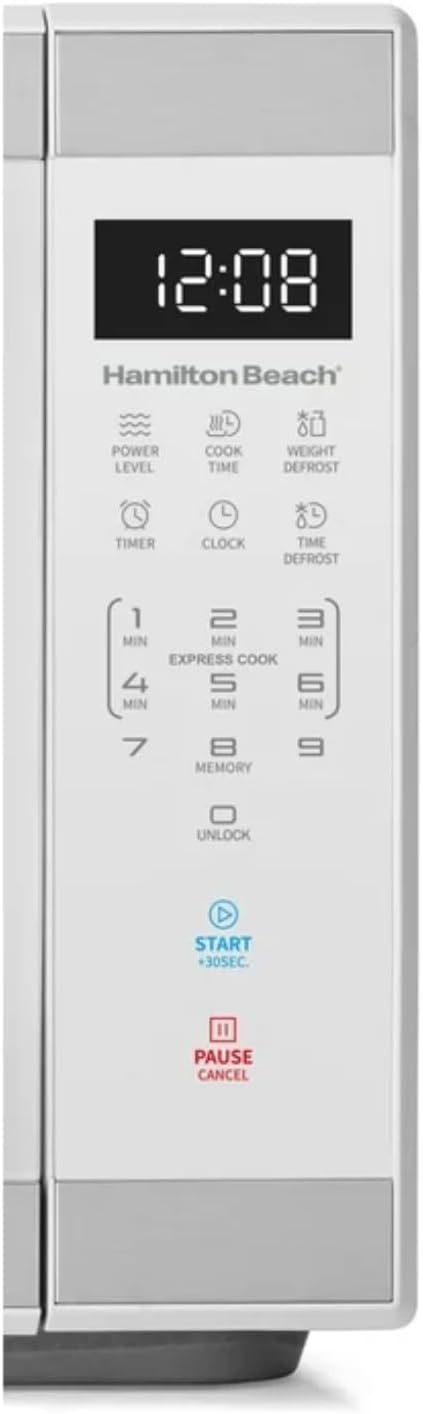
Obraz: Szczegółowy view of the intuitive touchscreen control panel and LED display.
Blokada bezpieczeństwa dla dzieci
This microwave features a child safety lock to prevent unintended operation. The door automatically locks when cooking starts.
To Open Microwave During or After Use:
- Naciśnij 0/ODBLOKUJ or WSTRZYMAJ/ANULUJ podkładka.
- Grasp the handle and open the door.
To Deactivate the Child Safety Lock:
- Naciśnij 0/ODBLOKUJ pad for 3 seconds. The display will indicate "Loc".
- Naciśnij 7 podkładka.
- Naciśnij 9 pad. The display will show "ULoc".
To re-activate the child safety lock, repeat the above steps.
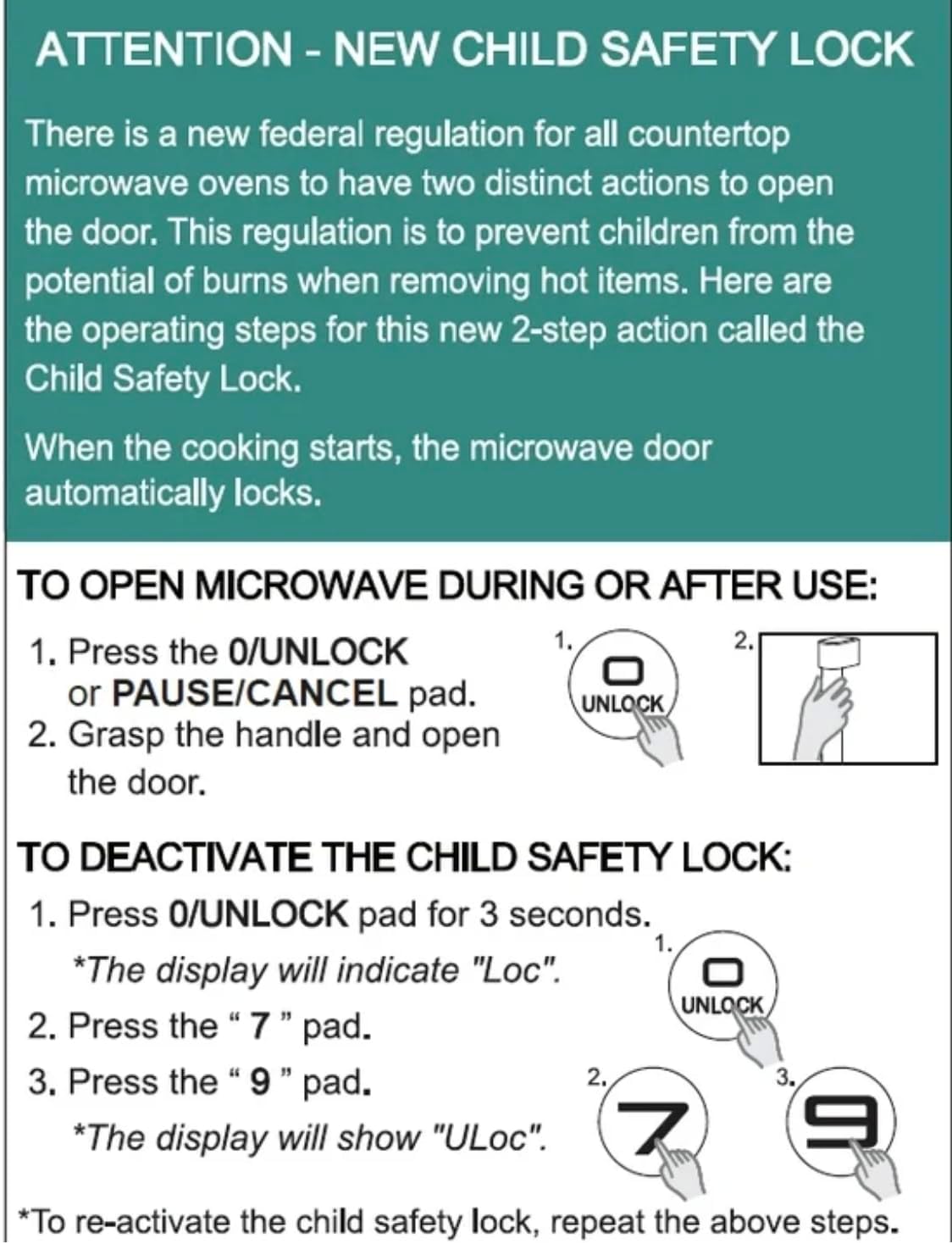
Image: Instructions for the new child safety lock feature, including how to open the door and deactivate the lock.
Konserwacja i czyszczenie
- Czyszczenie wnętrza: Wytrzyj wnętrze piekarnika adamp cloth after each use. For stubborn stains, use a mild detergent. Ensure the interior is dry before next use.
- Czyszczenie zewnętrzne: Wyczyść powierzchnię zewnętrzną miękką,amp płótno. Nie używaj ściernych środków czyszczących ani żrących chemikaliów.
- Czyszczenie gramofonu: The glass turntable and turntable ring can be removed for cleaning. They are dishwasher safe or can be hand-washed with warm, soapy water.
- Uszczelki drzwi: Regularly inspect the door seals and surrounding areas for any damage or food residue. Clean as needed to ensure proper sealing.
Rozwiązywanie problemów
| Problem | Możliwa przyczyna / rozwiązanie |
|---|---|
| Piekarnik nie uruchamia się. |
|
| Jedzenie nie gotuje się równomiernie. |
|
| Light bulb is out. | Contact customer support for bulb replacement. Do not attempt to replace it yourself. |
| Display shows "Loc". | Child safety lock is activated. Follow instructions in the "Child Safety Lock" section to deactivate. |
Gwarancja i wsparcie
For warranty information or technical support, please refer to the warranty card included with your purchase or contact Hamilton customer service. Keep your proof of purchase for warranty claims.
Obsługa klienta: Proszę odwiedzić stronę producenta website or refer to your product packaging for contact details.


