1. Wprowadzenie
This manual provides detailed instructions for the installation, setup, and operation of your Ctronics 4K Outdoor Security Camera, model CTIPC-950 (950C-4KB). Please read this manual thoroughly before using the product to ensure proper functionality and safety. Keep this manual for future reference.
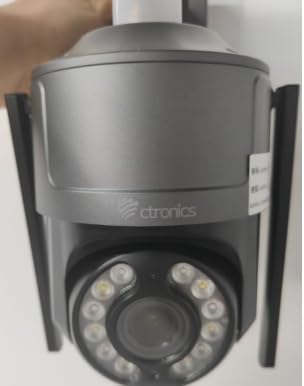
Figure 1: Ctronics 4K Outdoor Security Camera (Model CTIPC-950)
2. Funkcje produktu
- True 4K Ultra HD with Starlight Lens: Experience superior image clarity day and night. Features vivid color night vision up to 30 meters.
- Advanced AI Detection & Auto Tracking: Accurately detects humans, vehicles, and pets. Automatically tracks moving targets to minimize false alarms.
- Powerful Red & Blue Strobe Light with Siren Alarm: Deters intruders effectively with visual and audible alerts.
- 8 Preset Positions & 4 Custom Detection Zones: Configure specific camera positions for quick patrols and define areas for focused surveillance.
- Privacy Masking Feature: Protect sensitive areas by masking them from surveillance.
- Flexible Installation & Multi-Device Remote Access: Supports wall or ceiling mounting. Manage up to 36 cameras via the Ctronics app on mobile or PC, with split-screen viewing, group management, and multi-user sharing.
- Dwuzakresowe Wi-Fi: Supports both 2.4GHz and 5GHz Wi-Fi for reliable and stable connection.
- Odporność na warunki atmosferyczne IP66: Durable metal construction ensures reliable operation in various outdoor conditions.
3. Zawartość opakowania
Sprawdź, czy w opakowaniu znajdują się wszystkie elementy:
- Ctronics 4K Security Camera (CTIPC-950 / 950C-4KB)
- Instrukcja obsługi (ten dokument)
- Śruby montażowe i kołki ścienne
- Zasilacz
4. Konfiguracja
4.1 Pierwsze włączenie zasilania i konfiguracja sieci
- Podłącz zasilanie: Plug the power adapter into the camera's power jack and then into a power outlet. The camera will power on and perform a self-test.
- Download the Ctronics App: Szukaj "Ctronics" in your mobile device's app store (iOS or Android) and download the official application.
- Zarejestruj się/Zaloguj: Otwórz aplikację i utwórz nowe konto lub zaloguj się, używając istniejącego.
- Dodaj kamerę: Tap the "+" icon in the app to add a new device. Select "Wireless Installation" or scan the QR code located on the camera body.
- Połącz się z Wi-Fi: Follow the on-screen prompts to connect the camera to your home's dual-band (2.4GHz or 5GHz) Wi-Fi network. Ensure your phone's volume is turned up to maximum during sound-based configuration.
Video 1: Wi-Fi Setting via Sound (S20-G model, similar process for CTIPC-950)
This video demonstrates the Wi-Fi setup process using sound configuration, which is applicable to various Ctronics camera models including the CTIPC-950. It shows how to power on the camera, open the rubber cover, and use the mobile app to connect to your home Wi-Fi network by entering the password and allowing the phone to transmit sound signals to the camera for configuration.
5. Instalacja
5.1 Miejsce montażu
Choose a suitable outdoor location for mounting. The camera supports both wall and ceiling installation. Ensure the chosen spot provides a clear view of the area you wish to monitor and has access to a power source.
5.2 Kroki montażu
- Zaznacz otwory wiertnicze: Use the provided mounting template or the camera's base to mark the positions for drilling on the wall or ceiling.
- Wiercenie otworów: Drill pilot holes at the marked positions. Insert wall plugs if mounting on masonry or concrete.
- Zabezpiecz bazę: Attach the camera's mounting base to the wall or ceiling using the provided screws.
- Zamocuj kamerę: Securely attach the camera unit to the mounted base.
6. Instrukcja obsługi
6.1 Na żywo View i sterowanie obrotem/pochyleniem
Access the live feed through the Ctronics app. Use the on-screen controls to pan the camera horizontally up to 355° and tilt vertically up to 90° to adjust the viewkąt.
Video 2: Ctronics 4K Security Camera Overview (Model 930C, similar features for CTIPC-950)
Ten film zapewnia ponadview of a Ctronics 4K security camera, highlighting its 355° pan and 90° tilt capabilities, 4K UHD resolution, starlight lens for night vision, AI detection for humans, pets, and vehicles, and the red and blue alarm light with siren. It also shows the metal body, IP67 weatherproof rating, 24/7 recording, dual-band Wi-Fi, and cloud/SD card storage options.
6.2 Wykrywanie sztucznej inteligencji i automatyczne śledzenie
The camera's advanced AI can differentiate between humans, vehicles, and pets. When motion is detected, the camera can automatically track the moving object and send real-time notifications to your linked devices.
6.3 Tryby widzenia nocnego
Kamera oferuje wiele opcji widzenia nocnego:
- Kolorowe widzenie nocne: Utilizes the starlight lens to provide full-color images in low-light conditions up to 30 meters.
- Widzenie nocne w podczerwieni (IR): Zapewnia wyraźne czarno-białe obrazy w całkowitej ciemności.
6.4 funkcji alarmu
Upon detection of an intruder, the camera can activate its red and blue strobe lights and a loud siren to deter unwanted visitors. You will also receive instant alerts on your mobile device.
6.5 Preset Positions and Detection Zones
Configure up to 8 preset camera positions for quick navigation to frequently monitored areas. Define up to 4 customizable motion detection zones to focus surveillance on critical areas and reduce irrelevant alerts.
6.6 Dźwięk dwukierunkowy
Korzystaj z wbudowanego mikrofonu i głośnika, aby komunikować się z gośćmi lub odstraszać intruzów bezpośrednio za pośrednictwem aplikacji.
7. Specyfikacje
| Funkcja | Opis |
|---|---|
| Nazwa modelu | CTIPC-950 (950C-4KB) |
| Zastosowanie wewnątrz/na zewnątrz | Plenerowy |
| Rozdzielczość przechwytywania wideo | 3840 (4K UHD) |
| Efektywna rozdzielczość obrazu nieruchomego | 8 MP |
| Zakres noktowizora | 50 Meters (Color Night Vision up to 30m) |
| Technologia łączności | Wireless (Dual-Band Wi-Fi: 2.4GHz, 5GHz), Ethernet, ONVIF, RTSP |
| Źródło zasilania | Elektryczny przewodowy (12 V, 12 W) |
| Typ kontrolera | Aplikacja Ctronics |
| Typ montażu | Montaż ścienny, montaż sufitowy |
| Międzynarodowa Ocena Ochrony | IP66 (odporny na warunki atmosferyczne) |
| Tworzywo | Metal |
| Pozycja Wymiary (dł. x szer. x wys.) | 5.91 x 5.91 x 5.91 cala |
| Waga przedmiotu | 2.2 funta |
| Opcje przechowywania | Micro SD (up to 256GB), FTP, NAS, Cloud Storage |
8. Konserwacja
- Regularne czyszczenie: Okresowo czyść obiektyw i obudowę aparatu miękką,amp ściereczką, aby zapewnić wysoką jakość obrazu. Nie używaj silnych środków chemicznych.
- Aktualizacje oprogramowania układowego: Check the Ctronics app regularly for firmware updates to ensure optimal performance and security.
- Sprawdzenie zasilania: Ensure the power adapter and cable are free from damage and properly connected.
- Stabilność sieci: Verify your Wi-Fi network is stable to maintain continuous camera operation.
9. Rozwiązywanie Problemów
- Kamera nie łączy się z Wi-Fi:
- Upewnij się, że kamera znajduje się w zasięgu routera Wi-Fi.
- Sprawdź, czy hasło Wi-Fi jest poprawne.
- Spróbuj ponownie uruchomić kamerę i router.
- Ensure your router supports 2.4GHz or 5GHz bands and that the camera is attempting to connect to the correct band.
- Słaba jakość obrazu:
- Wyczyść obiektyw aparatu.
- Sprawdź prędkość swojego połączenia sieciowego. Wolne połączenie może mieć wpływ na jakość przesyłania strumieniowego.
- Upewnij się, że nie ma żadnych przeszkód blokujących kamerę. view.
- Fałszywe alarmy:
- Dostosuj ustawienia czułości wykrywania ruchu w aplikacji.
- Configure detection zones to exclude areas with frequent irrelevant motion (e.g., moving trees).
- Ensure AI detection for humans/vehicles/pets is enabled to filter out other movements.
- Brak zasilania:
- Check if the power adapter is securely plugged into both the camera and the power outlet.
- Sprawdź gniazdko elektryczne, podłączając do niego inne urządzenie, aby upewnić się, że działa prawidłowo.
10. Gwarancja i wsparcie
Your Ctronics 4K Outdoor Security Camera is covered by a manufacturer's warranty. For specific warranty terms and conditions, please refer to the documentation included with your purchase or visit the official Ctronics website. For technical support, troubleshooting assistance, or any product-related inquiries, please contact Ctronics customer service through the contact information provided on their webstronie lub w aplikacji Ctronics.


