Wstęp
This manual provides detailed instructions for setting up, operating, and maintaining your Blink Video Doorbell and Blink Outdoor 4 camera system. These devices offer advanced wireless smart security features, including head-to-toe HD view, two-year battery life, and two-way audio, designed to enhance your home security and peace of mind.

Obraz: Ponadview of the Blink Video Doorbell system highlighting key features like Head-to-Toe HD View, Two-Year Battery Life, Two-Way Audio, and Smart Notifications.
Co jest zawarte
Your Blink Video Doorbell + Outdoor 4 system package includes the following components:
- 1 Blink Video Doorbell
- 1 Blink Outdoor 4 camera
- 1 Blink Sync Module Core
- 5 AA Energizer lithium batteries (3 for Doorbell, 2 for Outdoor 4)
- Mounting kits for each device
- 1 Wall Plate (for Doorbell)
- 1 Doorbell Removal Tool
- 2 Wire Extenders (for Doorbell)
- 1 Corner Mount Accessory (for Doorbell)
- 1 Drill template (for Doorbell)
- 1 Doorbell removal key
- 1 Power Adapter (for Sync Module Core)
- 1 USB-C Cable (for Sync Module Core)
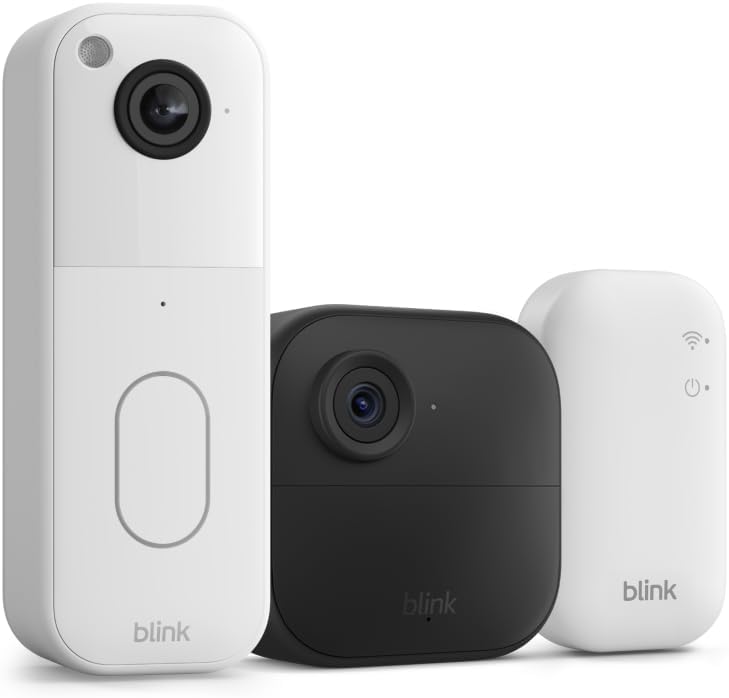
Image: The main components of the Blink security system: the Blink Video Doorbell, the Blink Outdoor 4 camera, and the Blink Sync Module Core.
Przewodnik po konfiguracji
1. Download the Blink Home Monitor App
Before beginning installation, download the Blink Home Monitor app from your device's app store (iOS, Android, or Fire OS). Create an account or log in if you already have one.
2. Set Up the Sync Module Core
The Sync Module Core is essential for your Blink system to function.
- Plug the Sync Module Core into a power outlet using the provided power adapter and USB-C cable.
- Place it centrally within your home, ensuring it's within Wi-Fi range and can communicate with both the Video Doorbell and Outdoor 4 camera.
- Follow the in-app instructions to connect the Sync Module Core to your 2.4 GHz Wi-Fi network.
3. Install the Blink Video Doorbell
The Blink Video Doorbell can be installed wirelessly or wired to an existing chime.
- Insert the three AA lithium batteries into the Video Doorbell.
- Choose your mounting location. Use the drill template and mounting kit to secure the wall plate.
- If wiring, connect the doorbell wires to the terminals on the wall plate using the wire extenders if necessary. Ensure power is off before connecting.
- Snap the Video Doorbell onto the wall plate.
- Follow the in-app instructions to add the Video Doorbell to your Sync Module system.
4. Install the Blink Outdoor 4 Camera
The Outdoor 4 camera is designed for outdoor use and is completely wireless.
- Insert the two AA lithium batteries into the Outdoor 4 camera.
- Select an optimal outdoor location for the camera, ensuring it has a clear view and is within range of the Sync Module Core.
- Use the provided mounting kit to securely attach the camera to a wall or surface.
- Follow the in-app instructions to add the Outdoor 4 camera to your Sync Module system.

Image: A hand holding the Blink Video Doorbell, illustrating its compact size and the location of the battery compartment, emphasizing its two-year battery life.
Operating Your Blink System
Using the Blink Home Monitor App
The Blink app is your central control hub for managing your security system.
- Na żywo View: Access real-time video streams from your Video Doorbell (head-to-toe HD) and Outdoor 4 camera (1080p HD).
- Dwukierunkowy dźwięk: Speak and listen to visitors or deter intruders using the built-in microphone and speaker on both devices.
- Detekcja ruchu: Configure motion detection zones and sensitivity for both devices. Receive instant alerts on your smartphone when motion is detected. Outdoor 4 features enhanced dual-zone motion detection.
- Widzenie nocne: Both devices feature infrared night vision for clear vieww warunkach słabego oświetlenia.
- Arm/Disarm System: Easily arm or disarm your entire system or individual cameras through the app.
- Przechowywanie wideo: With a Blink Subscription Plan (sold separately), securely store video clips in the cloud for up to 60 days. A free 30-day trial is typically included.
- Inteligentne powiadomienia: Receive intelligent alerts, including person detection (with a Blink Subscription Plan), directly on your phone.

Image: A smartphone displaying the Blink app interface, showcasing the 150-degree head-to-toe field of view from the Blink Video Doorbell, allowing users to see packages and visitors clearly.

Obraz: Rodzina viewing a live feed from their Blink camera on an Alexa-compatible smart display, demonstrating the two-way communication feature.

Image: A smartphone screen displaying smart notifications from the Blink app, including alerts for motion detection and person detection.
Konserwacja
Wymiana baterii
Both the Video Doorbell and Outdoor 4 camera are designed for up to two years of battery life under typical usage. The Blink app will notify you when battery levels are low.
- Wideodomofon: Use the provided doorbell removal tool to detach the doorbell from its wall plate. Replace the three AA 1.5V lithium metal batteries.
- Outdoor 4 Camera: Open the battery compartment on the back of the camera. Replace the two AA 1.5V lithium metal batteries.
- Always use non-rechargeable lithium metal batteries for optimal performance and battery life.
Cleaning Your Devices
Periodically clean the camera lenses and device surfaces to ensure clear video quality and proper functionality.
- Use a soft, dry, lint-free cloth to wipe the lens and body of the devices.
- Unikaj stosowania silnych środków chemicznych i ściernych środków czyszczących, gdyż mogą one uszkodzić urządzenie.
Rozwiązywanie problemów
Problemy z łącznością
- Nie na żywo View/Urządzenie offline: Ensure your Sync Module Core is powered on and connected to your Wi-Fi network. Check your home Wi-Fi signal strength.
- Słaba jakość wideo: Sprawdź siłę sygnału Wi-Fi w miejscu, w którym znajduje się kamera. Upewnij się, że obiektyw kamery jest czysty i nie ma w nim żadnych przeszkód.
Problemy z wykrywaniem ruchu
- Too Many/Few Alerts: Adjust motion detection sensitivity and activity zones within the Blink app. Consider the camera's placement relative to high-traffic areas or environmental factors (e.g., moving branches).
- Fałszywe alarmy: Refine activity zones to exclude areas with frequent, non-relevant motion.
Battery Life Concerns
- Shorter Than Expected Battery Life: Frequent Live View access, high motion detection sensitivity, and extreme temperatures can reduce battery life. Review your settings in the Blink app. Ensure you are using recommended lithium metal batteries.
Specyfikacje
Dzwonek wideo Blink
- Pole View: 150°HV
- Rozdzielczość wideo: 1440x1440p
- Proporcje obrazu: 1:1
- Liczba klatek na sekundę kamery: 30 klatek na sekundę
- Wymiary: 1.85 cala x 5.12 cala x 1.44 cala (47 mm x 130 mm x 36.6 mm)
- Waga: 4oz (113 g)
- Moc: 3 AA 1.5V lithium metal (non-rechargeable) batteries; Existing chime wiring: 8-24 VAC
- Audio: Speaker output and two-way audio recording
- diody LED: Recording indicator, Button LED
- Temperatura pracy: -5 ° F do 113 ° F (-20 ° do 45 ° C)
- Generacja: 2. generacja
Blink Outdoor 4 Camera
- Pole View: 143° po przekątnej
- Rozdzielczość kamery: Wideo HD 1080p
- Rozdzielczość zdjęcia: 640x360
- Liczba klatek na sekundę kamery: Do 30 fps
- Wymiary: 2.8 x 2.8 x 1.6 cala (70 x 70 x 41 mm)
- Waga jednostkowa: 5.0 uncje (141 g)
- Moc: 2 AA 1.5V lithium metal batteries (non-rechargeable)
- Audio: Dźwięk dwukierunkowy
- Temperatura pracy: -4°F do 113°F
- Generacja: 4. generacja – wydanie 2023
Ogólne wymagania systemowe
- Połączenie internetowe: Always-on high-speed internet (broadband, fiber, or DSL)
- Sieć Wi-Fi: 2.4 GHz 802.11b / g / n
- Minimum Smartphone Requirements: iOS 15.0, Android 9.0 lub Fire 9.0
- Blink App: Mrugaj monitor główny
Gwarancja i wsparcie
Informacje o gwarancji
Your Blink Video Doorbell and Outdoor 4 camera system comes with a one-year limited warranty. The purchase and use of Blink devices are subject to the terms found on the official Blink webstrona.
Aktualizacje zabezpieczeń oprogramowania
This device receives guaranteed software security updates for at least four years after it is last available for purchase as a new unit on our websites. For more information on software security updates, please refer to the official Blink support resources.
Obsługa klienta
For additional information, setup guides, and troubleshooting assistance, please visit the official Blink Support page.
Visit the Blink Store


