1. Wprowadzenie
This manual provides detailed instructions for the installation, operation, maintenance, and troubleshooting of your SwitchBot Video Doorbell Camera with Monitor. Please read this manual thoroughly before using the product to ensure proper function and safety.
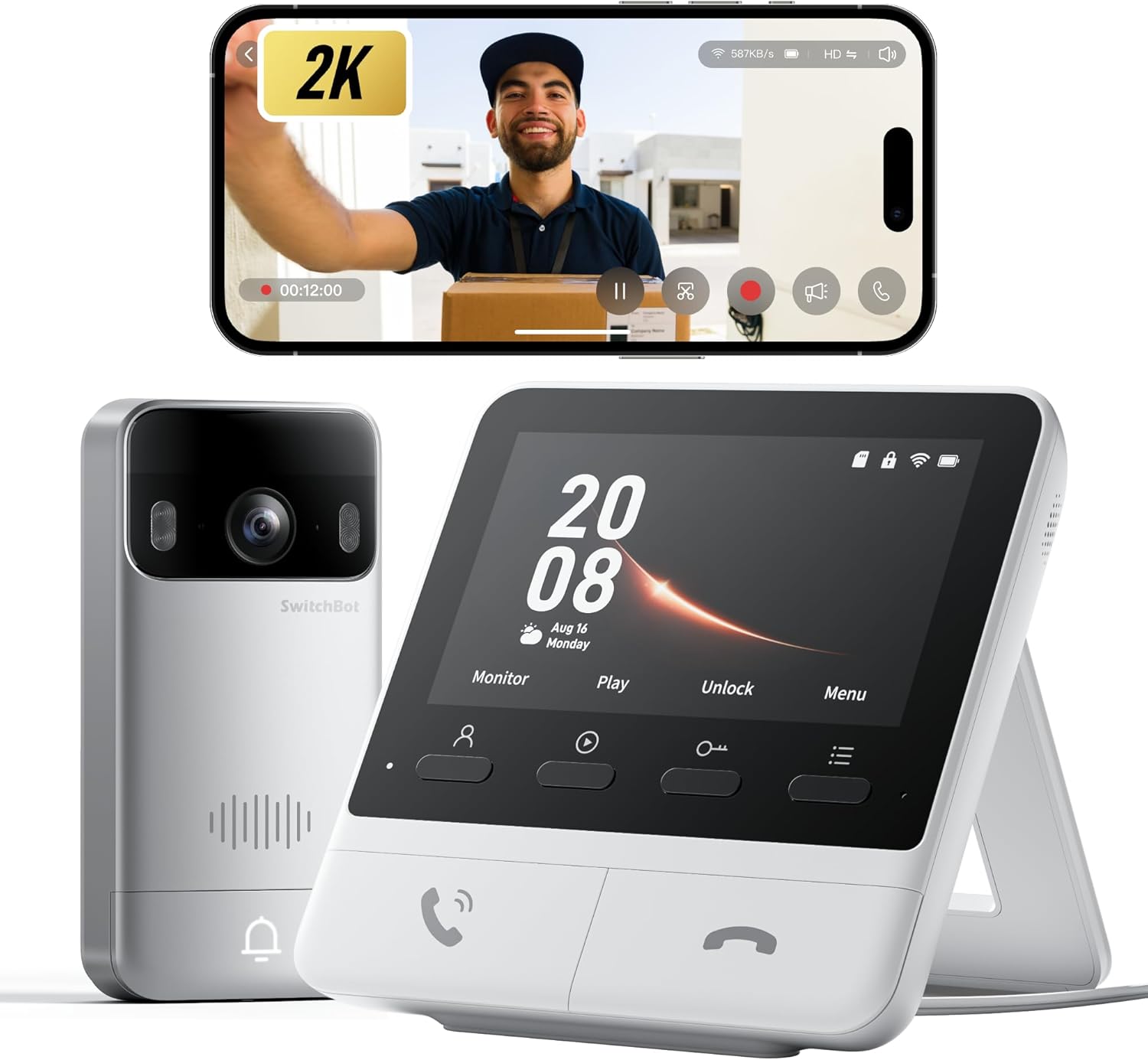
Image 1.1: The SwitchBot Video Doorbell Camera and its accompanying 4.3-inch indoor monitor.
2. Zawartość opakowania
Sprawdź, czy w opakowaniu znajdują się wszystkie elementy:
- Jednostka wideodomofonu
- Jednostka monitora wewnętrznego
- Kabel ładujący
- Mounting Kit & Adjustable Viewing Angle Kit
- Instrukcja obsługi (ten dokument)
- Karta Micro SD 4 GB (wstępnie zainstalowana lub dołączona osobno)
3. Konfiguracja i instalacja
3.1. Środki ostrożności podczas instalacji
- For optimal communication stability, place the monitor near your Wi-Fi router.
- Avoid placing the monitor on metal surfaces, as this can interfere with wireless signals.
- Ensure both the Video Doorbell and Monitor are installed on the same floor.
- For detached houses, install the doorbell within 10 meters of the door, minimizing obstructions.
- For apartments, install the doorbell within 5 meters of the door, minimizing wall obstructions.

Image 3.1: Diagrams illustrating recommended installation distances for the doorbell and monitor in different housing types.
3.2. Doorbell Installation
The Video Doorbell can be installed using either the included 3M adhesive tape or screws.
- Instalacja kleju: Clean the mounting surface thoroughly. Apply the 3M adhesive to the back of the mounting bracket and firmly press it onto the desired location.
- Instalacja śrubowa: Use the provided template to mark drill holes. Drill pilot holes, then secure the mounting bracket to the wall or door using the screws.
- Attach the Video Doorbell unit to the installed mounting bracket.
3.3. Umiejscowienie monitora
Place the indoor monitor unit in a central location within your home, adhering to the distance guidelines mentioned in Section 3.1. Ensure it is plugged into a power outlet using the provided charging cable.

Image 3.2: Visual guide for doorbell installation using adhesive or screws, and monitor placement.
3.4. Konfiguracja początkowa i parowanie aplikacji
- Pobierz aplikację SwitchBot ze sklepu z aplikacjami na swoim urządzeniu.
- Utwórz konto lub zaloguj się.
- Follow the in-app instructions to add the Video Doorbell and Monitor to your account. This typically involves powering on both devices and following pairing prompts.
4. Działanie
4.1. Na żywo View i dwukierunkowe audio
When a visitor presses the doorbell, the indoor monitor will display a live video feed, and your smartphone will receive a notification. You can:
- Odbieraj połączenia: Press the answer button on the monitor or within the app to initiate two-way audio communication.
- Speak to Visitors: Use the built-in microphone and speaker on both the doorbell and monitor/app to communicate.
- Szybkie odpowiedzi: If busy, select from preset quick replies via the monitor or app to respond instantly.

Image 4.1: Demonstrates real-time communication with visitors using the indoor monitor and the mobile application.
4.2. Jakość wideo i widzenie nocne
The doorbell features 2K Full HD video resolution and a 165° ultra-wide-angle lens, providing a clear and comprehensive view. It also includes full-color night vision for enhanced visibility in low-light conditions.

Image 4.2: Illustrates the clarity of 2K Full HD video and the effectiveness of full-color night vision.
4.3. Detekcja ruchu i alerty
The doorbell is equipped with motion detection capabilities. When motion is detected, you will receive instant alerts on your smartphone and the monitor will activate. The system records these events for later review.

Obraz 4.3: Example of a real-time notification for detected human motion.
4.4. Local Storage and Cloud Options
The indoor monitor includes a slot for a Micro SD card (4GB card included) for local storage of video recordings. This allows for recording without a subscription. The device supports up to 512GB SD cards. Optional cloud storage with a 30-day trial is also available for new users.

Image 4.4: The indoor monitor showing video playback and indicating local storage via an SD card.
4.5. Integracja inteligentnego domu
The SwitchBot Video Doorbell is compatible with Alexa, Google Home, and Home Assistant. This allows for voice-controlled video feeds and integration into your smart home ecosystem. It also pairs seamlessly with the SwitchBot Smart Lock for enhanced security and convenience, enabling one-touch unlocking from the monitor.
5. Konserwacja
5.1. Ładowanie baterii
The Video Doorbell is powered by a 5000mAh rechargeable battery. To charge, remove the doorbell unit from its mounting bracket and connect it via a USB-C cable. An optional SwitchBot Solar Panel can provide continuous power, eliminating the need for manual charging.

Image 5.1: Shows the doorbell being charged via USB-C and an example of solar panel integration for extended battery life.
5.2. Czyszczenie
Wipe the doorbell and monitor units with a soft, dry cloth. Avoid using abrasive cleaners or solvents that could damage the surfaces or electronic components. The doorbell unit is IP65 dustproof and waterproof, suitable for outdoor use, but should not be submerged.
6. Rozwiązywanie Problemów
| Wydanie | Możliwa przyczyna | Rozwiązanie |
|---|---|---|
| Brak sygnału wideo na monitorze/aplikacji | Poor Wi-Fi signal, low doorbell battery, device not paired. | Ensure monitor is near router. Charge doorbell. Re-pair devices via the SwitchBot app. |
| Motion alerts are inconsistent | Incorrect sensitivity settings, obstructions in view. | Adjust motion detection sensitivity in the app. Clear any objects blocking the doorbell's view. |
| Two-way audio is unclear | Weak Wi-Fi signal, environmental noise. | Improve Wi-Fi signal strength. Reduce background noise if possible. |
| Doorbell not charging | Faulty cable, power adapter, or USB-C port. | Try a different USB-C cable and power adapter. Ensure the port is clean. |
| Tamper alarm triggered unexpectedly | Doorbell unit was moved or dislodged. | Re-secure the doorbell unit to its mounting bracket. Check mounting for stability. |
7. Specyfikacje
| Funkcja | Szczegół |
|---|---|
| Numer modelu | W6802000 |
| Zastosowanie wewnątrz/na zewnątrz | Plenerowy |
| Rozdzielczość przechwytywania wideo | 1920p (2K FHD) |
| Viewing kąt | 165 stopni |
| Zakres noktowizora | 7.5 metrów (kolorowa wizja nocna) |
| Źródło zasilania | Battery (5000mAh) / Hardwired Powered |
| Protokół łączności | Bluetooth, Wi-Fi (2.4 GHz) |
| Kompatybilne urządzenia | Smartphone, Amazon Alexa, Google Home, Home Assistant |
| Składowanie | Micro SD (w zestawie 4 GB, obsługuje do 512 GB) |
| Poziom wodoodporności | Wodoodporność IP65 |
| Tworzywo | Plastikowy |
| Wymiary produktu | 2.56 x 1.18 x 5.16 cala |
| Waga przedmiotu | 1.94 funta |
8. Gwarancja i wsparcie
8.1. Informacje o gwarancji
Aby uzyskać szczegółowe informacje dotyczące gwarancji, zapoznaj się z kartą gwarancyjną dołączoną do produktu lub odwiedź oficjalną stronę SwitchBot webZachowaj dowód zakupu na wypadek roszczeń gwarancyjnych.
8.2. Obsługa klienta
If you encounter any issues or have questions not covered in this manual, please contact SwitchBot customer support through their official website or the SwitchBot app. Support resources, including FAQs and video tutorials, are also available online.


