1. Wprowadzenie
Thank you for choosing the GOBOULT Astra Neo Bluetooth In-Ear Earbuds. This manual provides essential information for setting up, operating, and maintaining your earbuds to ensure optimal performance and longevity. Please read this manual thoroughly before use.
2. Informacje dotyczące bezpieczeństwa
- Nie wystawiaj słuchawek ani etui ładującego na działanie ekstremalnych temperatur, wilgoci ani płynów.
- Unikaj upuszczania, uderzania i demontażu urządzenia.
- Do ładowania należy używać wyłącznie dołączonego kabla ładującego lub certyfikowanego kabla typu C.
- Aby zapobiec uszkodzeniu słuchu, słuchaj przy umiarkowanym poziomie głośności.
- Przechowywać w miejscu niedostępnym dla dzieci i zwierząt domowych.
3. Zawartość opakowania
Sprawdź, czy w przesyłce znajdują się wszystkie elementy:
- GOBOULT Astra Neo Earbuds (Left and Right)
- Etui ładujące
- Kabel ładujący typu C.
- Nauszniki (różne rozmiary)
- Instrukcja obsługi
- Karta gwarancyjna
4. Koniec produktuview
The GOBOULT Astra Neo earbuds feature a sleek design with touch controls and a compact charging case. The case includes breathing LED lights for status indication.

Image: GOBOULT Astra Neo Earbuds and Charging Case. The image displays the black earbuds removed from their charging case, which features a glowing blue LED strip.

Image: GOBOULT Astra Neo Comfort Grip Case and Earbuds. This image highlights the textured surface of the charging case and earbuds, along with the breathing case lights.
5. Konfiguracja
5.1 Ładowanie słuchawek dousznych i etui
Przed pierwszym użyciem należy w pełni naładować słuchawki i etui ładujące.
- Umieść słuchawki w etui ładującym. Upewnij się, że są prawidłowo osadzone.
- Podłącz kabel ładujący typu C do portu ładowania w obudowie i do źródła zasilania.
- The LED indicator on the case will illuminate during charging and turn off or change color when fully charged.
A 10-minute charge provides approximately 100 minutes of playtime.

Image: GOBOULT Astra Neo Fast Charging Feature. This image illustrates the 70-hour playtime and the fast charging capability: 10 minutes of charge equals 100 minutes of playtime.
5.2 Parowanie z urządzeniem (Bluetooth 5.4)
The Astra Neo uses Bluetooth 5.4 with Blink & Pair technology for quick and stable connections.
- Otwórz etui ładujące. Słuchawki automatycznie przejdą w tryb parowania.
- Włącz Bluetooth na swoim urządzeniu (smartfonie, tablecie, laptopie).
- Szukaj available Bluetooth devices and select "GOBOULT Astra Neo" from the list.
- Po nawiązaniu połączenia usłyszysz komunikat głosowy potwierdzający pomyślne sparowanie.

Image: GOBOULT Astra Neo Bluetooth 5.4 Pairing. This image shows a smartphone screen displaying a successful Bluetooth 5.4 connection to 'Astra Neo', emphasizing power efficiency and stable connection.
6. Instrukcja obsługi
6.1 Sterowanie dotykowe
The Astra Neo earbuds feature intuitive touch controls on each earbud:
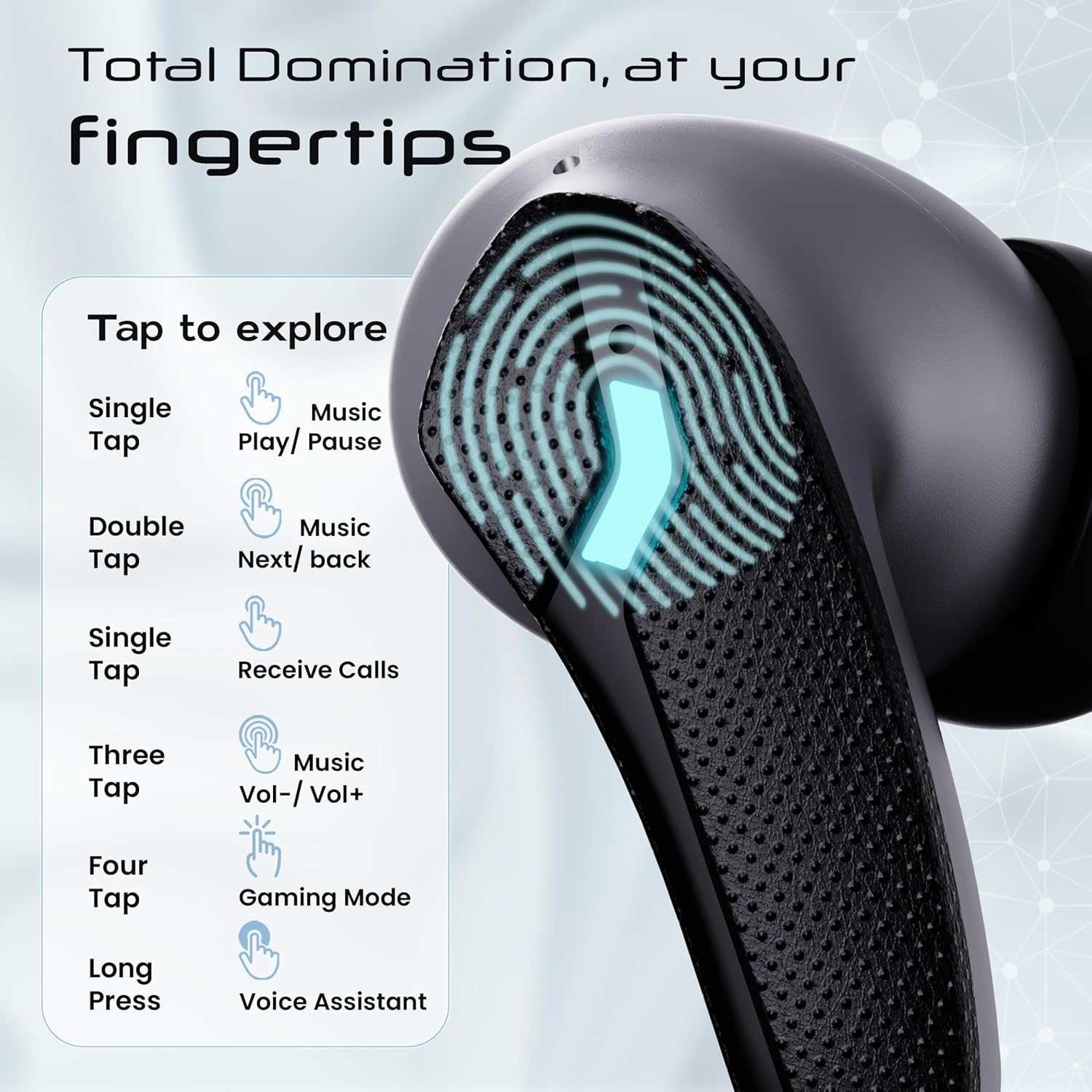
Image: GOBOULT Astra Neo Touch Controls Guide. This graphic details the various touch gestures for controlling music, calls, gaming mode, and voice assistant.
- Pojedyncze dotknięcie: Play/Pause music, Receive Calls.
- Podwójne wciśnięcie: Music Next/Back (specific earbud for each function).
- Three Tap: Music Volume Up/Down (specific earbud for each function).
- Four Tap: Activate Gaming Mode.
- Długie naciśnięcie: Activate Voice Assistant (Google Assistant/Siri).
6.2 Gaming Mode (40ms Low Latency)
Activate Gaming Mode for a synchronized audio experience during gameplay, reducing audio delay to 40ms.
- To activate: Four tap on either earbud.
- To deactivate: Four tap again on either earbud.

Image: GOBOULT Astra Neo Gaming Mode with 40ms Low Latency. This image depicts a user playing a mobile game with the earbuds, highlighting the ultra-low latency feature for an immersive gaming experience.
6.3 ZEN Quad Mic ENC for Calls
The ZEN Quad Mic Environmental Noise Cancellation (ENC) system ensures clear voice calls by filtering out background noise.

Image: GOBOULT Astra Neo ZEN Quad Mic ENC Technology. This image illustrates the internal components and the function of the 4 microphones for clear in-game communication and crystal-clear calling with Acoustic Echo Cancellation (AEC).
6.4 tryby korektora
The Astra Neo earbuds support 4 EQ modes for customized audio experiences. Refer to the product packaging or official GOBOULT website for specific instructions on how to switch between these modes, as this functionality is typically managed via a companion app or specific touch gestures not detailed here.
7. Konserwacja
7.1 Czyszczenie
- Delikatnie przetrzyj słuchawki douszne i etui ładujące miękką, suchą i niepozostawiającą włókien ściereczką.
- Nie używaj ostrych środków chemicznych, rozpuszczalników czyszczących ani silnych detergentów.
- Aby zapewnić prawidłowe ładowanie, należy regularnie czyścić styki ładowania zarówno w słuchawkach, jak i w etui.
7.2 Wodoodporność (IPX5)
The Astra Neo earbuds are IPX5 water-resistant, meaning they are protected against sweat, rain, and splashes. They are not designed for submersion in water.
- Nie zanurzaj celowo słuchawek dousznych w wodzie.
- If exposed to sweat or rain, wipe them dry before placing them back in the charging case.

Image: GOBOULT Astra Neo IPX5 Water Resistance and Voice Assistant. This image highlights the earbuds' sweatproof, rainproof, and splashproof capabilities, along with compatibility with Google Assistant and Hey Siri.
7.3 Przechowywanie
Gdy nie używasz słuchawek, przechowuj je w etui ładującym, aby je chronić i utrzymać naładowanie.
8. Rozwiązywanie Problemów
- Słuchawki nie łączą się: Ensure both earbuds are in the charging case, then open the lid to re-enter pairing mode. Check your device's Bluetooth settings and try reconnecting.
- Działa tylko jedna słuchawka: Włóż obie słuchawki z powrotem do etui, zamknij pokrywę, odczekaj kilka sekund, a następnie otwórz ją ponownie. To często powoduje ich ponowną synchronizację.
- Brak dźwięku: Sprawdź poziom głośności zarówno na urządzeniu, jak i w słuchawkach. Upewnij się, że słuchawki są prawidłowo podłączone do urządzenia.
- Problemy z ładowaniem: Clean the charging contacts on the earbuds and inside the case. Ensure the charging cable is securely connected and the power source is active.
- Słaba jakość połączeń: Upewnij się, że mikrofony nie są zasłonięte. Spróbuj przejść w cichsze miejsce.
9. Specyfikacje
Key technical specifications for the GOBOULT Astra Neo Earbuds:
| Funkcja | Specyfikacja |
|---|---|
| Nazwa modelu | Astry Neo |
| Wersja Bluetooth | 5.4 |
| Pauza w szkole | Do 70 godzin (z etui ładującym) |
| Szybkie ładowanie | 10 minut ładowania = 100 minut odtwarzania |
| Niskie opóźnienie | 40 ms (tryb gier) |
| Rozmiar kierowcy | 13mm BoomX Drivers |
| Mikrofon | ZEN Quad Mic ENC |
| Odporność na wodę | IPX5 |
| Metoda kontroli | Dotykać |
| Technologia łączności | Bluetooth, bezprzewodowy |
| Gniazdo słuchawkowe | Type-C Fast Charging Jack |
| Waga przedmiotu | 47 gram |
| Wymiary produktu | Wymiary 6.2 x 5.3 x 3.2 cm |
| Typ baterii | Polimer litowy |
| Zasięg Bluetooth | 10 metrów |
| Impedancja | 32 omy |

Image: GOBOULT Astra Neo 13mm BoomX Drivers. This image highlights the 13mm BoomX drivers, emphasizing crystal clear sound and support for MSBC, SBC, and AAC codecs.
10. Gwarancja i wsparcie
The GOBOULT Astra Neo Earbuds come with a 1-letnia gwarancja producenta from the date of purchase. This warranty covers manufacturing defects. For warranty claims or technical support, please refer to the contact information provided on your warranty card or visit the official GOBOULT webstrona.


