1. Koniec produktuview
The Orbic Speed (RC400L) is a compact and portable 4G LTE MiFi Mobile Hotspot Router designed to provide secure and reliable Wi-Fi connectivity on the go. It allows you to connect up to 10 Wi-Fi enabled devices simultaneously, offering high-speed internet access for various activities such as checking email, streaming media, and working remotely. This device features a long-lasting rechargeable battery and dual-band 802.11ac Wi-Fi for optimal performance and range.
Główne cechy
- Unlocked Connectivity: Kompatybilny z różnymi operatorami (pierwotnie Verizon).
- Dłuższa żywotność baterii: Do 12 godzin ciągłej pracy na jednym ładowaniu.
- Fast Wi-Fi: Dual-band 802.11ac Wi-Fi for high-speed data and extended range.
- Obsługa wielu urządzeń: Securely connect up to 10 Wi-Fi enabled devices.
- Kompaktowy i przenośny: Lightweight design for easy travel and discreet placement.
- Informacyjny wyświetlacz LCD: Provides real-time status updates of the mobile hotspot.
Co jest w pudełku
- Orbic Speed (RC400L) Mobile Hotspot Router
- Kabel USB
- Akumulator litowo-jonowy (wstępnie zainstalowany lub osobno)
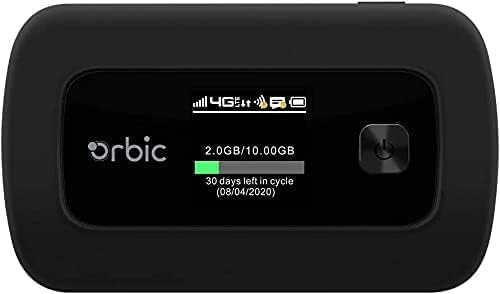
Figure 1: Orbic Speed (RC400L) Front View z wyświetlaczem
2. Rozpoczęcie pracy: konfiguracja
2.1. Ładowanie urządzenia
Before initial use, fully charge your Orbic Speed hotspot. Connect the provided USB cable to the device's charging port and the other end to a compatible USB power adapter (not included) or a computer's USB port. The device's display will indicate charging status.
- Używaj wyłącznie zatwierdzonych akcesoriów do ładowania.
- Avoid leaving the device plugged in for extended periods after it is fully charged to prolong battery life.
2.2. Wkładanie karty SIM
The Orbic Speed (RC400L) requires a compatible 4G LTE SIM card (not included) to access cellular data networks. Follow these steps to insert the SIM card:
- Sprawdź, czy urządzenie jest wyłączone.
- Carefully remove the back cover of the device. The back cover is designed to snap off easily without tools.
- Znajdź gniazdo karty SIM.
- Włóż kartę SIM do gniazda złotymi stykami do dołu i wyciętym rogiem, dokładnie dopasowując ją do siebie. Delikatnie dociśnij, aż zatrzaśnie się na swoim miejscu.
- Replace the back cover, ensuring it snaps securely into position.

Figure 2: Orbic Speed (RC400L) Back View (SIM card slot is under the cover)
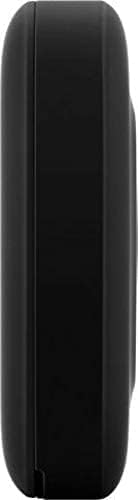
Figure 3: Orbic Speed (RC400L) Side View (Charging port location)
2.3. Włączanie/wyłączanie zasilania
- Włączanie: Press and hold the Power button (usually located on the front or side) until the display lights up.
- Aby wyłączyć: Press and hold the Power button until the "Power Off" option appears on the display, then confirm. Alternatively, hold the power button for several seconds until the device shuts down.
3. Operating the Hotspot
3.1. Łączenie urządzeń przez Wi-Fi
Once your Orbic Speed hotspot is powered on and has established a cellular connection, you can connect your Wi-Fi enabled devices (laptops, tablets, smartphones, etc.) to it.
- Na swoim urządzeniu otwórz ustawienia Wi-Fi.
- Przeskanuj dostępne sieci Wi-Fi.
- Select the network name (SSID) displayed on your Orbic Speed's screen.
- Enter the Wi-Fi password (Key) also displayed on the hotspot's screen.
- Your device should now be connected to the internet through the hotspot.
The Orbic Speed supports both 2.4GHz and 5GHz Wi-Fi bands. You can switch between these or configure them via the web interfejs administracyjny.
3.2. Dostęp do Web Administration Interface
For advanced settings, network monitoring, and configuration, you can access the Orbic Speed's web administration interface from a connected device.
- Ensure your device is connected to the Orbic Speed's Wi-Fi network.
- Otwórz web przeglądarka (np. Chrome, Firefox, Edge).
- In the address bar, type the default IP address for the hotspot (commonly 192.168.1.1 or 192.168.0.1, refer to your device's display or packaging for the exact address).
- Enter the administrator username and password when prompted. Default credentials are often "admin" for both, but it is highly recommended to change these for security.
Z web interface, you can manage Wi-Fi settings, view connected devices, monitor data usage, change passwords, and configure other network parameters.
3.3. Zrozumienie wyświetlacza LCD
The Orbic Speed's LCD display provides essential information at a glance:
- Siła sygnału: Bars indicating the strength of the cellular network signal.
- Typ sieci: Icons for 4G LTE, 3G, etc.
- Stan Wi-Fi: Wskazuje, czy sieć Wi-Fi jest aktywna i czy urządzenia są połączone.
- Poziom naładowania baterii: Icon showing remaining battery charge.
- Wykorzystanie danych: Displays current data consumption (e.g., GB used out of total plan).
- Połączone urządzenia: Liczba urządzeń aktualnie podłączonych do punktu dostępowego.
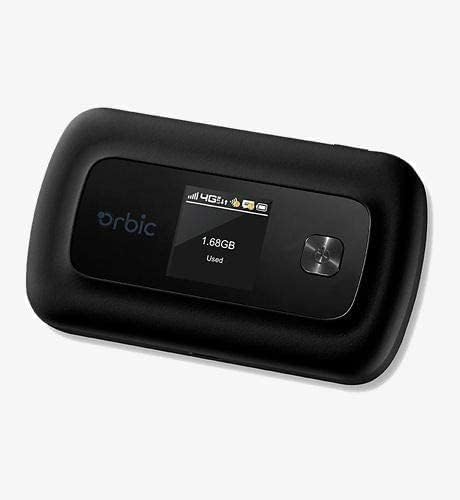
Figure 4: Orbic Speed (RC400L) Display in Use
4. Konserwacja
4.1. Pielęgnacja baterii
To maximize the lifespan of your device's battery:
- Unikaj ekstremalnych temperatur.
- Do not leave the device continuously plugged in for extended periods (e.g., 24/7) if not necessary, as this can degrade battery health over time.
- Jeśli urządzenie będzie przechowywane przez dłuższy czas, przed schowaniem należy je naładować do około 50%.
- The battery is designed for easy replacement. Should replacement be necessary, the back casing can be snapped off to access the battery without tools.
4.2. Czyszczenie urządzenia
Use a soft, dry, lint-free cloth to clean the exterior of the device. Do not use liquid cleaners or aerosols directly on the device.
4.3. Aktualizacje oprogramowania
Okresowo sprawdzaj dostępność aktualizacji oprogramowania za pomocą web administration interface. Updates can improve performance, add features, and enhance security.
5. Rozwiązywanie Problemów
| Problem | Możliwa przyczyna | Rozwiązanie |
|---|---|---|
| Brak połączenia internetowego | No SIM card, SIM not activated, poor cellular signal, data plan exhausted. |
|
| Urządzenie nie włącza się | Low battery, faulty charger/cable. |
|
| Niska prędkość Wi-Fi | Poor cellular signal, too many connected devices, interference. |
|
| Nie można uzyskać dostępu Web UI | Incorrect IP address, not connected to hotspot Wi-Fi. |
|
If problems persist, consider performing a factory reset (refer to the web administration interface for instructions, as this will erase all custom settings) or contact customer support.
6. Specyfikacje
| Funkcja | Szczegół |
|---|---|
| Nazwa modelu | Orbic Speed (RC400L) |
| Technologia łączności | USB, Wi-Fi (4G LTE) |
| standard bezprzewodowy | 802.11ac (Dual-Band) |
| Kompatybilne urządzenia | Laptop, Tablet, Smartphone, etc. |
| Kolor | Czarny |
| Waga przedmiotu | 7.8 uncji |
| Wymiary opakowania | 5.75 x 3.46 x 2.2 cala |
| Bateria | 1 bateria litowo-jonowa (w zestawie) |
| Funkcja specjalna | Wskaźnik LED |
| Producent | Orbic |
7. Gwarancja i wsparcie
Ten produkt jest sprzedawany jako Odnowiony Amazon item. Amazon Renewed products are pre-owned and refurbished by qualified suppliers to work and look like new. They come with the Amazon Renewed Guarantee, which provides a replacement or refund within 90 days of receipt if the product does not work as expected.
For technical support or warranty claims, please refer to the Amazon Renewed program details or contact the seller directly through your Amazon order history. For general product inquiries or advanced troubleshooting not covered in this manual, you may also visit the official Orbic support webwitryna, jeśli jest dostępna.
For additional information regarding your purchase, please visit your Amazon Order History.


