1. Wprowadzenie
Thank you for choosing the ARRIS MN-128 1/12 Scale RC Rock Crawler. This hobby-grade remote control vehicle is designed for enthusiasts seeking realistic off-road performance and detailed design. With its 4x4 drive system, durable construction, and precise control, the MN-128 is ready to conquer various terrains. This manual provides essential information for setup, operation, maintenance, and troubleshooting to ensure optimal performance and enjoyment.

Figure 1: The ARRIS MN-128 1/12 Scale RC Rock Crawler.
2. Co znajduje się w pudełku
The ARRIS MN-128 comes as a Ready-To-Run (RTR) package, including everything needed to start your adventure:
- 1x ARRIS MN-128 1/12 Scale RC Rock Crawler
- 1x 2.4GHz Remote Control Transmitter
- 1x 7.4V 1200mAh Battery
- 1x ładowarka USB
- 1x Instrukcja obsługi
3. Funkcje
The MN-128 RC Rock Crawler is engineered with several key features for enhanced performance and realism:
- Realistic Design & Durable Build: Features a highly detailed 1/12 scale Jeep Wrangler design with a sturdy hard plastic shell, functional doors, roof racks, bumpers, and side mirrors.
- Wyższa wydajność: Equipped with a 4WD system, powerful 390 magnetic motor, and 250g waterproof servo for exceptional traction and stability.
- Precyzyjna kontrola: Proportional throttle and steering system allow for smooth acceleration and responsive turning.
- Możliwość jazdy w każdym terenie: Durable vacuum tires, independent suspension, high-elastic shock absorbers, and high ground clearance enable excellent performance on rocky, grassy, sandy, and muddy terrains.
- Customizable & Upgradable: Supports aftermarket enhancements like metal gears, upgraded servos, and larger batteries. The paintable body shell allows for personalized customization.
- Advanced Lighting System: Features functional LED headlights, brake lights, reverse lights, and front/rear turn signals for enhanced realism and visibility.

Figure 2: 4WD All-Terrain Design of the MN-128.

Figure 3: Improved 4x4 Performance Components.
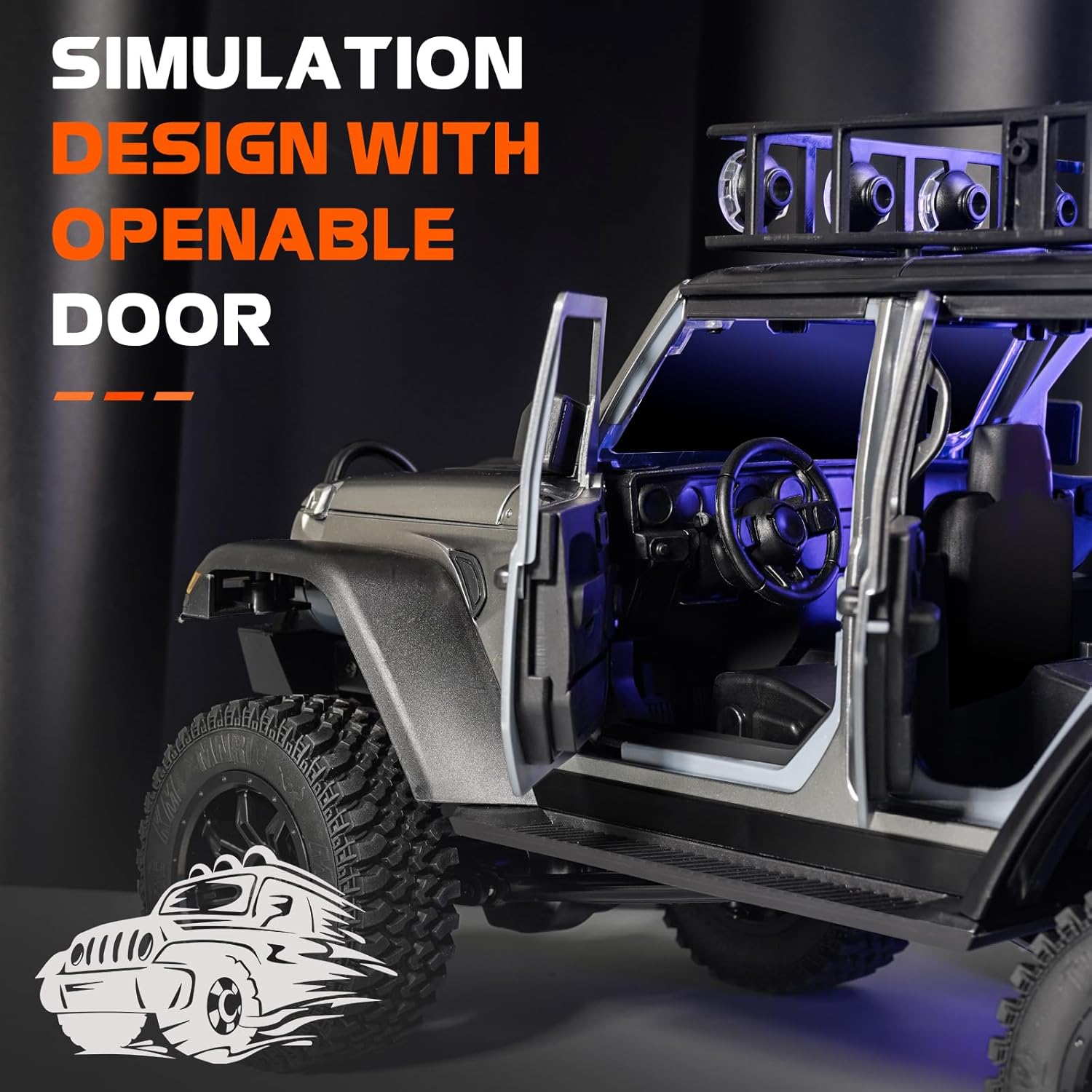
Figure 4: Simulation Design with Openable Doors.

Figure 5: Internal Components and Chassis Layout.
4. Konfiguracja
The MN-128 is designed for quick setup. Follow these steps to get started:
- Naładuj baterię: Connect the provided 7.4V 1200mAh battery to the USB charger. Plug the charger into a suitable USB power source. The indicator light on the charger will show the charging status (e.g., red for charging, green for fully charged).
- Zainstaluj baterię: Carefully remove the body shell of the RC crawler. Locate the battery compartment and securely place the charged battery inside. Connect the battery cable to the vehicle's power connector.
- Zainstaluj baterie w pilocie: Open the battery compartment on the remote control. Insert 1 AA battery (included) ensuring correct polarity. Close the compartment.
- Włączanie: Turn on the RC crawler by pressing and holding the power button (usually located on the chassis) for a few seconds until the LED lights illuminate. Then, turn on the remote control. The remote and vehicle should automatically bind. If not, refer to the remote control's specific binding instructions.
5. Instrukcja obsługi
Once set up, you can begin operating your ARRIS MN-128 RC Rock Crawler. Familiarize yourself with the remote control functions:
- Przepustnica: Use the trigger on the remote control to move the vehicle forward (pull) and backward (push).
- Sterowniczy: Use the steering wheel on the remote control to turn the vehicle left or right.
- System oświetlenia: The remote control may have buttons to cycle through different lighting modes for the headlights, brake lights, and turn signals. Experiment with these to enhance your driving experience.

Figure 6: Precision Lighting System.
The 2.4GHz remote control system ensures interference-free operation, allowing multiple RC cars to run simultaneously. The MN-128 is built to handle rugged terrain, sand, mud, rocks, and mountain trails with its independent suspension and high-traction tires.
Video 1: Demonstration of the MN-128 RC Crawler in action on various terrains.
6. Konserwacja
Regular maintenance will prolong the life and performance of your RC crawler:
- Czyszczenie: After each use, especially in dusty or muddy conditions, clean the vehicle with a soft brush or compressed air. Avoid using water directly on electronic components.
- Pielęgnacja baterii: Always fully charge the battery before storage and discharge it to approximately 50% if storing for extended periods. Do not overcharge or over-discharge the battery.
- Kontrola: Periodically check all screws, linkages, and moving parts for looseness or damage. Tighten any loose screws and replace damaged parts as needed.
- Smarowanie: Apply a small amount of RC-safe lubricant to moving metal parts (e.g., drive shafts, gears) to reduce wear and friction.
7. Rozwiązywanie Problemów
If you encounter issues with your MN-128, refer to the following common problems and solutions:
- Pojazd nie odpowiada:
- Upewnij się, że zarówno pojazd, jak i pilot zdalnego sterowania są włączone.
- Sprawdź, czy akumulator jest całkowicie naładowany i prawidłowo podłączony.
- Sprawdź, czy baterie w pilocie zdalnego sterowania są nowe i prawidłowo zainstalowane.
- Re-bind the remote control to the vehicle if necessary (refer to remote control instructions).
- Poor Performance/Weak Power:
- Akumulator może być rozładowany. Naładuj go całkowicie.
- Check for debris or obstructions in the drivetrain or wheels.
- Inspect the motor and gears for any visible damage or wear.
- Problemy ze sterowaniem:
- Check the steering trim on the remote control.
- Inspect the steering servo and linkages for damage or obstructions.
8. Specyfikacje
Detailed specifications for the ARRIS MN-128 RC Rock Crawler:
- Skala: 1/12
- Wymiary produktu: 15 x 8 x 7 cala
- Waga przedmiotu: 5.19 funta
- Prędkość: 8KM/H
- Kąt wspinaczki: ≤45°
- Tractive Force: 20 kg
- Loading Weight: 5 kg
- Silnik: 390 Mocny silnik
- Servo: Wodoodporny serwomotor 25g
- Kąt skrętu: ≤30°
- Signal/Distance: 2.4G/50m
- Zalecany wiek producenta: 16 lata i więcej

Rysunek 7: Wymiary produktu.
9. Informacje dotyczące bezpieczeństwa
Aby zapewnić bezpieczną obsługę i zapobiec uszkodzeniom, należy przestrzegać następujących wskazówek bezpieczeństwa:
- Always operate the RC crawler in open areas away from people, pets, and obstacles.
- Do not operate in wet conditions or near water, as electronics may be damaged (unless specifically rated waterproof).
- Keep fingers, hair, and loose clothing away from moving parts (wheels, gears, drive shafts).
- Supervise children during operation, even if they meet the recommended age.
- Use only the provided charger and battery. Do not attempt to modify or use incompatible components.
- Store the vehicle and battery in a cool, dry place away from direct sunlight and heat.
10. Gwarancja i wsparcie
The ARRIS MN-128 RC Rock Crawler is designed for durability and performance. While specific warranty details are not provided in this manual, ARRIS is committed to customer satisfaction. If any issues arise with your product, please contact our support team for assistance. We are ready to help resolve any concerns you may have.


