Wstęp
This user manual provides detailed instructions for the FREEWOLF T96 Smart Display Wireless Gaming Keyboard and Mouse Combo. This combo is designed for a seamless and responsive experience across various devices and applications, from gaming to office work.
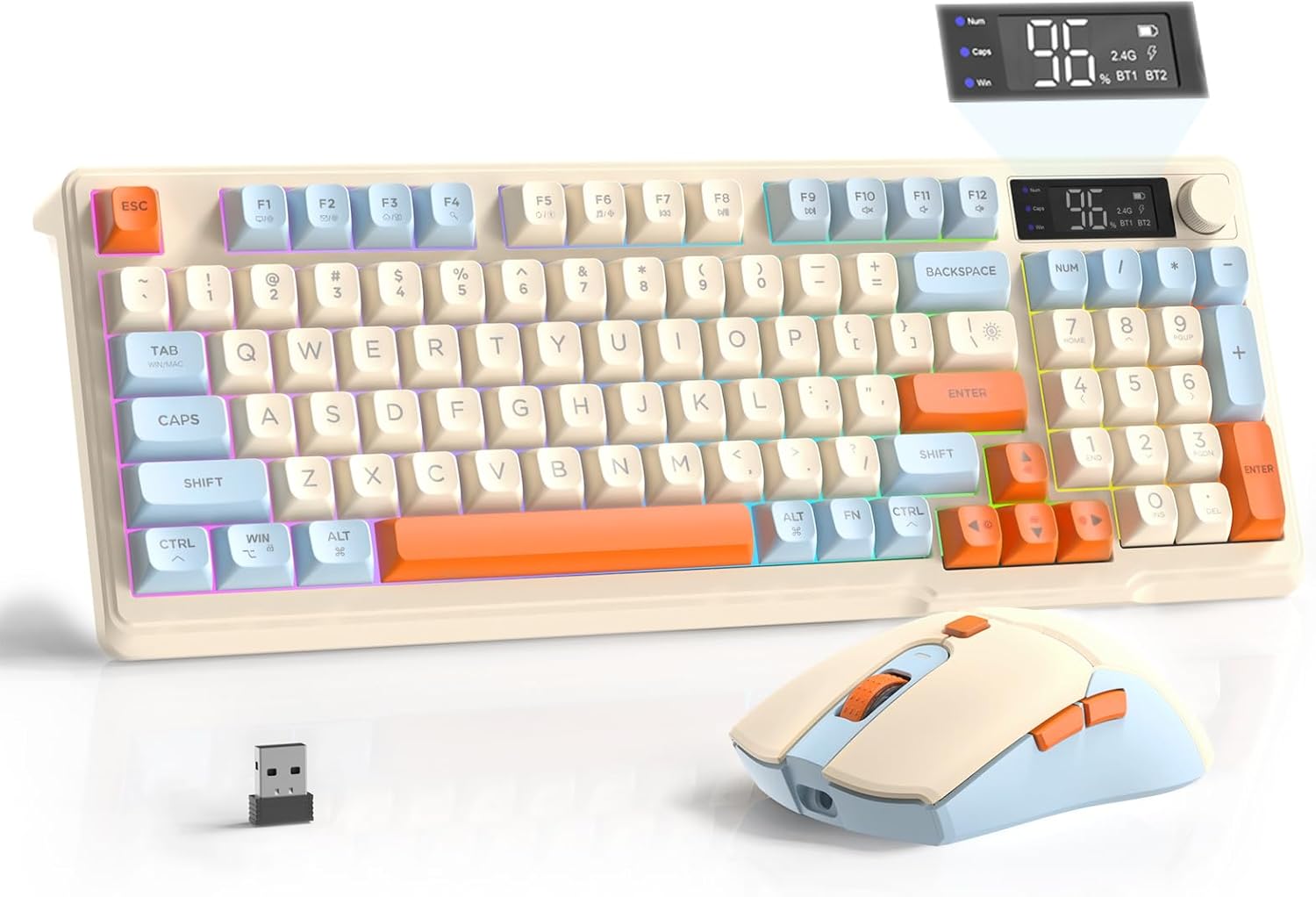
Image: The FREEWOLF T96 Wireless Gaming Keyboard and Mouse Combo, featuring the keyboard, mouse, and USB receiver.
Zawartość opakowania
Sprawdź, czy w przesyłce znajdują się wszystkie elementy:
- 1 x T96 Membrane Keyboard
- 1 x T96 Wireless Mouse
- 1 x kabel USB-C
- 1 x USB Receiver (stored in mouse bottom slot)
- 1 x Instrukcja obsługi
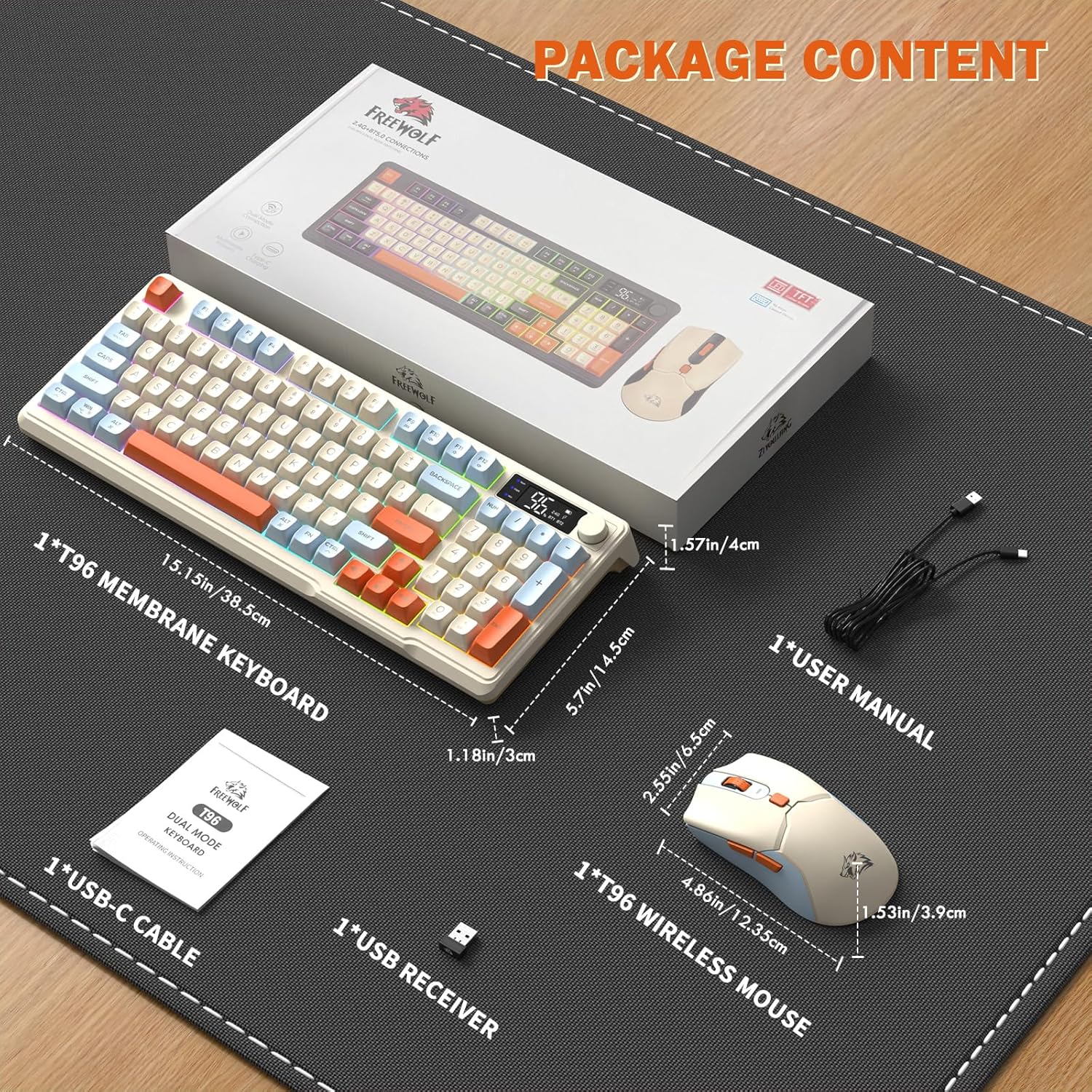
Image: A visual representation of the package contents, including the keyboard, mouse, USB-C cable, USB receiver, and user manual.
Organizować coś
Opcje łączności
The T96 combo supports dual-mode wireless connectivity:
- Połączenie bezprzewodowe 2.4G: Utilizes the included USB receiver for a stable, plug-and-play connection.
- Bluetooth Connections (BT1/BT2): Allows pairing with up to two Bluetooth-enabled devices, enabling seamless switching.
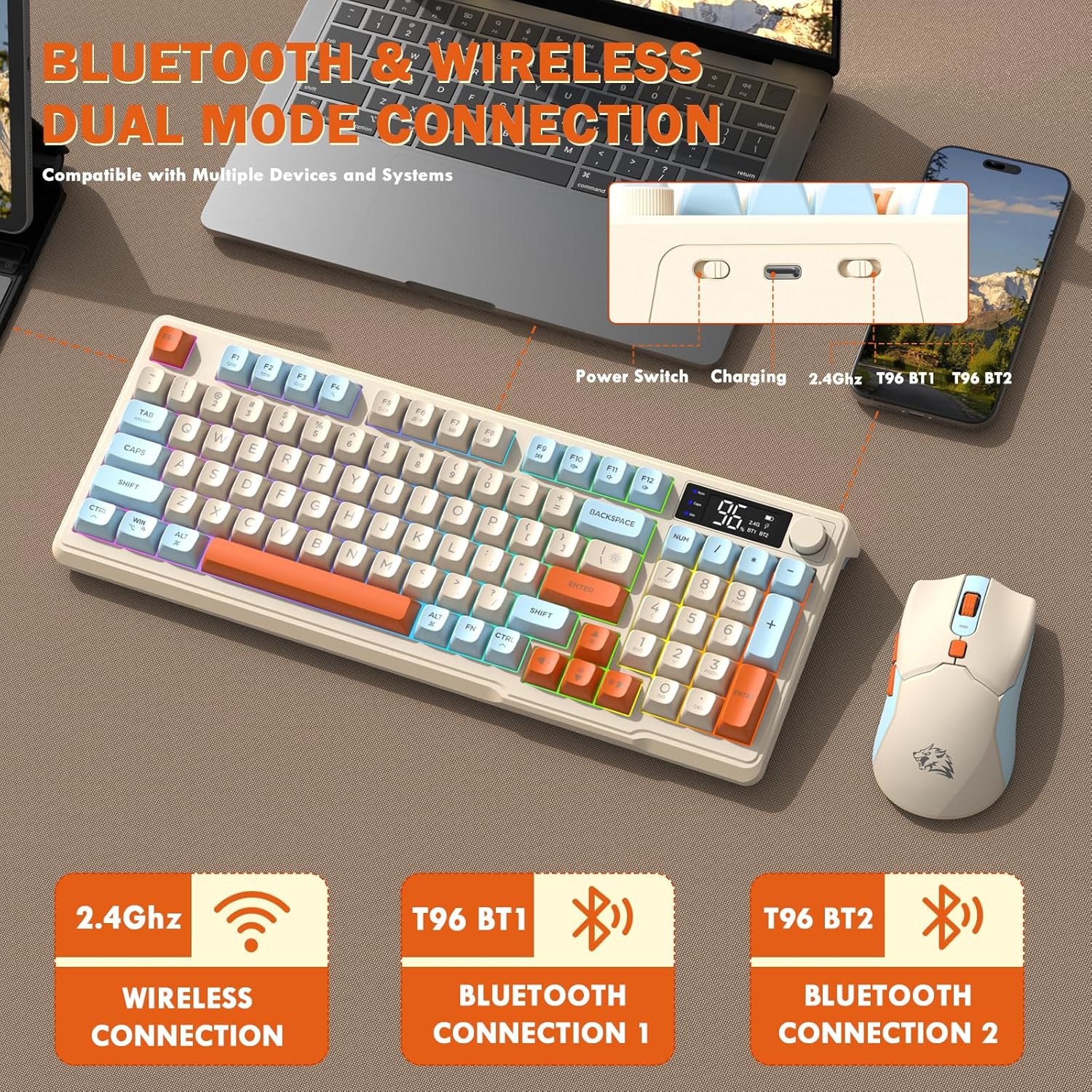
Image: Diagram illustrating the dual-mode connection options (2.4GHz, Bluetooth 1, Bluetooth 2) and the location of the power switch, charging port, and connection indicators on the keyboard.
Początkowe kroki konfiguracji
- Urządzenia ładujące: Before first use, fully charge both the keyboard and mouse using the provided USB-C cable. The keyboard has a 2000mAh battery, and the mouse has a 500mAh battery. The smart display on the keyboard will show charging progress.
- Zlokalizuj odbiornik USB: The USB receiver for 2.4G wireless connection is stored in a slot on the bottom of the mouse. Remove it for use.
- Włączanie: Włącz klawiaturę i mysz za pomocą odpowiednich przełączników zasilania.
- Connect via 2.4G Wireless:
- Podłącz odbiornik USB do wolnego portu USB w komputerze.
- Ensure the keyboard and mouse are set to 2.4G mode (indicated on the keyboard's smart display). They should connect automatically.
- Połącz przez Bluetooth:
- Switch the keyboard and mouse to BT1 or BT2 mode.
- On your device (PC, laptop, tablet, smartphone), open Bluetooth settings.
- Szukaj "T96 Keyboard" and "T96 Mouse" in the list of available devices and pair them.
- The smart display will indicate the active Bluetooth connection (BT1 or BT2).
Instrukcja obsługi
Obsługa klawiatury
The T96 keyboard features a 94-key compact layout with various functions to enhance your experience.
Smart Display Functions
The intelligent LED display provides real-time information:
- Status baterii: Pokazuje pozostały poziom naładowania baterii w procentachtage.
- Tryb połączenia: Indicates active connection (2.4G, BT1, BT2).
- Postęp ładowania: Displays charging status when connected to power.
- Caps Lock/Num Lock/Win Lock Indicators: Shows status of these keys.
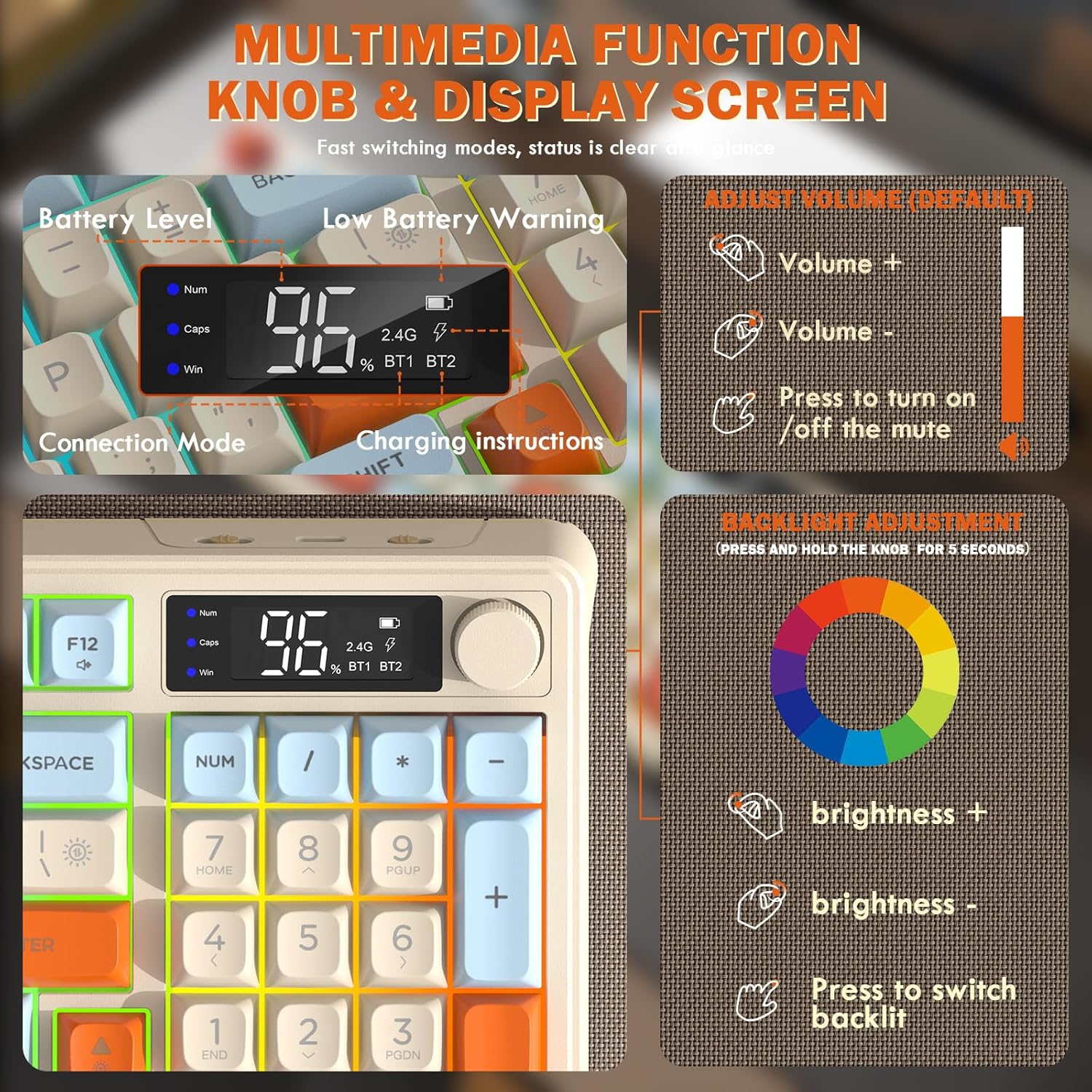
Image: Close-up of the keyboard's smart display showing battery level, connection mode, and charging instructions. Also details the multimedia knob's functions for volume and backlight control.
Multimedia Control Knob
Located on the top right of the keyboard, this knob offers quick control:
- Obracać: Adjusts system volume (clockwise for volume up, counter-clockwise for volume down).
- Naciskać: Toggles mute on/off.
- Naciśnij i przytrzymaj (5 sekund): Activates backlight adjustment mode. Rotate to change brightness, press to switch light effects.
Multimedia Hotkeys (FN Combinations)
The keyboard includes 12 dedicated multimedia hotkeys accessible via the FN klawisz:
- FN + F1-F12: Access various multimedia and system functions (e.g., media playback, volume, browser, email). Refer to keycap legends for specific functions.
Kontrola podświetlenia
The keyboard features vibrant rainbow LED backlighting. Control it using the following combinations:
- FN + strzałka w górę: Zwiększ jasność podświetlenia.
- FN + strzałka w dół: Zmniejsz jasność podświetlenia.
- FN + strzałka w prawo: Zwiększ prędkość podświetlenia.
- FN + Strzałka w lewo: Zmniejsz prędkość podświetlenia.
- FN + \|: Switch between different lighting modes (e.g., always on, breathing, off).
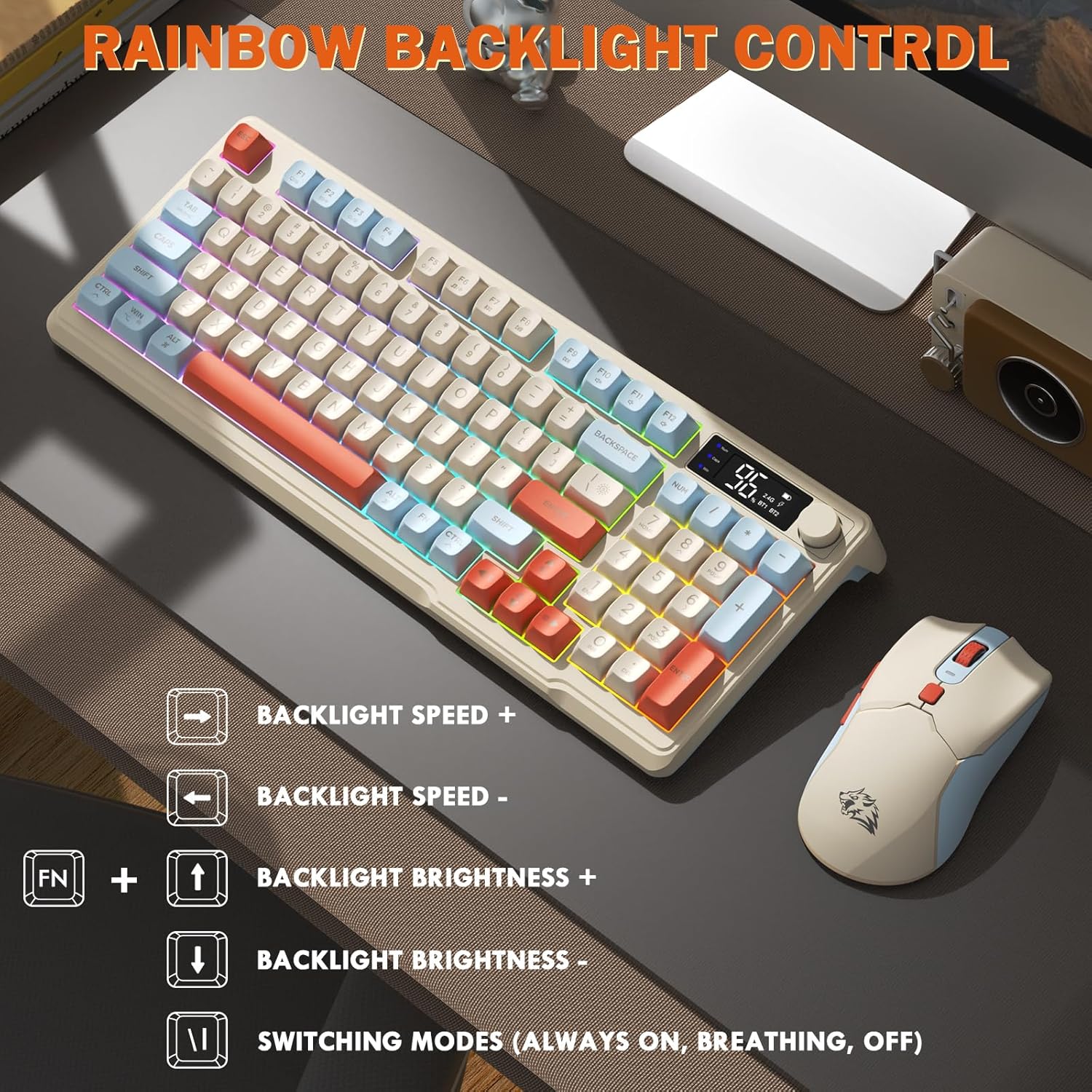
Image: Visual guide for controlling the rainbow LED backlight, showing key combinations for brightness, speed, and mode switching.
Anty-ghosting
The keyboard supports 26-key rollover anti-ghosting technology, ensuring accurate registration of multiple simultaneous key presses, crucial for gaming.
Działanie myszy
The T96 gaming mouse is designed for precision and comfort.
Regulacja DPI
Adjust the mouse sensitivity (DPI) to suit your preference:
- Naciśnij Przycisk DPI (located behind the scroll wheel) to cycle through available DPI settings: 800 / 1600 / 2400 / 4000 DPI.
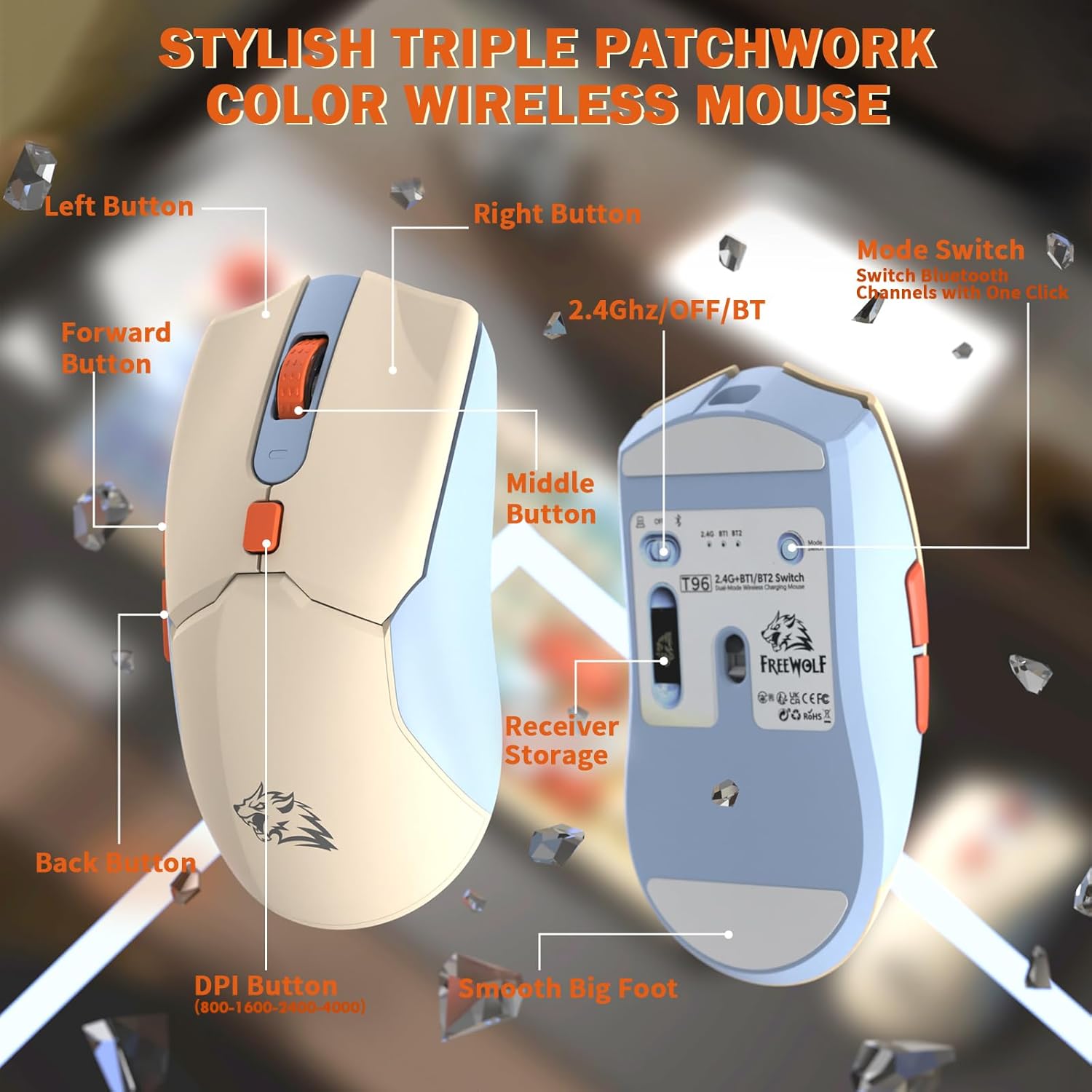
Obraz: Szczegółowy view of the T96 wireless mouse, highlighting its buttons (Left, Right, Middle, Forward, Back, DPI) and the receiver storage compartment on the bottom.
Programowalne przyciski
The mouse features six programmable buttons. Refer to specific software (if applicable, not mentioned in data) or operating system settings for customization options.
Wskaźniki odpytywania
The mouse operates at different polling rates depending on the connection mode:
- Bluetooth (BT): 115 Hz
- Łączność bezprzewodowa 2.4G: 125 Hz
Konserwacja
Czyszczenie
- Use a soft, dry cloth to clean the surfaces of the keyboard and mouse.
- W przypadku uporczywych zabrudzeń, delikatnieamppl szmatkę wodą lub łagodnym, nieściernym środkiem czyszczącym.
- Unikaj stosowania silnych środków chemicznych, rozpuszczalników i materiałów ściernych, gdyż mogą one uszkodzić wykończenie.
- Do not immerse the devices in water or any liquid.
Pielęgnacja baterii
Aby zmaksymalizować czas pracy baterii i wydajność:
- Recharge the devices when the low battery indicator appears on the keyboard's smart display.
- Unikaj częstego całkowitego rozładowywania baterii.
- Przechowuj urządzenia w chłodnym i suchym miejscu, jeśli nie będziesz ich używać przez dłuższy czas.
- The devices feature smart power-saving modes: the keyboard enters sleep mode after 3 minutes of inactivity, and the mouse after 2 minutes. They wake instantly upon touch.

Image: Illustration showing the 2000mAh battery capacity of the keyboard and 500mAh battery capacity of the mouse, emphasizing long-lasting power.
Rozwiązywanie problemów
If you encounter issues with your T96 combo, refer to the following common solutions:
| Problem | Możliwa przyczyna | Rozwiązanie |
|---|---|---|
| Klawiatura/mysz nie reaguje | Niski poziom naładowania baterii; Nieprawidłowy tryb połączenia; Odbiornik USB nie jest podłączony (2.4G); Moduł Bluetooth nie jest sparowany. |
|
| Opóźnienie lub przerywane połączenie | Zakłócenia; Odległość od odbiornika/urządzenia; Niski poziom naładowania baterii. |
|
| Podświetlenie nie działa lub jest słabe | Backlight turned off; Brightness set too low; Low battery. |
|
| DPI myszy się nie zmienia | Przycisk DPI nie został wciśnięty prawidłowo. |
|
Specyfikacje
| Funkcja | Szczegół |
|---|---|
| Marka | Wolny Wilk |
| Model | T96 |
| Technologia łączności | 2.4Ghz Wireless, Bluetooth (BT1, BT2) |
| Typ klawiatury | Membrane, 94-Key Compact Layout |
| Klawisze | PBT Triple-Tone Spherical Keycaps |
| Podświetlenie | Rainbow LED Backlight |
| Anty-ghosting | 26-Key Rollover |
| Keyboard Battery Capacity | 2000mAh |
| DPI myszy | 800 / 1600 / 2400 / 4000 DPI (regulowana) |
| Mouse Polling Rate (BT) | 115 Hz |
| Mouse Polling Rate (2.4G) | 125 Hz |
| Pojemność baterii myszy | 500mAh |
| Kompatybilne urządzenia | Laptop, Gaming Console, PC, Tablet, Smartphone |
| Systemy operacyjne | Windows, macOS, Linux, iOS, Android |
| Waga przedmiotu | 2.12 funta (ok. 0.96 kg) |
| Wymiary opakowania | 16.26 x 8.78 x 1.85 cala (ok. 41.3 x 22.3 x 4.7 cm) |
Gwarancja i wsparcie
Information regarding product warranty and customer support was not provided in the available data. Please refer to the product packaging or the manufacturer's official webWięcej szczegółów na temat zakresu gwarancji oraz sposobu kontaktowania się z obsługą klienta w celu uzyskania pomocy znajdziesz na tej stronie.


