1. Wprowadzenie
This manual provides detailed instructions for the Symcode Wearable Glove Barcode Scanner. This device is designed for efficient, hands-free barcode scanning, featuring dual wireless connectivity (Bluetooth 6.0 & 2.4G) and a long-lasting battery. It is suitable for various applications including warehouses, retail, and logistics, offering fast decoding of 1D, 2D, and QR codes.
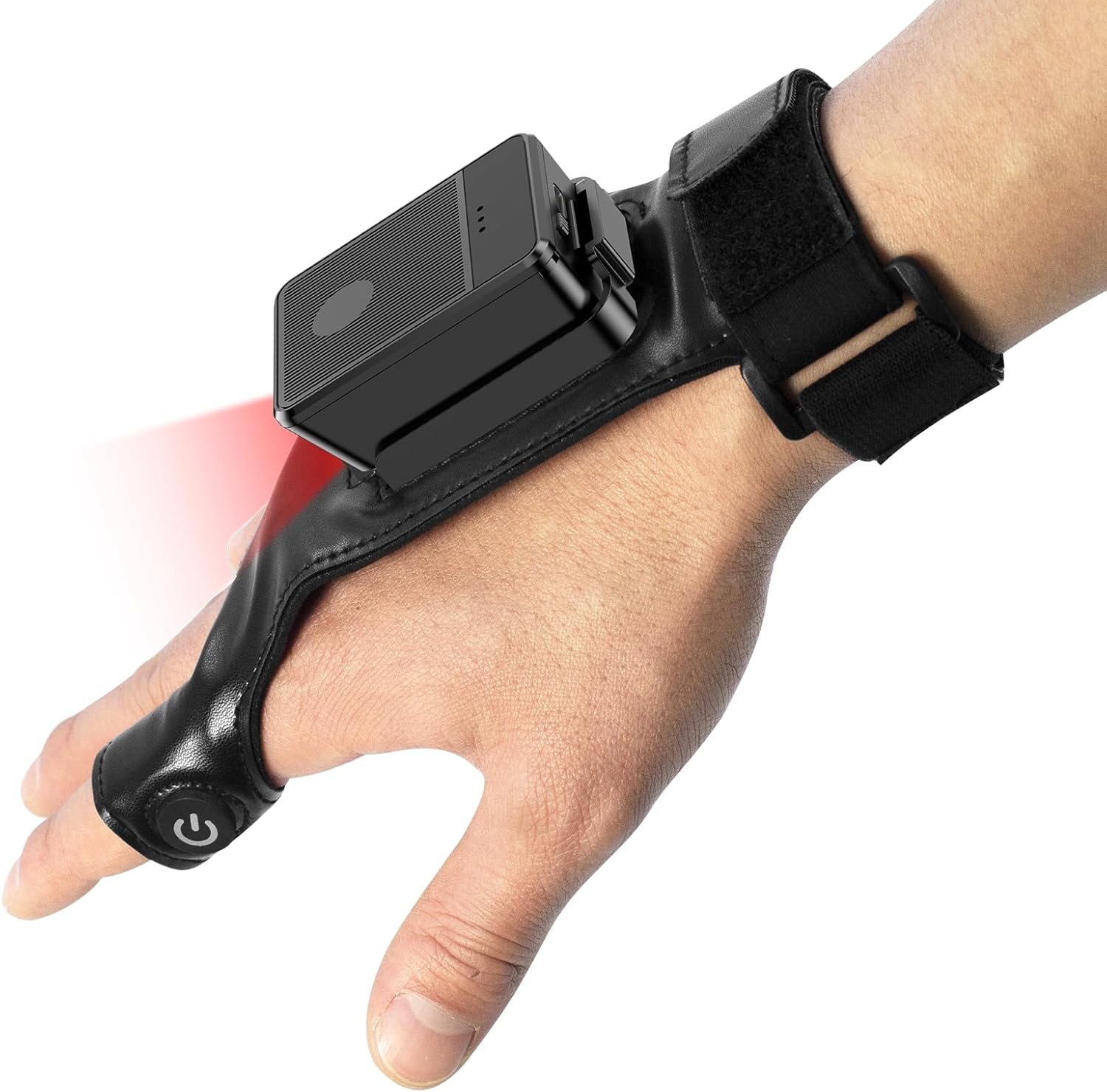
This image shows the Symcode Wearable Glove Barcode Scanner attached to a user's hand, demonstrating its ergonomic, hands-free design. The scanner unit is positioned on the back of the hand, with the scanning beam visible.
2. Informacje dotyczące bezpieczeństwa
- Nie wystawiaj urządzenia na działanie ekstremalnych temperatur, wilgoci ani substancji żrących.
- Unikaj bezpośredniego narażenia oczu na światło skanujące.
- Nie próbuj samodzielnie demontować ani naprawiać urządzenia. W celu uzyskania pomocy skontaktuj się z wykwalifikowanym personelem.
- Aby zapobiec uszkodzeniom, należy używać wyłącznie dołączonego kabla ładującego i adaptera.
3. Zawartość opakowania
Prosimy o sprawdzenie zawartości przesyłki po jej otrzymaniu. Jeśli brakuje któregokolwiek z elementów lub jest on uszkodzony, prosimy o kontakt ze sprzedawcą.
- Symcode Wearable Glove Barcode Scanner
- Kabel ładujący USB
- Bezprzewodowy adapter 2.4G
- Instrukcja obsługi
4. Koniec produktuview
The Symcode Wearable Glove Barcode Scanner consists of a compact scanning unit and an adjustable glove-style strap. The scanning unit features a durable trigger button, indicator lights, and a charging port. The glove is designed for comfort and secure fit, allowing for hands-free operation.

Zbliżenie view of the scanner on a hand, highlighting the red scanning beam and the durable resin material of the trigger button located on the index finger. The image also shows a roll of barcode labels, indicating its primary function.
5. Konfiguracja
5.1 Ładowanie urządzenia
Before first use, fully charge the scanner. Connect the USB charging cable to the scanner's charging port and to a power source (e.g., computer USB port or USB wall adapter). The charging indicator light will show charging status. A full charge takes approximately 5 hours.
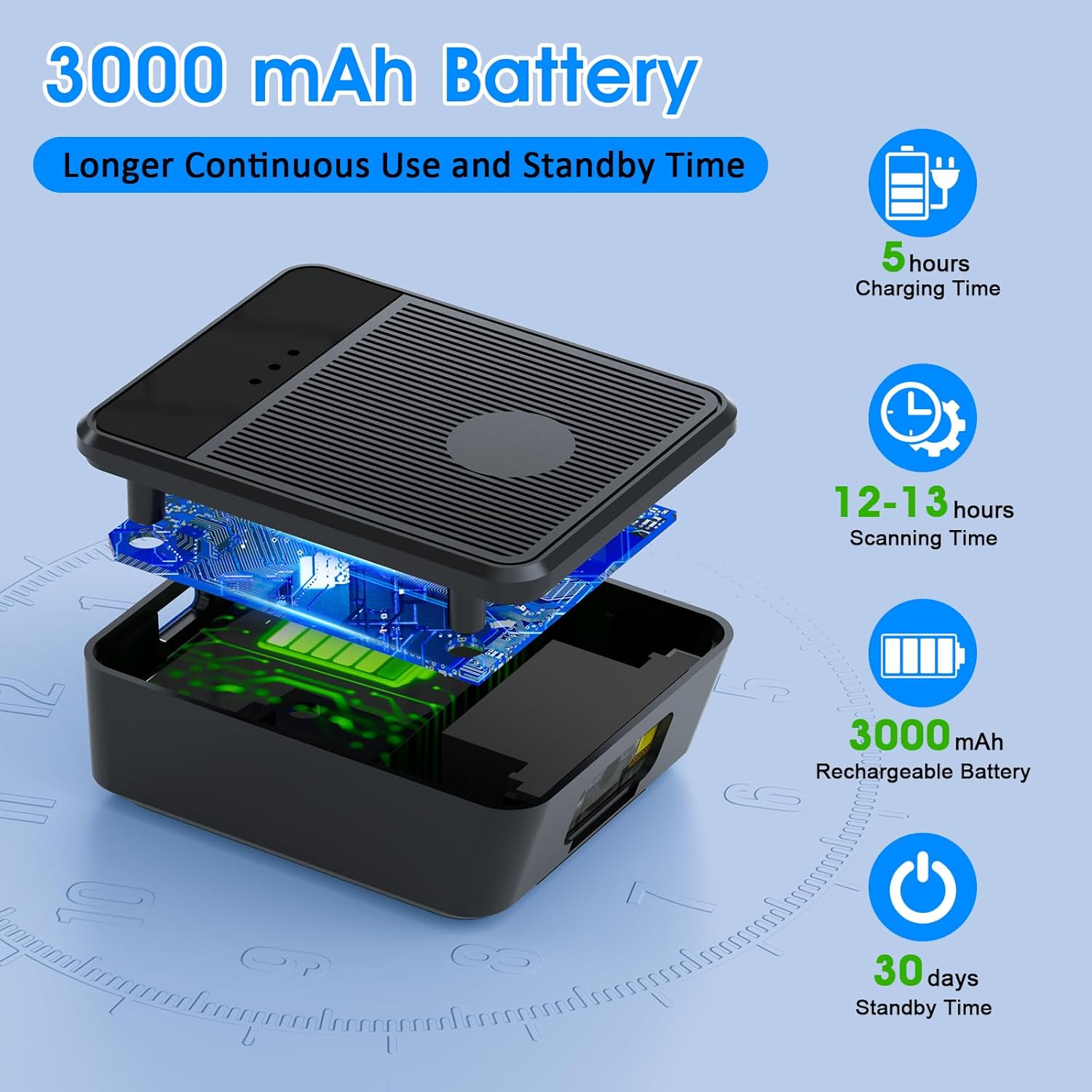
eksplodował view diagram of the scanner unit, emphasizing its 3000 mAh rechargeable battery. Accompanying text indicates a 5-hour charging time, 12-13 hours of continuous scanning, and 30 days of standby time.
5.2 Noszenie skanera
Slide your hand into the glove, ensuring the scanner unit is positioned comfortably on the back of your hand. Adjust the strap for a secure fit. The trigger button should align with your index finger for easy access.

Two workers are shown in a warehouse environment, handling boxes. One worker is actively using the wearable barcode scanner on their hand to scan a package, demonstrating the hands-free benefit of the device during logistics operations.
5.3 Podłączanie do urządzenia
The scanner supports two wireless connection methods:
5.3.1 2.4G Wireless Dongle Connection
- Plug the 2.4G wireless dongle into a USB port on your computer or compatible device.
- Włącz skaner. Powinien automatycznie sparować się z kluczem sprzętowym.
- A successful connection is indicated by a specific light pattern or sound (refer to device indicators).
5.3.2 Połączenie Bluetooth 6.0
- Włącz skaner.
- Aktywuj Bluetooth na urządzeniu hosta (np. smartfonie, tablecie, komputerze).
- Szukaj available Bluetooth devices and select the Symcode scanner from the list.
- Pairing may require a confirmation or a default PIN (check device documentation for specific PIN if required).
6. Instrukcja obsługi
6.1 Podstawowe skanowanie
To scan a barcode, point the scanner's beam at the barcode and press the trigger button located on your index finger. A successful scan will typically be indicated by a beep, a vibration, or a change in the indicator light.
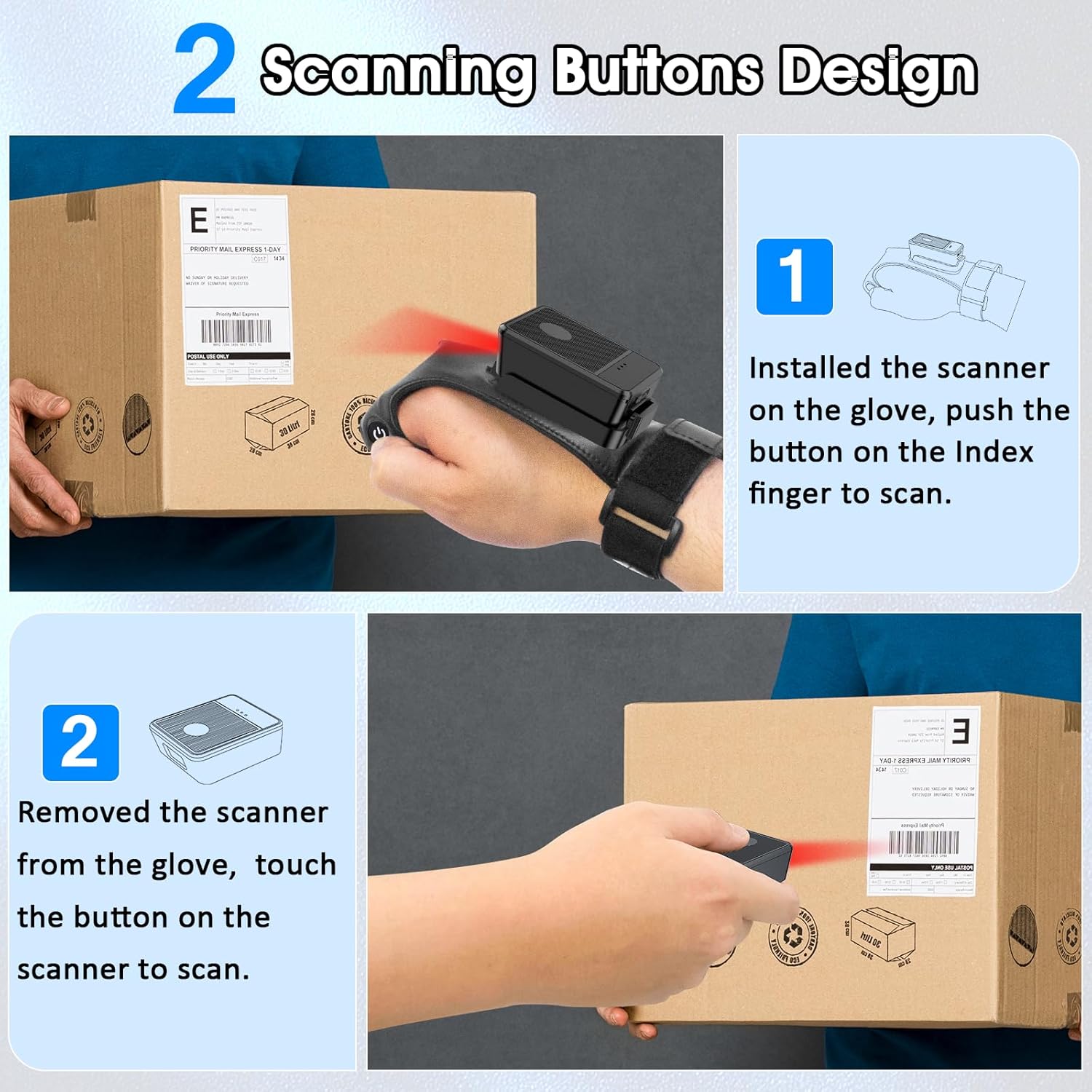
This diagram illustrates two ways to use the scanner: 1) installed on the glove, scanning with the index finger button, and 2) removed from the glove, scanning by touching the button directly on the scanner unit. Both methods are shown with the scanner pointed at a package.
6.2 tryby pracy
The scanner supports two operational modes:
6.2.1 Tryb natychmiastowego przesyłania
In this mode, scanned barcode data is immediately transmitted to the connected host device. This is ideal for real-time inventory updates or point-of-sale transactions.
6.2.2 Offline Storage Mode
This mode allows the scanner to store up to 50,000 barcodes internally when not connected to a host device or when connectivity is intermittent. Data can then be uploaded to a computer or POS system at a later time.
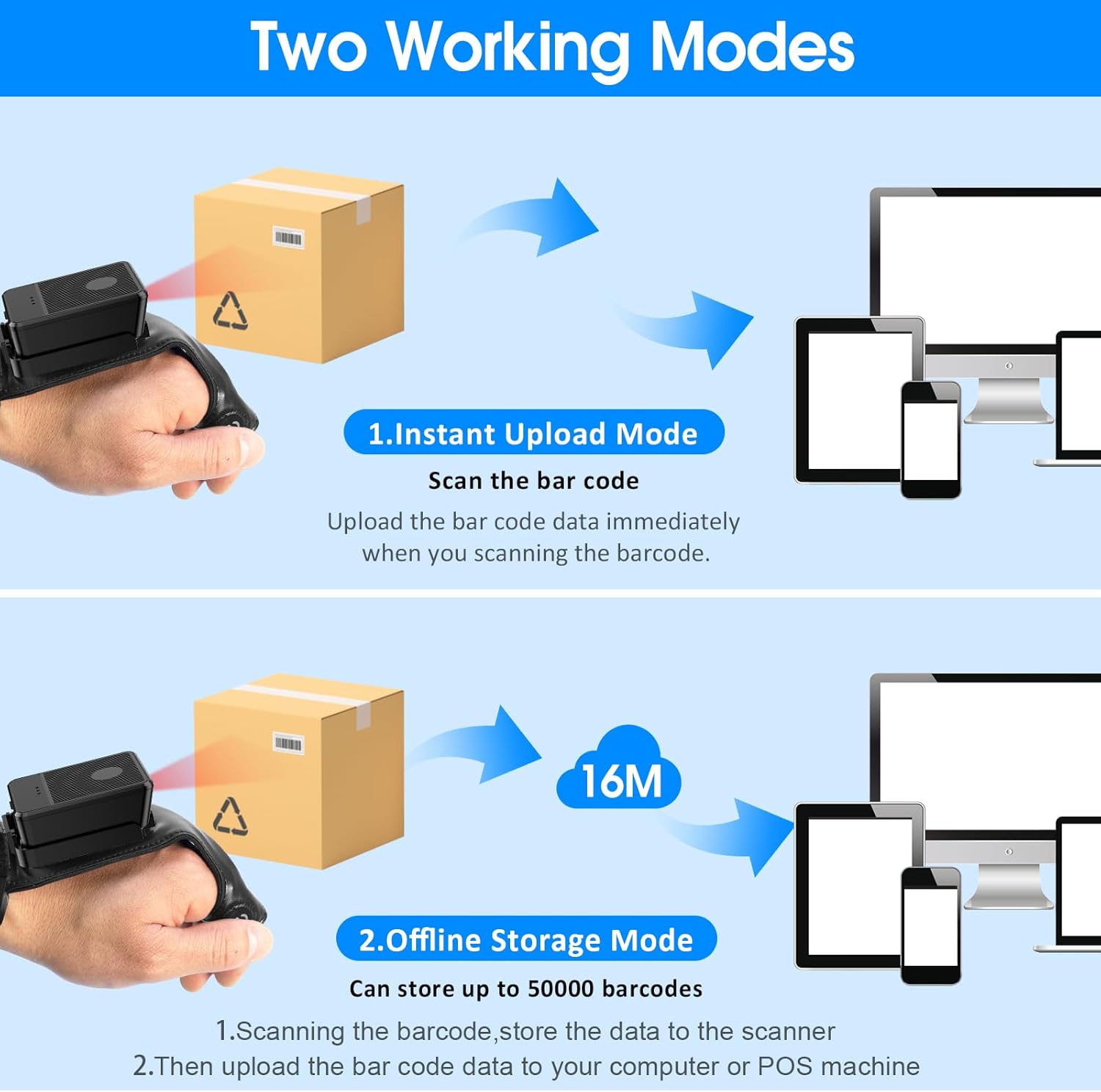
This image explains the two operational modes: Instant Upload Mode, where scanned data is immediately sent to a connected device, and Offline Storage Mode, which allows storing up to 50,000 barcodes internally before uploading them to a computer or POS system.
6.3 Dostosowywanie ustawień
The scanner allows for customization of various settings, including:
- Dźwięk: Enable or disable the audible beep for successful scans.
- Wibracja: Enable or disable vibration alerts for successful scans, useful in quiet environments.
- Funkcje klawiatury: Add keyboard functions such as TAB or Enter after each scan for seamless data entry into applications.
Refer to the quick setup guide or manufacturer's website for specific programming barcodes to adjust these settings.
7. Konserwacja
- Czyszczenie: Use a soft, dry cloth to clean the scanner's exterior. For stubborn dirt, slightly dampWytrzyj szmatkę wodą. Nie używaj silnych środków chemicznych ani ściernych środków czyszczących.
- Składowanie: Przechowuj skaner w chłodnym, suchym miejscu, z dala od bezpośredniego światła słonecznego i ekstremalnych temperatur, gdy nie jest używany.
- Pielęgnacja baterii: Aby przedłużyć żywotność baterii, unikaj częstego całkowitego rozładowywania baterii. Ładuj urządzenie regularnie, nawet jeśli nie jest używane regularnie.
8. Rozwiązywanie Problemów
8.1 Scanner Not Turning On
- Ensure the battery is charged. Connect the scanner to a power source and allow it to charge for at least 30 minutes before attempting to turn it on again.
8.2 Unable to Connect Wirelessly
- Połączenie 2.4G: Verify the 2.4G dongle is securely plugged into the host device. Try plugging it into a different USB port. Ensure the scanner is within range of the dongle.
- Połączenie Bluetooth: Ensure Bluetooth is enabled on your host device. Delete any previous pairings for the scanner and attempt to pair again. Ensure the scanner is in pairing mode (refer to device indicators).
- Restart both the scanner and the host device.
8.3 Skaner nie odczytuje kodów kreskowych
- Upewnij się, że kod kreskowy jest czysty, nieuszkodzony i wyraźnie wydrukowany.
- Dostosuj odległość i kąt między skanerem a kodem kreskowym.
- Check if the scanner is in the correct working mode (Instant Upload or Offline Storage).
- Verify that the barcode type is supported by the scanner (1D, 2D, QR codes are supported).
9. Specyfikacje
| Marka | kod symboliczny |
| Model | Wearable Glove Barcode Scanner (B0F1FSMWCD) |
| Technologia łączności | 2.4G, Bluetooth 6.0 |
| Kompatybilne urządzenia | Desktop, Laptop, Tablet, Smartphone (Windows XP/7/8/10, Android, iOS) |
| Źródło zasilania | Zasilany bateryjnie |
| Typ baterii | 1 bateria litowo-polimerowa (w zestawie) |
| Pojemność baterii | 1100mAh (Product Description) / 3000mAh (Image) - Note: Discrepancy in source data, refer to product packaging for accurate capacity. |
| Czas ciągłej pracy | Up to 10 hours (Product Description) / 12-13 hours (Image) - Note: Discrepancy in source data, refer to product packaging for accurate time. |
| Czas ładowania | Około 5 godzin |
| Czas czuwania | Do 30 dni |
| Prędkość skanowania | Up to 300 scans per second |
| Zakres skanowania | 2 do 4.9 stóp |
| Pojemność pamięci masowej offline | Do 100 000 kodów kreskowych |
| Waga przedmiotu | 5 uncji |
| Wymiary opakowania | 7.48 x 3.74 x 2.44 cala |
10. Informacje o gwarancji
This Symcode product is covered by a manufacturer's warranty. For specific warranty terms, duration, and conditions, please refer to the warranty card included with your product or visit the official Symcode webZachowaj dowód zakupu na wypadek roszczeń gwarancyjnych.
11. Obsługa klienta
If you encounter any issues or have questions regarding your Symcode Wearable Glove Barcode Scanner, please contact Symcode customer support. Contact details can typically be found on the product packaging, the official Symcode webna stronie internetowej lub u sprzedawcy.