1. Wprowadzenie
The LAUNCH X-431 i-TPMS is a professional handheld tool designed for comprehensive Tire Pressure Monitoring System (TPMS) services. It supports activation, programming, relearn, and diagnosis of TPMS sensors, specifically compatible with LAUNCH 315/433MHz sensors. This manual provides detailed instructions for the proper use and maintenance of your i-TPMS device.
2. Koniec produktuview
The X-431 i-TPMS is a portable and user-friendly device. It can operate in two primary modes: bound with a LAUNCH X-431 diagnostic scanner or standalone via the i-TPMS mobile application. Its core functions include reading sensor ID, tire pressure, tire temperature, and battery status, as well as performing sensor activation, programming, and relearn procedures.

Figure 2.1: LAUNCH X-431 i-TPMS device in operation.
2.1 Komponenty urządzenia

Figure 2.2: Labeled components of the X-431 i-TPMS device.
- Sensor Slot: Area for interacting with TPMS sensors.
- Dioda LED ładowania: Wskazuje stan ładowania.
- Ekran wyświetlacza: Shows operational information and menus.
- Przycisk W GÓRĘ: Nawiguje w górę menu lub zwiększa wartości.
- Przycisk zasilania: Włącza/wyłącza urządzenie.
- Przycisk DÓŁ: Nawiguje w dół menu lub zmniejsza wartości.
- OK (Confirm) Button: Potwierdza wybory lub działania.
- Port ładowania: Port micro USB do ładowania urządzenia.
3. Konfiguracja
3.1 Pierwsze ładowanie
Before first use, ensure the i-TPMS device is fully charged. Connect the device to a power source using the provided USB cable via the Charging Port. The Charging LED will indicate the charging status.
3.2 Włączanie/wyłączanie
- Aby włączyć: Naciśnij i przytrzymaj Przycisk ZASILANIA aż ekran się zaświeci.
- Aby wyłączyć: Naciśnij i przytrzymaj Przycisk ZASILANIA aż urządzenie się wyłączy.
4. Instrukcja obsługi
The LAUNCH X-431 i-TPMS offers two modes of operation: binding with a compatible LAUNCH X-431 scanner or operating standalone with the i-TPMS mobile application.
4.1 Operation with LAUNCH X-431 Scanner
When bound with a LAUNCH X-431 scanner (8-inch screen or above), the i-TPMS can perform a full range of TPMS services including activation, programming, relearn, and diagnosis for sensors.

Rysunek 4.1: Koniecview of TPMS functions available with an X-431 scanner.
- Aktywacja: Read sensor ID, tire pressure, tire temperature, sensor battery, sensor position, and frequency.
- Programowanie: Create new sensor IDs for LAUNCH sensors. Supports auto-creation for 1-16 sensors or manual input.
- Naucz się ponownie: Perform Stationary Relearn, Automatic Relearn, or OBD Relearning procedures to link new sensor IDs to the vehicle's ECU.
- Diagnoza: Read and clear TPMS fault codes.
4.2 Standalone Operation with i-TPMS Mobile App
The i-TPMS can also function independently when paired with the i-TPMS mobile application on an Android phone. This mode supports sensor activation and programming.
- Replace Tire Pressure Sensor: Guide through the process of replacing a sensor.
- Aktywuj czujnik: Initiate communication with the sensor to read its data.
- Program Sensor ID: Create new sensor IDs.
- Query Sensor OE Part Number: Retrieve original equipment part numbers for sensors.
- Generate Tire Pressure Detection Reports: Create reports based on sensor data.
4.3 Programowanie czujnika TPMS
The i-TPMS allows for programming LAUNCH LTR RF sensors to replace original equipment (OE) sensors. This process can be done automatically or manually.

Figure 4.2: Sensor ID programming options.
- Auto Create Sensor ID: If the original sensor ID is unknown, the i-TPMS can automatically generate a new ID.
- Manual Create Sensor ID: Allows the user to manually input a specific sensor ID.
4.4 Procedury ponownego uczenia się TPMS
After replacing or programming a sensor, a relearn procedure is necessary to ensure the vehicle's ECU recognizes the new sensor IDs.

Figure 4.3: TPMS Relearn options.
- Ponowne nauczenie się OBD: Connects to the vehicle's OBD-II port to transfer sensor IDs.
- Automatyczne ponowne uczenie: Sensors are automatically learned by driving the vehicle.
- Ponowna nauka stacjonarna: Requires specific steps to be performed while the vehicle is stationary.
4.5 Odczyt i kasowanie kodów błędów
The i-TPMS can diagnose issues within the TPMS by reading and clearing diagnostic trouble codes (DTCs).
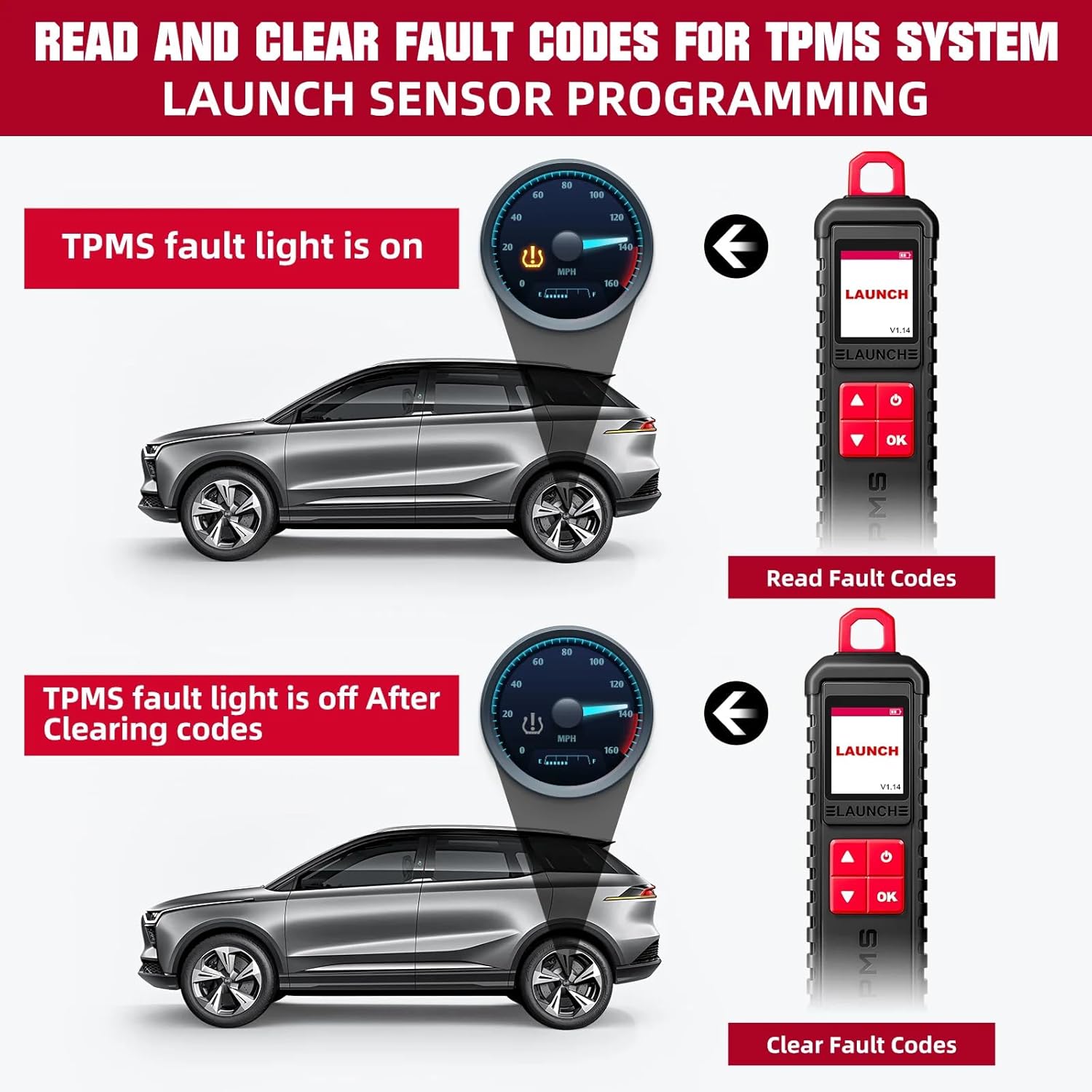
Figure 4.4: Process of reading and clearing TPMS fault codes.
- Odczyt kodów błędów: Access and display current and stored TPMS-related DTCs.
- Wyczyść kody błędów: Erase DTCs from the vehicle's ECU after repairs or sensor replacements.
5. Zgodność
5.1 Compatible LAUNCH X-431 Devices
The LAUNCH X-431 i-TPMS is designed to work with various LAUNCH X-431 intelligent diagnostic tools that feature an 8-inch or larger screen.

Figure 5.1: Compatible LAUNCH X-431 scanner models.
- LAUNCH X-431 PRO
- LAUNCH X-431 V/PRO V5.0
- LAUNCH X-431 PRO TT/DYNO
- LAUNCH X-431 PRO 3
- LAUNCH X-431 PRO3S+/PRO3S+ V5.0
- LAUNCH X-431 V+
- LAUNCH X-431 PRO3 ACE/APEX
- LAUNCH X-431 PAD III
- LAUNCH X-431 PAD V
- LAUNCH X-431 PAD VII
Notatka: The i-TPMS requires a compatible LAUNCH diagnostic tablet (8-inch or above) for full functionality. It cannot be used for advanced functions if purchased separately without a compatible scanner.
5.2 Supported Vehicle Brands and Protocols
The i-TPMS supports over 98% of mainstream vehicles equipped with a TPMS system. For OBDII diagnostics, it is compatible with most cars built in 1996 or later, supporting various protocols:
- ISO 14230-4 (KWP2000)
- Norma ISO 15765-4 (KAN)
- ISO 9141-2 (ISO)
- ISO 14229 (UDS)
- SAE J1850 (VPW i PWM)
- Original protocols of various manufacturers
For advanced functions like active tests, all system diagnostics, and maintenance services, it covers approximately 95% of car models, including:
- Azja: Daewoo, Honda, JP Isuzu, Kia, Mazda, Mitsubishi, Nissan, SGM, Subaru, Suzuki, Toyota, Hyundai, Ssangyong.
- Europa: Aston Martin, Audi, Benz, BMW, Citroen, Ferrari, Fiat, Land Rover, Maserati, Opel, Porsche, Renault, Rover, Saab, Seat, Skoda, Smart, Sprinter, Volvo, VW, Peugeot.
- Ameryka: Chrysler, USA-Ford, GM.
6. Konserwacja
- Czyszczenie: Użyj miękkiego, damp Do czyszczenia urządzenia należy używać ściereczki. Unikać środków czyszczących o działaniu ściernym i rozpuszczalników.
- Składowanie: Przechowywać urządzenie w chłodnym i suchym miejscu, z dala od bezpośredniego światła słonecznego i ekstremalnych temperatur.
- Pielęgnacja baterii: Aby przedłużyć żywotność baterii, unikaj częstego całkowitego rozładowywania urządzenia. Regularnie je ładuj.
- Aktualizacje oprogramowania: Regularly check for and install software updates for both the i-TPMS device and any paired X-431 scanner or mobile application to ensure optimal performance and compatibility.
7. Rozwiązywanie Problemów
This section addresses common issues you might encounter with the LAUNCH X-431 i-TPMS.
| Problem | Możliwa przyczyna | Rozwiązanie |
|---|---|---|
| Urządzenie nie włącza się. | Niski poziom naładowania baterii; awaria urządzenia. | Charge the device fully. If issue persists, contact customer service. |
| Nie można aktywować czujnika. | Sensor out of range; sensor faulty; incorrect frequency. | Ensure device is close to the sensor. Verify sensor type and frequency (315/433MHz). Check sensor battery. |
| Programming fails. | Sensor not a LAUNCH LTR RF sensor; device not properly connected to scanner/app. | Ensure you are using LAUNCH LTR RF sensors. Verify connection to X-431 scanner or i-TPMS app. |
| Relearn procedure unsuccessful. | Incorrect relearn procedure for vehicle; vehicle not in relearn mode. | Consult vehicle's service manual for correct relearn procedure. Ensure vehicle is in TPMS relearn mode. |
8. Specyfikacje
| Funkcja | Szczegół |
|---|---|
| Marka | POCZĄTEK |
| Numer modelu | X-431 i-TPMS (SDC447) |
| Waga przedmiotu | 2.2 funta |
| Supported Sensor Frequencies | 315/433MHz (LAUNCH sensors only) |
| Operating System (for paired scanner) | Windows 10 (as per product data, likely refers to scanner OS) |
| UPC | 810139309857 |
| Producent | ITCARDIAG-Official |
9. Co znajduje się w pudełku
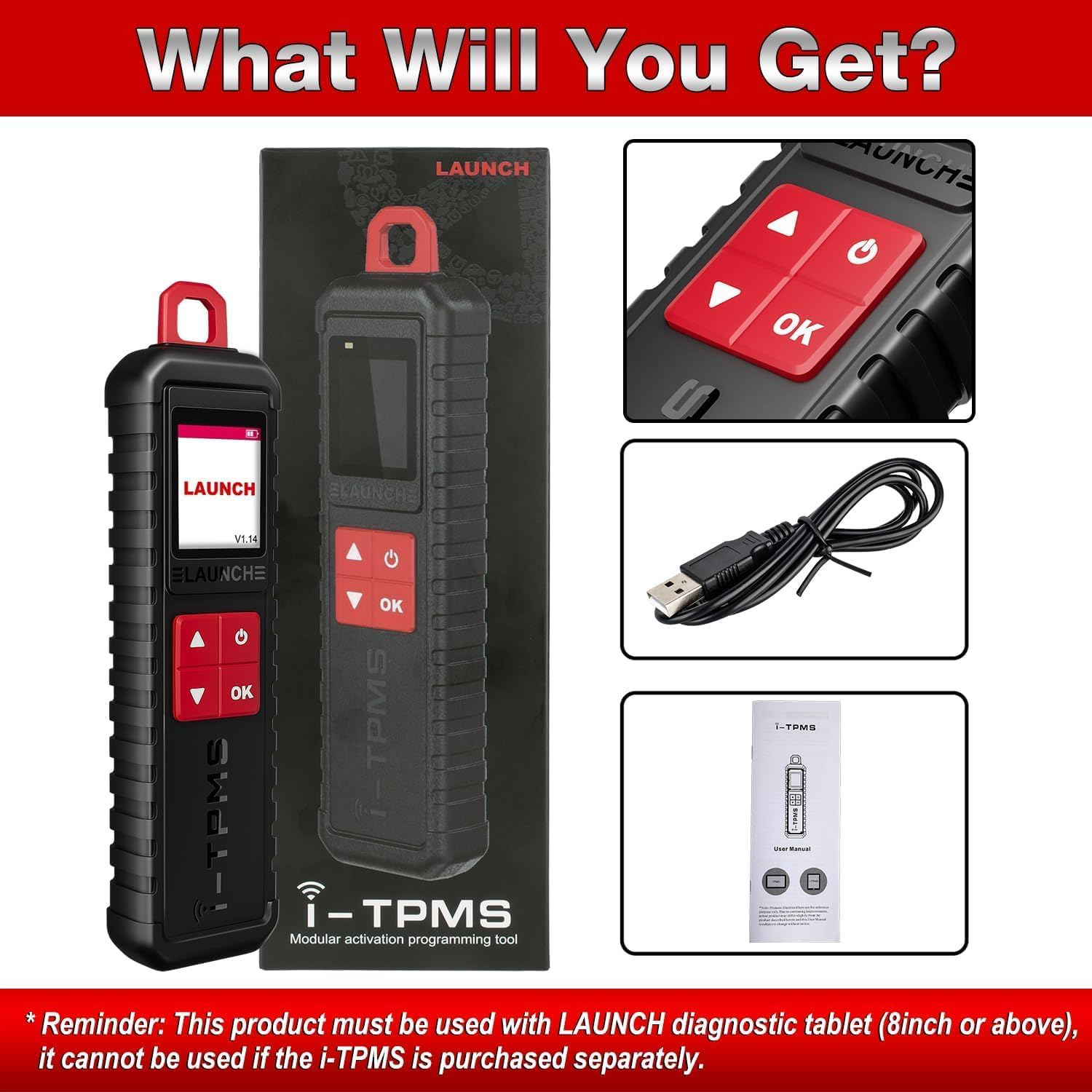
Rysunek 9.1: Zawartość opakowania.
- 1 x LAUNCH X-431 i-TPMS Device
- 1 x kabel ładujący USB
- 1 x Instrukcja obsługi (ten dokument)
10. Gwarancja i wsparcie
The manufacturer offers a free replacement or return service within 30 days of purchase. For any issues encountered during installation or use, please contact customer service for assistance.
For further inquiries or support, please refer to the contact information provided with your purchase or visit the official LAUNCH webstrona.
Online repair resources, including operating skills, DTC help, tech handbook, repair cases, and a tire pressure maintenance database, are available to assist with diagnosis and repair.


