1. Wprowadzenie
Thank you for choosing the Roborock Q10 VF Robot Vacuum and Mop. This device is designed to provide efficient and thorough cleaning of your home, combining powerful vacuuming with advanced mopping capabilities. This manual will guide you through the setup, operation, maintenance, and troubleshooting of your new robot cleaner to ensure optimal performance and longevity.
2. Informacje dotyczące bezpieczeństwa
Przed użyciem produktu należy uważnie przeczytać wszystkie instrukcje bezpieczeństwa. Nieprzestrzeganie tych instrukcji może spowodować porażenie prądem, pożar lub poważne obrażenia.
- Z urządzenia mogą korzystać dzieci w wieku od 8 lat oraz osoby o ograniczonej sprawności fizycznej, sensorycznej lub umysłowej, a także osoby nieposiadające odpowiedniego doświadczenia lub wiedzy, jeśli znajdują się pod nadzorem lub zostały poinstruowane na temat bezpiecznego korzystania z urządzenia i rozumieją związane z tym zagrożenia.
- Dzieci powinny znajdować się pod nadzorem, aby mieć pewność, że nie bawią się urządzeniem.
- Dzieciom nie wolno czyścić ani konserwować urządzenia bez nadzoru.
- Należy używać wyłącznie oryginalnego zasilacza i stacji ładującej dostarczonych przez producenta.
- Nie należy używać robota w miejscach, w których występuje otwarty ogień lub materiały łatwopalne.
- Trzymaj włosy, luźne ubrania, palce i inne części ciała z dala od otworów i ruchomych części.
- Nie zanurzaj robota ani jego stacji ładującej w wodzie ani innych płynach.
- Ensure the robot is placed on a stable surface to prevent falls.
3. Konfiguracja
3.1 Rozpakowywanie i umieszczanie
Carefully remove all components from the packaging. Place the charging dock against a wall on a hard, level surface, ensuring there is adequate space around it for the robot to maneuver. Connect the power adapter to the charging dock and plug it into a power outlet.

Image: The Roborock Q10 VF robot vacuum and mop with its charging dock, ready for initial setup.
3.2 Opłata początkowa
Place the robot on the charging dock. Ensure the charging contacts on the robot align with those on the dock. The robot will begin charging automatically. For first-time use, it is recommended to fully charge the robot before operation.
3.3 Pobieranie aplikacji i łączenie
Download the Roborock app from your mobile device's app store. Follow the in-app instructions to connect your robot to your home Wi-Fi network. Note: The robot supports only 2.4GHz Wi-Fi networks.
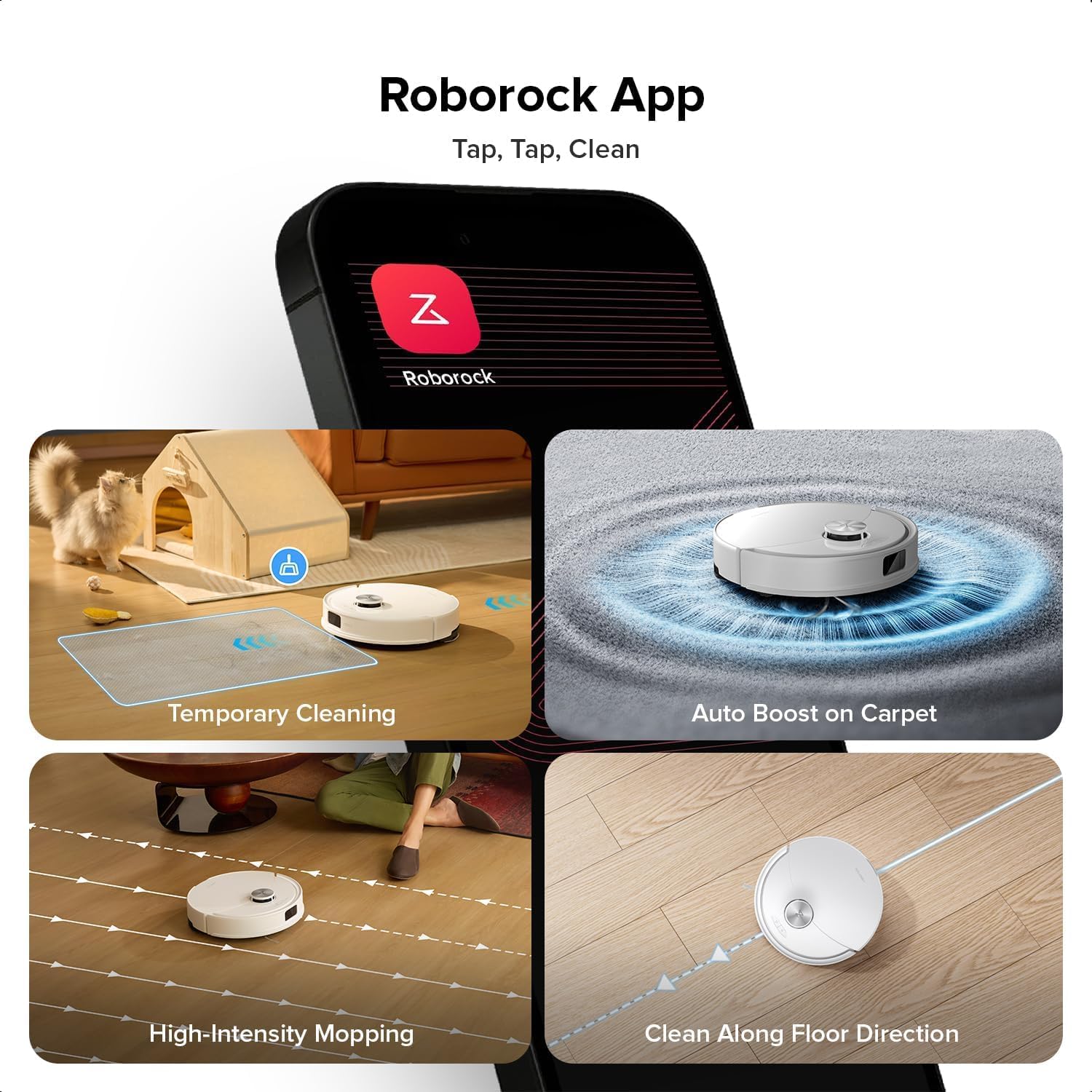
Image: A smartphone displaying the Roborock app interface, showing various cleaning options and controls.
3.4 Mapowanie początkowe
Once connected, initiate a full cleaning cycle from the app. The robot will use its PreciSense LiDAR Navigation system to create a detailed map of your home. This map is crucial for efficient cleaning and allows for advanced features like zone cleaning and no-go zones.

Image: The Roborock Q10 VF robot vacuum using its LiDAR sensor to scan and map the surrounding environment for navigation.
4. Instrukcja obsługi
4.1 Rozpoczęcie i zakończenie czyszczenia
Press the power button on the robot or use the Roborock app to start a cleaning cycle. Press the button again or use the app to pause or stop cleaning. The robot will automatically return to its charging dock when cleaning is complete or when its battery is low.
4.2 tryby czyszczenia
The Roborock Q10 VF offers various cleaning modes accessible via the app:
- Tylko odkurzacz: Do usuwania suchych zanieczyszczeń.
- Tylko mop: Do czyszczenia na mokro twardych podłóg.
- Odkurzanie i mycie: Jednoczesne odkurzanie i mycie podłóg.
- Czyszczenie na zamówienie: Wybierz konkretne pomieszczenia lub strefy, które chcesz posprzątać.
4.3 Funkcje zaawansowane
- HyperForce Suction: The robot provides an impressive 10000Pa suction power, effectively lifting hair, crumbs, and debris from deep carpets and floor crevices.
- ReactiveTech Obstacle Avoidance: Powered by structured light, this advanced system detects and navigates around obstacles effortlessly, even in cluttered rooms.

Image: The Roborock Q10 VF robot vacuum transitioning from a hard floor to a carpet, with its mop module automatically lifting to avoid wetting the carpet.
- Automatycznie podnoszony system mopowania: The mop automatically lifts when carpet is detected, allowing for seamless cleaning of both hard floors and carpets in a single session without manual adjustments.

Image: The Roborock Q10 VF robot vacuum intelligently detecting and navigating around various household obstacles on the floor.
- Inteligentne strefy zakazane: The app allows you to define virtual no-go zones and invisible walls to restrict the robot from entering certain areas or crossing boundaries.
5. Konserwacja
Regular maintenance ensures your Roborock Q10 VF operates at peak performance. Always power off the robot before performing any maintenance.
5.1 Opróżnianie pojemnika na śmieci
Open the robot's top cover and remove the dustbin. Empty its contents into a trash can. It is recommended to empty the dustbin after each cleaning cycle.
5.2 Cleaning the Main Brush and Side Brush
The Dual Anti-Tangle Design features a main brush and a side brush that work together to minimize hair tangles. Remove the main brush cover and lift out the main brush. Use the cleaning tool to remove any tangled hair or debris. Clean the side brush similarly. Reinstall all components securely.

Obraz: Zbliżenie view of the Roborock Q10 VF's underside, highlighting its dual anti-tangle main brush and side brush design.
5.3 Cleaning the VibraRise 2.0 Mopping System
Remove the mop pads from the robot. Wash the mop pads thoroughly with water and mild detergent. Allow them to air dry completely before reattaching. The VibraRise 2.0 system tackles stubborn stains with high-frequency scrubbing.
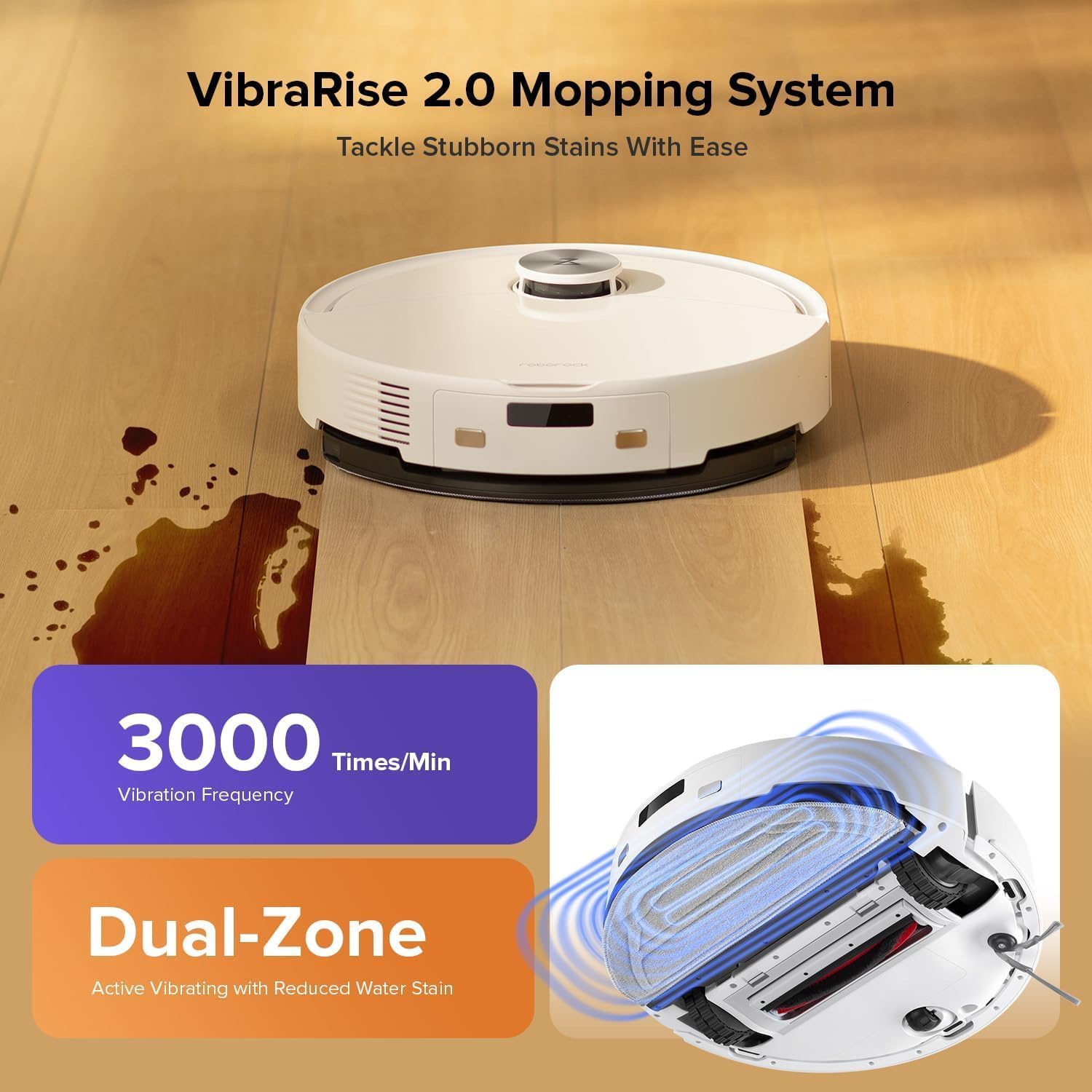
Image: The Roborock Q10 VF robot vacuum actively mopping a hard floor, illustrating the VibraRise 2.0 high-frequency scrubbing action.
5.4 Cleaning Filters and Sensors
Tap the filter to remove dust. The filter can be rinsed with water; ensure it is completely dry before reinstalling. Wipe all sensors (LiDAR, cliff sensors, wall sensors) with a soft, dry cloth to maintain optimal navigation and obstacle detection.
6. Rozwiązywanie Problemów
Jeśli napotkasz problemy z robotem, zapoznaj się z poniższymi typowymi problemami i rozwiązaniami:
| Problem | Możliwa przyczyna | Rozwiązanie |
|---|---|---|
| Robot się nie włącza | Niski poziom naładowania baterii; przycisk zasilania nie został prawidłowo naciśnięty | Naładuj robota; naciśnij i przytrzymaj przycisk zasilania przez 3 sekundy |
| Nie można połączyć się z siecią Wi-Fi | Incorrect Wi-Fi password; Not 2.4GHz network; Router issues | Verify password; Ensure 2.4GHz network; Restart router and robot |
| Słaba wydajność czyszczenia | Full dustbin; Clogged brushes/filter; Dirty sensors | Empty dustbin; Clean brushes and filter; Wipe sensors |
| Robot często się zacina | Obstacles on floor; Dirty cliff sensors | Clear floor of small objects; Clean cliff sensors |
| Mop nie podnosi się na dywanie | Carpet detection sensor dirty or blocked | Clean the carpet detection sensors on the underside of the robot |
7. Specyfikacje
| Funkcja | Szczegół |
|---|---|
| Marka | Roborock |
| Numer modelu | Q10VF02-00 |
| Kolor | Biały |
| Wymiary produktu | Wymiary 39.2 x 46.8 x 14 cm |
| Waga przedmiotu | 15.2 kilograma |
| Tomtage | 220.0 V |
| Poziom hałasu | 65dB |
| Maksymalny czas pracy | 250 minutes (4 hours 10 minutes) |
| Cechy specjalne | LiDAR Navigation, ReactiveTech Obstacle Avoidance, Auto-Lifting Mop |
| Zalecenia dotyczące powierzchni | Carpet, Hardwood Floor |
| Typ kontrolera | Kontrola aplikacji |
| Zawarte komponenty | Bateria |
| Typ filtra | Cloth and Foam |
| Pojemność pojemnika na śmieci | 500 ml |
| Pojemność zbiornika na wodę | 200 ml |
| Maximum Vacuuming Area | 1,937 stóp kwadratowych |
8. Gwarancja i wsparcie
Your Roborock Q10 VF Robot Vacuum and Mop comes with a standard manufacturer's warranty. For detailed warranty information, please refer to the warranty card included in your product packaging or visit the official Roborock website. For technical support, troubleshooting assistance, or to purchase replacement parts, please contact Roborock customer service through their official channels.
You can visit the official Roborock store on Amazon for more information and support: Roborock Amazon Store