1. Wprowadzenie
This manual provides detailed instructions for the installation, operation, and maintenance of your WEILAILIFE 4K 8MP PoE PTZ Security Camera System. Please read this manual thoroughly before using the product to ensure proper functionality and safety. Keep this manual for future reference.
2. Koniec produktuview
2.1. Zawartość opakowania
- 4K 8MP 8-Channel Network Video Recorder (NVR) with 1TB HDD: x 1
- 4K 8MP PTZ Camera: x 4
- LAN Cable for Camera (18.2 meters): x 4
- Instruction Manual: x 1
- Warning Label: x 1
- Camera Mounting Screws Pack: x 4
- NVR Power Supply (48V2A): x 1
- Pilot zdalnego sterowania: x 1
- USB Mouse: x 1
- HDMI Cable (1 meter): x 1
- LAN Cable (1 meter): x 1
2.2. Główne cechy
- 4K 8MP Ultra High Resolution: Captures video at 3264 x 2488 pixels for clear surveillance.
- Sterowanie PTZ: Pan 355° horizontally and Tilt 90° vertically for comprehensive area coverage.
- Automatyczne śledzenie: Automatically detects and follows human movement, ensuring critical events are recorded.
- Dwukierunkowy dźwięk: Enables real-time communication through the camera via the mobile application.
- PIR & AI Dual Detection: Advanced human detection technology reduces false alarms by distinguishing people from other moving objects.
- Obiektyw ultraszerokokątny 130°: Zapewnia szerokie pole view aby zminimalizować martwe pola.
- Kompresja H.265: Efficient video compression saves storage space and bandwidth while maintaining video quality.
- Odporność na warunki atmosferyczne IP66: Przeznaczony do stosowania wewnątrz i na zewnątrz, odporny na kurz i wodę.
- PoE (zasilanie przez Ethernet): Ułatwia instalację, dostarczając zasilanie i dane za pomocą jednego kabla Ethernet.
- Free Mobile App: Dostęp na żywo view and recordings without monthly fees using the 'Honestview' or 'Eseecloud' app.

Obraz 2.1: Koniecview of the WEILAILIFE 4K 8MP PoE PTZ Security Camera System, including the NVR, four cameras, 1TB HDD, and remote control.
3. Przewodnik konfiguracji
3.1. Połączenie początkowe
- Podłącz NVR do zasilania: Plug the NVR power adapter (48V2A) into the NVR and a power outlet.
- Podłącz NVR do monitora: Use the provided HDMI cable to connect the NVR to a monitor or TV.
- Podłącz mysz USB: Podłącz mysz USB do portu USB w rejestratorze NVR, aby móc korzystać z nawigacji.
- Podłącz kamery: Connect each camera to an available PoE port on the NVR using the provided LAN cables. The cameras will power on automatically.
- Connect NVR to Internet (Optional for Remote Access): Connect the NVR's LAN port to your router using an Ethernet cable.

Image 3.1: Illustration showing the simple connection of a camera to the NVR using a single LAN cable for both power and data, supporting up to 200 meters of transmission distance.
3.2. Konfiguracja aplikacji mobilnej
- Pobierz aplikację: Szukaj 'Honestview' or 'Eseecloud' in your smartphone's App Store (iOS) or Play Store (Android) and install it.
- Zarejestruj Konto: Otwórz aplikację i postępuj zgodnie z instrukcjami wyświetlanymi na ekranie, aby zarejestrować nowe konto.
- Dodaj urządzenie: On the NVR's monitor, locate the device ID (usually found in the system settings or on a label). In the app, select 'Add Device' and scan the QR code or manually enter the device ID.
- Na żywo View: Po dodaniu powinieneś móc view żyćtage from your cameras and access NVR settings remotely.

Image 3.2: The system supports remote monitoring from various devices including smartphones, tablets, laptops, and desktop computers.
4. Instrukcja obsługi
4.1. Na żywo View i odtwarzanie
- Na monitorze: Use the USB mouse to navigate the NVR interface. Click on camera feeds to view them in full screen. Access playback options from the main menu.
- W aplikacji mobilnej: Select a camera from the device list to view transmisja na żywo. Użyj funkcji odtwarzania, aby ponownieview nagrano footage zapisane na NVR.
4.2. Sterowanie PTZ
The PTZ (Pan-Tilt-Zoom) cameras can be controlled remotely via the mobile app or NVR interface.
- Panoramowanie/pochylanie: Na żywo view, use the directional controls to rotate the camera horizontally (355°) and vertically (90°).
- Zoom cyfrowy: Use the zoom controls to digitally magnify the image up to 5x.
- Automatyczne śledzenie: Enable auto-tracking in the camera settings. The camera will automatically follow detected human movement within its field of view.

Image 4.1: Demonstrates PTZ control (355° pan, 90° tilt) and 10x digital zoom functionality managed through a smartphone application.

Image 4.2: Visual representation of the automatic tracking feature, where the camera follows a person's movement.
4.3. Dźwięk dwukierunkowy
The cameras are equipped with a microphone and speaker for two-way communication.
- Aktywować: W aplikacji mobilnej na żywo viewDotknij ikony mikrofonu, aby mówić przez kamerę. Dotknij ikony głośnika, aby usłyszeć dźwięk z kamery.
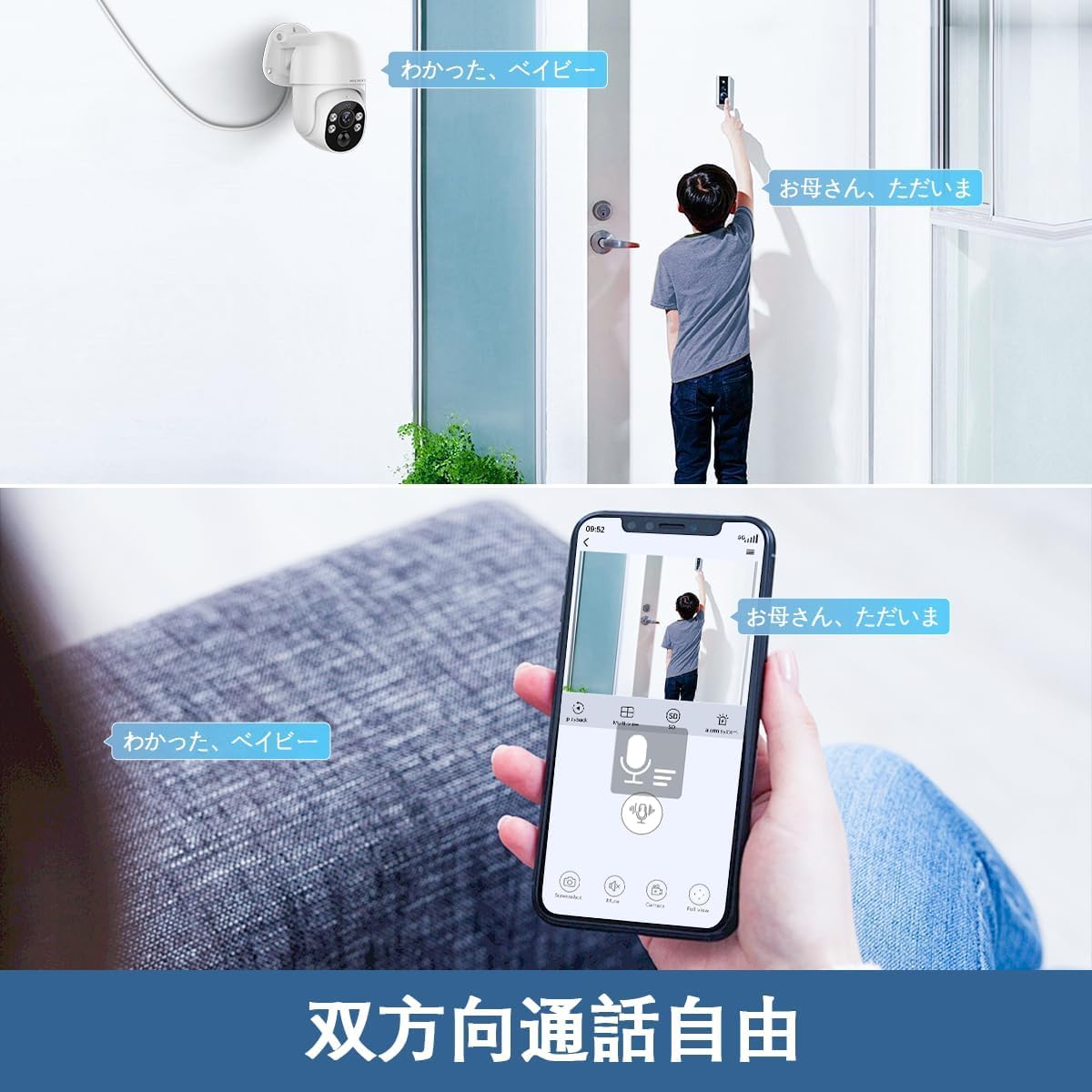
Image 4.3: A user communicating through the camera's two-way audio feature using a smartphone app, allowing interaction with someone at the door.
4.4. Detekcja ruchu i alerty
The system uses PIR and AI dual detection to accurately identify human movement and send alerts.
- Konfiguruj strefy wykrywania: In the NVR or app settings, you can define specific areas for motion detection to avoid unnecessary alerts.
- Powiadomienia o alertach: When motion is detected, the system can send real-time notifications to your smartphone, email alerts, or trigger a siren.

Image 4.4: Visual explanation of PIR and AI dual detection, highlighting how the system differentiates human movement from other objects like cars to reduce false alarms.

Obraz 4.5: Byłyample of a real-time alert notification displayed on a smartphone when an intruder is detected by the security camera.

Image 4.6: Diagram illustrating how users can define specific motion detection areas to focus surveillance on critical zones and ignore irrelevant movements outside the designated area.
5. Konserwacja
- Regularne czyszczenie: Okresowo czyść obiektywy aparatu miękką,amp ściereczką, aby zapewnić wysoką jakość obrazu. Nie używaj silnych środków chemicznych.
- Aktualizacje oprogramowania układowego: Check the WEILAILIFE webodwiedź witrynę lub aplikację, aby sprawdzić dostępne aktualizacje oprogramowania sprzętowego i zapewnić optymalną wydajność i bezpieczeństwo.
- Kontrola kabla: Regularly inspect all cables for any signs of wear or damage, especially for outdoor installations.
- Zarządzanie pamięcią masową: Dysk twardy o pojemności 1TB zapewnia ample storage. Periodically review i wykonaj kopię zapasową ważnych informacjitage. The H.265 compression helps maximize storage efficiency.

Image 5.1: The camera is designed to withstand various weather conditions, operating effectively between -10°C and 50°C, and is IP66 waterproof.

Image 5.2: Detail of the waterproof connector design, ensuring the LAN connection remains protected from rain and moisture when installed outdoors.
6. Rozwiązywanie Problemów
| Problem | Możliwa przyczyna | Rozwiązanie |
|---|---|---|
| Brak obrazu z kamery | Power issue, loose cable, NVR port issue | Check power supply to NVR and camera. Ensure LAN cable is securely connected. Try a different NVR port. |
| Nie można połączyć się z aplikacją | NVR not connected to internet, incorrect device ID, app issues | Verify NVR internet connection. Double-check device ID. Restart app or NVR. |
| Niska jakość obrazu | Brudny obiektyw, słabe oświetlenie, przepustowość sieci | Clean camera lens. Ensure adequate lighting or check night vision settings. Verify network speed. |
| False motion alarms | Incorrect detection zone, sensitivity too high | Adjust motion detection zones to exclude irrelevant areas. Lower sensitivity settings. |
| PTZ control unresponsive | Network delay, camera malfunction | Check network connection. Restart camera/NVR. If issue persists, contact support. |
7. Specyfikacje
- Rozdzielczość przechwytywania wideo: 4K 2160P, 800 million pixels (3264×2488)
- Kolor: Biały
- Liczba elementów: 1 (System)
- Liczba kanałów: 8
- Współczynnik kształtu: Kopuła
- Pole View: 130 stopnia
- Zasięg widzenia w nocy: 20 metrów
- Szybkość klatek: 15 klatek na sekundę
- Tworzywo: Aluminium
- Tomtage: 110 V (AC)
- Cotage: 60 W
- Wymiary produktu (DxSxW): Wymiary 28 x 16 x 31 cm
- Poziom wodoodporności: IP66 (wodoodporność i pyłoszczelność)
- Czujnik obrazu: CMOS
- Zoom Ratio (Digital): 5:1
- Konfiguracja obiektywu: Szeroki kąt
- Typ silnika: Zoom cyfrowy
- Numer modelu produktu: WL-POE-PTZ80041T
- Zalecane użycie: Bezpieczeństwo wewnętrzne, bezpieczeństwo zewnętrzne
- Technologia łączności: Przewodowy (PoE)
- Cechy: 130° Ultra-Wide Angle, H.265 Compression, PIR & AI Dual Detection, Two-Way Audio, Free APP & No Monthly Fees
- Zastosowanie wewnątrz / na zewnątrz: Wewnątrz, Na zewnątrz
- Zgodne urządzenia: Camera, Smartphone, Tablet, TV, Desktop
- Źródło zasilania: Elektryczny przewodowy
- Protokół połączenia: ONVIF
- Rodzaj kontrolera: APP Control, Remote Control
- Typ montażu: Montaż ścienny
8. Gwarancja i wsparcie
8.1. Informacje o gwarancji
WEILAILIFE provides a 12-miesięczna gwarancja jakości for this product. This warranty covers manufacturing defects and ensures stable, high-quality performance. Please retain your proof of purchase for warranty claims.
8.2. Obsługa klienta
For any questions, concerns, or technical assistance regarding your WEILAILIFE security camera system, please contact our support team:
- Wsparcie e-mailowe: info-jp@weilailifetech.com (24-hour response time)
- Urzędnik Webstrona: jp.weilailifetech.com
- Usługa LINE: For quick support, add us on LINE: https://lin.ee/EqPKtnq

Image 8.1: Details on the 12-month warranty, official website, and email support for WEILAILIFE products.


