1. Wprowadzenie
This manual provides essential information for the safe and efficient operation of your Ulefone Armor X31 rugged smartphone. Please read this manual thoroughly before using your device to ensure proper functionality and to understand its features.
The Ulefone Armor X31 is designed for durability and performance, featuring a robust build, advanced camera system, and long-lasting battery life, suitable for various environments.
2. Co znajduje się w pudełku
Sprawdź, czy w opakowaniu produktu znajdują się wszystkie elementy:
- Smartfon Ulefone Armor X31
- AC Power Charger (100~240V)
- Kabel danych typu C do typu C (100 cm)
- Folia ochronna na ekran (wstępnie nałożona lub osobno)
- Wysuwacz tacy na kartę SIM
- Falrep
- Instrukcja obsługi (ten dokument)
3. Urządzenie ponadview
Familiarize yourself with the physical components of your Ulefone Armor X31.

Obraz: przód i tył view of the Ulefone Armor X31 rugged smartphone, showcasindzięki solidnej konstrukcji i modułowi kamery.
3.1 Komponenty fizyczne
- Przód: 6.56-inch HD+ display with Corning Gorilla Glass, 16MP front camera, earpiece, sensors.
- Tył: 48MP main camera, 20MP night vision camera, 2MP macro camera, LED flash, fingerprint sensor, Ulefone branding.
- Strony: Power button, volume up/down buttons, custom key, SIM/microSD card slot, USB Type-C port, 3.5mm audio jack.
4. Konfiguracja początkowa
4.1 Instalowanie kart SIM i karty MicroSD
- Znajdź tackę na kartę SIM znajdującą się z boku urządzenia.
- Włóż narzędzie do wyjmowania tacki karty SIM w mały otwór obok tacki i mocno naciśnij, aż tacka wyskoczy.
- Place your Nano-SIM cards (up to two) and/or a microSD card (for storage expansion up to 2TB) into the designated slots on the tray. Ensure the gold contacts face downwards.
- Ostrożnie włóż tackę z powrotem do telefonu, aż zatrzaśnie się na swoim miejscu.
4.2 Włączanie/wyłączanie
- Włączanie: Naciśnij i przytrzymaj przycisk zasilania, aż pojawi się logo Ulefone.
- Aby wyłączyć: Naciśnij i przytrzymaj przycisk zasilania, aż pojawi się menu opcji zasilania, a następnie wybierz opcję „Wyłącz”.
- Zrestartować: Naciśnij i przytrzymaj przycisk zasilania, aż pojawi się menu opcji zasilania, a następnie wybierz opcję „Uruchom ponownie”.
4.3 Konfiguracja początkowa
Upon first power-on, follow the on-screen prompts to complete the initial setup, which includes selecting your language, connecting to Wi-Fi, setting up your Google account, and configuring security features.
5. Obsługa urządzenia
5.1 Podstawowe funkcje telefonu
- Dzwonić: Otwórz aplikację Telefon, wprowadź numer i dotknij ikony połączenia.
- Wysyłanie wiadomości: Otwórz aplikację Wiadomości, dotknij opcji „Rozpocznij czat”, wprowadź odbiorcę i treść wiadomości, a następnie wyślij.
- Łączność z Internetem: Połącz się z siecią Wi-Fi, przechodząc do Ustawień > Sieć i internet > Wi-Fi lub włącz transmisję danych mobilnych, przechodząc do Ustawień > Sieć i internet > Sieć komórkowa.
5.2 Wydajność i przechowywanie

Image: Diagram illustrating the MediaTek Helio G91 processor, highlighting its 8-core CPU and 2.0GHz clock speed.
The Armor X31 is powered by a MediaTek Helio G91 8-core processor, ensuring smooth performance for daily tasks and applications. It features 6GB of physical RAM, expandable with up to 6GB of virtual RAM, totaling 12GB. Internal storage is 128GB, with support for up to 2TB via a microSD card.

Image: Graphic detailing the 12GB RAM (6GB physical + 6GB virtual) and 128GB ROM, with 2TB expansion capability.
5.3 Funkcje aparatu

Image: Visual representation of the Ulefone Armor X31's camera setup, including the 48MP main, 20MP night vision, 2MP macro, and 16MP front cameras, with exampzdjęcia.
- Główna kamera: The 48MP main camera captures high-resolution photos. Open the Camera app and select 'Photo' mode.
- Kamera noktowizyjna: The 20MP night vision camera allows for clear imaging in low-light or complete darkness. Select 'Night Vision' mode in the Camera app.
- Kamera makro: Use the 2MP macro camera for detailed close-up shots.
- Przednia kamera: The 16MP front camera is for selfies and video calls. Switch to the front camera in the Camera app.
- Tryb podwodny: This mode allows you to take photos and videos while submerged. Activate it from the camera settings or quick toggles. Ensure all ports are securely sealed before submerging the device.
5.4 Funkcje wyświetlacza

Image: Graphic highlighting the 6.56-inch display with 720x1612 resolution, 90Hz refresh rate, 800 nits brightness, and Corning Gorilla Glass protection.
The 6.56-inch HD+ display offers a 720 x 1612 resolution and a 90Hz refresh rate for smooth visuals. With 800 nits brightness, it provides good visibility outdoors. The screen is protected by Corning Gorilla Glass for enhanced durability.
5.5 Zarządzanie baterią

Image: Illustration of the 6050mAh battery and its estimated usage times for standby, talk, music, and video playback.
The device is equipped with a 6050mAh battery, providing extended usage times. It supports 18W fast charging. The reverse charging feature allows you to use your phone as a power bank to charge other compatible devices via a USB-C to USB-C cable (sold separately).
5.6 Wytrzymałe funkcje
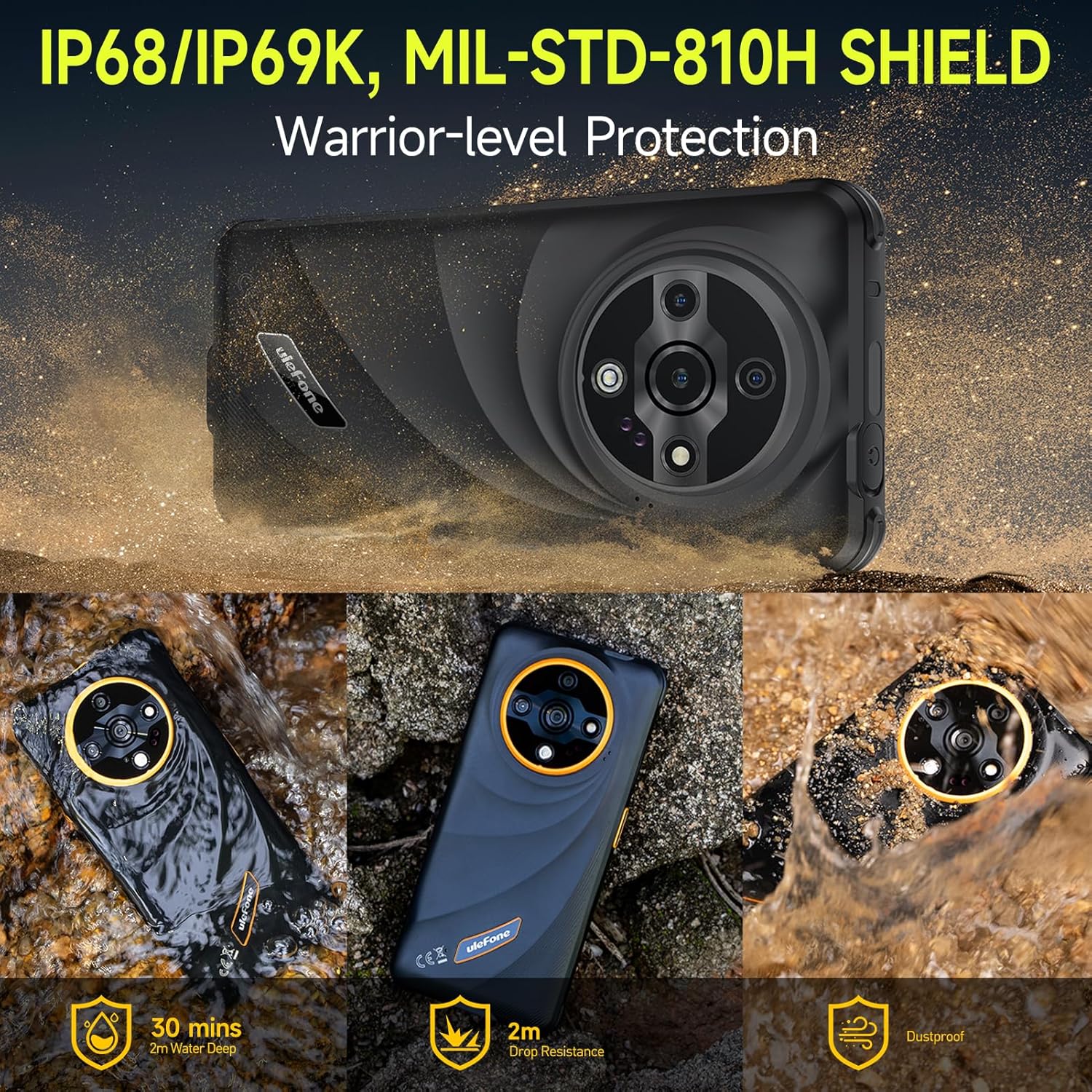
Image: Depiction of the Ulefone Armor X31's IP68/IP69K and MIL-STD-810H ratings, showing its resistance to water, drops, and dust in various scenarios.
The Armor X31 is IP68/IP69K certified and meets MIL-STD-810H standards, making it highly resistant to water, dust, and drops. It can withstand submersion in up to 2 meters of water for 30 minutes and drops from up to 2 meters.
5.7 dodatkowych funkcji
- 120 Lumen Flashlight: An independent, high-brightness flashlight is integrated for illumination in dark environments.
- Google Lens Support: Utilize Google Lens through the camera for instant translations, object identification, and image searches.
- Obsługa Widevine L1: Enables streaming of high-definition content from platforms like Netflix and Disney+.
- Miotacz podczerwieni: Use your phone as a universal remote control for compatible home appliances.
- Odblokowywanie odciskiem palca i odblokowywanie twarzą: Secure your device with biometric authentication.
- NFC: Supports contactless payments and data transfer.
- Radio FM bez zestawu słuchawkowego: Listen to FM radio without needing to connect headphones as an antenna.
- Klucz niestandardowy: A programmable button for quick access to frequently used apps or functions.
- Skrzynka narzędziowa do użytku na zewnątrz: A suite of utility apps designed for outdoor activities.
- 3-Card Slot: Accommodates two SIM cards and one microSD card simultaneously.
- GPS + GLONASS + Beidou + Galileo: Wiele systemów nawigacyjnych umożliwiających dokładne pozycjonowanie.
- Tryb rękawiczek: Enhances touch screen sensitivity for operation while wearing gloves.

Image: Graphic showing Widevine L1 support, enabling HD streaming on platforms like Netflix and Disney+.
6. Konserwacja
6.1 Czyszczenie urządzenia
To clean your Armor X31, use a soft, lint-free cloth. For stubborn dirt or grime, especially after exposure to mud or saltwater, rinse the device under fresh water and ensure all ports are closed. Allow the device to air dry completely before charging or opening any ports.
6.2 Pielęgnacja baterii
- Avoid exposing the device to extreme temperatures (below 0°C or above 45°C) as this can degrade battery performance.
- Aby zapobiec uszkodzeniom i zapewnić optymalne ładowanie, używaj wyłącznie oryginalnej ładowarki i kabla dostarczonych wraz z urządzeniem.
- Do not attempt to replace the battery yourself, as it is an integrated component and requires professional service.
6.3 Ogólna opieka
Despite its rugged design, avoid unnecessary drops or impacts. Ensure all port covers are securely closed when the device is exposed to water or dust.
7. Rozwiązywanie Problemów
This section addresses common issues you might encounter with your Ulefone Armor X31.
| Wydanie | Możliwe rozwiązanie |
|---|---|
| Urządzenie nie włącza się | Upewnij się, że bateria jest naładowana. Podłącz ładowarkę i odczekaj kilka minut przed ponowną próbą włączenia. Jeśli urządzenie nie reaguje, wykonaj wymuszony restart, przytrzymując przycisk zasilania przez 10–15 sekund. |
| Słaby sygnał sieci | Check if your SIM card is properly inserted. Move to an area with better network coverage. Restart the device. Verify mobile data settings in 'Settings > Network & internet > Mobile network'. |
| Aplikacje ulegają awarii lub zawieszają się | Close and reopen the app. Clear the app's cache and data via 'Settings > Apps > [App Name] > Storage & cache'. Ensure the app is updated to the latest version. Restart the phone. |
| Ekran dotykowy nie reaguje | Restart the device. Ensure the screen is clean and dry. If using a screen protector, ensure it is properly applied and not interfering with touch sensitivity. |
| Urządzenie się nie ładuje | Check the charging cable and adapter for damage. Ensure the USB-C port is clean and free of debris. Try a different power outlet. Use the original charger and cable. |
If you encounter issues not listed here or if solutions do not resolve the problem, please contact Ulefone customer support.
8. Specyfikacje
| Funkcja | Szczegół |
|---|---|
| Nazwa modelu | Ulefone Armor X31 |
| System operacyjny | Android 14 |
| Edytor | MediaTek Helio G91, 8-core, 2.0 GHz |
| BARAN | 12 GB (6 GB pamięci fizycznej + 6 GB pamięci wirtualnej) |
| Pamięć wewnętrzna | 128 GB |
| Możliwość rozbudowy pamięci masowej | Do 2 TB za pomocą karty microSD |
| Wyświetlacz | 6.56 inches HD+ (720 x 1612), 90 Hz Refresh Rate, 800 nits Max Brightness, Corning Gorilla Glass |
| Kamery tylne | Główny aparat 48 MP, kamera noktowizyjna 20 MP, kamera makro 2 MP |
| Przednia kamera | 16MP |
| Pojemność baterii | 6050 mAh |
| Ładowanie | Szybkie ładowanie 18 W, ładowanie wsteczne |
| Trwałość | Wodoodporność i pyłoszczelność IP68/IP69K, odporność na wstrząsy MIL-STD-810H |
| Łączność | Dual 4G, Wi-Fi, Bluetooth 5.2, NFC, GPS (GPS+GLONASS+Beidou+Galileo), USB Type-C, 3.5mm Audio Jack |
| Cechy specjalne | 120 Lumen Flashlight, IR Blaster, Fingerprint Unlock, Face Unlock, Custom Key, Outdoor Toolbox, Widevine L1, Headset-Free FM Radio, Gloves Mode |
| Wymiary | 6.84 x 3.23 x 0.54 cala (173.78 x 82 x 13.65 mm) |
| Waga | 10.6 uncji (301 grama) |
9. Gwarancja i wsparcie
9.1 Gwarancja producenta
The Ulefone Armor X31 comes with a 12-month manufacturer warranty service in the US. This warranty covers defects in materials and workmanship under normal use. It does not cover damage caused by misuse, accidents, unauthorized repairs, or normal wear and tear.
9.2 Obsługa klienta
For technical assistance, warranty claims, or any questions regarding your Ulefone Armor X31, please contact Ulefone customer support. Refer to the contact information provided in your product packaging or visit the official Ulefone webstronie, aby uzyskać szczegółowe informacje na temat pomocy technicznej.


