1. Koniec produktuview
The Nokia G310 5G Smartphone (Model TA-1573) offers lightning-fast 5G connectivity and modern mobile technology. It features a vibrant display for various tasks, a powerful processor for smooth performance, and an advanced camera system for detailed photos. Designed for daily use, it provides a comfortable grip and durable build quality. Enjoy extensive network compatibility, ample storage, a long-lasting battery with quick charging, and a user-friendly interface with regular software updates.
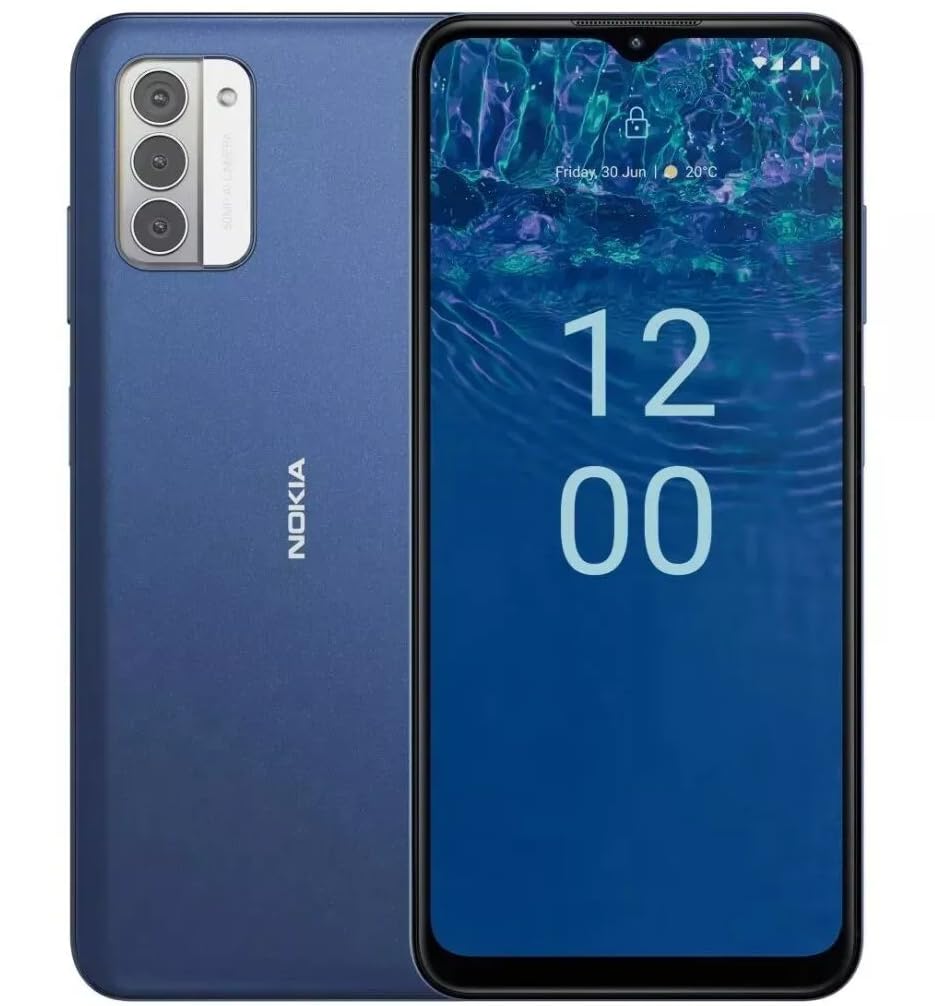
Obraz: Tył view of the Nokia G310 5G Smartphone, showcasing the triple camera module and Nokia branding.
Główne cechy
- Łączność 5G: Experience ultra-fast mobile data speeds and low latency.
- Żywy wyświetlacz: Large touchscreen display delivers vibrant colors and sharp visuals.
- Wydajna wydajność: Processor handles everyday tasks smoothly, from browsing to gaming.
- Trwała konstrukcja: Sleek and modern smartphone design with durable construction.
2. Rozpoczęcie pracy
Co jest w pudełku
- Smartfon Nokia G310 5G
- Rumak
SIM and MicroSD Card Installation
Locate the SIM/MicroSD card tray on the side of your device. Use the provided SIM ejector tool to open the tray. Insert your Nano-SIM card(s) and/or MicroSD card into the designated slots. Ensure the cards are correctly oriented. Gently push the tray back into the device until it clicks into place.
Włączanie/wyłączanie
To power on your Nokia G310, press and hold the Power/Fingerprint Sensor button located on the right side of the device until the Nokia logo appears. To power off, press and hold the Power/Fingerprint Sensor button, then select 'Power off' from the options that appear on the screen.
3. Układ urządzenia
Przyciski fizyczne i porty
- Przyciski głośności: Located on the right side, above the Power/Fingerprint Sensor button, for adjusting media and call volume.
- Power/Fingerprint Sensor Button: Located on the right side, used for powering the device on/off, locking/unlocking the screen, and fingerprint authentication.
- Port USB-C: Znajduje się na dole, służy do ładowania i przesyłania danych.
- Gniazdo audio 3.5 mm: Znajduje się na dole i służy do podłączania przewodowych słuchawek.
- Głośnik: Znajduje się na dole i służy do wyjścia audio.
- Mikrofon: Zintegrowany z obsługą połączeń i poleceń głosowych.
Moduł kamery
The rear of the device features a multi-lens camera module, including a main camera, along with a flash for low-light photography. The front-facing camera is discreetly placed within a notch at the top of the display.
4. Instrukcja obsługi
Podstawowa nawigacja
The Nokia G310 operates on the Android operating system, offering an intuitive touchscreen interface. Swipe up from the bottom of the screen to access the app drawer, swipe down from the top for notifications and quick settings, and use gestures or navigation buttons (configurable in settings) to move between apps and screens.
Łączność
- 5G Cellular Data: The device supports 5G connectivity for ultra-fast mobile data speeds. Ensure your SIM card and plan support 5G.
- Wi-Fi: Connect to wireless networks for internet access. Go to Settings > Network & internet > Wi-Fi to manage connections.
- Bluetooth: Pair with other Bluetooth-enabled devices like headphones or speakers. Go to Settings > Connected devices > Bluetooth.
- GPS: Wykorzystaj wbudowany moduł GPS do obsługi usług lokalizacyjnych i nawigacji.
5. Korzystanie z aparatu
The Nokia G310 features an advanced camera system designed to capture memorable moments. Access the camera app from your home screen or app drawer.
Robienie zdjęć
Open the Camera app, frame your shot, and tap the shutter button on the screen to take a picture. The advanced AI camera assists in optimizing settings for various scenes.
Nagrywanie filmów
In the Camera app, switch to video mode, then tap the record button to start and stop recording. The phone supports various video resolutions.
Tryby aparatu
Explore different camera modes available in the camera app, such as Portrait, Panorama, and Night mode, to enhance your photography experience.
6. Zarządzanie baterią
Ładowanie urządzenia
The Nokia G310 is equipped with a 5000 Milliamp Hours (5000.0 Battery Power Rating) battery. Connect the provided USB-C charger to the port at the bottom of the device. The phone supports quick charging for reduced downtime.
Optymalizacja żywotności baterii
- Dostosuj jasność ekranu do komfortowego poziomu.
- Włącz tryb oszczędzania baterii, gdy poziom naładowania baterii jest niski.
- Zamknij nieużywane aplikacje działające w tle.
- Wyłącz Wi-Fi, Bluetooth lub GPS, gdy z nich nie korzystasz.
7. Specyfikacje techniczne
| Numer modelu | TA-1573 |
| System operacyjny | Android |
| Model procesora | MediaTek Helio P60T |
| Technologia komórkowa | 5G |
| Operator sieci bezprzewodowej | Odblokowany |
| Pojemność pamięci masowej | 4 GB |
| Rezolucja | 1080x2340 |
| Wejście interfejsu ludzkiego | Ekran dotykowy |
| Pojemność baterii | 5000 mlnamp Godziny |
| Gniazdo audio | 3.5 mm |
| Kolor | Niebieski |
| Producent | Nokię |
| Data pierwszej dostępności | 31 stycznia 2025 r. |
8. Rozwiązywanie Problemów
If you encounter issues with your Nokia G310, try the following common troubleshooting steps:
- Urządzenie nie odpowiada: Naciśnij i przytrzymaj przycisk zasilania przez około 10–15 sekund, aby wymusić ponowne uruchomienie.
- Problemy z łącznością: Toggle Wi-Fi or Bluetooth off and on. Restart your device. Check network settings.
- Aplikacja nie działa: Wyczyść pamięć podręczną i dane aplikacji w Ustawieniach > Aplikacje. Jeśli problem nadal występuje, odinstaluj aplikację i zainstaluj ją ponownie.
- Bateria szybko się rozładowuje: Review battery usage in Settings > Battery to identify power-hungry apps. Adjust screen brightness and enable Battery Saver.
- Magazyn pełny: Usuń niepotrzebne files, photos, or apps. Transfer media to a computer or cloud storage. Consider using a MicroSD card for additional storage.
9. Konserwacja i pielęgnacja
- Czyszczenie: Do czyszczenia urządzenia używaj miękkiej, niepozostawiającej włókien ściereczki. Unikaj agresywnych środków chemicznych i materiałów ściernych.
- Aktualizacje oprogramowania: Regularly check for and install software updates to ensure your device runs optimally and has the latest security features. Go to Settings > System > System update.
- Zarządzanie pamięcią masową: Okresowo ponownieview your device's storage to free up space and maintain performance.
- Warunki środowiskowe: Avoid exposing your device to extreme temperatures, direct sunlight, or excessive moisture.
10. Gwarancja i wsparcie
For warranty information, please refer to the warranty card included in your product packaging or visit the official Nokia support website. For further assistance, contact Nokia customer support.


