1. Wprowadzenie
This manual provides detailed instructions for the installation, operation, and maintenance of the Aoleaby XR64CX-5N1C3 Temperature Controller. This device is designed for precise temperature management, offering features such as fast response, high stability, and data recording capabilities. Please read this manual thoroughly before using the product to ensure correct operation and to prevent damage.
2. Informacje dotyczące bezpieczeństwa
- Bezpieczeństwo elektryczne: Ensure all electrical connections are made by a qualified professional and comply with local electrical codes. Disconnect power before installation or maintenance.
- Warunki środowiskowe: Nie wystawiaj kontrolera na działanie nadmiernej wilgoci, kurzu lub ekstremalnych temperatur wykraczających poza określony zakres roboczy.
- Prawidłowe użycie: Use the controller only for its intended purpose as a temperature management device. Any unauthorized modifications or misuse may result in damage or injury.
- Obsługiwanie: Aby uniknąć uszkodzeń fizycznych, należy obchodzić się z urządzeniem ostrożnie.
3. Koniec produktuview
The Aoleaby XR64CX-5N1C3 is a compact and user-friendly temperature controller. It features a digital display for temperature readings and several buttons for configuration and control.
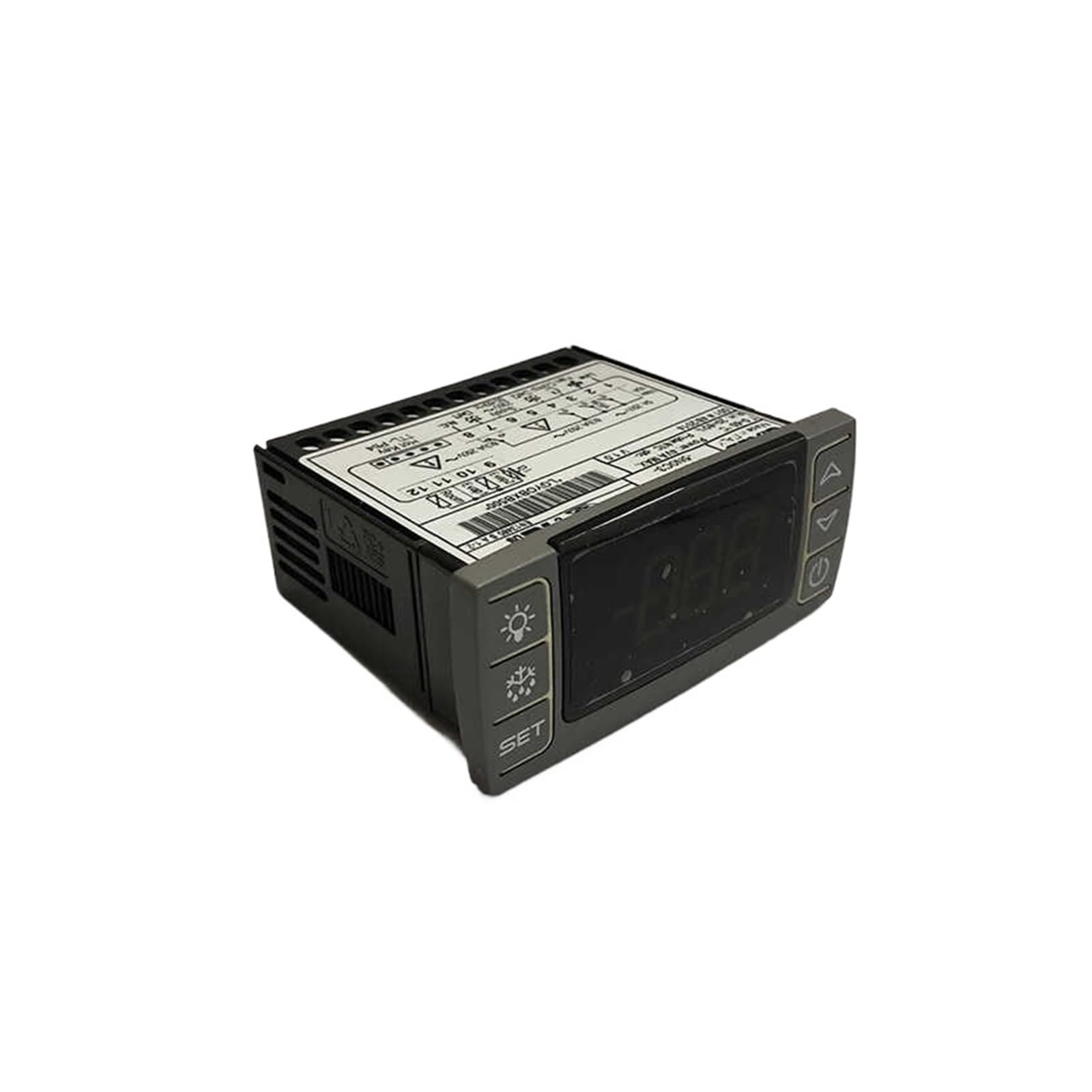
Rysunek 1: Przód view of the Aoleaby XR64CX-5N1C3 Temperature Controller. The display shows temperature readings, and buttons on the left and right allow for setting parameters and controlling functions like defrost and light.
3.1. Układ panelu sterowania
- Wyświetlacz cyfrowy: Shows current temperature and parameter values.
- Przycisk SET: Służy do wejścia w tryb ustawiania parametrów lub potwierdzania wyboru.
- Light Button (Bulb icon): Controls the internal light (if applicable) or other auxiliary functions.
- Defrost Button (Snowflake/Water drop icon): Initiates or controls the defrost cycle.
- Przycisk strzałki w górę: Zwiększa wartości lub umożliwia nawigację po opcjach menu.
- Przycisk strzałki w dół: Zmniejsza wartości lub umożliwia nawigację po opcjach menu.
- Power Button (Circle with vertical line): Turns the device on/off or enters standby mode.
4. Konfiguracja i instalacja
Proper installation is crucial for the optimal performance and longevity of the temperature controller. Ensure power is disconnected before proceeding.
4.1. Montaż
The controller is designed for panel mounting. Cut an appropriate opening in the panel according to the dimensions provided in the specifications. Insert the controller and secure it using the provided clips or mounting hardware.
4.2. Połączenia elektryczne
Refer to the wiring diagram typically found on the side or back of the unit, or in a separate wiring guide. Connect the power supply, temperature sensors, and output loads (e.g., compressor, fan, heater) to the corresponding terminals. Ensure all connections are secure and correctly polarized.
- Zasilanie: Connect to the specified voltage i częstotliwość.
- Wejścia czujników: Connect temperature probes to the designated sensor terminals.
- Wyjścia przekaźnikowe: Connect the controlled devices (e.g., refrigeration unit, defrost heater) to the appropriate relay outputs.
Notatka: Incorrect wiring can damage the unit and connected equipment. If unsure, consult a qualified electrician.
5. Instrukcja obsługi
The XR64CX-5N1C3 controller is designed for ease of use, offering intuitive control over temperature settings and functions.
5.1. Włączanie/wyłączanie zasilania
Naciśnij i przytrzymaj Przycisk zasilania (Circle with vertical line icon) for a few seconds to turn the controller on or off.
5.2. Viewbieżąca temperatura
Upon powering on, the digital display will show the current temperature measured by the primary sensor.
5.3. Setting the Setpoint Temperature
- Naciśnij Przycisk SET once. The display will show the current setpoint value.
- Użyj Strzałka w górę or Strzałka w dół przyciski umożliwiające dostosowanie nastawy do żądanej temperatury.
- Naciśnij Przycisk SET again to confirm and save the new setpoint. If no button is pressed for several seconds, the controller will automatically exit the setting mode without saving changes.
5.4. Accessing and Modifying Parameters
Advanced parameters control various aspects of the controller's operation, such as differential, defrost cycles, and sensor calibration.
- Naciśnij i przytrzymaj Przycisk SET for approximately 3 seconds to enter the parameter setting menu. The display will show the first parameter code.
- Użyj Strzałka w górę or Strzałka w dół buttons to scroll through the parameter codes.
- Po wyświetleniu żądanego kodu parametru naciśnij przycisk Przycisk SET Do view jej obecna wartość.
- Użyj Strzałka w górę or Strzałka w dół buttons to modify the parameter value.
- Naciśnij Przycisk SET aby potwierdzić i zapisać nową wartość.
- To exit the parameter setting menu, press the Przycisk zasilania or wait for the timeout.
5.5. Ręczne odszranianie
To initiate a manual defrost cycle, press and hold the Przycisk rozmrażania (Snowflake/Water drop icon) for a few seconds. The defrost indicator will illuminate, and the cycle will begin according to programmed parameters.
5.6. Kontrola światła
Naciśnij Przycisk światła (Bulb icon) to toggle the internal light or other auxiliary functions connected to this output.
5.7. Rejestrowanie i analiza danych
The controller supports data recording of temperature values. For data export and analysis, refer to the specific instructions for connecting the controller to a compatible data logging system or software, if available for this model. This feature allows for monitoring temperature trends and ensuring optimal performance over time.
6. Konserwacja
Regular maintenance ensures the longevity and accurate operation of your temperature controller.
6.1. Czyszczenie
- Przed czyszczeniem należy odłączyć zasilanie.
- Wipe the display and control panel with a soft, damp cloth. Do not use abrasive cleaners, solvents, or excessive moisture, as these can damage the unit.
- Ensure no liquid enters the controller's casing.
6.2. Sensor Inspection
Periodically inspect the temperature sensors for any signs of damage or corrosion. Ensure they are securely placed in their intended measurement locations and are free from obstructions that could affect accuracy.
6.3. Połączenia elektryczne
Occasionally check all electrical connections for tightness and signs of wear or overheating. Loose connections can lead to intermittent operation or electrical hazards.
7. Rozwiązywanie Problemów
This section addresses common issues you might encounter with the XR64CX-5N1C3 temperature controller.
| Problem | Możliwa przyczyna | Rozwiązanie |
|---|---|---|
| Kontroler nie włącza się. | Brak zasilania, nieprawidłowe okablowanie, uszkodzone urządzenie. | Sprawdź połączenia zasilania i napięcie zasilaniatage. Verify wiring against the diagram. If issues persist, contact support. |
| Display shows "Err" or abnormal readings. | Sensor fault; sensor disconnected; sensor out of range. | Check sensor connections. Inspect sensor for damage. Replace sensor if necessary. |
| Temperature control is inaccurate. | Sensor placement; incorrect parameter settings; sensor calibration issue. | Ensure sensor is correctly placed and not affected by external heat sources. Verify setpoint and differential parameters. Check sensor calibration. |
| Output (e.g., compressor) does not turn on/off. | Incorrect wiring; faulty relay; parameter settings (e.g., delay times). | Verify output wiring. Check relevant parameters like compressor delay or differential. Test the connected device independently. |
Jeżeli napotkasz problemy, które nie zostały tutaj wymienione lub jeżeli proponowane rozwiązania nie pomogą w rozwiązaniu problemu, skontaktuj się z obsługą klienta.
8. Specyfikacje
Below are the technical specifications for the Aoleaby XR64CX-5N1C3 Temperature Controller.
- Model: XR64CX-5N1C3
- Marka: Aoleaby
- Wymiary opakowania: 1.18 x 0.79 x 0.39 cala
- Waga przedmiotu: 1.32 funta (600 gramów)
- Kolor: Jeden kolor
- Producent: Aoleaby
- Wymagany montaż: NIE
- Liczba sztuk: 1
9. Obsługa klienta
For technical assistance, warranty information, or service inquiries, please contact your retailer or the manufacturer directly. Please have your product model number (XR64CX-5N1C3) available when contacting support.
